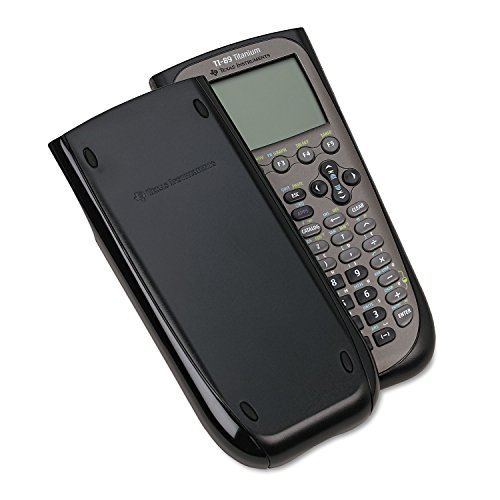
Texas Instruments TI-89 Titanium Graphing Calculator (packaging may differ)



Key features
- •Graphing calculator handles calculus, algebra, matrices, and statistical functions
- •188 KB RAM and 2.7 MB flash memory for speed; plenty of storage for functions, programs, data
- •Large 100 x 160 pixel display for split-screen views. Compatible with CBL 2 system, CBR 2 motion sensor, vernier easylink and vernier easytemp systems to allow collection and analysis of real-world data
- •USB on-the-go technology for file sharing with other calculators and connecting with PCs. Matrix operations including inverse, determinant, transpose, augment, elementary row operations and reduced row echelon form; matrix elements can be real or complex and numeric or symbolic
- •Backed by 1-year warranty
Texas Instruments TI-89 Titanium Graphing Calculator (packaging may differ)
List Price: $218.24$196.42DEALYou Save: $21.82 (10%)
Free shippingFree Returns – 30 daysFree Order CancellationSecure Payment2–3 Days DeliveryGet It October 25, 2026In Stock (4)No marketing spamNo account requiredFulfilment by FedEx / Amazon / UPS / ShipwirePayPal / Card Buyer Protection
Customer Reviews
Reviews sourced from verified Amazon purchasers4.6
out of 5
Based on 10 reviews
5★
80%
4★
20%
3★
0%
2★
0%
1★
0%
Found my mistress!
Juan A. Ramos✓ Verified Purchase•July 16, 2023
From slide rulers to Ti-89's, let me tell you! Even my proessor wanted to use it! Long story short, I have never owned a graphing calculator until now. I am auditing a calculus class this summer and needed something more powerful than my Casio fx-115ES (which is sweet, BTW). My Casio can integrate, but not do diff Q's.
Well, let me start by price. My friends all suggested I bought and used a Ti-86 or even a Ti-85 unless I was going into a technical major. Surprise, surprise, I'm an engineer major. I figured if I was going to shell out over $100 on a calculator, I should choose the best available. Needless to say, everyone knew about the Ti-89. I showed it to my math professor who had the same reaction as me (think a kid on Christmas morning opening his gifts). The first thing he asked was "How much was it?" I told him I paid $140 clams and he said "Wow! How'd you get it so cheap?" It wasn't just him though. I showed my buddy in AutoCAD and he was astonished by the price as well.
Next is features. I loved the fact that it came with an instruction booklet and the batteries. It let me jump into playing with it the minute I got it. The book is about the size of a video game manual (assuming a modern-day RPG). There is a lot to read and I am still reading it. It's not too hard to figure some things out assuming you're rather savvy with electronics and have some free time on your hands. I learned to graph polynomial functions while walking to class! Italready has pre-loaded apps, but I will ask around and get some more when I finally have a chance (and some sleep), since several apps are useful for certain classes.
Next is size. I know graphing calculators are big, but wow! It doesn't fit in my pockets, that's for sure! I usually stick it in my backpack or in my cargo pockets on days when I have those kinds of pants.
Finally, utility. As I am still using it and figuring it out, it seems to do basically anything I need it to do. I am contemplating buying the Dummies' book for it since that might tell me something the instruction booklet omits, plus they often have tips within!
Overall, I would say it is a must-buy. Most of my friends (90% engineer majors) have older models and would kill for a Ti-89. It is a steal at some prices and I love the fact that even my math professor was impressed and asked me if I could bring it by his office sometime. I love calculators and this seems to be the best out there. If you don't want to break the bank, but want something good, try the aforementioned calculator (Casio) since it worked great for me!
Well, let me start by price. My friends all suggested I bought and used a Ti-86 or even a Ti-85 unless I was going into a technical major. Surprise, surprise, I'm an engineer major. I figured if I was going to shell out over $100 on a calculator, I should choose the best available. Needless to say, everyone knew about the Ti-89. I showed it to my math professor who had the same reaction as me (think a kid on Christmas morning opening his gifts). The first thing he asked was "How much was it?" I told him I paid $140 clams and he said "Wow! How'd you get it so cheap?" It wasn't just him though. I showed my buddy in AutoCAD and he was astonished by the price as well.
Next is features. I loved the fact that it came with an instruction booklet and the batteries. It let me jump into playing with it the minute I got it. The book is about the size of a video game manual (assuming a modern-day RPG). There is a lot to read and I am still reading it. It's not too hard to figure some things out assuming you're rather savvy with electronics and have some free time on your hands. I learned to graph polynomial functions while walking to class! Italready has pre-loaded apps, but I will ask around and get some more when I finally have a chance (and some sleep), since several apps are useful for certain classes.
Next is size. I know graphing calculators are big, but wow! It doesn't fit in my pockets, that's for sure! I usually stick it in my backpack or in my cargo pockets on days when I have those kinds of pants.
Finally, utility. As I am still using it and figuring it out, it seems to do basically anything I need it to do. I am contemplating buying the Dummies' book for it since that might tell me something the instruction booklet omits, plus they often have tips within!
Overall, I would say it is a must-buy. Most of my friends (90% engineer majors) have older models and would kill for a Ti-89. It is a steal at some prices and I love the fact that even my math professor was impressed and asked me if I could bring it by his office sometime. I love calculators and this seems to be the best out there. If you don't want to break the bank, but want something good, try the aforementioned calculator (Casio) since it worked great for me!
Very good quality machine with good improvements over the TI-89
Ann E. Revelle✓ Verified Purchase•July 15, 2023
I have owned top of the line graphing and scientific calculators from TI, HP, Casio, Sharp, etc. Back when I was a student, TI's were very cheaply made and often broke quite easily. This machine, the TI-89, Titanium, is definitely not cheaply made and is definitely put together very well. It is also a good improvement over its predecessor, the TI-89 with more memory and with an improved keyboard and improved keyboard "feel" and a much better feature set, etc. The pros and cons as I see it are:
PROS:
1) It has all the standard and CAS (Computer Algebra SYstem) features that we have come to expect on such a machine, plus many nice very detailed and topic as well as course specific APPS that are already preloaded or can be added in electronically and quite simply from the TI website. The interface with a computer is fast and easy to set up.
2) It has a very nice calendar and note storage system for keeping track of coursework and daily workload assignments.
3) It is quite fast with a nice graphical interface and resultant plotting system. The resultant plots are high quality and with the many added features available for enhancement are very intuitive for the learning process.
4) The icon system for choosing where you want to be on the machine can also be converted to a much easier and quicker to navigate text-list system.
5) It has a nice and quite modern, curved body design that sits very nicely both on a desk or a table as well as in your hand.
6) It has a large amount of onboard main memory, plus additional Flash memory for tackling quite memory intensive problems.
CONS:
1) There is no SD card slot as on the HP50g.
2) Integrals are completed by a table look-up process and not by direct manipulation so very little insight can be found by students as to why the result appears the way it does. On the HP50g, in step by step mode, much insight can be gained by the manner in which the integrals are performed for example.
3) The algebraic operating system is the only choice available on this machine which usually requires many more keystrokes to do a complicated problem.
4) The available programming languages are quite limited on this machine as compared again to the HP50g.
5) Some functions that you would readily expect to be available with a single key press require instead at least two key presses, but usually with only a single shift key press first.
6) The color coding choices are not nearly as distinctive and easy to quickly recognize as on the HP50g.
7) As with the HP50g, it require multiple batteries plus a backup coin cell battery to save everything briefly when changing the main batteries.
8) TI should also impliment a fine backlight system for viewing the screen at low light levels, as recently included on the Casio FX-9860g Slim version for example.
PROS:
1) It has all the standard and CAS (Computer Algebra SYstem) features that we have come to expect on such a machine, plus many nice very detailed and topic as well as course specific APPS that are already preloaded or can be added in electronically and quite simply from the TI website. The interface with a computer is fast and easy to set up.
2) It has a very nice calendar and note storage system for keeping track of coursework and daily workload assignments.
3) It is quite fast with a nice graphical interface and resultant plotting system. The resultant plots are high quality and with the many added features available for enhancement are very intuitive for the learning process.
4) The icon system for choosing where you want to be on the machine can also be converted to a much easier and quicker to navigate text-list system.
5) It has a nice and quite modern, curved body design that sits very nicely both on a desk or a table as well as in your hand.
6) It has a large amount of onboard main memory, plus additional Flash memory for tackling quite memory intensive problems.
CONS:
1) There is no SD card slot as on the HP50g.
2) Integrals are completed by a table look-up process and not by direct manipulation so very little insight can be found by students as to why the result appears the way it does. On the HP50g, in step by step mode, much insight can be gained by the manner in which the integrals are performed for example.
3) The algebraic operating system is the only choice available on this machine which usually requires many more keystrokes to do a complicated problem.
4) The available programming languages are quite limited on this machine as compared again to the HP50g.
5) Some functions that you would readily expect to be available with a single key press require instead at least two key presses, but usually with only a single shift key press first.
6) The color coding choices are not nearly as distinctive and easy to quickly recognize as on the HP50g.
7) As with the HP50g, it require multiple batteries plus a backup coin cell battery to save everything briefly when changing the main batteries.
8) TI should also impliment a fine backlight system for viewing the screen at low light levels, as recently included on the Casio FX-9860g Slim version for example.
Quality graphing calculator that will last high school through grad school.
DIYEngineer✓ Verified Purchase•June 15, 2023
Had one of these from high school all the way through engineering school and beyond. It did become a bit much to use in the field due to its size but it never failed me. So it's now that it's time for my son to start needed a graphing calculator for his high school calculus I knew exactly which one to buy.
5/5
Mat✓ Verified Purchase•June 4, 2023
Product came as descibed
Around Since 2004, it's Still a Good Workhorse
John✓ Verified Purchase•May 4, 2023
Bought three years ago in 2016 to retire a TI-85 that was 21 years old. Still going strong but the means and data link technology to connect it to a PC was designed in the era of Windows 3.1 and just beginning to transition to Windows 95. The TI-89 has been everything I expected and more in supplanting the TI-85. For some beginning and younger students it might be a bit of overkill. Consider the features and functions this one has compared to one of the several TI-84 still in production and make a cost effectiveness decision. The more complex and feature laden, the bigger the learning curve. Also be aware that a TI-89 of any type cannot be used on an ACT exam (as of my writing this in 2019). HS students preparing to take the ACT will need a calculator that is allowed and it should be one they're sufficiently familiar with to use on the exam without fumbling around with it. Shouldn't deter getting this calculator, but they'll need a different one and should practice with it for the ACT. A calculator is still handy for use out of the office when hauling a laptop around isn't very convenient. Even then, my laptop is often tied up with other tasks using a browser and MS Office when I need to use the calculator. Pulling out the TI-89 Titanium (or an HP 50g I also have) is much easier than fussing around with Excel. The case is quite robust and after three years the keyboard is very responsive without sticking keys, key bounce, or non-responsive keys. Keycap labels are still as legible as when it was new. Take care of it without sliming it with food, or spilling beverages on it and it will last for many years. I'm giving it four stars overall as the technology under the hood with a B/W screen is 15 years old now. Its gets 5 stars for sturdiness, value and durability as those don't consider the technology inside. Those needing high end speed and sophistication for advanced applications should look at the TI-Nspire and HP Prime models. (The HP equivalent to this one is the 50g.) One drawback for the color backlit screens on the Nspire and Prime models is use in bright sun. Reflective B/W LCD panels are easier to see and read in direct sunlight.
Page 1 of 2