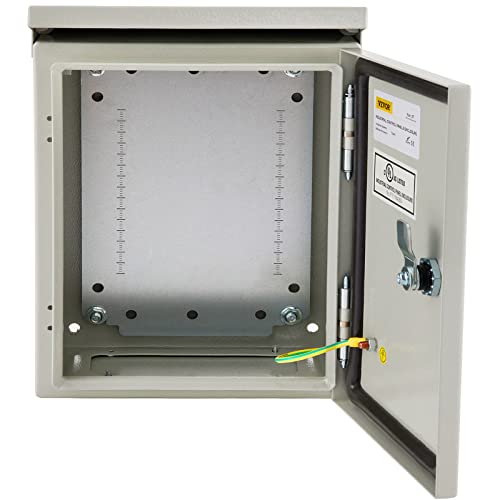
Legrand - OnQ 14 Inch Cable Management, In-Wall 20-Gauge Media Box, Structured Wiring Enclosure with 2.5 Inch Openings for Wires, Glossy White, EN1400


Key features
- •SCREWON COVER: ScrewOn Cover flanged covers hide drywall openings. Literature pouch is included for dealer information.
- •MATERIAL FOR SCREWON COVER: It has drywall depth indicators and the material is 20 Gauge CRS.
- •STANDARD INSTALLATION: The ScrewOn Cover has flush and surface installation and it's mounting tabs provide correct flush-mount position for standard installations.
- •AVAILABLE SIZES: It has different size for the different enclosure. The sizes are 14", 20", 28" or 42". 14" Enclosure has 14" H x 14" W x 3.6" D, 20" Enclosure has 20" H x 14" W x 3.6" D, 28" Enclosure has 28" H x 14" W x 3.6" D, 42" Enclosure has 42" H x 14" W x 3.6" D as their dimensions.
Legrand - OnQ 14 Inch Cable Management, In-Wall 20-Gauge Media Box, Structured Wiring Enclosure with 2.5 Inch Openings for Wires, Glossy White, EN1400
List Price: $81.36$73.22DEALYou Save: $8.14 (10%)
Free shippingFree Returns – 30 daysFree Order CancellationSecure Payment2–3 Days DeliveryGet It October 27, 2026In Stock (1)No marketing spamNo account requiredFulfilment by FedEx / Amazon / UPS / ShipwirePayPal / Card Buyer Protection
Customer Reviews
Reviews sourced from verified Amazon purchasers4.3
out of 5
Based on 10 reviews
5★
60%
4★
20%
3★
10%
2★
0%
1★
10%
Works as advertised
Tom✓ Verified Purchase•November 17, 2017
The product itself is great, but their manufacturing process/consistency could use some improvement. I have seen two of these and have one installed in my basement - mine has a really rough corner on the cover and the other cover was missing some paint. The cabinets are great though and work well. I didn't want to use their accessories, so I installed textured plastic in the back cover and mounted things to that.
Five Stars
Flyboyyy✓ Verified Purchase•April 17, 2017
Just a nice structured wiring box - as shown in the pictures.
"Gold Standard" for home structured wiring (cable, TV, phone, etc.)
Mac_Cat✓ Verified Purchase•February 28, 2017
Best cabinet for structured wiring (home or light commercial).
This is an On-Q brand - it's the "Gold Standard" for home applications.
This is similar to a medicine cabinet, just drilled out for all kinds of connections.
The design allows you to setup your low voltage wiring (Phone, Networks, Video, Cable TV, etc.)
all connected in one place, making repairs and changes simpler and safer.
Most modern homes how have a central wiring location for all the security and internet connected devices.
While the home owner many not appreciate it, your home repair people definitely will prefer this design.
And, now the prices are very affordable (at least, for the cabinet - the custom shelves are very expensive).
Look at:
Tripp Lite 550VA Audio/Video Backup Power Block ($200)
Specially designed for a 3" deep cabinet, this UPS fits nicely on a half-width shelf and it's secured with velcro straps (provided).
The makes wiring easier, with outlets on the edge, rather than on the front of the UPS.
more . .
I bought the largest box because I own one already. It barely was large enough for the smallest UPS I could find (slim and very flat).
This time, I found a better, even smaller UPS (See highly recommended for this cabinet applications). I put everything in this box except for the Security System (located in a more secure area in my master bedroom closet). The box has plenty of room to install cable amplifiers, spitters, network patch panels, telephone punch blocks, and other high tech devices needed. Plus, there is ample space to layout the wiring, label it, and organize the cables for service and inspections.
The box has 3" holes cut in the top for cables to enter.
It does not have any kind of bushing or cable protection, but with a hole that size, you should install a short piece of PVC gray conduit to protect your cable from chafing and cutting.
The bottom of the cabinet has two standard sized outlet cutouts. You can knock out one or both to install the 120v electrical outlet (or 220v). I chose one with lightning protection (they sell some that are colored plastic and have tiny sirens that go off when they get activated). Lightning protection or surge-protection circuits vary by size and quality, so choose a good one or let your electrician put one on the whole house breaker box.
Isolating the low voltage electronics makes service easier and it protects them better than putting them all over the house and worse, snaking wires and cables around. Nearly everything today is wireless, which does require less wire. However, for more secure connections, you still want to use a wired Ethernet cable (CAT5e or CAT6 now days). The outlet and box are not included - mine was about $80 for the white painted metal box (standard metal gang box, but well pained).
Note: Paint got into the screw threads in the cabinet, so clear those screw holes before trying to use them, first.
Normally, you just slip this box in-between a pair of studs in your house wall. If the studs are too far apart, you add on 48 inch long 2x4's or other wood to fill out the space. Use short sheetrock screws for temporary hanging the box, until your sheetrock is repaired. (Box usually needs to stick out 1/2", so the hanged door has room to fit and swing open or closed).
Cabinet lock and key come with the door, which is packed separately (it goes on last).
Buy lots of cable ties and if you use 3rd party hardware in cabinet, you need to be prepared to drill some additional holes.
And, last recommendation, think about adding a 3 inch computer pan-fan ($5) in the top for silent air movement.
Mine cools well enough on it's own, because the entire back is riddle with pre-drilled boiler-plate holes that vent and cool nicely.
It works in any empty wall space, but most people choose a void or closet location, where access to the attic is easy and not so messy.
In my house, that's a central closet.
The only things that don't go in this box are routers and anything with an antenna, as the box will shield them.
Routers (NetGear, Apple, LinkSys, etc.) have antennas, so they need to be set-up outside the cabinet.
In my case, I just set them on a nearby shelf.
It would be nice if someone packaged a kit with all the extra stuff you need, because if you are not a hobbies or electrician, you won't have all the little extra parts you really need (shelves, standoffs, splitters, UPS, surge-protection, screws, bushings).
If you are looking at a small cabinet, I'd urge you to go for a larger one!
You need a lot of room to route stiff cables, band them, and route them around the box (think larger coils, loops, and turns).
Cable TV uses coax wire (RG-6).
Internet and Phones (CAT5e and CAT6)
While I recommend this box highly, it's not for beginners.
This is a project that requires basic tools.
Not recommended for home security - those boxes are more specialized.
This box is not exactly generic (custom holes and snap-pin connectors), but it can be used that way.
This is an On-Q brand - it's the "Gold Standard" for home applications.
This is similar to a medicine cabinet, just drilled out for all kinds of connections.
The design allows you to setup your low voltage wiring (Phone, Networks, Video, Cable TV, etc.)
all connected in one place, making repairs and changes simpler and safer.
Most modern homes how have a central wiring location for all the security and internet connected devices.
While the home owner many not appreciate it, your home repair people definitely will prefer this design.
And, now the prices are very affordable (at least, for the cabinet - the custom shelves are very expensive).
Look at:
Tripp Lite 550VA Audio/Video Backup Power Block ($200)
Specially designed for a 3" deep cabinet, this UPS fits nicely on a half-width shelf and it's secured with velcro straps (provided).
The makes wiring easier, with outlets on the edge, rather than on the front of the UPS.
more . .
I bought the largest box because I own one already. It barely was large enough for the smallest UPS I could find (slim and very flat).
This time, I found a better, even smaller UPS (See highly recommended for this cabinet applications). I put everything in this box except for the Security System (located in a more secure area in my master bedroom closet). The box has plenty of room to install cable amplifiers, spitters, network patch panels, telephone punch blocks, and other high tech devices needed. Plus, there is ample space to layout the wiring, label it, and organize the cables for service and inspections.
The box has 3" holes cut in the top for cables to enter.
It does not have any kind of bushing or cable protection, but with a hole that size, you should install a short piece of PVC gray conduit to protect your cable from chafing and cutting.
The bottom of the cabinet has two standard sized outlet cutouts. You can knock out one or both to install the 120v electrical outlet (or 220v). I chose one with lightning protection (they sell some that are colored plastic and have tiny sirens that go off when they get activated). Lightning protection or surge-protection circuits vary by size and quality, so choose a good one or let your electrician put one on the whole house breaker box.
Isolating the low voltage electronics makes service easier and it protects them better than putting them all over the house and worse, snaking wires and cables around. Nearly everything today is wireless, which does require less wire. However, for more secure connections, you still want to use a wired Ethernet cable (CAT5e or CAT6 now days). The outlet and box are not included - mine was about $80 for the white painted metal box (standard metal gang box, but well pained).
Note: Paint got into the screw threads in the cabinet, so clear those screw holes before trying to use them, first.
Normally, you just slip this box in-between a pair of studs in your house wall. If the studs are too far apart, you add on 48 inch long 2x4's or other wood to fill out the space. Use short sheetrock screws for temporary hanging the box, until your sheetrock is repaired. (Box usually needs to stick out 1/2", so the hanged door has room to fit and swing open or closed).
Cabinet lock and key come with the door, which is packed separately (it goes on last).
Buy lots of cable ties and if you use 3rd party hardware in cabinet, you need to be prepared to drill some additional holes.
And, last recommendation, think about adding a 3 inch computer pan-fan ($5) in the top for silent air movement.
Mine cools well enough on it's own, because the entire back is riddle with pre-drilled boiler-plate holes that vent and cool nicely.
It works in any empty wall space, but most people choose a void or closet location, where access to the attic is easy and not so messy.
In my house, that's a central closet.
The only things that don't go in this box are routers and anything with an antenna, as the box will shield them.
Routers (NetGear, Apple, LinkSys, etc.) have antennas, so they need to be set-up outside the cabinet.
In my case, I just set them on a nearby shelf.
It would be nice if someone packaged a kit with all the extra stuff you need, because if you are not a hobbies or electrician, you won't have all the little extra parts you really need (shelves, standoffs, splitters, UPS, surge-protection, screws, bushings).
If you are looking at a small cabinet, I'd urge you to go for a larger one!
You need a lot of room to route stiff cables, band them, and route them around the box (think larger coils, loops, and turns).
Cable TV uses coax wire (RG-6).
Internet and Phones (CAT5e and CAT6)
While I recommend this box highly, it's not for beginners.
This is a project that requires basic tools.
Not recommended for home security - those boxes are more specialized.
This box is not exactly generic (custom holes and snap-pin connectors), but it can be used that way.
Great product
Terrance J. Caffee✓ Verified Purchase•December 29, 2016
Excellent enclosure for my in home communication wiring.
Five Stars
Joe✓ Verified Purchase•December 23, 2016
Great price and plenty of room for all current and future equipment
Page 1 of 2