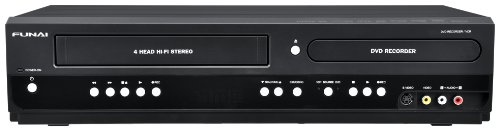
Dazzle DVD Recorder (Old Version)


Key features
- •V
- •i
- •d
- •e
- •o
BrandDazzle
CategoryDVD Recorders
Dazzle DVD Recorder (Old Version)
List Price: $96.42$86.78DEALYou Save: $9.64 (10%)
Free shippingFree Returns – 30 daysFree Order CancellationSecure Payment2–3 Days DeliveryGet It October 25, 2026In Stock (2)No marketing spamNo account requiredFulfilment by FedEx / Amazon / UPS / ShipwirePayPal / Card Buyer Protection
Customer Reviews
Reviews sourced from verified Amazon purchasers3.2
out of 5
Based on 10 reviews
5★
30%
4★
30%
3★
20%
2★
10%
1★
10%
Difficult to use
Eileen Fitzgerald•January 23, 2018
I had a very hard time getting this to work. When I finally did it went to 97% and would go no further but nothing was burned to my disk. But my disk was also then unusable. Frustrating
Dazzles me not at all
Wild Redhead Homestead•July 1, 2015
Extremely difficult to set up. The directions are miserable. It doesn't come with everything necessary to make it work properly. You have to update it through a site to get it to work for xbox. We ended up watching 3 different youtube videos to get the thing to work. You can't hear your voice when you are recording so you have to use a different download to hear yourself. With the Pinnacle you can only hear others when recording not yourself. It does work, but it isn't the best.
A headache
Z•June 3, 2010
I knew going in that this isn't a plug-and-play product, as Pinnacle claims. What I didn't know was that Pinnacle doesn't provide any set-up support, refuses to address the tiny output image and poor quality issues, and finding help on youtube, as suggested in many reviews, will only work if you're trying to record from a video game platform. Since I wanted this to record old VHS to digital files I could import to DVD (or not, at my discretion), the hundreds of video tutorials I found on youtube were little help. In total, I wasted over 5 hours sifting through search results trying to find help.
Searching forums and tutorial sites was also unhelpful; most were written for users who are familiar with advanced audio/video set-up. Many suggested purchasing expensive additional equipment and then skipped over "basic" steps I needed, such as which cable gets plugged into which female port.
Ultimately, my local Radio Shack was able to guide me through the set-up process and tell me what cables I needed based on my particular VCR. They were familiar enough with the Dazzle capture card to guide me through after I showed them a high-resolution picture of the back of my VCR. Sadly, I have quite a few extra cables I will probably never need because I bought them on the suggestion of other reviews here or the tutorials I watched on youtube.
My advice for anyone trying to use this with a component other than a video game system is to buy just the Dazzle and then show a picture of the back of your component (VCR, DVD player, etc.) to the knowledgeable folks at Radio Shack and they'll sell you exactly what you need and nothing you don't.
This product would not be worth the time, money, and energy I have poured into it if I were trying to convert anything other than VHS format home movies to make a DVD for my parents' 50th wedding anniversary. It has been a huge headache and if I ever had to purchase equipment to convert VHS to DVD again, I would find another product from different manufacturer.
Searching forums and tutorial sites was also unhelpful; most were written for users who are familiar with advanced audio/video set-up. Many suggested purchasing expensive additional equipment and then skipped over "basic" steps I needed, such as which cable gets plugged into which female port.
Ultimately, my local Radio Shack was able to guide me through the set-up process and tell me what cables I needed based on my particular VCR. They were familiar enough with the Dazzle capture card to guide me through after I showed them a high-resolution picture of the back of my VCR. Sadly, I have quite a few extra cables I will probably never need because I bought them on the suggestion of other reviews here or the tutorials I watched on youtube.
My advice for anyone trying to use this with a component other than a video game system is to buy just the Dazzle and then show a picture of the back of your component (VCR, DVD player, etc.) to the knowledgeable folks at Radio Shack and they'll sell you exactly what you need and nothing you don't.
This product would not be worth the time, money, and energy I have poured into it if I were trying to convert anything other than VHS format home movies to make a DVD for my parents' 50th wedding anniversary. It has been a huge headache and if I ever had to purchase equipment to convert VHS to DVD again, I would find another product from different manufacturer.
Review of Dazzle (VHS to) DVD Recorder
J. Devries•January 25, 2010
Dazzle worked OK initially, but then the recording began to slow down so the end product was poor. Contacted customer support who advised, among other things, to have no other programs running at the same time Dazzle runs. They also advised to download latest drivers for the video capture unit. Downloaded latest drivers and Dazzle appeared to run okay.
I also previously have used Honestech's VHS to DVD 3.0. I had a problem with it of jiggly video and crackled audio. But that has since cleared up after I downloaded updated drivers for the video capture box.
From my perspective, the VHS to DVD product is superior to Dazzle. I use the products to take a VHS recording of 4 to 6 hours for DVD capture and later put the captured files onto DVD. The problem with Dazzle is it will only allow about 2 hours per DVD if you use the recording direct to dvd feature. If you use the capture to conputer file feature and later want to convert those files to DVD, it will allow slightly over 3 hours per dvd. Also the video files Dazzle creates are large (5+GB range). VHS to DVD provides some flexibility in file sizes by offering 4 quality settings and 3 file sizes, the smallest of which is 3.8GB. Choosing "average" quality produces 3.8GB files running about 125min each. Choosing the "best" quality will result in around 50 to 60 minutes of recording for a 3.8 GB file. I don't use the dvd burning capability of either product. Instead I use ConvertXtoDVD as it produces a DVD from any number and size of video files.
I also previously have used Honestech's VHS to DVD 3.0. I had a problem with it of jiggly video and crackled audio. But that has since cleared up after I downloaded updated drivers for the video capture box.
From my perspective, the VHS to DVD product is superior to Dazzle. I use the products to take a VHS recording of 4 to 6 hours for DVD capture and later put the captured files onto DVD. The problem with Dazzle is it will only allow about 2 hours per DVD if you use the recording direct to dvd feature. If you use the capture to conputer file feature and later want to convert those files to DVD, it will allow slightly over 3 hours per dvd. Also the video files Dazzle creates are large (5+GB range). VHS to DVD provides some flexibility in file sizes by offering 4 quality settings and 3 file sizes, the smallest of which is 3.8GB. Choosing "average" quality produces 3.8GB files running about 125min each. Choosing the "best" quality will result in around 50 to 60 minutes of recording for a 3.8 GB file. I don't use the dvd burning capability of either product. Instead I use ConvertXtoDVD as it produces a DVD from any number and size of video files.
Finally!
Elaine F. Ferris•September 20, 2009
I tried and failed with two other devices before I found this one. The Dazzle DVC 100 was easy to set up and use even on my fickle 64-bit Windows Vista laptop. Pinnacle's website offers updated drivers on its site ([...] so even though it's described as working only on 32-bit Vista, I had no trouble whatsoever setting it up after installing the 64-bit driver.
The device itself is light and not too big, and sports a conveniently long cable.
I use it for playing video game consoles using my laptop monitor as the display, with which I've experienced overall good sound quality and no lag whatsoever. Though I was unable to find a full-screen preview option in the included software (which seems simple to use), I ultimately found that Ulead VideoStudio SE (from an EasyCAP's included software) did the trick after allowing audio in through the device. I'm sure many such programs, including free ones, could easily do an audio-enabled, full-screen preview (without recording) like this so you can just play the game on the laptop monitor.
I haven't tried attaching a camera, but I can vouch that it works well with a PS2!
The device itself is light and not too big, and sports a conveniently long cable.
I use it for playing video game consoles using my laptop monitor as the display, with which I've experienced overall good sound quality and no lag whatsoever. Though I was unable to find a full-screen preview option in the included software (which seems simple to use), I ultimately found that Ulead VideoStudio SE (from an EasyCAP's included software) did the trick after allowing audio in through the device. I'm sure many such programs, including free ones, could easily do an audio-enabled, full-screen preview (without recording) like this so you can just play the game on the laptop monitor.
I haven't tried attaching a camera, but I can vouch that it works well with a PS2!
Page 1 of 2