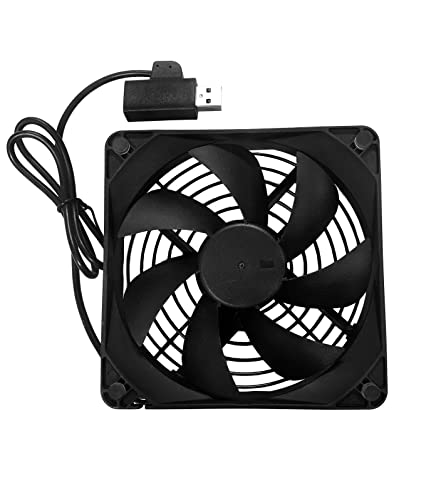
Coolerguys Single USB Fan for PlayStation, Xbox, Receivers, Roku (120mm)


Key features
- •Extremely Quiet 1200RPM Fan
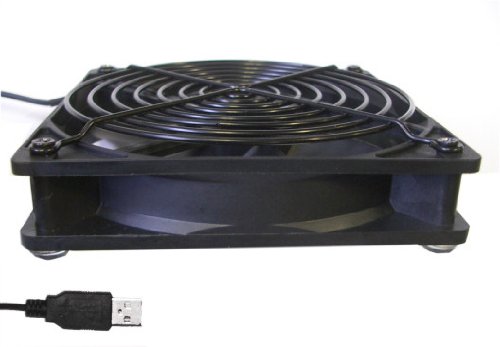
- •Rubber feet included so you won't scratch any component
- •120mm back finger grill pre-installed.
- •USB Powered
- •2ft USB cord
Coolerguys Single USB Fan for PlayStation, Xbox, Receivers, Roku (120mm)
List Price: $21.24$19.12DEALYou Save: $2.12 (10%)
Free shippingFree Returns – 30 daysFree Order CancellationSecure Payment2–3 Days DeliveryGet It October 25, 2026In Stock (1)No marketing spamNo account requiredFulfilment by FedEx / Amazon / UPS / ShipwirePayPal / Card Buyer Protection
Customer Reviews
Reviews sourced from verified Amazon purchasers4.5
out of 5
Based on 10 reviews
5★
60%
4★
40%
3★
0%
2★
0%
1★
0%
This is a great 120 mm usb powered fan
Darren✓ Verified Purchase•August 3, 2023
This is a great 120 mm usb powered fan. It is fairly quite, since it is large it can move a lot of air without having to spin super fast. With it being usb you can use it to cool a variety of electronics.
I originally bought it to cool off my old wireless router which would have to be reset every month or so due to running hot. It had a usb port on the back that I wasn't using so I plugged this in and cut a hole in the case so this could blow on it. I also bought some copper video ram heatsinks to put on the wireless chip which ran hot.
Eventually this router died, so now I use it to cool off some hard drives that are plugged into an old desktop I'm using as a server since one of them got a smart heat warning the other day The case doesn't have any way to mount a fan in front of the drives, but I had this fan so I cut some holes in the plastic and plugged this into a usb port on the front. It has lowered the temperature of the drives quite noticeably.
My dad has one plugged into his PS3 to ventilate the cabinet it is in while the PS3 is running. With the usb plug on the fan you don't have to buy a power adapter and a switching surge protector, or rig up something similar. The fan just turns on with the PS3.
I originally bought it to cool off my old wireless router which would have to be reset every month or so due to running hot. It had a usb port on the back that I wasn't using so I plugged this in and cut a hole in the case so this could blow on it. I also bought some copper video ram heatsinks to put on the wireless chip which ran hot.
Eventually this router died, so now I use it to cool off some hard drives that are plugged into an old desktop I'm using as a server since one of them got a smart heat warning the other day The case doesn't have any way to mount a fan in front of the drives, but I had this fan so I cut some holes in the plastic and plugged this into a usb port on the front. It has lowered the temperature of the drives quite noticeably.
My dad has one plugged into his PS3 to ventilate the cabinet it is in while the PS3 is running. With the usb plug on the fan you don't have to buy a power adapter and a switching surge protector, or rig up something similar. The fan just turns on with the PS3.
Works but could use a bit more air flow..
Karen✓ Verified Purchase•July 23, 2023
We have a Dish Joey Receiver that never ran hot until this summer..We have our Tv sitting on a 5" high TV stand, with the DVD under the stand.. They both sit on top of a cabinet. The back of the TV stand is open, so the DVD player has open air, but it was still getting hot.. We raised the DVD player so air could get under it and had one of those little round personal fans cooling it for weeks, but it was rather noisy so we wanted to find something quiet..
This seemed like a good idea.. I checked with Dish first to make sure it wouldn't harm the DVD player plugging a fan like this into it.. They said no problem.
I first tried to lay this fan flat underneath the DVD, but it did absolutely nothing. Which now I'm thinking, duh! The sides are solid so it wasn't getting any air to create an air flow. Within an hour, the DVD player was hot again.. So I set it upright behind the player.. It was a little tricky getting it positioned so it didn't fall over, but once I got it in the perfect spot, it works pretty good and it's nice that it just plugs into the DVD's USB port..
It's very quiet, we can barely hear it when the tv is off, but I will say, it doesn't really pump out that much air.. I can feel the air flow, slightly, but it's not like the air flow that came out of the personal fan.. The DVD player is cooler, absolutely, but it's still warmer than it was when we had the personal fan pointed at it..
I'm looking for one that will create a bit more air flow to replace it, and then I'll use this one for the DVR and VCR, which are set inside the cabinet and only run hot when we use them..
All in all, it's a good little unit and it does the job.. I just wish it had more air flow.
One thing you should be aware of, the back of it is open.. When trying to position it and get it set in just the right spot, the blades hit my fingers a couple of different times..
This seemed like a good idea.. I checked with Dish first to make sure it wouldn't harm the DVD player plugging a fan like this into it.. They said no problem.
I first tried to lay this fan flat underneath the DVD, but it did absolutely nothing. Which now I'm thinking, duh! The sides are solid so it wasn't getting any air to create an air flow. Within an hour, the DVD player was hot again.. So I set it upright behind the player.. It was a little tricky getting it positioned so it didn't fall over, but once I got it in the perfect spot, it works pretty good and it's nice that it just plugs into the DVD's USB port..
It's very quiet, we can barely hear it when the tv is off, but I will say, it doesn't really pump out that much air.. I can feel the air flow, slightly, but it's not like the air flow that came out of the personal fan.. The DVD player is cooler, absolutely, but it's still warmer than it was when we had the personal fan pointed at it..
I'm looking for one that will create a bit more air flow to replace it, and then I'll use this one for the DVR and VCR, which are set inside the cabinet and only run hot when we use them..
All in all, it's a good little unit and it does the job.. I just wish it had more air flow.
One thing you should be aware of, the back of it is open.. When trying to position it and get it set in just the right spot, the blades hit my fingers a couple of different times..
Works as expected, its quiet.
J Bird✓ Verified Purchase•July 12, 2023
This works great and is fairly quiet. The only complaint I would have is that the USB connector is not flat so when you connect two together they do not lay flat.
Coolerguys 120mm USB fan
Mark Dixon✓ Verified Purchase•June 29, 2023
I just recently got a new desk for my home office which had an enclosed cabinet for the computer tower. Except for a couple 2" holes for wires to feed through there was no ventilation at all. I had to leave the front door open just to get some air in. So I purchased one of the Coolerguys 120mm fans and mounted it to the top rear of the enclosure to suck out the air, I used a 4-1/2" hole saw to make the hole. I also installed a 120mm SilverStone fan filter in the lower front side panel of the enclosure after putting a 4-1/2" hole as well, this is used as an air intake. I can say that this concept works perfect! The fan is plugged into the back of the computer, so it turns on and off with the computer, my only complaint is the USB cord was too short, I can't pull the computer all the way out of the enclosure without unplugging it. Otherwise the fan is whisper quiet and it keeps the enclosure and the computer case cool to the touch. The CFM of this fan is not listed anywhere, but it must turn the air over in my cabinet at least a couple times a minute with the front door closed.
Just a note after I posted this review I went to the coolerguys site and found a fan similar to this one that had a rating of 44CFM. I cannot confirm that it is the same exact fan however. Also the fan I received had the USB splitter on it as some others have mentioned, nice to know when you are limited on USB ports.
Just a note after I posted this review I went to the coolerguys site and found a fan similar to this one that had a rating of 44CFM. I cannot confirm that it is the same exact fan however. Also the fan I received had the USB splitter on it as some others have mentioned, nice to know when you are limited on USB ports.
Quiet, with enough cooling for my needs!
E.A.✓ Verified Purchase•June 25, 2023
This fan is quiet and moves just enough air for my purposes.
I have a fanless, custom built Linux box with no moving parts.
The problem is my case is all metal and is just 7" x 9" and is only 2.5" high.
Even though there are multiple ventilation holes on the top and sides of this Wii sized case, the small size and all metal construction still traps in the heat. Add to the fact that this case is inside an enclosed TV stand, and it gets toasty warm.
My temps for a 9 watt AMD Kabini chip clocked at only 1Ghz was 66 Celsius idle and 69-76 Celsius when watching a two-hour movie. Can't imagine what the temps would be during the summer with no AC.
This fan is virtually silent from 3 feet away, and definitely silent from inside an enclosed TV stand.
The cord is about 18 inches and has an open usb slot at the end, so when plugged into an existing usb port, you can still plug another usb device right into the end of this cable (you don't lose your usb port).
The rubber feet are stick-ons. So decide whether you want to blow air on your device, or suck air out of your device before you glue the feet on, since you can unscrew the grill and place it to the other side.
I placed this fan on top of my case, right over the top ventilation holes sucking air out of my case.
The temps stayed at 44-46 Celsius idle and never went above 49 Celsius while watching 720p video for a couple of hours.
For such a small case, this fan is more than adequate, and silent with my setup.
Money well spent!
I have a fanless, custom built Linux box with no moving parts.
The problem is my case is all metal and is just 7" x 9" and is only 2.5" high.
Even though there are multiple ventilation holes on the top and sides of this Wii sized case, the small size and all metal construction still traps in the heat. Add to the fact that this case is inside an enclosed TV stand, and it gets toasty warm.
My temps for a 9 watt AMD Kabini chip clocked at only 1Ghz was 66 Celsius idle and 69-76 Celsius when watching a two-hour movie. Can't imagine what the temps would be during the summer with no AC.
This fan is virtually silent from 3 feet away, and definitely silent from inside an enclosed TV stand.
The cord is about 18 inches and has an open usb slot at the end, so when plugged into an existing usb port, you can still plug another usb device right into the end of this cable (you don't lose your usb port).
The rubber feet are stick-ons. So decide whether you want to blow air on your device, or suck air out of your device before you glue the feet on, since you can unscrew the grill and place it to the other side.
I placed this fan on top of my case, right over the top ventilation holes sucking air out of my case.
The temps stayed at 44-46 Celsius idle and never went above 49 Celsius while watching 720p video for a couple of hours.
For such a small case, this fan is more than adequate, and silent with my setup.
Money well spent!
Page 1 of 2