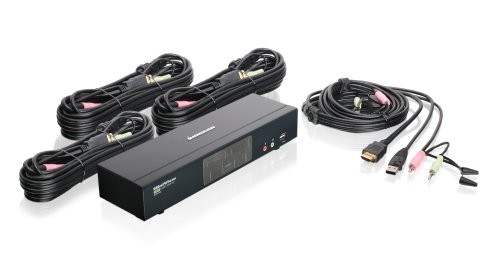
IOGEAR 4-Port HDMI Multimedia KVM Switch with Audio, USB 2.0 Hub and HDMI KVM w/Full Set of Cables, (GCS1794 TAA Compliant)


Key features
- •Share an HDTV or Display with HDMI connections, keyboard, mouse with digital surround sound between 4 of USB / HDMI computers and devices
- •2 x USB 2. 0 peripherals sharing ports. Dolby True HD and DTS HD Master Audio Support
- •Multi-platform OS support - Windows, Mac, Sun Solaris, Linux
- •Complete keyboard and mouse emulation for error free booting and real time switching
- •Power on Detection automatically switch to the next powered on computer
- •Backed by IOGEAR's 3-year and FREE lifetime technical support
IOGEAR 4-Port HDMI Multimedia KVM Switch with Audio, USB 2.0 Hub and HDMI KVM w/Full Set of Cables, (GCS1794 TAA Compliant)
List Price: $324.60$292.14DEALYou Save: $32.46 (10%)
Free shippingFree Returns – 30 daysFree Order CancellationSecure Payment2–3 Days DeliveryGet It October 26, 2026In Stock (8)No marketing spamNo account requiredFulfilment by FedEx / Amazon / UPS / ShipwirePayPal / Card Buyer Protection
Customer Reviews
Reviews sourced from verified Amazon purchasers3.8
out of 5
Based on 10 reviews
5★
30%
4★
70%
3★
0%
2★
0%
1★
0%
Pricy but quality unit
ariy✓ Verified Purchase•August 10, 2023
I've tried others, but keep coming back to these. This is my third one. I use them until the technology gets too far ahead and I need a new one to connect my equipment. They are solidly built and do their job. That said, I do have some minor issues with it.
I am puzzled by the decision not to include USB 3.0 in something like this, though admittedly I don't really need to connect anything USB 3.0 through it, and maybe that is still the case for most users. However, people using KVM switches are probably not average users.
The buttons on the front of the unit are hard to distinguish by feel, so if you want to hide this thing out of sight or just out of your line of sight, it may be difficult to hit the right button. They need to bring back the prominent physical buttons. Furthermore, these are designed more like two buttons than 4, as if they are for adjusting something on two devices rather than selecting among 4. Maybe they are trying to provide dual use for the front panels in order to cut production cost, but the effect is an un-intuitive design that detracts from the overall product quality. If the keyboard commands worked, maybe that would be less of an issue, but I have not been able to make them work.
Having said all of that, I am still happy with my purchase. The issue with wireless keyboards/mice not working seems to have been overcome in this model. Everything works well, and I expect I'll be using it for many years to come.
I am puzzled by the decision not to include USB 3.0 in something like this, though admittedly I don't really need to connect anything USB 3.0 through it, and maybe that is still the case for most users. However, people using KVM switches are probably not average users.
The buttons on the front of the unit are hard to distinguish by feel, so if you want to hide this thing out of sight or just out of your line of sight, it may be difficult to hit the right button. They need to bring back the prominent physical buttons. Furthermore, these are designed more like two buttons than 4, as if they are for adjusting something on two devices rather than selecting among 4. Maybe they are trying to provide dual use for the front panels in order to cut production cost, but the effect is an un-intuitive design that detracts from the overall product quality. If the keyboard commands worked, maybe that would be less of an issue, but I have not been able to make them work.
Having said all of that, I am still happy with my purchase. The issue with wireless keyboards/mice not working seems to have been overcome in this model. Everything works well, and I expect I'll be using it for many years to come.
Quite good, just a few annoyances
David Norris✓ Verified Purchase•July 24, 2023
This works well, for the most part. It would be much better to have a power switch, as there are times when it gets confused and completely stops working. When this happens, I have to unplug all the USB and HDMI ports to deprive it of power long enough for it to reset. Otherwise, it's quite good. I was able to get to work with my evoluent 4 button mouse, the audio and video quality is good, and it does the auto detection even for computers that are not the currently active one. This is great, as I can boot up multiple computers at the same time without having to switch to each one so Windows can properly detect the video.
The most annoying thing are the buttons to switch to a different computer. They are flat and hard to distinguish, and you have to press pretty hard for about a 2nd and a half before the switch actually takes place. The video and keyboard switches much quicker than with other KVM switches I have used, I used to have to wait a few seconds before I could use the mouse or start typing.
It's a bit expensive, but feels solid and looks like it will last for years. For anyone who has multiple computers of their constantly switching between, I highly recommend it. Just make sure that all of your computers use HDMI and USB, I wouldn't take an older computer that has BGA or a PS2 keyboard and try to use an adapter.
The most annoying thing are the buttons to switch to a different computer. They are flat and hard to distinguish, and you have to press pretty hard for about a 2nd and a half before the switch actually takes place. The video and keyboard switches much quicker than with other KVM switches I have used, I used to have to wait a few seconds before I could use the mouse or start typing.
It's a bit expensive, but feels solid and looks like it will last for years. For anyone who has multiple computers of their constantly switching between, I highly recommend it. Just make sure that all of your computers use HDMI and USB, I wouldn't take an older computer that has BGA or a PS2 keyboard and try to use an adapter.
Among a limited selection of 4-port, HDMI KVM Switches, this seems like the best
JW✓ Verified Purchase•July 24, 2023
The pros and cons here are wrapped up in the fact that this is one of the very few 4-port, HDMI, KVM switches. When there are few options, you live with the quirks.
Windows 10 + Mac. It works well with both. Nice, clear picture. One trick I had to learn was un-mapping the Scroll Lock key from the Mac's old F14 key. Google that and you'll understand. I game on my Win10 machine, and it works just fine. I can only speak for my experience and I've seen only good results.
The biggest "Pro" is that this is the only, name-brand, 4-port, HDMI KVM switch that I've seen. I don't really trust the other brands I've seen, and for my uses, 4-ports is really handy.
Cons:
1. There's no command to switch to the next ACTIVE port. When I have fewer than 4 devices attached, the "3 key sequence" to switch to the next computer can go to a dead port. Now it's a 4 key sequence where I have to tap+tap+number+enter. Not a huge deal, but there it is.
2. The beep. Oh my goodness the cursed beep! This is about as annoying as digital cameras that need to go "click" when you take a picture.
3. The ctrl+F12 "hot key mode" doesn't work for me at all. I am going to try different keyboards, and unplugging/re-plugging things. Meanwhile, I can't switch from Scroll Lock to CTRL for the hotkey, and I can't shut off the stupid beeping.
4. A SERIAL cable for a firmware upgrade? I know this is the ol' standard, but what computer still has a serial cable on it? ALSO the firmware cannot be upgraded with any computer USING the KVM still active. So, the answer is to get a USB-to-serial adapter, unplug everything from the KVM, then the firmware can be upgraded.
I really want to give this 3 stars. Compared to the VGA IOGear switch I had, the feature functionality of this is lacking. However, among the market for HDMI KVM switches, this seems tolerable enough for 4 stars.
Windows 10 + Mac. It works well with both. Nice, clear picture. One trick I had to learn was un-mapping the Scroll Lock key from the Mac's old F14 key. Google that and you'll understand. I game on my Win10 machine, and it works just fine. I can only speak for my experience and I've seen only good results.
The biggest "Pro" is that this is the only, name-brand, 4-port, HDMI KVM switch that I've seen. I don't really trust the other brands I've seen, and for my uses, 4-ports is really handy.
Cons:
1. There's no command to switch to the next ACTIVE port. When I have fewer than 4 devices attached, the "3 key sequence" to switch to the next computer can go to a dead port. Now it's a 4 key sequence where I have to tap+tap+number+enter. Not a huge deal, but there it is.
2. The beep. Oh my goodness the cursed beep! This is about as annoying as digital cameras that need to go "click" when you take a picture.
3. The ctrl+F12 "hot key mode" doesn't work for me at all. I am going to try different keyboards, and unplugging/re-plugging things. Meanwhile, I can't switch from Scroll Lock to CTRL for the hotkey, and I can't shut off the stupid beeping.
4. A SERIAL cable for a firmware upgrade? I know this is the ol' standard, but what computer still has a serial cable on it? ALSO the firmware cannot be upgraded with any computer USING the KVM still active. So, the answer is to get a USB-to-serial adapter, unplug everything from the KVM, then the firmware can be upgraded.
I really want to give this 3 stars. Compared to the VGA IOGear switch I had, the feature functionality of this is lacking. However, among the market for HDMI KVM switches, this seems tolerable enough for 4 stars.
Better than the rest by a huge margin, but limited support for 1440p and 4K (30Hz only)
O. NeDroid✓ Verified Purchase•July 15, 2023
UPDATE: Limited refresh rate support makes this switch INCONVENIENT for use with 4K MONITORS. Not lowering the rating because the switch works well for what it is designed to handle.
I've tried several 4-port HDMI switches recently. This one, although almost twice as pricey, wins my vote. Some of the "pros" below seem obvious, but you'd be surprised how many other switches do not support one or more.
Pros:
1. Remembers monitor resolution (EDID) and sends it to each connected PC even if it is currently disconnected from the monitor. There are no monitor adjustments each time the PC is connected, there are no 1024x768 tiny Windows screens when PC is rebooted without being actually connected to the monitor. It's what the doctor ordered. (See the "not tested" comments though).
2. Direct switching via keyboard shortcuts. You can switch directly to any PC, no need to cycle through every PC.
3. Ability to switch the monitor only, leaving the keyboard and the mouse attached to the other PC. If you do any kind of cross work across PCs, and do not have another keyboard lying around (or no room for it), this may be handy.
4. Support. The support site has all the manuals, even firmware upgrades.
Cons:
1. Switching is not instantaneous. It takes a few seconds for the picture to appear. But this happened with every switch I tested. Perhaps it is my monitor or perhaps this can't be avoided.
2. The switch doesn't handle resolutions above 1920 x 1200 well. Only 30Hz refresh rate is supported. This presents a problem with 4K and 1440p monitors. These montiors present EDID resolution data to the computer indicating that 4K @60Hz or 1440p @60Hz is supported. This makes the computer switch to the best available resolution supported by the monitor but the switch cannot handle it. Then... no picture. Unless a monitor is connected using a different cable to bypass the switch, no BIOS settings or graphics card settings are going to be accessible.
Not tested:
* How keyboard emulation may affect gaming speed.
* Analog sound and mike. Sound is delivered via HDMI in my setup.
I've tried several 4-port HDMI switches recently. This one, although almost twice as pricey, wins my vote. Some of the "pros" below seem obvious, but you'd be surprised how many other switches do not support one or more.
Pros:
1. Remembers monitor resolution (EDID) and sends it to each connected PC even if it is currently disconnected from the monitor. There are no monitor adjustments each time the PC is connected, there are no 1024x768 tiny Windows screens when PC is rebooted without being actually connected to the monitor. It's what the doctor ordered. (See the "not tested" comments though).
2. Direct switching via keyboard shortcuts. You can switch directly to any PC, no need to cycle through every PC.
3. Ability to switch the monitor only, leaving the keyboard and the mouse attached to the other PC. If you do any kind of cross work across PCs, and do not have another keyboard lying around (or no room for it), this may be handy.
4. Support. The support site has all the manuals, even firmware upgrades.
Cons:
1. Switching is not instantaneous. It takes a few seconds for the picture to appear. But this happened with every switch I tested. Perhaps it is my monitor or perhaps this can't be avoided.
2. The switch doesn't handle resolutions above 1920 x 1200 well. Only 30Hz refresh rate is supported. This presents a problem with 4K and 1440p monitors. These montiors present EDID resolution data to the computer indicating that 4K @60Hz or 1440p @60Hz is supported. This makes the computer switch to the best available resolution supported by the monitor but the switch cannot handle it. Then... no picture. Unless a monitor is connected using a different cable to bypass the switch, no BIOS settings or graphics card settings are going to be accessible.
Not tested:
* How keyboard emulation may affect gaming speed.
* Analog sound and mike. Sound is delivered via HDMI in my setup.
Disable keyboard emulation
Gregg A Jacobs✓ Verified Purchase•June 29, 2023
Good: Easy to install the hardware, works well once some issues were addressed
Difficult: Debugging issues with particular hardware
I have a Cooler Master tenkeyless keyboard because I never used the number pad, so why waste the desk space and push the mouse further away? The KVM initially would not work with the keyboard. After searching online, I found that people with a specialized mouse needed to disable the mouse emulation on the KVM. Digging further I found it is also possible to disable the keyboard emulation. I had to get a cheap $10 standard keyboard to be able to disable the emulation on the KVM. The instructions that came with the KVM did not seem to work. After searching more web sites, I found the hotkeys were the alternate keys from what was stated in the instructions. Finally I was able to disable the keyboard emulation. Now all seems fine. The KVM switches the keyboard, video, and mouse between two computers. Having the keyboard and mouse emulation has not caused any issues in either computer recognized the hardware when switching.
I was about to return the KVM, but finally I found a solution to the issues. More clear information on the manufacturer website for people who experience these issues would probably be very useful. The manufacturer website explains the intent of the emulation, but does not discuss how issues with non-standard hardware may be avoided by disabling the emulation and how to disable the emulation. There are many comments on other websites regarding a non-standard mouse, but I did not see anyone with a non-standard keyboard.
Difficult: Debugging issues with particular hardware
I have a Cooler Master tenkeyless keyboard because I never used the number pad, so why waste the desk space and push the mouse further away? The KVM initially would not work with the keyboard. After searching online, I found that people with a specialized mouse needed to disable the mouse emulation on the KVM. Digging further I found it is also possible to disable the keyboard emulation. I had to get a cheap $10 standard keyboard to be able to disable the emulation on the KVM. The instructions that came with the KVM did not seem to work. After searching more web sites, I found the hotkeys were the alternate keys from what was stated in the instructions. Finally I was able to disable the keyboard emulation. Now all seems fine. The KVM switches the keyboard, video, and mouse between two computers. Having the keyboard and mouse emulation has not caused any issues in either computer recognized the hardware when switching.
I was about to return the KVM, but finally I found a solution to the issues. More clear information on the manufacturer website for people who experience these issues would probably be very useful. The manufacturer website explains the intent of the emulation, but does not discuss how issues with non-standard hardware may be avoided by disabling the emulation and how to disable the emulation. There are many comments on other websites regarding a non-standard mouse, but I did not see anyone with a non-standard keyboard.
Page 1 of 2