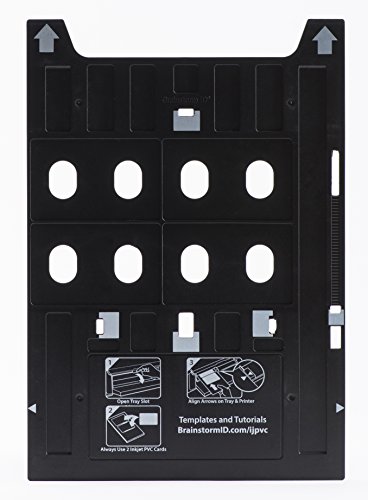
PVC ID Card Tray for Epson R280, Artisan 50, R260, R265, R270, R290, R380, RX580, RX595, RX680, P50, and T50

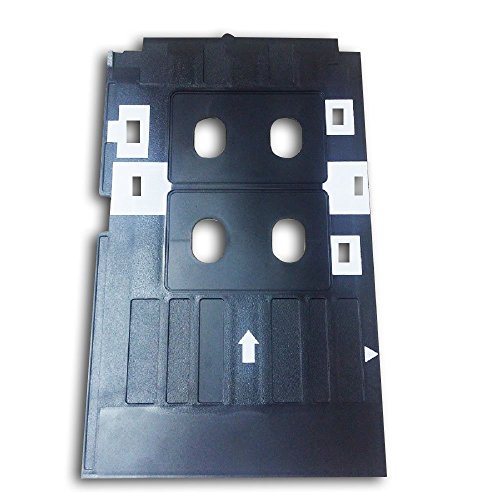
Key features
- •Epson CD/DVD Tray Replacement to Print On Inkjet Printable PVC Cards
- •Tray Measures 147mm x 246mm
- •Holds 2 Inkjet PVC cards to print 2 cards at a time (always put 2 cards in the tray, even if only printing 1 card)
- •Inkjet PVC Cards Sold Separately
BrandBrainstorm ID
CategoryPrinter Trays
PVC ID Card Tray for Epson R280, Artisan 50, R260, R265, R270, R290, R380, RX580, RX595, RX680, P50, and T50
List Price: $38.78$34.90DEALYou Save: $3.88 (10%)
Free shippingFree Returns – 30 daysFree Order CancellationSecure Payment2–3 Days DeliveryGet It June 25, 2026In Stock (12)No marketing spamNo account requiredFulfilment by FedEx / Amazon / UPS / ShipwirePayPal / Card Buyer Protection
Customer Reviews
Reviews sourced from verified Amazon purchasers4.3
out of 5
Based on 10 reviews
5★
50%
4★
50%
3★
0%
2★
0%
1★
0%
Great money saver
pjgraham62✓ Verified Purchase•July 2, 2023
I've always wanted to make professional looking membership cards for my club, but with less than 600 members it was just too expensive. The cheapest card printers are nearly $1,000.00 - well outside our budget. This product changed that. With an $150 inkjet printer and this magic tray, I was able to get my cost down to less than $0.35 per card. There is a small downside. Large jobs will take a lot of time. Some of that is probably my fault, as I still haven't figured out how to print two cards at a time. But now that the main project is done, I will only need to print a dozen or so per week - so this is perfect for us. When you design your card, make sure to leave the very bottom corners blank. The printer thinks it is printing on a disc, so that small radius at the bottom of the card is not a printable area.
Perfect for my Epson Artisan 50
One G.✓ Verified Purchase•May 13, 2023
This IS the card tray you need for the Epson Artisan 50. it's easy to get confused and mixed up with other card trays since they may not specifically list your model but say "...and more" in the description you may assume it includes you model and you may assume wrong. However, if you have an Epson Artisan 50 and are not sure or a little confused as to what card tray you need, rest assured this is the one you want/ need.
QUESTION: Will this tray work with Epson Stylus Photo R1900?
Aliquis✓ Verified Purchase•May 11, 2023
CLOSING REVIEW: 21 June 2012
Platinum ID Cards finally responded to me and I was able to return this tray and received the new tray today with a free set of ID Cards (Thanks Chris Bonno - Platinum ID!). Although this tray also does not fit in the R1900, I modified it and now it works. Awesome!
UPDATED: 12 June 2012
----------
This Tray does not work with Epson Stylus Photo R1900. I've tried repeatedly to contact Platinum ID Cards (via e-mail and telephone - they are not responding) so that I can switch this tray with the other one because I see that the other tray's slots more clearly resembles the CD/DVD tray for the R1900.
*I have given one star at this stage because the Seller (Platinum ID Cards) is not responding
----------
----------
ORIGINAL REVIEW: May 2012
I have already ordered this item, so I guess my question is a bit 'after the fact' :-)
Anyway, anyone out there who have used this tray on the R1900?
----
If there's no one, I guess I will update soon with a review to say yay or nay!
Thanks!!
~~~~~
***** The 5 stars is for 'If it works on my printer' because I think it is an awesome idea and I don't know why Epson didn't include something like this in the first place.
Platinum ID Cards finally responded to me and I was able to return this tray and received the new tray today with a free set of ID Cards (Thanks Chris Bonno - Platinum ID!). Although this tray also does not fit in the R1900, I modified it and now it works. Awesome!
UPDATED: 12 June 2012
----------
This Tray does not work with Epson Stylus Photo R1900. I've tried repeatedly to contact Platinum ID Cards (via e-mail and telephone - they are not responding) so that I can switch this tray with the other one because I see that the other tray's slots more clearly resembles the CD/DVD tray for the R1900.
*I have given one star at this stage because the Seller (Platinum ID Cards) is not responding
----------
----------
ORIGINAL REVIEW: May 2012
I have already ordered this item, so I guess my question is a bit 'after the fact' :-)
Anyway, anyone out there who have used this tray on the R1900?
----
If there's no one, I guess I will update soon with a review to say yay or nay!
Thanks!!
~~~~~
***** The 5 stars is for 'If it works on my printer' because I think it is an awesome idea and I don't know why Epson didn't include something like this in the first place.
Works great with Epson R280
Scott✓ Verified Purchase•May 4, 2023
This tray works great with my Epson R280. Just set the printer tray to the CD position, slide the ID tray in until the arrows line up, and then print using the A4 standard settings for printing CDs. (Select "Best Picture" printing in the settings as well.) You can print one card if desired, but you will need to have a PVC card in each slot. (The printer checks surface area whereas it is designed to print on CDs and will not print unless that surface area is correct. It will spit the tray out if two cards are not inserted.) For printing to cards, download a template that shows you where your image needs to be for proper alignment with the card location. A simple search such as "Epson R280 ID card template" will give the results you need. The cards will have great image quality comparable to thermal ID printers..... BUT, the surface will feel tacky whereas ink is on the surface of the card. It won't readily smear or wash off, but you will need to apply a clear overlay in order to get a smooth surface and protect the image. Also note that you will need "INK JET" PVC cards (30 mil). You cannot print on the PVC cards designed for thermal printers because they don't have a printable surface.
Quick delivery time and Service from Seller
APabon✓ Verified Purchase•April 24, 2023
Ordered product after careful research on price and functionality. Received product before estimated time of delivery which is always a pleasant surprise.
I had questions of concern from product packaging, but after contacting the seller, (whom by the way was quick to respond), were resolved and had no functionality issues with the Epson R280 printer.
The tray has two slots for the cards, but noticed it was not working when I inserted the tray. Even though I wanted to print only one (1) card, you must insert two cards for the printer to accept it, even if only one (1) was printed on. This was an over site on my end and not the product.
I would not hesitate to purchase from seller again as the communications with them was professional and prompt.
Saved $$ compared to other sites that were twice the cost.
I had questions of concern from product packaging, but after contacting the seller, (whom by the way was quick to respond), were resolved and had no functionality issues with the Epson R280 printer.
The tray has two slots for the cards, but noticed it was not working when I inserted the tray. Even though I wanted to print only one (1) card, you must insert two cards for the printer to accept it, even if only one (1) was printed on. This was an over site on my end and not the product.
I would not hesitate to purchase from seller again as the communications with them was professional and prompt.
Saved $$ compared to other sites that were twice the cost.
Page 1 of 2