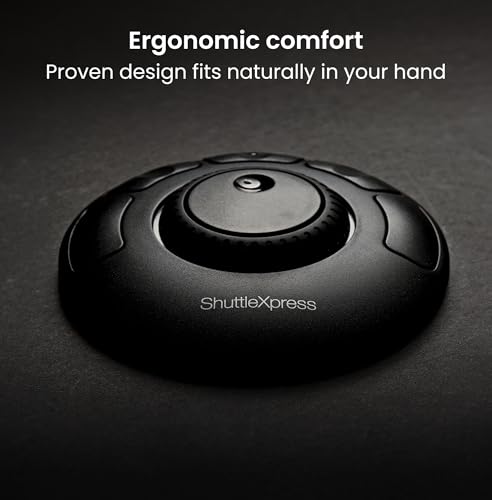
Contour Shuttle Xpress - Multimedia Controller Ergonomic Jog Dial for Video Music Image Editor, USB Multimedia Controller for PC & Mac, 5 programmable Buttons, 7 Speed Jog Ring - Black



Key features
- •The Shuttle Xpress has five (5) programmable buttons
- •The Shuttle device software allows you to manage a specific configuration of your Shuttle device for every application you have on your computer
- •The software will automatically select the appropriate configuration according to the current active application
- •Jog & Shuttle can also be used for scrolling, volume control, sequencing & more!
- •The Contour Shuttle Xpress have been designed to enhance the productivity of multimedia content creators, but they also increase productivity in many other types of applications, including: Graphics and photo editing, Word processing, Spreadsheet manipulation, Internet operations, Medical imaging, Any application that uses key commands. The Xpress consist of two (2) components: the ergonomically designed device itself and the software that allows you to manage it
Contour Shuttle Xpress - Multimedia Controller Ergonomic Jog Dial for Video Music Image Editor, USB Multimedia Controller for PC & Mac, 5 programmable Buttons, 7 Speed Jog Ring - Black
List Price: $93.79$84.41DEALYou Save: $9.38 (10%)
Free shippingFree Returns – 30 daysFree Order CancellationSecure Payment2–3 Days DeliveryGet It October 25, 2026In Stock (3)No marketing spamNo account requiredFulfilment by FedEx / Amazon / UPS / ShipwirePayPal / Card Buyer Protection
Customer Reviews
Reviews sourced from verified Amazon purchasers4.2
out of 5
Based on 10 reviews
5★
80%
4★
10%
3★
10%
2★
0%
1★
0%
Surprisingly useful
Rina•July 12, 2017
I originally purchased this as a jog wheel for video editing, which I don't do a whole lot. I was afraid it would be a waste of money getting so little use, but as someone who routinely keeps way too many tabs open in whatever program(s) I'm working in, I've found it incredibly useful for window/tab management as well. For example in my browser I have the top 5 buttons synced to (left to right respectively): Back one window, back one tab, close current tab, forward one tab, forward one window. And I have the shuttle wheel set up to provide scroll control, which is infinitely easier when scrolling through very long pages.
Gotta say, I love it!
Gotta say, I love it!
Amazing
D. Belnap•May 29, 2017
I use this device to work with while drawing in manga studio on my surface pro 4 and wow it really saves alot of time having shortcuts a click away. The outer ring is real handy for rotation but can be programmed to do far more with each 15 degree being a command option. The inner i use for zoom due to it being up to 2 commands right or left but it does repeat if the direction is continually scrolled. Decent weight. Buttons are solid. A must have for mobile art.
What A Great Product!
Ibmpcer•February 24, 2017
This is a great tool!! It does take a little time setting up any programs\applications that aren't supported as a default. Once I got this set up, it absolutely works flawlessly and switches to different software automatically with no issues. This is truly one of my most favorite purchases and such a time saver over using a keyboard for editing. The only thing that could be better is the center knob should have 4 finger indentations, that way no matter what position the knob is in, you'll always hit and indentation.Thank You!
Ideal for video editing; automatically works with most apps
Cathy L. Kaplan•February 22, 2017
Fantastic product! Ideal for video editing, but it works system wide with most apps to scroll & do common tasks. Main wheel on outside feels good with good springbuck, and jog when on inside works great for fine tuning. Well made - solid with good weight, doesn't slip around. It's kinda hard to tell what button you're on by touch, but the fact that they're "programmable" is awesome - the app UI lets you program about any action to the buttons (or wheel). I wish it were less expensive, but this device really works great!
This works perfect once it set up correctly
Maui Wowi•November 1, 2016
This works perfect once it set up correctly. The only problem I ran into was getting the software to run correctly based on what application I had open. Otherwise the preset buttons you set for Adobe Premiere for example wont work. This happens because it won't automatically switch (at least on windows 10) unless you mount the software icon to windows task bar in the bottom right of the screen. (next to the clock and internet status icons) Then when you want to pick your software mode when you have your desired software open, right click on the little wheel icon. This took me hours to figure out and was not clear on the website.
If you need to figure out how to do this, I found this solution at the manufacturers forum.
[...]
Hope this helps.
If you need to figure out how to do this, I found this solution at the manufacturers forum.
[...]
Hope this helps.
Page 1 of 2