ION Pics 2 SD | Photo, Slide and Film Scanner with SD Card
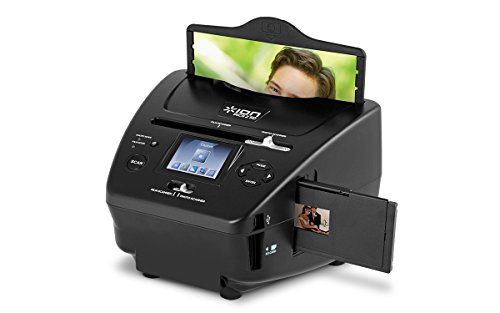



Key features
- •Scans your pictures, slides and negatives to the included SD card --no computer needed!
- •High-resolution scanning keeps your photos looking great for pristing archival
- •Works with 35mm negatives, 35mm slides, and 3x5, 4x6, and 5x7-inch pictures
- •High-resolution 5.1 MP scanner with up to 2500 DPI
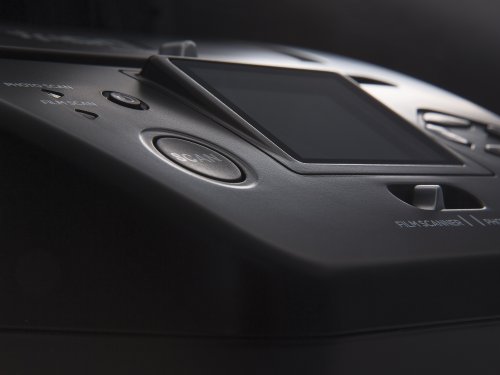
- •Color screen for viewing your pictures
- •Includes easy image transfer and editing software
ION Pics 2 SD | Photo, Slide and Film Scanner with SD Card
List Price: $181.86$163.67DEALYou Save: $18.19 (10%)
Free shippingFree Returns – 30 daysFree Order CancellationSecure Payment2–3 Days DeliveryGet It October 27, 2026In Stock (5)No marketing spamNo account requiredFulfilment by FedEx / Amazon / UPS / ShipwirePayPal / Card Buyer Protection
Customer Reviews
Reviews sourced from verified Amazon purchasers3.6
out of 5
Based on 10 reviews
5★
20%
4★
30%
3★
10%
2★
20%
1★
20%
Good ,but could use more instructions.
Patricia F.•October 21, 2017
I have 68 scrapbooks full of pictures and two storage boxes full of boxes of slides. There is a learning curve and not everything is in the instructions. I have tried calling for information, but I'm not patient with long holds. The info on the internet is the same as the pamphlet. It is adequate for copying to disc. Slow going with very old pictures that vary in size. Color on slides needs to be adjusted for vivid scenery to look like it should. I had to learn how to do this too. Slides take time to put in right. It depends on how you want them to look, as to how long it takes to put them in the holder and adjustments
Great Idea, Does Not Work With Glossy Photos
D. Richards•October 14, 2017
I so wanted to like this scanner. The quality of the item was fine in terms of construction, and I was excited to be able to scan the 1000s of photos that I have in albums. However, as some have noted -- there is a design flaw for those photos that are darker or those photos that are printed in glossy paper. The Light source inside the unit reflects off the paper and shows up on the scan. No setting can be changed to properly eliminate this and in some photos it's so pronounced that the scan is worthless. If you have photos mostly taken outside in bright light, and used a matte finish on your prints, this scanner might work perfectly for you. Otherwise, unfortunately it just does not work.
reloading the tray for the photos was not convenient for ...
Amazon Customer•October 8, 2017
reloading the tray for the photos was not convenient for the amount that I have to do. It was a simple process that worked ok. Having to place the photos on the computer via the SD card was not convenient. I will look into a photo scanner that does the transfer directly via a cable or wireless.
Not the best thing I have purchased but will work for my ...
Rimas V.•June 1, 2016
Not the best thing I have purchased but will work for my purposes. Is stand-alone "camera in a box" and came with an SD card so you can do a bunch of pictures before you download to a computer (either by reading the SD card or by plugging in the device, which then acts like a thumbdrive.) The device also has a small internal memory which can maybe hold about 20 or so pix -- note that this memory is "hidden" if an SD card is inserted.
Overall comment -- the device "crops" your pictures assuming a 1/4" border and slides/negs assuming typical slide-mount. Also while the device can do some color/brightness adjustment your software on your computer may be better and easier -- I just adjusted enough to get it most of the way and make sure all colors were there, then used the computer to finish.
For slides -- holder is a bit cumbersome but works as long as you don't try to "back it up". Seems to do a good job, can do some minor color or exposure correction using the tiny screen (screen's main use is to center your picture). Will magnify all flaws, scratches, and dirt on the slides so prep them well. Not sure higher resolution mode will buy you much.
For negatives -- seems to do a reasonable job of "inverting", but you might need to do some adjustment. Same caveat re scratches and dirt. Also note that old negatives may have shifted in color (like old fotos)
For photos -- here found a design issue. Some light reflects off the picture being photographed and "illuminates" the internals of the machine, which then might affect your image. Most pictures (especially pictures with lots of color and busy background, like crowds, etc) come through fine, but on pictures with lots of dark AND some light you will see either a "loss of contrast" (darks not as dark) with matte finish photos or actual circular shadows (reflections of camera lens and surrounding structure) on glossy prints. In some cases this can be "tuned out" by playing with the exposure settings -- darken the photo and the reflection will be reduced on glossies and virtually disappear on mattes. But a few pictures might be challenging. Again an issue with only some photos and glossy finished with very dark areas are most likely to see this. (At some point I might get ambitious enough to open this thing very carefully and see if I can add some black flocking to reduce this effect, but right now am living with it.) Otherwise does a decent job and was able to save some old fotos. And it is easier to use than a scanner, especially with smaller prints
Off-size slides/negs -- will at some point try to build a Carrier: for some half-frame and 110's I have -- should not be too difficult to do. Also have a few 126's; will try to deal with those but here will have to give up some edge I think as device designed for 35mm slides/negs.
Off-size fotos and borderless fotos. -- for 5x7 it will crop. For 4x6 or 3x5 try setting the device for the next size up (use 5x7 setting for 4x6 in the 4x6 frame) -- you will get some edges that you will have to crop off with other software but at least you will get 98% of teh pix. For fotos other than that size -- often these can be carefully inserted in a carrier along one side and as long as you are gentle and there is no foto curl you can probably slip these in and out without them falling out. If in doubt try sticking a little tape on the loose corner to hold the pix in place. Oh, and suggest you cut some 3x5/4x6/5x7 rectangles of flat black paper or poster as the picture holders have a glossy back (note comment about lens reflection above). Have had good success with these tricks (have many off-size fotos), just be slow and patient.
Note that some processors cut prints a smidge wide -- here the processor is at fault, not the device. If the picture is hard to put in either trim it or consider using the next-size-up frame and treating it like an off-size.
I intend to keep the device and use it. Will write back if I succeed in opening it up and improving the reflection issue, but that may be several months from now.
Overall comment -- the device "crops" your pictures assuming a 1/4" border and slides/negs assuming typical slide-mount. Also while the device can do some color/brightness adjustment your software on your computer may be better and easier -- I just adjusted enough to get it most of the way and make sure all colors were there, then used the computer to finish.
For slides -- holder is a bit cumbersome but works as long as you don't try to "back it up". Seems to do a good job, can do some minor color or exposure correction using the tiny screen (screen's main use is to center your picture). Will magnify all flaws, scratches, and dirt on the slides so prep them well. Not sure higher resolution mode will buy you much.
For negatives -- seems to do a reasonable job of "inverting", but you might need to do some adjustment. Same caveat re scratches and dirt. Also note that old negatives may have shifted in color (like old fotos)
For photos -- here found a design issue. Some light reflects off the picture being photographed and "illuminates" the internals of the machine, which then might affect your image. Most pictures (especially pictures with lots of color and busy background, like crowds, etc) come through fine, but on pictures with lots of dark AND some light you will see either a "loss of contrast" (darks not as dark) with matte finish photos or actual circular shadows (reflections of camera lens and surrounding structure) on glossy prints. In some cases this can be "tuned out" by playing with the exposure settings -- darken the photo and the reflection will be reduced on glossies and virtually disappear on mattes. But a few pictures might be challenging. Again an issue with only some photos and glossy finished with very dark areas are most likely to see this. (At some point I might get ambitious enough to open this thing very carefully and see if I can add some black flocking to reduce this effect, but right now am living with it.) Otherwise does a decent job and was able to save some old fotos. And it is easier to use than a scanner, especially with smaller prints
Off-size slides/negs -- will at some point try to build a Carrier: for some half-frame and 110's I have -- should not be too difficult to do. Also have a few 126's; will try to deal with those but here will have to give up some edge I think as device designed for 35mm slides/negs.
Off-size fotos and borderless fotos. -- for 5x7 it will crop. For 4x6 or 3x5 try setting the device for the next size up (use 5x7 setting for 4x6 in the 4x6 frame) -- you will get some edges that you will have to crop off with other software but at least you will get 98% of teh pix. For fotos other than that size -- often these can be carefully inserted in a carrier along one side and as long as you are gentle and there is no foto curl you can probably slip these in and out without them falling out. If in doubt try sticking a little tape on the loose corner to hold the pix in place. Oh, and suggest you cut some 3x5/4x6/5x7 rectangles of flat black paper or poster as the picture holders have a glossy back (note comment about lens reflection above). Have had good success with these tricks (have many off-size fotos), just be slow and patient.
Note that some processors cut prints a smidge wide -- here the processor is at fault, not the device. If the picture is hard to put in either trim it or consider using the next-size-up frame and treating it like an off-size.
I intend to keep the device and use it. Will write back if I succeed in opening it up and improving the reflection issue, but that may be several months from now.
Easy to use
PKFay•March 19, 2016
Easy to use and light weight. Only thing I didn't like is having to manually move the negative folder through it. I wish when you put the folder in the machine after you capture the pic it would automatically advance to the next one. Other than that very happy with it.
Page 1 of 2


