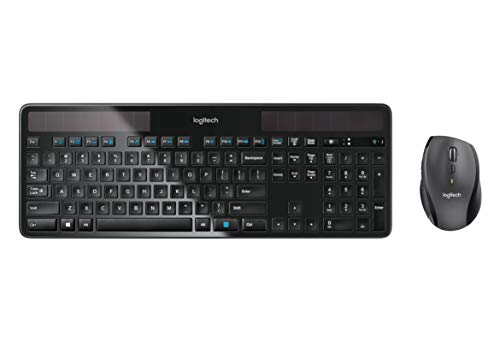
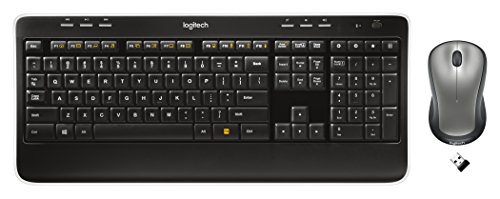
Logitech MK520 Wireless Keyboard and Mouse Combo — Keyboard and Mouse, Long Battery Life, Secure 2.4GHz Connectivity


Key features
- •FULL-SIZE FUNCTIONALITY - Have the functionality of a full-size keyboard without sacrificing form or function. The MK520 includes a stylish and streamlined keyboard and ambidextrous mouse
- •PRECISION MOUSE WORKS IN EITHER HAND - The M310 wireless mouse features soft rubber grips and can be used in either hand. It provides the precision needed for fine applications
- •LONG BATTERY LIFE - Tired of short battery life? The MK520 package boasts significant battery run time. Using 3 regular batteries, the keyboard will last for up to 3 years, and the mouse for up to 18 months
- •SIMPLE SETUP - Simply plug the Logitech Unifying receiver into your computer and you're ready to work-nothing else is needed
- •ENCRYPTED CONNECTION - Enjoy the flexibility of working wirelessly with an encrypted connection. The MK520 utilizes 128-bit AES encryption and a 2.4GHz signal to keep your connection fast and secure
- •System Requirements: Windows XP, Windows Vista, Windows 7, Windows 8, Windows 10,USB port,Internet connection (for software download),Chrome OS
Logitech MK520 Wireless Keyboard and Mouse Combo — Keyboard and Mouse, Long Battery Life, Secure 2.4GHz Connectivity
List Price: $85.29$76.76DEALYou Save: $8.53 (10%)
Free shippingFree Returns – 30 daysFree Order CancellationSecure Payment2–3 Days DeliveryGet It October 24, 2026In Stock (24)No marketing spamNo account requiredFulfilment by FedEx / Amazon / UPS / ShipwirePayPal / Card Buyer Protection
Customer Reviews
Reviews sourced from verified Amazon purchasers4.4
out of 5
Based on 10 reviews
5★
50%
4★
50%
3★
0%
2★
0%
1★
0%
Such an improvement over my old keyboard
Sandy✓ Verified Purchase•November 1, 2023
My old keyboard still worked, but the letters were gone on most of the keys and my trained "touch typing" wasn't getting me far because of overall keyboard wear. This is the current version of the old one so no problem adapting except to appreciate the improvement. I'm not using the mouse because I have a Logitech one that's a bit bigger that my dominant hand likes. This set was one of Amazon's "used - like new" options and I'm so thrilled with the quality of the keyboard and its reduced price for it. Thx!
Great keyboard, not so great mouse
debhibb✓ Verified Purchase•October 6, 2023
I bought this to replace the logitech MK 710 keyboard, which was virtually impossible to type on without the keys sticking after just a little over a year of regular use. I did NOT like the MK 710 keyboard, BUT it comes with a fabulous ergo mouse that is sturdy, big and has a wheel that doesn't click when you scroll it up or down. This MK 520 mouse is nothing like the MK 710's mouse. It's tiny, the wheel requires more effort to scroll and click, it's too lightweight, and basically just feels cheap! I do however, like the keyboard better than the MK 710's keyboard - so far anyway. The keys of course don't stick yet, but we'll have to see if that lasts more than a year like that. In a side by side comparison at the store (prior to purchasing this online since it was some $20 cheaper on Amazon), the keys on this keyboard don't "wiggle" as much. Also, the keys themselves have smooth/rounded edges, vs. sharper/squared edges that many keyboards have. This seems to allow one to depress the key from an angle and have it work more often (always in fact so far).
While I like the concept of the super tiny USB dongle (you could just keep it in all the time without it getting bumped or bent), I'm not really a fan of it. Mainly, because I tote my laptop to and from the office and have to unplug the stuff because I don't have a docking station (since my work won't supply one, and I don't have admin rights to get my own). That means I'm at serious risk of losing the dongle. It does also come with a USB extension cord, so I may plug the tiny (only about 2cm square) USB dongle into the extension cord, and then plug the extension into my laptop.
One last thing, the keyboard has "feet" in the back, which is great if you like to type with your keyboard tilted up towards you (which I do). The feet are closer together than the MK 710 though - i.e. closer together than the width of my laptop (15" basic Lenovo laptop). However, the back of the feet (i.e. when they are NOT pulled down/opened) are rubberized, so I can rest it on my laptop like I used to do and it kind of "sticks" to the laptop. Someone was thinkin' when they did that!
Oh, and how cool that it came with batteries included!
While I like the concept of the super tiny USB dongle (you could just keep it in all the time without it getting bumped or bent), I'm not really a fan of it. Mainly, because I tote my laptop to and from the office and have to unplug the stuff because I don't have a docking station (since my work won't supply one, and I don't have admin rights to get my own). That means I'm at serious risk of losing the dongle. It does also come with a USB extension cord, so I may plug the tiny (only about 2cm square) USB dongle into the extension cord, and then plug the extension into my laptop.
One last thing, the keyboard has "feet" in the back, which is great if you like to type with your keyboard tilted up towards you (which I do). The feet are closer together than the MK 710 though - i.e. closer together than the width of my laptop (15" basic Lenovo laptop). However, the back of the feet (i.e. when they are NOT pulled down/opened) are rubberized, so I can rest it on my laptop like I used to do and it kind of "sticks" to the laptop. Someone was thinkin' when they did that!
Oh, and how cool that it came with batteries included!
Don't Fear the Wireless Keyboard
John_JT✓ Verified Purchase•October 1, 2023
I purchased the Mk520 based on my working daily with the Mk320 at my office. The batteries last about six months, and that is with never turning anything off. My computer sits underneath my table at home and the USB receiver is plugged into the back. I have no issue with erratic cursor movements or missed key strokes or anything that could be related to a signal issue between the keyboard / mouse and receiver. The keyboard has a less tactile feel to it than my old Dell keyboard, but I guess I'll get used to that. It's not annoying, it's just different. The mouse is nicely styled and fits my hand perfectly. I was tempted to buy a more expensive ergonomic keyboard, but I don't regret the purchase of the Mk520 at all.
Update 11-10-2013 - What a difference from my initial impression in February. The communication between the keyboard and computer is erratic at best. Many times there is severe latency keyboard does not respond or it has a significant lag before your typing appears on the screen. I have replaced batteries three times and installed a new version of the unifying software. I turn the keyboard off and on several times a day (and this is a computer at home that is primarily used in the evening) to reestablish the connection.
I paid more for the Mk520 thinking it would be better than my still functioning Mk320, but that is not the case. If you are tempted to buy the 520, save your money and buy the 320 instead.
Update 12-19-2013 - Not long after my previous update, I emailed Logitech technical support for help. Of course they are going to have you try a few different things to see if they can get the keyboard to work. I went through these steps and when they didn't work, Logitech said they would send me a replacement as long as I provided proof of purchase. I emailed a PDF of my Amazon order and within a week I had my replacement. I guess I just got one of the bad units out there, but Logitech stands by their products and the replacement keyboard is working quite well.
Update 11-10-2013 - What a difference from my initial impression in February. The communication between the keyboard and computer is erratic at best. Many times there is severe latency keyboard does not respond or it has a significant lag before your typing appears on the screen. I have replaced batteries three times and installed a new version of the unifying software. I turn the keyboard off and on several times a day (and this is a computer at home that is primarily used in the evening) to reestablish the connection.
I paid more for the Mk520 thinking it would be better than my still functioning Mk320, but that is not the case. If you are tempted to buy the 520, save your money and buy the 320 instead.
Update 12-19-2013 - Not long after my previous update, I emailed Logitech technical support for help. Of course they are going to have you try a few different things to see if they can get the keyboard to work. I went through these steps and when they didn't work, Logitech said they would send me a replacement as long as I provided proof of purchase. I emailed a PDF of my Amazon order and within a week I had my replacement. I guess I just got one of the bad units out there, but Logitech stands by their products and the replacement keyboard is working quite well.
Wouldn't want it as my primary setup
Amazon Customer✓ Verified Purchase•September 28, 2023
This is a great little combination wireless mouse and keyboard. I have not had it anywhere near long enough to review its battery life claims, but everything else I feel comfortable to discuss. It suits my needs perfectly--as a wireless keyboard and mouse to use on my computer hooked up to my 42" LCD-TV. I leave it on my coffee table and either pull it in my lap, or leave it there for some quick hunt and peck.
It does this job perfectly. The media buttons are useful and worked out of the box with no set-up (even opened Winamp instead of Windows Media Player), the function keys are actually useful (particularly the lock button), it's comfortable to use in my lap, and the "feet" are grippy enough that it won't slide off my coffee table when my I prop my feet up and try and swipe it away. The mouse is usable, though on the smallish size. It also has a good grippy texture and good button feel.
One other feature that I really love is that both the keyboard and the mouse have physical, sliding on/off switches. If I know I'm gonna be away for the weekend or just watch TV and leave the computer off, I can easily turn them off and make sure they keep their battery charge. It sounds silly, but I definitely prefer it to the little sliver of a "press and hold" button on my other Logitech laser mouse.
However, I definitely can not recommend this product as an every day use keyboard and mouse. The keyboard has a horrible feel on it for actually typing. The key throws are fairly bad for typing, both a combo mushy and long throw that just are not conducive to typing. And the mouse, while it tracks well on my jeans or couch, just doesn't cut it for every day use. Its small, ambidextrous design doesn't compare to my larger, heavier right-hand only model. Also, it misses the modern features I've become accustomed, scratch that, addicted too--namely forward and back thumb rockers. Not having the forward and back buttons on a mouse feels barbaric and is enough of a reason for me to not use this product daily. Combined with my other shortcomings about regular use, I can't recommend it for other people, either.
But, if you have a specialty use like I do, it can be great for you, as long as you know what to expect.
It does this job perfectly. The media buttons are useful and worked out of the box with no set-up (even opened Winamp instead of Windows Media Player), the function keys are actually useful (particularly the lock button), it's comfortable to use in my lap, and the "feet" are grippy enough that it won't slide off my coffee table when my I prop my feet up and try and swipe it away. The mouse is usable, though on the smallish size. It also has a good grippy texture and good button feel.
One other feature that I really love is that both the keyboard and the mouse have physical, sliding on/off switches. If I know I'm gonna be away for the weekend or just watch TV and leave the computer off, I can easily turn them off and make sure they keep their battery charge. It sounds silly, but I definitely prefer it to the little sliver of a "press and hold" button on my other Logitech laser mouse.
However, I definitely can not recommend this product as an every day use keyboard and mouse. The keyboard has a horrible feel on it for actually typing. The key throws are fairly bad for typing, both a combo mushy and long throw that just are not conducive to typing. And the mouse, while it tracks well on my jeans or couch, just doesn't cut it for every day use. Its small, ambidextrous design doesn't compare to my larger, heavier right-hand only model. Also, it misses the modern features I've become accustomed, scratch that, addicted too--namely forward and back thumb rockers. Not having the forward and back buttons on a mouse feels barbaric and is enough of a reason for me to not use this product daily. Combined with my other shortcomings about regular use, I can't recommend it for other people, either.
But, if you have a specialty use like I do, it can be great for you, as long as you know what to expect.
Mostly really good. Mouse a bit small.
Usher✓ Verified Purchase•September 18, 2023
Nice-looking, full-size keyboard. Met nearly all my requirements, was not very expensive, and I have few complaints, so I'm giving it 4 stars. It somehow falls short of being really great though. In a do-over, I'd try something else.
Pros for me:
- Biggest advantage is that the mouse and keyboard are on one USB receiver, so it only takes up one USB slot and I can swap both accessories to my work laptop in a heartbeat. Very quickly recognized by either computer.
- Includes both a Windows key and a Function key with nicely labeled (and gold color-coordinated) functions on the relevant keys, plus grey volume control buttons and a calculator shortcut key. (Plus other stuff, but these are the shortcuts I use a lot.)
- Bottom front of keyboard has rubber feet to reduce sliding (but it won't stop it), and a small stand to lift the back up. The stand is a hair shorter than I'd like it to be, but it's fine.
- Has a battery indicator, which only comes on briefly when keyboard is turned on, and presumably when battery is low; and has a quick on/off switch that would reduce battery drain if I used it, I suppose.
- Has a normal-sized Enter key. Caps lock has a step on it (a little easier to find it when touch-typing).
Cons:
- Keys are very low profile. It looks nice, but as a touch-typist, I find it just a little harder to locate keys than on other keyboards with taller keys. Those gaps, it turns out, make it easier to navigate my way across the keyboard without looking. Also for some reason, the little bumps on F and J are a little less noticeable than I'm used to, so I find myself typing the wrong letters for a word or two before re-positioning a hand.
- A plus (and one of my requirements) is that the F keys are grouped in sets of four, which makes them easier to find as quick keys during gaming. But the gap between F12 and Print Screen is small enough to make it easy to tap the wrong one. Minor, but annoying.
- Not really a fair complaint (as it's likely true for every wireless keyboard/mouse), but response is not consistently fast. I notice this when typing sometimes (I can type fairly quickly) but most during gaming. It's not a gaming keyboard and I didn't expect it to be, and you shouldn't, either. You can expect to see some lag occasionally. Not enough to be detrimental under most use cases, besides gaming.
- The mouse is a little small. I am a woman and do not have large hands, but it feels a little small to me, with not *quite* enough support under my palm, causing a little hand fatigue if I use it for long periods. If you have large hands, it may feel too much like a travel mouse than something you want to be using all the time.
I'd recommend it, but not unreservedly.
Pros for me:
- Biggest advantage is that the mouse and keyboard are on one USB receiver, so it only takes up one USB slot and I can swap both accessories to my work laptop in a heartbeat. Very quickly recognized by either computer.
- Includes both a Windows key and a Function key with nicely labeled (and gold color-coordinated) functions on the relevant keys, plus grey volume control buttons and a calculator shortcut key. (Plus other stuff, but these are the shortcuts I use a lot.)
- Bottom front of keyboard has rubber feet to reduce sliding (but it won't stop it), and a small stand to lift the back up. The stand is a hair shorter than I'd like it to be, but it's fine.
- Has a battery indicator, which only comes on briefly when keyboard is turned on, and presumably when battery is low; and has a quick on/off switch that would reduce battery drain if I used it, I suppose.
- Has a normal-sized Enter key. Caps lock has a step on it (a little easier to find it when touch-typing).
Cons:
- Keys are very low profile. It looks nice, but as a touch-typist, I find it just a little harder to locate keys than on other keyboards with taller keys. Those gaps, it turns out, make it easier to navigate my way across the keyboard without looking. Also for some reason, the little bumps on F and J are a little less noticeable than I'm used to, so I find myself typing the wrong letters for a word or two before re-positioning a hand.
- A plus (and one of my requirements) is that the F keys are grouped in sets of four, which makes them easier to find as quick keys during gaming. But the gap between F12 and Print Screen is small enough to make it easy to tap the wrong one. Minor, but annoying.
- Not really a fair complaint (as it's likely true for every wireless keyboard/mouse), but response is not consistently fast. I notice this when typing sometimes (I can type fairly quickly) but most during gaming. It's not a gaming keyboard and I didn't expect it to be, and you shouldn't, either. You can expect to see some lag occasionally. Not enough to be detrimental under most use cases, besides gaming.
- The mouse is a little small. I am a woman and do not have large hands, but it feels a little small to me, with not *quite* enough support under my palm, causing a little hand fatigue if I use it for long periods. If you have large hands, it may feel too much like a travel mouse than something you want to be using all the time.
I'd recommend it, but not unreservedly.
Page 1 of 2
Related products
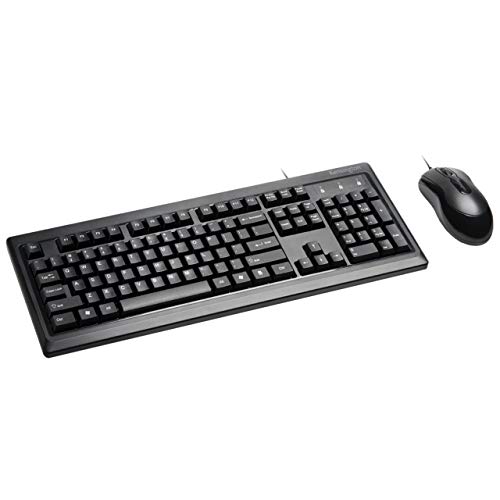
Kensington Mouse-in-a-Box and Keyboard Wired USB Desktop Set (K72436AM), Black
List: $36.58$32.92DEAL