Canon 4350B001 Wireless Color Photo Printer
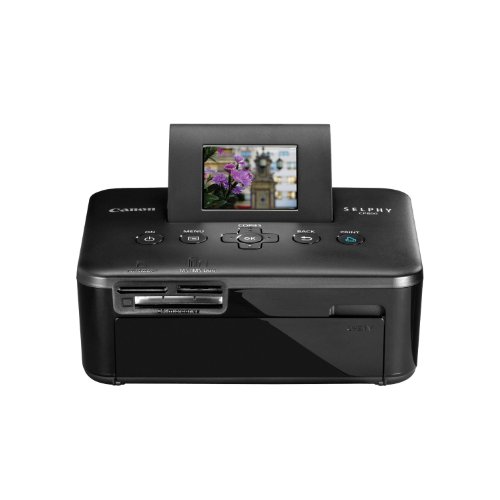


Key features
- •Light, compact body and an optical battery makes it easy to take this printer with you
- •Preview your images on the built-in 2.5" tilt-up LCD
- •Enhance your photos with the improved "Portrait Image Optimize"
- •Print water resistant photos that last up to 100 years in just 47 seconds
- •Print directly from your memory cards, compatible digital camera, USB Flash Drive or wirelessly from a Bluetooth enabled device
Canon 4350B001 Wireless Color Photo Printer
List Price: $210.96$189.86DEALYou Save: $21.10 (10%)
Free shippingFree Returns – 30 daysFree Order CancellationSecure Payment2–3 Days DeliveryGet It October 25, 2026In Stock (3)No marketing spamNo account requiredFulfilment by FedEx / Amazon / UPS / ShipwirePayPal / Card Buyer Protection
Customer Reviews
Reviews sourced from verified Amazon purchasers4.0
out of 5
Based on 10 reviews
5★
60%
4★
20%
3★
10%
2★
10%
1★
0%
Fabulous little printer
AndreaB•January 6, 2015
This printer is fabulous! We absolutely love the scrapbooks we are able to make with the variety of sizes this printer creates. The maximum size is 4x6, but we use the 1/2 and 1/4 sizes a lot. The way we use it -- from the computer, group the pics you want to print at each size, and load those onto a thumb drive together. So, if you want 2 1/2-size pics, put just those 2. If you want 1/4-size, load just those 4. Then navigate to the menu and choose the layout. Another favorite is the 'shuffle', where you can load up to 7 pics to be combined into a 4x6 mosaic.
A couple of small quirks -- the shuffle is random, and you can't see the layout before it prints. Always a surprise, but usually good. Also, if you have edited a photo, then it will not display on the preview screen. That's why we load just what we want to print at one time, rather than trying to choose from a large number in the printer itself. You have to arrow down through the menu to get to the layout options, so I wish that was at the top. But, we have had this for 2 years, and have printed at least 400 photo pages on it so far, which means well over a thousand vacation photos. Far cheaper than printing everything at full size, and far more interesting to have the variety of sizes in our layouts.
A couple of small quirks -- the shuffle is random, and you can't see the layout before it prints. Always a surprise, but usually good. Also, if you have edited a photo, then it will not display on the preview screen. That's why we load just what we want to print at one time, rather than trying to choose from a large number in the printer itself. You have to arrow down through the menu to get to the layout options, so I wish that was at the top. But, we have had this for 2 years, and have printed at least 400 photo pages on it so far, which means well over a thousand vacation photos. Far cheaper than printing everything at full size, and far more interesting to have the variety of sizes in our layouts.
Canon can do better...
J. Lee•November 5, 2014
I'm a semi-pro / freelance photographer who on many occassions would like to print out a photo right away vs. ordering prints through an external party.
I have used this printer for awhile now and there definitely are some major pros and cons with this canon printer.
Pros:
-Print quality is rather impressive as long as your original image file is crisp and clear.
-Very portable and light weight, battery sold seperately a great option.
-Can print via usb, card reader or through computer.
Cons:
-The worst part - takes forever to print one photo (close to a minute per photo) - if you have a bunch of photos to print or at an event and printing photos for guests, the speed is unbearable...
-If you connect to a computer, some software is required - and also NOT COMPATABLE with MAC (no software available).
-Prints are approximately $0.30 per sheet vs. avg $0.10 ordering online.
For personal use to print few photos I would recommend, but for anything else especially for an event don't bother.
I have used this printer for awhile now and there definitely are some major pros and cons with this canon printer.
Pros:
-Print quality is rather impressive as long as your original image file is crisp and clear.
-Very portable and light weight, battery sold seperately a great option.
-Can print via usb, card reader or through computer.
Cons:
-The worst part - takes forever to print one photo (close to a minute per photo) - if you have a bunch of photos to print or at an event and printing photos for guests, the speed is unbearable...
-If you connect to a computer, some software is required - and also NOT COMPATABLE with MAC (no software available).
-Prints are approximately $0.30 per sheet vs. avg $0.10 ordering online.
For personal use to print few photos I would recommend, but for anything else especially for an event don't bother.
Canon Selphy cp800
James•January 21, 2014
work great in windows 7 but will not work in windows 8 or windows 8.1 it will work as a stand alone from your memory card. it is a great printer. It print great pictures. If you have a windows 8 do not buy this printer buy on of the new printer Canon do not have a update driver for this printer. If you have a windows 7 OS and do not plane to upgrade to windows 8 you will be ok.
Nice little printer
Chris•July 24, 2012
I bought this printer specifically because the ink doesn't run dry. I tend to print in small batches, with 6 or more months in between printings. This system will cost me less per print in the long run because the ink will not dry up as compared to an inkjet printer.
I'm very impressed with the quality of the prints! Canon nailed it here, and this is where it counts. The colors are vivid but natural and the detail is great. Photos come out sharp.
An impressive feature of this printer is the built-in printer adjustments. I used my Nikon D3100 camera to shoot a friend's newborn baby. Then I placed the SD card in the Selphy and noticed that the baby was too pink because of incorrect camera settings. No problem, because the Selphy has a printer adjustment, the "My Colors" setting. I set it to "Neutral" and just like that the pink skin became a natural creamy tone without desaturating the bright blue of his baby clothes. This setting, by the way, is exactly what one would adjust in a Canon camera to get a natural skin tone, and it's great that Canon included that technology here in this printer.
Because of the in-printer adjustments, I wouldn't need to print from my computer unless I were doing some major editing or cropping. The Selphy doesn't come with a cable to connect to the PC but it's a common USB 2.0 cable and I happened to have an extra laying around. I didn't touch the CD that it came with. Instead I downloaded the latest drivers (drivers only, without the software) directly from Canon. Installed easily and works great with my computer running Windows 7.
Overall I'm very happy with this purchase!
I'm very impressed with the quality of the prints! Canon nailed it here, and this is where it counts. The colors are vivid but natural and the detail is great. Photos come out sharp.
An impressive feature of this printer is the built-in printer adjustments. I used my Nikon D3100 camera to shoot a friend's newborn baby. Then I placed the SD card in the Selphy and noticed that the baby was too pink because of incorrect camera settings. No problem, because the Selphy has a printer adjustment, the "My Colors" setting. I set it to "Neutral" and just like that the pink skin became a natural creamy tone without desaturating the bright blue of his baby clothes. This setting, by the way, is exactly what one would adjust in a Canon camera to get a natural skin tone, and it's great that Canon included that technology here in this printer.
Because of the in-printer adjustments, I wouldn't need to print from my computer unless I were doing some major editing or cropping. The Selphy doesn't come with a cable to connect to the PC but it's a common USB 2.0 cable and I happened to have an extra laying around. I didn't touch the CD that it came with. Instead I downloaded the latest drivers (drivers only, without the software) directly from Canon. Installed easily and works great with my computer running Windows 7.
Overall I'm very happy with this purchase!
Not that great...
MJ•June 7, 2012
I print a lot of pictures, so I thought this was a good idea. If I print from the memory card, it will cut off some of the picture.(Half a face, the cool tree on the side...just gone) I've played around with the settings (boarder-less, or boarders) and couldn't find a way around this. So, I had to install the software and hook it to my computer. (No longer portable printer). The software is a joke. Extremely slow, and it's not my computer. (Asus Republic of Gamers i7 laptop with 16GB ram, USB 3.0 125GB SSD, Windows 7). It takes forever to scan through and pick up all my pictures, and it has to do this every time I start the program. Most times I just get little blank squares, and have to close the program and restart it. It does allow you to move the picture and pick what you want it to cut off, but it will not scale it. So, I have to go to Photoshop, change the image size, save it, wait for the printer software to find the picture, then wait for it to print. Kind defeats the purpose of 'quick printing at home'. The pictures are clear, and pretty when they finally print though, have to give it that. I have had quite a few pictures (12 total now) that when I click print, the printer will just spit out the white card, not printing a picture on it. I thought I could just put the paper back in and try again, but no, the ink for that picture is gone, so it is wasted. I'm not real sure why it's doing this. I guess it's okay for the price, and what it is. If I had the chance to use one before ordering, I would not have bought this. But it is what it is. I will keep sending my pictures to Snapfish for now, and use this for the one of two pictures I want to print at home.
Page 1 of 2


