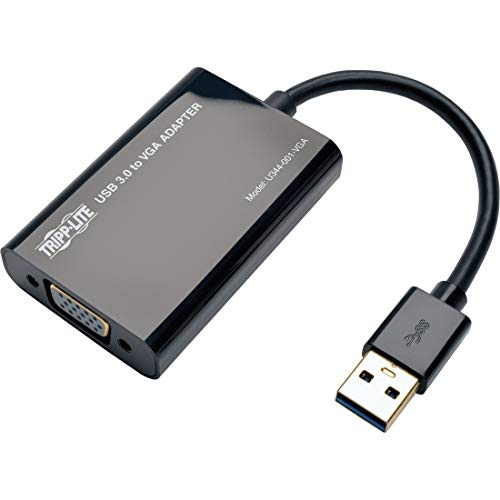
Plugable USB 2.0 to VGA Video Graphics Adapter for Multiple Monitors up to 1920x1080 Supports Windows 11,10, 8.1, 7, XP, Mac, and ChromeOS


Key features
- •Connect multiple additional monitors to your Windows laptop, desktop, or tablet PC (one display adapter required per monitor) to expand your workspace and increase your productivity
- •Create a large desktop by spanning/extending displays using any VGA, DVI, or HDMI monitor or projector. DisplayLink DL-165 chipset supports resolutions up to 1920x1080@60Hz (1080P)
- •Compatible with Windows 10, 8.1/8, 7, XP (drivers available via Windows Update, direct download, or CD). Mac & Linux not supported
- •Requires up-to-date, WDDM compatible graphics driver in Windows; most modern Windows systems meet this requirement. Some graphics drivers (Intel HD4000 and prior) do not support mirror/cloned external display in Windows 10. You cannot mirror more than two displays due to a limitation at the operating system level
- •We love our Plugable products and hope you will too. All of our products are backed with a 1-year limited parts and labor warranty and Seattle-based email support.
BrandPlugable
CategoryUSB-to-VGA Adapters
Size1920 VGA
ColorBlack
WarrantyWe love our Plugable products and hope you will too. All of our products are backed with a 1-year limited parts and labor warranty and Seattle-based email support.
Plugable USB 2.0 to VGA Video Graphics Adapter for Multiple Monitors up to 1920x1080 Supports Windows 11,10, 8.1, 7, XP, Mac, and ChromeOS
List Price: $52.29$47.06DEALYou Save: $5.23 (10%)
Free shippingFree Returns – 30 daysFree Order CancellationSecure Payment2–3 Days DeliveryGet It October 26, 2026In Stock (2)No marketing spamNo account requiredFulfilment by FedEx / Amazon / UPS / ShipwirePayPal / Card Buyer Protection
Customer Reviews
Reviews sourced from verified Amazon purchasers4.5
out of 5
Based on 10 reviews
5★
10%
4★
20%
3★
40%
2★
20%
1★
10%
Great product! I'm not sure if the issue was ...
Dee✓ Verified Purchase•October 22, 2017
I have an HP zbook and 3 external monitors. I use this to connect the 2 monitors that needed this as the zbook only has one monitor connection. The monitors are an NCC 25" and the other is a Samsung 22" new monitor. One thing to note is that to not have any issues, I use this product to connect both monitors. There may be an issue using different connectors as indicated in the instructions but I haven't tried that out - and don't intend to. :-) The last ones I had lasted a few years so I purchased these again. Great product! I'm not sure if the issue was the monitor or these so I just replaced these and the monitor as my troubleshooting time was limited.
Works great, one snag in setting it up
Brent Butler✓ Verified Purchase•September 3, 2016
This worked great, and I hate to dock a star. However, I could not go from the USB port on my laptop to either the VGA or DVI inputs on the monitor with only the connections given with the product. To do that, I needed either a Male to Male VGA or DVI adapter, or just a normal HDMI cable. Luckily, I have spare HDMI cables.
So here is what I had to do:
1. Their USB to mini-USB cable to their box
2. Their DVI to HDMI coming out out of their box
3. My HDMI cable, to
4. their HDMI to male DVI, into the monitor.
That's a lot of connections, but it is working. Make sure to use the screws to snug up the connection into the monitor. Most of the time I don't have to do that, but this DVI male adapter would not maintain a secure fit without screwing it down.
Other than that, it was just a matter of arranging things and installing the driver. I did power down and back up after plugging into my USB port, just in case. Next I installed the driver from their mini-CD. As soon as I then snugged up the DVI adapter to the back of the monitor, I was immediately in business.
If their product page made it clear that you would need your own cable or adapter somewhere in the connection process, I would give this five stars. I consider the operation once that is accomplished to be five stars.
So here is what I had to do:
1. Their USB to mini-USB cable to their box
2. Their DVI to HDMI coming out out of their box
3. My HDMI cable, to
4. their HDMI to male DVI, into the monitor.
That's a lot of connections, but it is working. Make sure to use the screws to snug up the connection into the monitor. Most of the time I don't have to do that, but this DVI male adapter would not maintain a secure fit without screwing it down.
Other than that, it was just a matter of arranging things and installing the driver. I did power down and back up after plugging into my USB port, just in case. Next I installed the driver from their mini-CD. As soon as I then snugged up the DVI adapter to the back of the monitor, I was immediately in business.
If their product page made it clear that you would need your own cable or adapter somewhere in the connection process, I would give this five stars. I consider the operation once that is accomplished to be five stars.
Packaging was great with no damage to the unit
Jim✓ Verified Purchase•April 16, 2016
I received my adapter on Friday which was a day or 2 earlier than I thought it would arrive. Packaging was great with no damage to the unit. I hooked it up using the DVI output using a brand new DVI cable and could not get it to work at all. I then tried the VGA and after trying to get it to work for about 1/2 hour, I restarted my computer and was able to get it to work as an extension to the main desktop which is how I expected it to work. I also tried connecting it to my Surface Pro running Windows 10 and using the dvi connector. It would not work on DVI. I have not tried it using VGA yet on the tablet. The issue I seem to be having is that every time I restart my PC (Windows Vista) I have to reset the display in control panel. I will give a 5 star if I can make this work without a problem, but I cant give it my full recommendation to use on our PC's at my work unless we can figure out what is happening to cause the reset.
***UPDATE***
04/26/16 Still no resolution to the reset issue.
***UPDATE***
04/26/16 Still no resolution to the reset issue.
It connected easy enough and was recognized by Windows 10 right off ...
Rich Schreiber✓ Verified Purchase•March 6, 2016
My Situation:
I used this adapter to add a 3rd monitor to my setup. The purpose of this monitor was to have system status screens up and running all day long, while I do work on my other two screens (connected to my laptops docking station). It connected easy enough and was recognized by Windows 10 right off the bat.
Cons:
The monitor refresh rate really plays hell on the eyes, if you are doing more than just glancing at it occasionally. I realize that there could be a lot of variables in my setup, it could be the USB bus on my docking station, it could be EMI from all of the wires running behind my desk, but when the monitor is connected directly into a video port on my docking station it looks fine. I've tried plugging the USB plug directly into the laptop with it undocked. No Joy! The only settings that seem to make any difference is to change the Monitor refresh rate from the default 60 to 75 Hertz. But even then, I would not want to read email from it all day long.
I used this adapter to add a 3rd monitor to my setup. The purpose of this monitor was to have system status screens up and running all day long, while I do work on my other two screens (connected to my laptops docking station). It connected easy enough and was recognized by Windows 10 right off the bat.
Cons:
The monitor refresh rate really plays hell on the eyes, if you are doing more than just glancing at it occasionally. I realize that there could be a lot of variables in my setup, it could be the USB bus on my docking station, it could be EMI from all of the wires running behind my desk, but when the monitor is connected directly into a video port on my docking station it looks fine. I've tried plugging the USB plug directly into the laptop with it undocked. No Joy! The only settings that seem to make any difference is to change the Monitor refresh rate from the default 60 to 75 Hertz. But even then, I would not want to read email from it all day long.
Not as expected
John W. Smith✓ Verified Purchase•September 23, 2015
Update: I lower the rating of this product, it is getting on my nerves. I'm a programmer, I don't use it to watch video or anything that would make the screen changes too often too quickly, I'm only writing code. It crashes more and more often and it is getting very annoying.
I have to say this one works better than the others I tried, it does flicker when the display changes very quickly, but I understand it is normal, and it doesn't do it too often to become an annoyance. BTW, I don't use it to watch any video , I only use it to write programs, but still flickers if I do something that changes the display too quickly. I wouldn't say it is perfect, but it does work and works as expected.
I have to say this one works better than the others I tried, it does flicker when the display changes very quickly, but I understand it is normal, and it doesn't do it too often to become an annoyance. BTW, I don't use it to watch any video , I only use it to write programs, but still flickers if I do something that changes the display too quickly. I wouldn't say it is perfect, but it does work and works as expected.
Page 1 of 2