Behringer XENYX 302USB Premium 5-Input Mixer with XENYX Mic Preamp and USB/Audio Interface Black


Key features
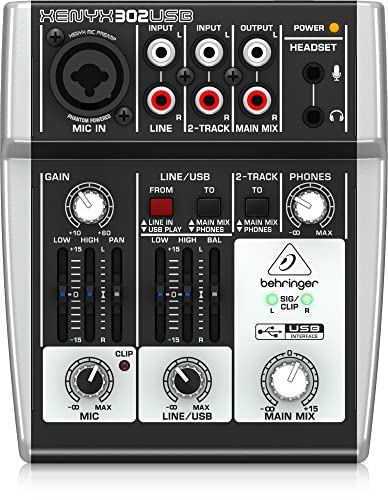
- •Ultra-compact and ultra-low noise analog mixer with USB/Audio interface
- •Powered through USB or external power adaptor (included)
- •Built-in stereo USB/Audio interface to connect directly to your computer
- •State-of-the-art, phantom powered XENYX Mic Preamp comparable to stand-alone boutique preamps
- •Neo-classic "British" 2-band graphic EQ for warm and musical sound
BrandBehringer
CategoryAudio Interfaces
ColorBlack
WarrantyPlease refer to http://www. Music-group. Com/warranty. Aspx.
Behringer XENYX 302USB Premium 5-Input Mixer with XENYX Mic Preamp and USB/Audio Interface Black
List Price: $104.41$93.97DEALYou Save: $10.44 (10%)
Free shippingFree Returns – 30 daysFree Order CancellationSecure Payment2–3 Days DeliveryGet It October 25, 2026In Stock (12)No marketing spamNo account requiredFulfilment by FedEx / Amazon / UPS / ShipwirePayPal / Card Buyer Protection
Customer Reviews
Reviews sourced from verified Amazon purchasers4.4
out of 5
Based on 10 reviews
5★
50%
4★
50%
3★
0%
2★
0%
1★
0%
First (and second) impressions
John Governale✓ Verified Purchase•October 6, 2023
I've been playing around with my new Behringer XENYX 302USB Mixer and so far my impressions are positive.
I was nervous about buying it because there were no reviews at all, so I opened the box carefully and took out only the 302, using my own cable and on-line documentation. That way, if I had to return it, packing it back up would be easy.
I use Audacity (with a single core, Pentium 4 PC running XP Pro) to record, and the program recognized the 302 (as USB codex), no problem.
One thing I wanted to do is record from an iPod Touch 4G to Audacity, then play that Audacity track back and record another track against it from the iPod. I used a mono cable that is 1/4 inch on one end (plugged into the mic jack of the 302) and 1/8 inch on the other (plugged into the headphone jack of the iPod).
I used an app called Chordbot to play a progression on the iPod, which was recorded through the 302 into Audacity. I didn't care that the track was mono, but if I wanted stereo, I could have used the line input on the 302 with RCA cables going to an 1/8th inch stereo plug.
Once my chord progression was recorded on an Audacity track, I played that back by using an RCAs to 1/8 inch plug to connect the line input on the 302 to the headphone jack of the computer. By pushing the red button on the 302, which selects input from the USB (the computer), and the black button next to it, which sends the signal to the headphones, I could hear the Audacity track playing as I recorded a new track, this time using an app called Thumbjams on the iPod.
It worked very well. No hiss or other unwanted noise present.
The 302 assumes (incorrectly, in my case) that I want to hear the mic input through the earphones as I'm recording. I don't. I never monitor myself when singing or playing guitar, but listen only to the backing track.
I got around this by using the pan slider on the 302, panning my live performance all the way to the right. I then removed the right earphone from my ear. I panned the sound coming from the computer all the way to the left. This way I could hear the backing track but not my voice in the headphones.
My Audio Technica AT2020 microphone recorded fine--with no hiss or noise--with the 302's gain set at 12 o'clock, the mic volume maxed, and the main mix volume at about 2 o'clock.
I could generate hiss with the AT2020 if I cranked the 302's gain and volume all the way up, but I can do that with most any mixing deck.
I could not get as loud a hissless track using the 2020 and the 302 as I would like. A preamp is probably called for. But the signal was usable if I increased the gain a bit in Audacity after recording, or if I doubled a track.
In addition to the iPod experiment, I recorded a nylon-string guitar, then recorded a vocal track against it. Used the AT2020 for both tracks. Worked fine.
I have an old Radio Shack dynamic mic with a built-in TSR cable that I tried. It also recorded well, for what it is. (I sound terminally depressed when I record with this mic, so only dig it out for experiments such as this.)
All in all, I'm liking the 302 and plan to use it instead of the XENYX 802/UCA202 USB interface rig I was using.
WOWSERS. Important update. The USB codec that Windows installed when I first plugged in the 302 doesn't play nice with Audacity. Often when I try to play back or play back and record, there is no sound through the 302, even though I can see audio levels in Audacity.
I went to the Behringer website and downloaded the ASIO 32 bit driver. Now things are great. Except. Whatever USB slot you install the driver to is taken over by the driver and can't used by any other audio codec.
This means that if you unplug the 302 and plug another audio device into the same slot, it can only play--if it will--using the Behringer ASIO codec. Other slots are unaffected. It's possible to undo this by running the setup file again and choosing to uninstall the driver.
I'm willing to give up a USB slot to the 302 because I'm liking it so much and will probably use it every day. YMMV.
I was nervous about buying it because there were no reviews at all, so I opened the box carefully and took out only the 302, using my own cable and on-line documentation. That way, if I had to return it, packing it back up would be easy.
I use Audacity (with a single core, Pentium 4 PC running XP Pro) to record, and the program recognized the 302 (as USB codex), no problem.
One thing I wanted to do is record from an iPod Touch 4G to Audacity, then play that Audacity track back and record another track against it from the iPod. I used a mono cable that is 1/4 inch on one end (plugged into the mic jack of the 302) and 1/8 inch on the other (plugged into the headphone jack of the iPod).
I used an app called Chordbot to play a progression on the iPod, which was recorded through the 302 into Audacity. I didn't care that the track was mono, but if I wanted stereo, I could have used the line input on the 302 with RCA cables going to an 1/8th inch stereo plug.
Once my chord progression was recorded on an Audacity track, I played that back by using an RCAs to 1/8 inch plug to connect the line input on the 302 to the headphone jack of the computer. By pushing the red button on the 302, which selects input from the USB (the computer), and the black button next to it, which sends the signal to the headphones, I could hear the Audacity track playing as I recorded a new track, this time using an app called Thumbjams on the iPod.
It worked very well. No hiss or other unwanted noise present.
The 302 assumes (incorrectly, in my case) that I want to hear the mic input through the earphones as I'm recording. I don't. I never monitor myself when singing or playing guitar, but listen only to the backing track.
I got around this by using the pan slider on the 302, panning my live performance all the way to the right. I then removed the right earphone from my ear. I panned the sound coming from the computer all the way to the left. This way I could hear the backing track but not my voice in the headphones.
My Audio Technica AT2020 microphone recorded fine--with no hiss or noise--with the 302's gain set at 12 o'clock, the mic volume maxed, and the main mix volume at about 2 o'clock.
I could generate hiss with the AT2020 if I cranked the 302's gain and volume all the way up, but I can do that with most any mixing deck.
I could not get as loud a hissless track using the 2020 and the 302 as I would like. A preamp is probably called for. But the signal was usable if I increased the gain a bit in Audacity after recording, or if I doubled a track.
In addition to the iPod experiment, I recorded a nylon-string guitar, then recorded a vocal track against it. Used the AT2020 for both tracks. Worked fine.
I have an old Radio Shack dynamic mic with a built-in TSR cable that I tried. It also recorded well, for what it is. (I sound terminally depressed when I record with this mic, so only dig it out for experiments such as this.)
All in all, I'm liking the 302 and plan to use it instead of the XENYX 802/UCA202 USB interface rig I was using.
WOWSERS. Important update. The USB codec that Windows installed when I first plugged in the 302 doesn't play nice with Audacity. Often when I try to play back or play back and record, there is no sound through the 302, even though I can see audio levels in Audacity.
I went to the Behringer website and downloaded the ASIO 32 bit driver. Now things are great. Except. Whatever USB slot you install the driver to is taken over by the driver and can't used by any other audio codec.
This means that if you unplug the 302 and plug another audio device into the same slot, it can only play--if it will--using the Behringer ASIO codec. Other slots are unaffected. It's possible to undo this by running the setup file again and choosing to uninstall the driver.
I'm willing to give up a USB slot to the 302 because I'm liking it so much and will probably use it every day. YMMV.
Longtime Owner's Review
JEDI✓ Verified Purchase•September 30, 2023
I've had the 302 for nearly a year now and have put it through it's paces. It's been the core of my PC's audio system since I got it and I have A LOT of experience with using it for a variety of sources and outputs. I've used it with my Audio Technica ATH M50s/ATH A700s, Sony MDR7506's, and pair of Logitech desktop speakers.
PROS
Incredible sound for the price
-Until you start pushing the various gains past ~150% they're almost totally transparent, no hiss at all. Given it's price, you'd expect the 302 to have all kinds of hiss and distortion issues, it doesn't, though it's not perfect (see CONS for more).
One of the few RCA mixers
-I've looked high and low for RCA mixers like the 302 and it's not a common feature. Not having to buy a bunch of 1/4 to RCA adapters has been a blessing.
Dual analog outputs with separate level controls
-Being able to use both my headphones and powered desktop speakers with the the ability to adjust their levels independently is a HUGE selling point of the 302 for me. I have a Schit Modi DAC (yes, I'm planning on replacing the 302 with their Magni AMP soon ;) ) and not having to constantly unplug and replug my headphones/speakers into is a big deal for me, saves my hardware from a lot of wear and tear.
Works as a hardware-controlled input via USB
-Though I rarely use this feature, I think it's one of the best things about the 302. Novice podcasters and musicians will get a lot of use out of this mixer, though the XLR input's phantom power is pretty weak.
USB input/output is better than most on-board audio devices
-If your computer's headphone or line out sounds funky (lots of hiss/distortion) this *might* be the best "cheap" solution (see CONS for more info).
Onboard EQ and Balance sliders
-They get the job done with minimal distortion and lock nicely at their 0 positions.
CONS
Doesn't "cleanup" a noisy USB connection
-My PC's motherboard isn't the best and leaks case noise (HDDs spinning, electronic signals over data connections, etc) over every USB port on it. Though my Schit Modi DAC nullfies this interference, the 302 doesn't. I'm not sure exactly why as I'm no engineer, but it'd be nice if Behringer gave the 302 the ability to "clean" your USB connection. In short, if your USB ports have interference, the 302 is going to have it too.
Has some distortion at the high and low frequencies
-A strong/deep bass signal or sharp high tone will be distorted by the 302. My assumption is it's an artifact of having so many inputs and outputs all wired to the same circuitry and isn't as much of a "Behringer being cheap issue" as it is "the concept of having multiple signals criss-crossing in one unit is going to make something sound distorted" issue. Personally, I find it pretty distracting but I can live with the distortion as it's not constant and it's basically expected in a device like this as cheap as it is.
Inconsistent Knob Quality
-The "Main Mix" knob is built like a tank, has no play, and doesn't have dead zones where it will drop signal from one channel. The headphone knob on the other hand, does have dead zones and has much more play. In itself, the headphone knob doesn't bother me, but knowing Behringer put a well made knob and a subpar knob on the same unit is kind of disappointing.
There's only 3 continuous inputs
-This does have 5 inputs, but both mic inputs (the XLR and 3.5mm ports) are essentially wired together and can't be used simultaneously. Additionally, the Line In and USB In have a toggle that turns one off and the other on with no option for both on at once. It seems like they, like the mic ports, are somehow wired together to reduce costs and it'd be nice to have a "both" and "Line OR USB" option.
XLR phantom power is barely useful
-The 302 doesn't provide a full 48v phantom power to the XLR port and mics that require a full 48v will not work well with it. 48v mics (basically anything that requires phantom power) that aren't exceptionally sensitive will require a lot of gain on the 302 which will introduce some hiss. Granted, good software can clean the signal up in editing, but I'd rather have an additional RCA stereo input over a half-powered XLR port.
CONCLUSION
The 302 is a wonderful little mixer that does a great job of providing you with basic control over 3 simultaneous, or 4 toggled inputs. If you're an aspiring podcaster or musician, this is the perfect mixer to start recording with. Despite having some pretty hefty limitations (weak phantom power, minimal hardware EQ controls), taking the time to learn how to use the 302 properly will yield fantastic results. As probably the cheapest XLR to USB interface you'll find, the 302 is well worth the $40-50.
Personally, I think the 302 is more useful as a way to combine multiple inputs (i.e., your PC and phone or iPod) into a single signal than as a recording interface, but it does both well and the main mix out is perfect for powered desktop speakers/monitors.
Audiophiles should know better than to buy something like the 302, not because of price, but because of features. Having this many inputs/outputs in one device is going to lead to distortion and eventually you'll get sick of it and want something better. What makes the 302 still valuable in my opinion is that it's a great jack of all trades device that will get any musican or podcaster through amatuer hour and into educated enthusiast territory.
For people just getting into recording or who don't put much weight in things being called "audiophile grade," the 302 is the perfect place to start building your PC audio system. Trust me when I say you'll eventually move on to something better but it's a great place to start working from if you don't know what better is.
PROS
Incredible sound for the price
-Until you start pushing the various gains past ~150% they're almost totally transparent, no hiss at all. Given it's price, you'd expect the 302 to have all kinds of hiss and distortion issues, it doesn't, though it's not perfect (see CONS for more).
One of the few RCA mixers
-I've looked high and low for RCA mixers like the 302 and it's not a common feature. Not having to buy a bunch of 1/4 to RCA adapters has been a blessing.
Dual analog outputs with separate level controls
-Being able to use both my headphones and powered desktop speakers with the the ability to adjust their levels independently is a HUGE selling point of the 302 for me. I have a Schit Modi DAC (yes, I'm planning on replacing the 302 with their Magni AMP soon ;) ) and not having to constantly unplug and replug my headphones/speakers into is a big deal for me, saves my hardware from a lot of wear and tear.
Works as a hardware-controlled input via USB
-Though I rarely use this feature, I think it's one of the best things about the 302. Novice podcasters and musicians will get a lot of use out of this mixer, though the XLR input's phantom power is pretty weak.
USB input/output is better than most on-board audio devices
-If your computer's headphone or line out sounds funky (lots of hiss/distortion) this *might* be the best "cheap" solution (see CONS for more info).
Onboard EQ and Balance sliders
-They get the job done with minimal distortion and lock nicely at their 0 positions.
CONS
Doesn't "cleanup" a noisy USB connection
-My PC's motherboard isn't the best and leaks case noise (HDDs spinning, electronic signals over data connections, etc) over every USB port on it. Though my Schit Modi DAC nullfies this interference, the 302 doesn't. I'm not sure exactly why as I'm no engineer, but it'd be nice if Behringer gave the 302 the ability to "clean" your USB connection. In short, if your USB ports have interference, the 302 is going to have it too.
Has some distortion at the high and low frequencies
-A strong/deep bass signal or sharp high tone will be distorted by the 302. My assumption is it's an artifact of having so many inputs and outputs all wired to the same circuitry and isn't as much of a "Behringer being cheap issue" as it is "the concept of having multiple signals criss-crossing in one unit is going to make something sound distorted" issue. Personally, I find it pretty distracting but I can live with the distortion as it's not constant and it's basically expected in a device like this as cheap as it is.
Inconsistent Knob Quality
-The "Main Mix" knob is built like a tank, has no play, and doesn't have dead zones where it will drop signal from one channel. The headphone knob on the other hand, does have dead zones and has much more play. In itself, the headphone knob doesn't bother me, but knowing Behringer put a well made knob and a subpar knob on the same unit is kind of disappointing.
There's only 3 continuous inputs
-This does have 5 inputs, but both mic inputs (the XLR and 3.5mm ports) are essentially wired together and can't be used simultaneously. Additionally, the Line In and USB In have a toggle that turns one off and the other on with no option for both on at once. It seems like they, like the mic ports, are somehow wired together to reduce costs and it'd be nice to have a "both" and "Line OR USB" option.
XLR phantom power is barely useful
-The 302 doesn't provide a full 48v phantom power to the XLR port and mics that require a full 48v will not work well with it. 48v mics (basically anything that requires phantom power) that aren't exceptionally sensitive will require a lot of gain on the 302 which will introduce some hiss. Granted, good software can clean the signal up in editing, but I'd rather have an additional RCA stereo input over a half-powered XLR port.
CONCLUSION
The 302 is a wonderful little mixer that does a great job of providing you with basic control over 3 simultaneous, or 4 toggled inputs. If you're an aspiring podcaster or musician, this is the perfect mixer to start recording with. Despite having some pretty hefty limitations (weak phantom power, minimal hardware EQ controls), taking the time to learn how to use the 302 properly will yield fantastic results. As probably the cheapest XLR to USB interface you'll find, the 302 is well worth the $40-50.
Personally, I think the 302 is more useful as a way to combine multiple inputs (i.e., your PC and phone or iPod) into a single signal than as a recording interface, but it does both well and the main mix out is perfect for powered desktop speakers/monitors.
Audiophiles should know better than to buy something like the 302, not because of price, but because of features. Having this many inputs/outputs in one device is going to lead to distortion and eventually you'll get sick of it and want something better. What makes the 302 still valuable in my opinion is that it's a great jack of all trades device that will get any musican or podcaster through amatuer hour and into educated enthusiast territory.
For people just getting into recording or who don't put much weight in things being called "audiophile grade," the 302 is the perfect place to start building your PC audio system. Trust me when I say you'll eventually move on to something better but it's a great place to start working from if you don't know what better is.
Ditch expensive sound cards and bypass static while gaining quality
Kevin C✓ Verified Purchase•September 20, 2023
Don't buy an expensive sound card to boost your computers microphone audio or to bypass static.
I sit on Skype several hours daily for various reasons as well as being in several mumbles. When I built my computer I went with some pretty premium hardware such as higher end Asus motherboards and 780 GTX video cards.
I noticed when listening to my microphone using the audio integrated with my motherboard was very quiet even at 100%. In order to be audible I had to use the microphone boost to +20db - this was not a good solution.
Computers make a lot of noise and I don't mean just the fans. Hardware in a computer like a high end graphics card creates a lot of interference and the need for a larger power supply to push out wattage - normally this isn't that big of an issue but when you need to boost your microphone from the computer to be audible it makes that slight buzzing sound from the hardware amplified that much more... and it's a lot more.
A very large amount of people have complained to me that the white noise in my background was very loud and at some points louder than when I talk and this was with no running fans or ambient noise going on. Sick of the problems this was causing I purchased a higher end sound card in the $150 range with high hopes this would help as it would be more isolated and shielded, but there was still noises from the computer being picked up.
I pretty much gave up on it for a while and had to deal with the issue. Recently I started thinking about it more and more and realized the static is being amplified way more than my voice due to the computer. A way to bypass this issue would be to amplify my microphone outside of the computer which is where the Behringer came into play. My microphone is very loud and clear with almost no background noise thanks to the Behringer.
I tried using Behringer as a Line In to my computer via RCA to 3.5mm but this created a strange buzzing in the background when slightly turned up which is due to the computer itself. I then tried using the USB output which sounded a lot more clean at pretty much equal volume. One issue with the USB output is that if the volume of the USB is turned up to a higher percent in windows it has this static to it. I bypassed this by leaving the USB at 20% in the recording tab and turning up the mic gain on the amp itself.
Everything sounds amazing and this is exactly what I wanted to achieve for a pretty low price. The equalizer is just a bonus on top of my voice which sounds absolutely amazing and adds a lot of warmth and quality to my voice. This is a steal and solved all my issues, do not spend hundreds on a sound card.
I sit on Skype several hours daily for various reasons as well as being in several mumbles. When I built my computer I went with some pretty premium hardware such as higher end Asus motherboards and 780 GTX video cards.
I noticed when listening to my microphone using the audio integrated with my motherboard was very quiet even at 100%. In order to be audible I had to use the microphone boost to +20db - this was not a good solution.
Computers make a lot of noise and I don't mean just the fans. Hardware in a computer like a high end graphics card creates a lot of interference and the need for a larger power supply to push out wattage - normally this isn't that big of an issue but when you need to boost your microphone from the computer to be audible it makes that slight buzzing sound from the hardware amplified that much more... and it's a lot more.
A very large amount of people have complained to me that the white noise in my background was very loud and at some points louder than when I talk and this was with no running fans or ambient noise going on. Sick of the problems this was causing I purchased a higher end sound card in the $150 range with high hopes this would help as it would be more isolated and shielded, but there was still noises from the computer being picked up.
I pretty much gave up on it for a while and had to deal with the issue. Recently I started thinking about it more and more and realized the static is being amplified way more than my voice due to the computer. A way to bypass this issue would be to amplify my microphone outside of the computer which is where the Behringer came into play. My microphone is very loud and clear with almost no background noise thanks to the Behringer.
I tried using Behringer as a Line In to my computer via RCA to 3.5mm but this created a strange buzzing in the background when slightly turned up which is due to the computer itself. I then tried using the USB output which sounded a lot more clean at pretty much equal volume. One issue with the USB output is that if the volume of the USB is turned up to a higher percent in windows it has this static to it. I bypassed this by leaving the USB at 20% in the recording tab and turning up the mic gain on the amp itself.
Everything sounds amazing and this is exactly what I wanted to achieve for a pretty low price. The equalizer is just a bonus on top of my voice which sounds absolutely amazing and adds a lot of warmth and quality to my voice. This is a steal and solved all my issues, do not spend hundreds on a sound card.
Solid equipment, good value
S. Dawdy✓ Verified Purchase•September 10, 2023
I bought the smaller Behringer 302usb mixer for a small home recording setup with a budget target of
I was looking to improve the quality of voice recordings for podcasts, interviews, etc., over a simple USB headset, without "breaking the bank". In addition to the positive reviews on Amazon about most of the Behringer equipment, my son, who has some experience with sound equipment said that Behringer makes solid items, but that I shouldn't expect much in the way of customer service. He's helped me work on tweaking my setup and he finds the items I bought to be quality as expected.
I'm glad that I moved up to this board, even though it has a lot of features that I won't personally use. I'm glad that this has two microphone inputs, if I do decided to conduct in person interviews using the board. Besides the extra mic input, my son will likely put some of the additional features to use recording some music with his electric guitar and making some mixes using the features in GarageBand.
I have found that my son's warning is somewhat correct, at least in regards to information provided for the customer by the company both in the paperwork included in the package and on the website. Since this is essentially entry level equipment, people like myself, who have little / no direct experience with sound equipment could use a little more guidance in using these projects, particularly in hooking things up to a computer, which is obviously an increasing application.
I couldn't find any information on the Behringer website or in the paperwork which provided guidance for a Mac user, for instance. In addition, it would be nice if the manufacturer would give some basic information on such items as use of headphones for monitoring, etc. when using with a computer, but they don't. I've done a lot of experimentation in addition to Googling to figure out how to get things up and run.
So far, I'm getting quality recording results from this board. I am currently using it with an RCA type cable with the input to my iMac's line-in. I might ultimately try another adapter for a USB connection or Firewire, but I haven't had the opportunity to research what is possible or which of the three options provide better sound. Whether I not I investigate will depend upon my needs in the future.
I believe I got excellent value in the equipment quality. I would give 5 stars, but the manufacturer should provide more information.
I was looking to improve the quality of voice recordings for podcasts, interviews, etc., over a simple USB headset, without "breaking the bank". In addition to the positive reviews on Amazon about most of the Behringer equipment, my son, who has some experience with sound equipment said that Behringer makes solid items, but that I shouldn't expect much in the way of customer service. He's helped me work on tweaking my setup and he finds the items I bought to be quality as expected.
I'm glad that I moved up to this board, even though it has a lot of features that I won't personally use. I'm glad that this has two microphone inputs, if I do decided to conduct in person interviews using the board. Besides the extra mic input, my son will likely put some of the additional features to use recording some music with his electric guitar and making some mixes using the features in GarageBand.
I have found that my son's warning is somewhat correct, at least in regards to information provided for the customer by the company both in the paperwork included in the package and on the website. Since this is essentially entry level equipment, people like myself, who have little / no direct experience with sound equipment could use a little more guidance in using these projects, particularly in hooking things up to a computer, which is obviously an increasing application.
I couldn't find any information on the Behringer website or in the paperwork which provided guidance for a Mac user, for instance. In addition, it would be nice if the manufacturer would give some basic information on such items as use of headphones for monitoring, etc. when using with a computer, but they don't. I've done a lot of experimentation in addition to Googling to figure out how to get things up and run.
So far, I'm getting quality recording results from this board. I am currently using it with an RCA type cable with the input to my iMac's line-in. I might ultimately try another adapter for a USB connection or Firewire, but I haven't had the opportunity to research what is possible or which of the three options provide better sound. Whether I not I investigate will depend upon my needs in the future.
I believe I got excellent value in the equipment quality. I would give 5 stars, but the manufacturer should provide more information.
Great USB mixer with ultra clean sound, USB works great for meeting computers
Edison✓ Verified Purchase•August 5, 2023
I used to trust Yamaha mixer and having a 10 port Yamaha USB mixer. But for our weekly gathering, we want to have a live meeting as well as zoom audiences, that USB mixer is little too complex for meeting people to handle and little too big. So I got this one from Amazon. To my surprises, this little mixer has better and cleaner sound than my Yamaha mixer. It is very easy to handle. Just make sure once plugged into computer, after computer recognized it, one might need to restart computer one more time. Then set in zoom microphone and speaker both to this USB device. Now, music played on computer can be heard by live audiences and remote audiences, remote audiences can also participate the live meeting. Whatever microphone picked up can be heard both in local live sound and remote zoom audiences.
Adjustment is so easy. Just make sure main out sound level is set to the clip light just becoming blinks most time, sound would not have distortion at that level. Highly recommend this for everyone.
Adjustment is so easy. Just make sure main out sound level is set to the clip light just becoming blinks most time, sound would not have distortion at that level. Highly recommend this for everyone.
Page 1 of 2