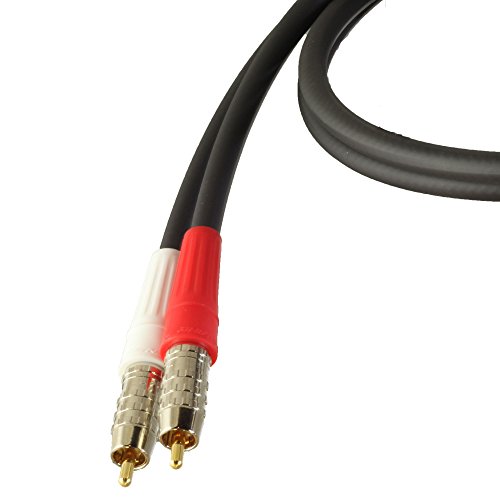
Goliton for Pioneer AUX Audio Input 3.5 mm Cable MP3 iPod CD-RB10 CD-RB20 IB100 IP-Bus 12-Pin


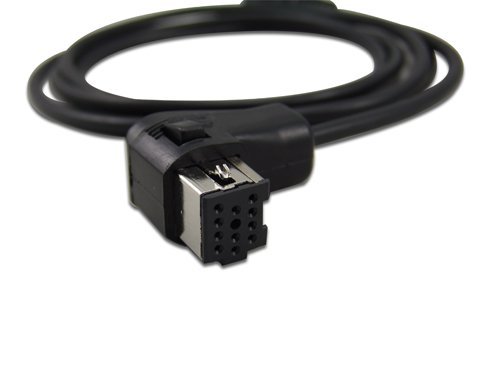
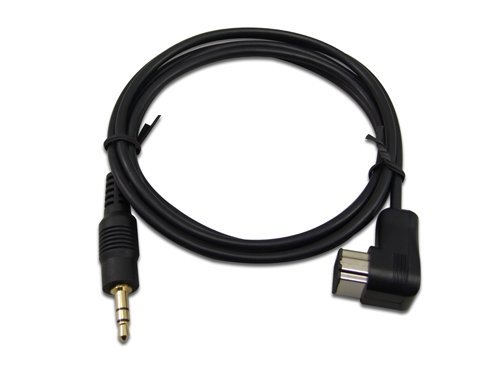
Goliton for Pioneer AUX Audio Input 3.5 mm Cable MP3 iPod CD-RB10 CD-RB20 IB100 IP-Bus 12-Pin
List Price: $19.30$17.37DEALYou Save: $1.93 (10%)
Free shippingFree Returns – 30 daysFree Order CancellationSecure Payment2–3 Days DeliveryGet It October 25, 2026In Stock (1)No marketing spamNo account requiredFulfilment by FedEx / Amazon / UPS / ShipwirePayPal / Card Buyer Protection
Customer Reviews
Reviews sourced from verified Amazon purchasers4.2
out of 5
Based on 10 reviews
5★
90%
4★
0%
3★
0%
2★
0%
1★
10%
FIND YOUR USER MANUAL
Jonathan Pagan•August 19, 2017
FIND THE USER MANUAL FOR YOUR HEAD UNIT!! There is a sequence of buttons to push to enable AUX input through the IP BUS. It works perfectly and as expected. Treat the cable with care, it may break inside. Feels kinda cheap.
Mine only works if you keep the cable extremely bent in one direction right under the 3.5mm jack male input. Use an extender, just in case!
Mine only works if you keep the cable extremely bent in one direction right under the 3.5mm jack male input. Use an extender, just in case!
Put the money toward a better head unit
Mike H•August 11, 2017
The whole IP bus wire when dealing with Pioneer is a nightmare. If you're looking for a short review, both this wire and my Pioneer DEH-P3800MP are going in the trash.
First issue is getting the IP bus wire to recognize and be enabled. For each head unit, the process is different. After searching for the solution to enable mine, the directions didn't work. Through about an hour of pressing buttons and making sure the wire was pressed all the way in, I finally figured the correct sequence to enable it and I was happy.
I went to plug in my phone and the connection was too big to plug in with my case on. This is the only aux cable that I've ever had this issue with. It wasn't a deal breaker as I planned to buy another aux cable to keep attached to this so it wouldn't wear out the connection from constant plugging and unplugging.
The final straw came when I put my entire dashboard back together and turned my car back on. Guess what wasn't enabled. Retrying the same sequence that worked before didn't work. I don't know if the wire isn't seated right or it's the head unit, but I've spent way too much time trying to get a stupid aux port on a radio that even the cheapest off brand has now. If you are considering buying the IP bus cable, do yourself a favor and put that money toward a cheap replacement head unit and save yourself the trouble. Mine will be in the trash today.
First issue is getting the IP bus wire to recognize and be enabled. For each head unit, the process is different. After searching for the solution to enable mine, the directions didn't work. Through about an hour of pressing buttons and making sure the wire was pressed all the way in, I finally figured the correct sequence to enable it and I was happy.
I went to plug in my phone and the connection was too big to plug in with my case on. This is the only aux cable that I've ever had this issue with. It wasn't a deal breaker as I planned to buy another aux cable to keep attached to this so it wouldn't wear out the connection from constant plugging and unplugging.
The final straw came when I put my entire dashboard back together and turned my car back on. Guess what wasn't enabled. Retrying the same sequence that worked before didn't work. I don't know if the wire isn't seated right or it's the head unit, but I've spent way too much time trying to get a stupid aux port on a radio that even the cheapest off brand has now. If you are considering buying the IP bus cable, do yourself a favor and put that money toward a cheap replacement head unit and save yourself the trouble. Mine will be in the trash today.
It's a cable and it works
rainman•July 14, 2016
Bought this in order to use the auxiliary in feature on my pioneer head unit (don't remember the model; previous owner installed it and the car is now gone). Easy to install, then had to play with the menu to enable the feature. Overall, not too bad. Average quality construction and sound. Did the job for me, at least. I would buy this cable again if I had to and would recommend it to a friend.
This product is great. I bought this for my boyfriend because he ...
Danielle•May 9, 2016
This product is great. I bought this for my boyfriend because he has been using spotify on a daily basis lately and listens to music in his car all the time. However I realized that he never utilized his speakers and it was because he didn't have an aux cable that would fit his car. I originally bought a male-male cable to find out that it is the wrong product. So I had him find the one he needed and bought this instead. Now he is happy because he can finally listen to the music he wants and the cable works well. Haven't had any audio issues yet. Satisfied with my purchase :)
I know how important reviews are in the decision making process prior to making a purchase. I personally rely on the reviews of others before making a purchase to determine whether a product is living up to expectations of others who purchased it. I also want to see how others feel about the product in relation to the quality. Because of this I review everything honestly. If you found this review helpful don't hesitate to hit the helpful vote :). Thanks!
I know how important reviews are in the decision making process prior to making a purchase. I personally rely on the reviews of others before making a purchase to determine whether a product is living up to expectations of others who purchased it. I also want to see how others feel about the product in relation to the quality. Because of this I review everything honestly. If you found this review helpful don't hesitate to hit the helpful vote :). Thanks!
Make sure aux is enabled and cable is FIRMLY plugged into the rear of the receiver
D. B•January 2, 2016
First attempt when using this was 0 sound, I had aux enabled so i pulled my stereo back up and made sure it was plugged in all the way, turns out it wasn't and it was actually not very easy to get it on all the way. Once that was done and stereo was put back in, went to aux and had music from my iPhone. Simple way to get something other than standard radio or CD on an older stereo.
Page 1 of 2



![90 Degree Right Angle Aux Cable - [24K Gold-Plated,Sound Quality]EMK Audio Stereo Male to Male Cable for Laptop, Tablets, MP3 Players,Car/Home Aux Stereo, Speaker or More (16Ft/5Meters)](https://m.media-amazon.com/images/I/517v+IXXeaL._SL500_.jpg)