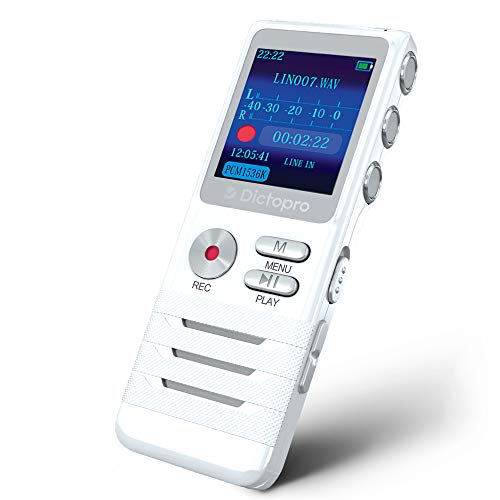
OM Digital Solutions DP-201 Digital Voice Recorder


Key features
- •202 Hours Of Recording Time - 2Gb Memory
- •80 Hours Battery Life
- •Large LCD And Speaker
- •Calendar Search Function
OM Digital Solutions DP-201 Digital Voice Recorder
List Price: $268.48$241.63DEALYou Save: $26.85 (10%)
Free shippingFree Returns – 30 daysFree Order CancellationSecure Payment2–3 Days DeliveryGet It October 24, 2026In Stock (3)No marketing spamNo account requiredFulfilment by FedEx / Amazon / UPS / ShipwirePayPal / Card Buyer Protection
Customer Reviews
Reviews sourced from verified Amazon purchasers4.2
out of 5
Based on 10 reviews
5★
40%
4★
30%
3★
20%
2★
0%
1★
10%
NOT FOR MUSICIANS. SOUND IS ATROCIOUS, DIRECTIONS ARE HORRIBLE !!
Indiana Opera Buff•July 27, 2016
If you are a musician wanting to record yourself, this recorder is not for you. The sound is atrocious. You could never tell whether you did it well or not. As a singer, you could not begin to tell if your tone was properly placed by the tinny sounds coming from this little machine. In addition, the directions are impossible. I had to call the Customer Service agent, in Columbia yet, to understand how to work it. The directions use few words, written in small print--mostly pictures of fingers and buttons. Do they think I don't know how to read? Not only is the sound bad, but the speaker is really too small for a musician. I had the sound turned all the way up. How I miss my SONY TCS-580V cassette recorder!
Requires FIVE keystrokes to delete a single recording
R. Dotson•May 31, 2014
Please note that this review ONLY applies to the 2GB Olympus DP-201 Digital Voice Recorder, and not the 4GB recorder which for some strange reason is sold on the same page as this Olympus recorder. The 4GB recorder (which I also unfortunately have) is completely inaudible and worthless in my opinion.
This little Olympus recorder was a beauty when I received it. The buttons are large and not only clearly labelled but also have unique shapes and colors to make them very easy to differentiate and it has a nice large display screen. I've only found three issues with it, otherwise I would have gladly given this little recorder five stars.
1. It requires FIVE separate keystrokes to delete a single recording.
2. The audio playback volume is acceptable, but only with both the microphone sensitivity and volume control set to maximum.
3. The recording button is recessed too far and there is no tactile feedback to indicate that the button press was effective, thus forcing the user to rely on the screen to know whether or not recording has commenced.
This little Olympus recorder was a beauty when I received it. The buttons are large and not only clearly labelled but also have unique shapes and colors to make them very easy to differentiate and it has a nice large display screen. I've only found three issues with it, otherwise I would have gladly given this little recorder five stars.
1. It requires FIVE separate keystrokes to delete a single recording.
2. The audio playback volume is acceptable, but only with both the microphone sensitivity and volume control set to maximum.
3. The recording button is recessed too far and there is no tactile feedback to indicate that the button press was effective, thus forcing the user to rely on the screen to know whether or not recording has commenced.
Memory assist!
Abi Gezint•February 27, 2014
Oh boy -- I think I might be starting to have memory problems -- a very scary prospect. I could have simply purchased some of those little 3x5 spiral notebooks to keep in my shirt pocket along with a golf pencil, but this is more entertaining and 21st Century. The Olympus DP-201 is smaller than a deck of cards, and can fit easily in purse or pocket. It runs on two AAA batteries. Should I find that I'm going through batteries like mayflies in spring, I will buy a set of rechargeable batteries and a charger. Once you "grok" how the thing works, it's a handy and useful item to have! And I have found that it really does help me to remember what I need to remember.
Alas, I must say this: it too often happens that when persons whose home and therefore whose native language is Japanese attempt to write technical instructions in English, the results can be less than desirable. This is the case here, with the accompanying instructions from Olympus. But it's more in the layout than the actual language. They try to convey the ideas with graphics, but the graphics are also (at least to me) in a confusing layout. Once you understand the operation of the machine, it's straightforward. The most complicated thing is erasing old recordings. Just remember this sequence: ERASER - REWIND - PLAY - REWIND - PLAY. Or, E-R-P-R-P. You'll understand this once you have the machine in your hand. (BTW -- it has an automatic shutoff to save battery life. To turn it on again, just press any of the buttons on the front.)
Alas, I must say this: it too often happens that when persons whose home and therefore whose native language is Japanese attempt to write technical instructions in English, the results can be less than desirable. This is the case here, with the accompanying instructions from Olympus. But it's more in the layout than the actual language. They try to convey the ideas with graphics, but the graphics are also (at least to me) in a confusing layout. Once you understand the operation of the machine, it's straightforward. The most complicated thing is erasing old recordings. Just remember this sequence: ERASER - REWIND - PLAY - REWIND - PLAY. Or, E-R-P-R-P. You'll understand this once you have the machine in your hand. (BTW -- it has an automatic shutoff to save battery life. To turn it on again, just press any of the buttons on the front.)
Good tool for the job, but erasing is a PAIN!
V. Hartman•January 11, 2014
Considering the price, I have only one beef with this recorder: It is a ROYAL PAIN to erase files you have no further use for. I use it to record college lectures several days a week. It's great for that because you can date your notes on paper and then just look up the file for that date on the recorder when you want to hear the lecture again. No problems there, and great for final exam review.
The problem manifests when the semester's over and you want or need to clear data from the recorder to get ready for the next semester. I've checked the manual and the manufacturer's FAQ page, and there is no way to erase the entire memory at once. You can only erase file by file by file, one at a time, or erase all files for a particular date. That's DATE, not dateS. If you've recorded several classes, several days a week, over an entire semester, that's a lot of dang files!
Not only that, but the number of steps you have to take to erase just one file or one day's files is ridiculous -- a minimum of five button pushes distributed over three different buttons, and believe me when I say it's not at all an intuitive process. Only one of the buttons says "erase;" the other two buttons used are the play/OK button and the rewind button. Yes, the rewind button! Makes no sense at all to me. Maybe this is some failsafe to keep people from inadvertently erasing files, but I find it ridiculously tedious. An option to erase all files on the device should be provided. Even if the erase-all function required five button pushes, it would be a heck of a lot better than the one-by-one deletion system as it is right now.
Otherwise, I'm very happy with this recorder. I'm on my fifth college semester with it, and it's still going strong.
The problem manifests when the semester's over and you want or need to clear data from the recorder to get ready for the next semester. I've checked the manual and the manufacturer's FAQ page, and there is no way to erase the entire memory at once. You can only erase file by file by file, one at a time, or erase all files for a particular date. That's DATE, not dateS. If you've recorded several classes, several days a week, over an entire semester, that's a lot of dang files!
Not only that, but the number of steps you have to take to erase just one file or one day's files is ridiculous -- a minimum of five button pushes distributed over three different buttons, and believe me when I say it's not at all an intuitive process. Only one of the buttons says "erase;" the other two buttons used are the play/OK button and the rewind button. Yes, the rewind button! Makes no sense at all to me. Maybe this is some failsafe to keep people from inadvertently erasing files, but I find it ridiculously tedious. An option to erase all files on the device should be provided. Even if the erase-all function required five button pushes, it would be a heck of a lot better than the one-by-one deletion system as it is right now.
Otherwise, I'm very happy with this recorder. I'm on my fifth college semester with it, and it's still going strong.
Great basic design
Edel•December 22, 2013
I use voice recorders mostly to record notes to myself while driving, or action items during conference calls to make sure my notes are comprehensive. Until now I was using my cell phone for that purpose, but was looking for something dedicated for the purpose of recording notes, preferably a device easy and reliable to operate. This recorder is perfect for my needs. The size is not too small (fits the palm of your hand), allowing for clear menus and decent speaker, but not too bulky either. It will capture very clearly your own notes or conference calls on speaker phone. It is easy to play back and navigate through the recording. I only use the recorder to transcribe my notes then immediately discard the files, so the lack of USB interface doesn't bother me, but if you want to archive your notes a recorder such as the WS-801 also by Olympus will be a better choice.
PROS
- Simple, clear design that not only allows for easy use but also looks good
- All the controls you need for basic needs (pause, fast forward and playback, playing speed adjustment, noise canceling and microphone sensitivity); pretty good for a basic device
- Well-designed to-the-point instructions manual
- Built-in microphone works well, and the integrated speaker gives you all the volume you need, delivering a better performance than any device I have used in the past
- Battery indicator in the top right corner is very useful and a welcome inclusion at this price point
- Auto shut-off after 10 min. when not in use to save battery life
CONS
- Finish is somewhat cheap and the feel plasticky - even though built itself is quite decent. Since this particular product is pretty much stand-alone (doesn't depend on evolving computer technology), it is likely to be used by the user for more than a year or two. I would not mind paying a little more for simple, reliable device that will take some abuse during travel and that is built to last for years
- On/off button could be more identifiable by its appearance itself, just as the erase button is (it is orange when the other buttons are all the same grey), it would help when you grab the recorder for an immediate need. I colored my on /off button in green and red with a permanent marker which helps
- A recording level bar would be nice so you can be sure the microphone is capturing the audio with enough strength
5 stars for its all-around value as well as functional and attractive design.
PROS
- Simple, clear design that not only allows for easy use but also looks good
- All the controls you need for basic needs (pause, fast forward and playback, playing speed adjustment, noise canceling and microphone sensitivity); pretty good for a basic device
- Well-designed to-the-point instructions manual
- Built-in microphone works well, and the integrated speaker gives you all the volume you need, delivering a better performance than any device I have used in the past
- Battery indicator in the top right corner is very useful and a welcome inclusion at this price point
- Auto shut-off after 10 min. when not in use to save battery life
CONS
- Finish is somewhat cheap and the feel plasticky - even though built itself is quite decent. Since this particular product is pretty much stand-alone (doesn't depend on evolving computer technology), it is likely to be used by the user for more than a year or two. I would not mind paying a little more for simple, reliable device that will take some abuse during travel and that is built to last for years
- On/off button could be more identifiable by its appearance itself, just as the erase button is (it is orange when the other buttons are all the same grey), it would help when you grab the recorder for an immediate need. I colored my on /off button in green and red with a permanent marker which helps
- A recording level bar would be nice so you can be sure the microphone is capturing the audio with enough strength
5 stars for its all-around value as well as functional and attractive design.
Page 1 of 2