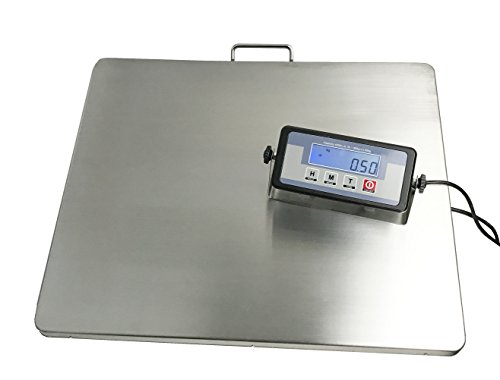
Salter-Brecknell LPS150 Portable Shipping Scale with LCD Display, 12" Length x 15" Width x 1" Height, 150lbs Capacity

Key features
- •Perfect for use in shipping/warehouse applications and for general purpose weighing up to 150lbs.
- •Maximum capacity 150lbs.
- •Typical applications: Light industrial, warehouse
- •Platform Dimensions: 12" (L) x 15" (W) x 1" (H)
- •Powered by Four AAA batteries or AC Adapter (both included)
Salter-Brecknell LPS150 Portable Shipping Scale with LCD Display, 12" Length x 15" Width x 1" Height, 150lbs Capacity
List Price: $265.73$239.16DEALYou Save: $26.57 (10%)
Free shippingFree Returns – 30 daysFree Order CancellationSecure Payment2–3 Days DeliveryGet It October 25, 2026In Stock (6)No marketing spamNo account requiredFulfilment by FedEx / Amazon / UPS / ShipwirePayPal / Card Buyer Protection
Customer Reviews
Reviews sourced from verified Amazon purchasers4.6
out of 5
Based on 3 reviews
5★
67%
4★
33%
3★
0%
2★
0%
1★
0%
Five Stars
FC✓ Verified Purchase•June 22, 2023
Very simple to use and so far, very precise as well.
Works with UPS Worldship but not thanks to the manual...
MW✓ Verified Purchase•June 17, 2023
For those of you trying to use this scale, the directions included aren't really that clear and neither is the manufacturer's website.
To get it to work:
Go into the setup by holding the power button and the Units button at the same time.
Press the Tare button to move to the different programming parameters (P1 through P20).
Go to P4, press the Units button to change the setting to 7 (NCI protocol)
Press the Tare button to save and go to P5, change this to 2 (4800 baud)
Press the Tare button to save and go to P6, change this to 2 (7E1)
Press the power button to save all settings.
In your PC, go to the port settings (on Windows PC's accessed through Device Manager / Ports).
Double click on the port you are using (in my case com1) and go to the port settings tab
Change as below:
Bits per second: 4800
Data bits: 7
Parity: Even
Stop Bits: 1
Flow control: none
Click OK and close device manager.
Open UPS Worldship, select the Tools tab, select System Preferences and click on Hardware;
Change the Scale port to COM1 (or whatever Com port you use)
Change the Scale Type to NCI 3835
Click on Test Scale, and you should see the weight reporting now from the scale.
To get it to work:
Go into the setup by holding the power button and the Units button at the same time.
Press the Tare button to move to the different programming parameters (P1 through P20).
Go to P4, press the Units button to change the setting to 7 (NCI protocol)
Press the Tare button to save and go to P5, change this to 2 (4800 baud)
Press the Tare button to save and go to P6, change this to 2 (7E1)
Press the power button to save all settings.
In your PC, go to the port settings (on Windows PC's accessed through Device Manager / Ports).
Double click on the port you are using (in my case com1) and go to the port settings tab
Change as below:
Bits per second: 4800
Data bits: 7
Parity: Even
Stop Bits: 1
Flow control: none
Click OK and close device manager.
Open UPS Worldship, select the Tools tab, select System Preferences and click on Hardware;
Change the Scale port to COM1 (or whatever Com port you use)
Change the Scale Type to NCI 3835
Click on Test Scale, and you should see the weight reporting now from the scale.
Outstanding
Joe Sikorski✓ Verified Purchase•April 20, 2023
This scale is used every day in a production department of a manufacturing firm. It takes a beating every day. Lasted 4 years and is still working. Only drawback is that it has to be turned on often, it turns itself off after sitting idle for a couple of minutes. This is the reason for us having to purchase a new one. The on/off button has worn out.
5 stars - I am buying a new one today.
5 stars - I am buying a new one today.