iSaddle for BMW Scanner 1.4.0 Programmer V1.4 ECU EEPROM Diagnostic Code Reader for E38 E39 E46 E53 (Must Work with Windows XP)
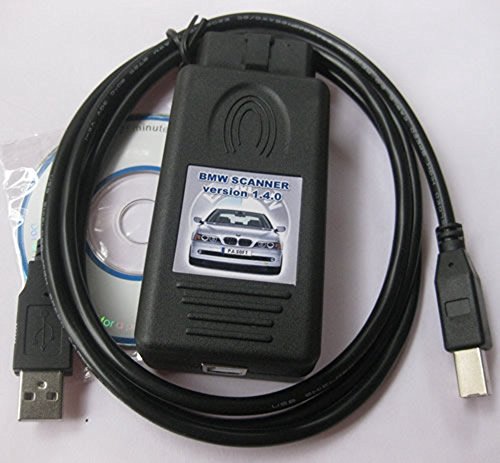
Key features
- •Compatible models: for BMW E38, E39, E46, E53, E83, E85 and etc
- •Determine chassis number, model, engine, gearbox and so forth
- •Copying ZCS (IKE - EWS) and FA (IKE - LCM) coding
- •Must work with Windows XP
- •Version: 1.4.0
iSaddle for BMW Scanner 1.4.0 Programmer V1.4 ECU EEPROM Diagnostic Code Reader for E38 E39 E46 E53 (Must Work with Windows XP)
List Price: $50.62$45.56DEALYou Save: $5.06 (10%)
Free shippingFree Returns – 30 daysFree Order CancellationSecure Payment2–3 Days DeliveryGet It October 25, 2026In Stock (1)No marketing spamNo account requiredFulfilment by FedEx / Amazon / UPS / ShipwirePayPal / Card Buyer Protection
Customer Reviews
Reviews sourced from verified Amazon purchasers3.5
out of 5
Based on 10 reviews
5★
50%
4★
40%
3★
0%
2★
0%
1★
10%
Good Scanner, if you get drivers sorted out. Good Luck!
bluelight•January 27, 2017
Good software. Nightmare to install drivers. Included CD is useless. I am very proficient with computers, but it took hours to finally get the right driver and then go through very convoluted process of setting up drivers. Good luck to folks who are just computer users. Anyway, once you got it working it is great tool. I finally got my BMW X3 Airbag icon off due to broken passenger occupancy sensor (no need for any bypass).
PS. Driver issues are caused by use of unauthorized FTDI USB Serial Port chip clones, so google for "BMW Scanner 1.4.0-Driver 64BIT.rar".
1. Plug the device into USB port
1. Let Windows to FAIL to install drivers for the scanner
2. Then select device "BMW Scanner" and update driver and point to the folder with driver - it will install some driver for it (wrong one). This will move the device under USB Hub
3. Now choose update driver again, keep all options the same but this time click on let me choose an existing device, uncheck compatible devices check box and select FTDI(left)->"USB Controller A" (right) - and let Windows update the drivers
4. Now will see another unknown port device. Let windows to FAIL to install drivers for it.
5. Select this device and choose update driver, then choose let me select existing device, then close Communication port (COM & LPT), then click on have disk and now select "ftdiport.inf" in the driver folder. Select USB Serial Port, and let Windows to install driver.
6. Now download bmwscan_140.zip (latest), unzip and install it. Or use one supplied on CD
7. Connect Scan tool to car, wait 5 secs, then connect to computer, then launch BMW Scanner 1.4 and it should work now.
PS. Driver issues are caused by use of unauthorized FTDI USB Serial Port chip clones, so google for "BMW Scanner 1.4.0-Driver 64BIT.rar".
1. Plug the device into USB port
1. Let Windows to FAIL to install drivers for the scanner
2. Then select device "BMW Scanner" and update driver and point to the folder with driver - it will install some driver for it (wrong one). This will move the device under USB Hub
3. Now choose update driver again, keep all options the same but this time click on let me choose an existing device, uncheck compatible devices check box and select FTDI(left)->"USB Controller A" (right) - and let Windows update the drivers
4. Now will see another unknown port device. Let windows to FAIL to install drivers for it.
5. Select this device and choose update driver, then choose let me select existing device, then close Communication port (COM & LPT), then click on have disk and now select "ftdiport.inf" in the driver folder. Select USB Serial Port, and let Windows to install driver.
6. Now download bmwscan_140.zip (latest), unzip and install it. Or use one supplied on CD
7. Connect Scan tool to car, wait 5 secs, then connect to computer, then launch BMW Scanner 1.4 and it should work now.
Works on 1999 528i E39 in windows 7 under virtualbox in Linux
Amazon Customer•December 6, 2016
This is my 2nd time purchasing the item. The original board uses thin cables to the ODBII port, and they can easily break as what happened in my case. They updated the design to use surface mount, so that issue is fixed You also had to take apart the original device and solder in a jumper to get it to work correctly, this is now done at the factory for the updated device.
I used this on my 1999 E39 528i wagon to reset the check engine light and air bag light.
I used windows 7 installed on VirtualBox in linux. If using windows 7 follow the instructions below to install the driver, post #7.
[...]
If your car has the round 20 Pin OBD port under the hood, like the 1999 E39 chassis, you need a 20 Pin To 16 Pin Obd2 Adapter Cable.
I used this on my 1999 E39 528i wagon to reset the check engine light and air bag light.
I used windows 7 installed on VirtualBox in linux. If using windows 7 follow the instructions below to install the driver, post #7.
[...]
If your car has the round 20 Pin OBD port under the hood, like the 1999 E39 chassis, you need a 20 Pin To 16 Pin Obd2 Adapter Cable.
Does not work as advertised!
Voomar1•October 29, 2016
I had high hopes for this product after reading some of the positive reviews. I was simply looking for a device that would allow me to turn off the DRL on my 2001 E46 325i. I promptly rec'd the product after ordering, installed the SW and drivers on my XP SP3 Dell Laptop per the limited instructions that came with the product. All seemed to be working fine since the SW recognized the drivers as being installed properly. I then plugged the scanner into the OBD II port on my car, turned on ignition to power the scanner and plugged the USB cable into my laptop upon which I rec'd a "hardware faulty" error message on the SW's initial screen. I uninstalled and reinstalled the SW and drivers multiple times, and verified both that the USB cable was functioning properly and pins 7 and 8 were connected together, but still got the same error message. I thought I might have rec'd a bad scanner, so I returned the first unit and bought another one...same exact error message/problem.I tried various versions of the SW that I downloaded from the web, but still rec'd the same error message. Returned both units. Kudos to Amazon for making the return/credit process painless
Works Well........Once You're Able to Set It Up
Rigo Delgadillo•September 11, 2016
This product works well once you get it set up correctly. Getting it set up is not as easy as you might think. I'm not sure if there is a virus or malware of some type on the software CD but Windows 10 seems to think so. In order to run the software, you pretty much have to turn off any virus or malware protection. Kind of strange. I tried downloading and installing from multiple alternate locations and every single version worked the same way. Windows doesn't like it but if you're patient, it works. I installed the software and linked it to my BMW 325xi and was able to read/clear codes as well as toggle many options. Worth buying if you are computer savvy. I would give it 5 stars if it were easier to set up because it works that well. If you're having problems with setup, go to forums and find help there. E46fanatics has a good thread.
Must-have diagnostic tool for all BMWs
Matt K•June 9, 2016
Works with PASoft software and my BMW E46 2001 330I. I used Win 7 XP Mode to install all the software as is recommended. Remember to install the drivers first properly and then install PASoft. In Win 7 XP Mode, you have to go to Attach at the top tool bar and attach the iSaddle USB in order for the computer to use the device. I forgot the name that it is called but it is one of the USB devices that is plugged into the computer. If you miss these two steps, your device may not work. I did not install the drivers correctly the first time around so it didn't work. Follow the PDF guide that is included in the CD.
This device is a godsend. It showed me approximately 50 errors (27 being in the DME) that obviously did not show on a regular OBDII scanner. What this means is that, even if you do not have a Service Engine Soon light, your car can still have problems that you will not be aware of unless you have the car properly diagnosed with the appropriate software.
I had the dreaded yellow brake light and traction control light on. One reset and I have not seen those lights since.
This device is a godsend. It showed me approximately 50 errors (27 being in the DME) that obviously did not show on a regular OBDII scanner. What this means is that, even if you do not have a Service Engine Soon light, your car can still have problems that you will not be aware of unless you have the car properly diagnosed with the appropriate software.
I had the dreaded yellow brake light and traction control light on. One reset and I have not seen those lights since.
Page 1 of 2