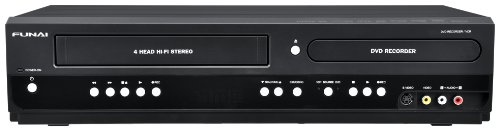
Magnavox MDR535 500GB HDD and DVD Recorder with SD Digital Tuner (Black)


Key features
- •Records from HDD to DVD
- •500GB HDD
- •ATSC Tuner can record when away from home
- •Records up to 604 HRS on HDD
- •1080P Up Conversion
Magnavox MDR535 500GB HDD and DVD Recorder with SD Digital Tuner (Black)
List Price: $2182.49$1964.24DEALYou Save: $218.25 (10%)
Free shippingFree Returns – 30 daysFree Order CancellationSecure Payment2–3 Days DeliveryGet It October 26, 2026In Stock (1)No marketing spamNo account requiredFulfilment by FedEx / Amazon / UPS / ShipwirePayPal / Card Buyer Protection
Customer Reviews
Reviews sourced from verified Amazon purchasers3.9
out of 5
Based on 10 reviews
5★
50%
4★
40%
3★
10%
2★
0%
1★
0%
Love it!
Mark Anderson•February 7, 2015
I've owned this unit for two years now, so I thought I'd pass along my experience. I bought this when I decided to cut the cable and install a rooftop antenna. This unit fits the bill just fine, but there are a few caveats.
First, it will only record one program at a time. My cable provider spoiled me in that I could record TWO programs at once. This unit will not do that. However in reality, that has not been an issue. I've not missed that feature but once or twice in the two years I've owned it.
Second, while it's recording, you cannot watch any other channel. You CAN watch something you've already recorded. Or, you can switch to another device (i.e. Roku or PS3) and watch something from Hulu, Amazon Prime, Netflix, etc. This IS a drawback from time to time. I've actually thought about buying another tuner going into a separate HDMI port on my system so that I could watch something from another channel. It hasn't been big enough of a deal-breaker to me to pop for the $100 or so for a separate tuner. Dual tuners in this machine would be nice.
Third, the clock loses time. With this DVD, you have to setup each recording as a starting and end time, and channel. So, if you setup a weekly program to record on channel 11.1 at 8:30 p.m. to 9:00 p.m. each Wednesday, that's exactly what it will do. Once the time starts walking, you'll find it starts recording a few minutes early, then cuts off the recording right before the ending, which is a pain. I try to remember to reset the time once a week, but you know how that goes. Over a couple of months, it can lose as much as 5 minutes on the clock.
All that said, I love the unit even for its flaws. It can record a TON of programs (I've never run out of space even recording at the highest level) and the picture quality is great on my 65" TV. I've integrated this unit with my Sony surround sound amp, PS3, and Visio TV with one Harmony remote and it works great.
First, it will only record one program at a time. My cable provider spoiled me in that I could record TWO programs at once. This unit will not do that. However in reality, that has not been an issue. I've not missed that feature but once or twice in the two years I've owned it.
Second, while it's recording, you cannot watch any other channel. You CAN watch something you've already recorded. Or, you can switch to another device (i.e. Roku or PS3) and watch something from Hulu, Amazon Prime, Netflix, etc. This IS a drawback from time to time. I've actually thought about buying another tuner going into a separate HDMI port on my system so that I could watch something from another channel. It hasn't been big enough of a deal-breaker to me to pop for the $100 or so for a separate tuner. Dual tuners in this machine would be nice.
Third, the clock loses time. With this DVD, you have to setup each recording as a starting and end time, and channel. So, if you setup a weekly program to record on channel 11.1 at 8:30 p.m. to 9:00 p.m. each Wednesday, that's exactly what it will do. Once the time starts walking, you'll find it starts recording a few minutes early, then cuts off the recording right before the ending, which is a pain. I try to remember to reset the time once a week, but you know how that goes. Over a couple of months, it can lose as much as 5 minutes on the clock.
All that said, I love the unit even for its flaws. It can record a TON of programs (I've never run out of space even recording at the highest level) and the picture quality is great on my 65" TV. I've integrated this unit with my Sony surround sound amp, PS3, and Visio TV with one Harmony remote and it works great.
A high quality and convenient way to record TV programs for later viewing
John Elliott•April 25, 2014
My wife and I are baseball fans, and we had been recording out favorite team's games on a VCR for later viewing so that we could "whiz" through the commercials. The quality of the playback, however, wasn't as good as we would have liked, and it was a hassle to manage the tapes.
We wanted a Digital Video Recorder (DVR) to replace the VCR. Our local cable TV provided wanted some $12 per month to provide the DVR service, plus another $12 per month for the rental of the DVR machine itself. We looked into purchasing our own TiVo, but that would involve a $15 per month subscription to TiVo, plus $2.50 per month for rental of a special card from the cable company to be inserted into the TiVo to make it work.
Then we discovered the Magnavox HDD/DVD recorder. It allows us to record one program at a time off the cable without any additional subscriptions or card rentals and to play them back whenever we choose -- including while we are recording another program. The hard drive will record some 97 hours of programming at the highest quality level and many more hours at lower levels of quality. The unit will also record to DVD and play back DVDs.
Set up is easy: connect the cable from the cable company to the back of the Magnavox and a jumper cable from the Magnavox to the back of your TV. You will also need (for highest quality playback) an HDMI cable connecting the Magnavox and your TV. You can also use cables provided with the unit, but that will result in lower quality playback. After connecting the Magnavox and your TV, you have to enter the time and date and then let the Magnavox search for available channels.
Recording a program is easy -- in HDD mode, press the Time Prog button, enter the necessary information, and press Time Prog again. To play back a program you have recorded, in HDD mode, press the Title button, select the program you want, and then use the controls like you would on a DVD player: forward, back, fast forward, etc. The picture quality is vastly better than VCR videotape and recorded programs are easier to manage. Unlike the DVR provided by the cable company or a TiVo, the Magnavox will record only program at a time.
A warning: because the unit offers many capabilities that I haven't touched on here, the manual is thick and can be daunting. There is, however, a quick-start guide that is very helpful.
I have owned the Magnavox HDD/DVD Recorder for only a week, so I can't comment on its long-term reliability. So far, however, it does exactly what I hoped it would do, is easy to use, and meets or exceeds my expectations.
Based on my experience to date, I would absolutely recommend it.
Update: I have now owned this unit for many months, and it has performed flawlessly. My absolute recommendation stands.
We wanted a Digital Video Recorder (DVR) to replace the VCR. Our local cable TV provided wanted some $12 per month to provide the DVR service, plus another $12 per month for the rental of the DVR machine itself. We looked into purchasing our own TiVo, but that would involve a $15 per month subscription to TiVo, plus $2.50 per month for rental of a special card from the cable company to be inserted into the TiVo to make it work.
Then we discovered the Magnavox HDD/DVD recorder. It allows us to record one program at a time off the cable without any additional subscriptions or card rentals and to play them back whenever we choose -- including while we are recording another program. The hard drive will record some 97 hours of programming at the highest quality level and many more hours at lower levels of quality. The unit will also record to DVD and play back DVDs.
Set up is easy: connect the cable from the cable company to the back of the Magnavox and a jumper cable from the Magnavox to the back of your TV. You will also need (for highest quality playback) an HDMI cable connecting the Magnavox and your TV. You can also use cables provided with the unit, but that will result in lower quality playback. After connecting the Magnavox and your TV, you have to enter the time and date and then let the Magnavox search for available channels.
Recording a program is easy -- in HDD mode, press the Time Prog button, enter the necessary information, and press Time Prog again. To play back a program you have recorded, in HDD mode, press the Title button, select the program you want, and then use the controls like you would on a DVD player: forward, back, fast forward, etc. The picture quality is vastly better than VCR videotape and recorded programs are easier to manage. Unlike the DVR provided by the cable company or a TiVo, the Magnavox will record only program at a time.
A warning: because the unit offers many capabilities that I haven't touched on here, the manual is thick and can be daunting. There is, however, a quick-start guide that is very helpful.
I have owned the Magnavox HDD/DVD Recorder for only a week, so I can't comment on its long-term reliability. So far, however, it does exactly what I hoped it would do, is easy to use, and meets or exceeds my expectations.
Based on my experience to date, I would absolutely recommend it.
Update: I have now owned this unit for many months, and it has performed flawlessly. My absolute recommendation stands.
Excellent Beats TIVO
Robert Schwartz•February 24, 2014
This device performs very well. I use a Dish Network receiver connected by a composite video cable and 2 audio cables. The DVR output is connected to my TV via an HDMI cable. this automatically sets the resolution at 1080. Note: You cannot use S-VIDEO in with HDMI out. This has a 500G hard disk drive. The recording mode is set to HQ and the audio is set to stereo. I set aspect ration is to 16:1. I tested by manually recording a few minutes to the hard disk. I have an HDTV. The result was a recording of outstanding quality. Even though the manual says the video is SD, I cannot tell the difference between this picture and the HD picture received by my TV. Magnavox has excellent technical support, accessed via phone. They are open until 11:00 PM EST. The number is on the front of the manual. It is NOT true that Magnavox will not warranty this item, if sold by Amazon. I called Magnavox to register. I selected the support option for DVD recorders. They asked for the model number, serial number, merchant name, and the date I received it. I was told that it would be covered for 1 year. I suggest that you register soon after you receive the DVR. Do not wait until you have a problem.
Recording from an antenna
R. Cichy•February 22, 2014
I was determined not to submit to satellite/cable tyranny in order to record from an antenna when my VCR/DVD died. However, obviously I am not a person who feels comfortable jumping into new technology. Nevertheless, I wanted to use a DVR, but I was disappointed to find that no stores in my area even carry a DVR any more because of the dominance of the satellite and cable companies. I did research online to find my options and decided that the Magnavox MDR 535 appeared to meet my needs and ordered a unit - with trepidation. However, after studying the diagrams and instructions, I was able to connect the DVR to my TV and then to record without any difficulty; the system worked fine after my first attempt. The quality of the recording is wonderful, and the ease of use surprises me. It is a huge improvement over my antique VCR, naturally, and I am extremely happy. I would urge anyone who wants to record from an antenna and not pay any monthly fees to take the leap.
I have 4 of these!
Patricia McDermott•February 4, 2014
Best thing to come out for recording. I seldom use the DVD recorder but the few times I have the picture and sound quality are very good. Most of my recording is of TV shows that I can watch later and I record these on the hard drive. I record almost everything in the LP speed and the picture and sound are great! Unfortunately, a few of the channels I record are not picked up by the recorder's tuner so I have to split the cable coming from the cable box and run one to the TV and one to one of the recorders. The quality is not as good, but I'm not saving the programs beyond the time I watch them, it works fine for me. But I have to set the recorder to channel 3 and remember to set the channel on my cable box. It's a pain and sometimes I forget so that's a problem when wanting to record something on a channel that the the recorder's tuner does not pick up. But as far as recording the channels that the recorder's tuner will get, it's a breeze and I just set it and forget it. Overall setup of the recorder was easy for me. One other flaw is that the clock picks up minutes every few weeks so I have to check and set it back a minute or two every so often. But there's so much room on the hard drive that I can set a program to go any number of minutes past the time it would ordinarily end and don't lose the end of any programs. Dubbing can get complicated but stick with it. I've also edited a few shows to cut out commercials. It's time consuming but not complicated. Also, if you have a show that you want to watch again, you can "protect" it so that it will not be erased when you clear your hard drive. I love this recorder and I highly recommend it.
Page 1 of 2