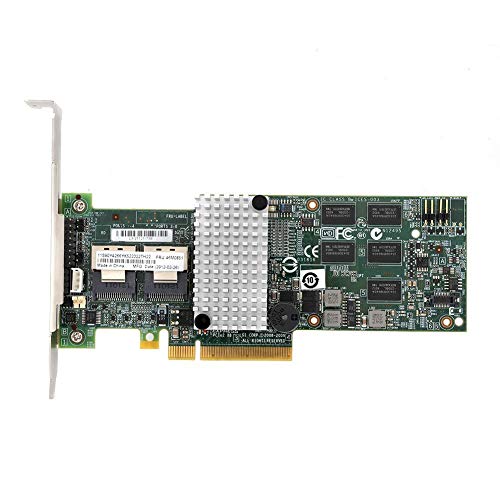
I/O Crest 4 Port SATA III PCI-e 2.0 x1 Controller Card Marvell 9215 Non-Raid with Low Profile Bracket SI-PEX40064


Key features
- •We recommend a fresh Windows install with this card
- •Drivers are required for this card to function.
- •Chipset: Marvell 88SE9215
- •Compliant with PCI-Express Specification v2.0 and backwards compatible with PCIex1
- •Compliant with Serial ATA Specification 3.0
- •Supports Communication Speeds of 6.0 Gbps, 3.0 Gbps, and 1.5 Gbps
I/O Crest 4 Port SATA III PCI-e 2.0 x1 Controller Card Marvell 9215 Non-Raid with Low Profile Bracket SI-PEX40064
List Price: $46.95$42.26DEALYou Save: $4.69 (10%)
Free shippingFree Returns – 30 daysFree Order CancellationSecure Payment2–3 Days DeliveryGet It October 26, 2026In Stock (19)No marketing spamNo account requiredFulfilment by FedEx / Amazon / UPS / ShipwirePayPal / Card Buyer Protection
Customer Reviews
Reviews sourced from verified Amazon purchasers4.4
out of 5
Based on 10 reviews
5★
60%
4★
40%
3★
0%
2★
0%
1★
0%
Very satisfied with this card, great solution for external (Port-Multiplier device) drive enclosure
Howard✓ Verified Purchase•November 16, 2023
I needed a Port-Multiplier compatible eSATA card for attaching a Mediasonic external RAID enclosure (my model is HFR2-SU3S2.) I found this card and it is better and faster than the Syba SD-SA2PEX-2E card Mediasonic recommended. This card is currently $22 more, but well worth the extra money. It's a PCI-e x2 lane sized card, which is part of benefit, but see details below, as it needs to be installed in a PCI-e x4, x8 or x16 slot. NOTE: It can get confusing because "Syba" and "IO Crest" and "Best connectivity" brands seem to be the same, with different packaging/branding. (When I ordered my original Syba card directly from the Amazon link Mediasonic provided, the box I received said "Best connectivity" but the product part number was identical. This IO Crest model I now use is the same part # as a Syba brand SI-PEX40063, and seems to be the same card, so you can purchase either brand of that model number. My situation as follows:
My system has Asus X79 (Rampage IV Extreme) motherboard, running Windows 7 Professional 64-bit.
I have the HFR2-SU3S2 set as RAID-5 with four 3TB drives. My motherboard onboard eSATA could not accommodate hot plugging or using drive after system is in sleep mode, so I needed an external PCI card. I purchased the Syba card Mediasonic recommended but was not impressed with the data transfer speeds I was getting, nor could I remove the HFR2-SU3S2 enclosure while the system was in sleep mode without getting errors on resume.
After much research I decided to try this (IO Crest) SI-PEX40063 card. I've been very pleased with the results. It's a SATA III (6G) card with PCI-e 2.0 x2 interface (lane). The x2 means the connector is physically bigger than the more commonly found x1 cards like the Syba SD-SA2PEX-2E, and thus needs to be installed in a PCI-Express x4, x8, or x16 slot. It will NOT fit into a PCI-e 1.0 x1 slot. The advantage of the x2 lane means that it's double the data bandwidth of an x1 lane. Whether due to the faster x2 interface or the SATA 6G specification, benchmark tests on my HFR2-SU3S2 show my sequential data transfer speed is SIGNIFCANTLY better - 100MB/s read and 81MB/s write faster with the new card! Since I cannot add my CrystalDiskMark benchmark screenshots, sequential speed on this card is 225MB/s read, 208MB/s write (versus 126/127 (read/write) on the Syba SD-SA2PEX-2E card.) 512K speeds are also faster: 47MB/s read and 26MB/s write (versus 38/21 on other Syba card.)
Also, hot plugging the drive enclosure into running Windows works, it reliably turns off when the system goes to sleep, and comes back online on resume, with no errors or problems being recognized. (I cannot "safely remove device" within Windows, but if I take it out while the system is in sleep mode, I do not get errors or problems on resume.) I've used this card for a month now with no problems.
Some additional notes: The SI-PEX40063 card uses a Marvel 88SE9235 chip (Marvel 92xx driver.) On initial install, Windows automatically added the standard Microsoft AHCI 1.0 Serial ATA controller driver, which works perfectly and which I am using. I did try the available Marvel driver(s), but I found them to be unreliable and unnecessary. Rolling Windows back to the original Microsoft driver proved the best solution. I spent an incredible amount of time trying to find a decent PCI e-SATA card for my Mediasonic enclosure, and I hope this posting and information helps others currently in the same position.
My system has Asus X79 (Rampage IV Extreme) motherboard, running Windows 7 Professional 64-bit.
I have the HFR2-SU3S2 set as RAID-5 with four 3TB drives. My motherboard onboard eSATA could not accommodate hot plugging or using drive after system is in sleep mode, so I needed an external PCI card. I purchased the Syba card Mediasonic recommended but was not impressed with the data transfer speeds I was getting, nor could I remove the HFR2-SU3S2 enclosure while the system was in sleep mode without getting errors on resume.
After much research I decided to try this (IO Crest) SI-PEX40063 card. I've been very pleased with the results. It's a SATA III (6G) card with PCI-e 2.0 x2 interface (lane). The x2 means the connector is physically bigger than the more commonly found x1 cards like the Syba SD-SA2PEX-2E, and thus needs to be installed in a PCI-Express x4, x8, or x16 slot. It will NOT fit into a PCI-e 1.0 x1 slot. The advantage of the x2 lane means that it's double the data bandwidth of an x1 lane. Whether due to the faster x2 interface or the SATA 6G specification, benchmark tests on my HFR2-SU3S2 show my sequential data transfer speed is SIGNIFCANTLY better - 100MB/s read and 81MB/s write faster with the new card! Since I cannot add my CrystalDiskMark benchmark screenshots, sequential speed on this card is 225MB/s read, 208MB/s write (versus 126/127 (read/write) on the Syba SD-SA2PEX-2E card.) 512K speeds are also faster: 47MB/s read and 26MB/s write (versus 38/21 on other Syba card.)
Also, hot plugging the drive enclosure into running Windows works, it reliably turns off when the system goes to sleep, and comes back online on resume, with no errors or problems being recognized. (I cannot "safely remove device" within Windows, but if I take it out while the system is in sleep mode, I do not get errors or problems on resume.) I've used this card for a month now with no problems.
Some additional notes: The SI-PEX40063 card uses a Marvel 88SE9235 chip (Marvel 92xx driver.) On initial install, Windows automatically added the standard Microsoft AHCI 1.0 Serial ATA controller driver, which works perfectly and which I am using. I did try the available Marvel driver(s), but I found them to be unreliable and unnecessary. Rolling Windows back to the original Microsoft driver proved the best solution. I spent an incredible amount of time trying to find a decent PCI e-SATA card for my Mediasonic enclosure, and I hope this posting and information helps others currently in the same position.
I had a couple of SSD that were running very poorly A Liteonit 256 GB and Samsung 930 pro both were benchmarking barley faster t
Clintlgm✓ Verified Purchase•November 4, 2023
Ok, I needed to get me some SATA ports. I am running a Ass P7P55-D Pro mother board. I had a couple of SSD that were running very poorly A Liteonit 256 GB and Samsung 930 pro both were benchmarking barley faster than good hard drivers. 250 mbs range both of them
So I found this card, it looked good, the reviews were mostly good. I bought it.
I had been running a dual boot Win 7 pro sp1 64 and Win 8.1.1 pro.
Documentation sucks as is expected these days
I installed the card in PCIe 2.0 16 slot, rebooted. ........................................ guess what my dual boot is busted ok Restored a Image I created just before installing the card. Still no boot. So I take the card out boot. No win 8 boot no win7 boot. Reinstall Images again. boot still nothing booting. So Im tryihg to figure out what went wrong. I read a question on this card Brad I think also has the same Mother Board. And had no problems. After really reading what he did I think I found my error. These board have 2 port SATA 3 Driven by Marvell drivers!!!!!!
Ok I go into my BIOS and Disable the 2 Marvell SATA 3 ports
Try to boot nothing working.
Clean Samsung 830 SSD, convert it to MBR format NTFS, Clean Install Windows 7 sp1 Pro 64 no problems boots up.
I move one of my hard drives that doesn't have important data on it to the new card.
Boot up it hooks right up. Cool. Go to Device Manager find Marvel Controller In other devices with the Big yellow ? Right click browse to the Marvell XX99 drivers for Vista, win7, win 8 Installed no problems Look in system devices you'll see Marvell Unify Configuration.
shut down put 1 of my 1GB WD Black on. Boot up looking good except I'm plugged into port 2 and 3. So for those of you that won't know this the 2 port away from and parallel to the mother board left to right 0 and 1 the two ports perpendicular are 2 and 3.
So now I have my Liteonit 256 GB SSD on port 0, the 2 1gb WD Blacks on 1 and 2 leaving port 3 for my Samsung 830 pro SSD
So I then move my clean installed Win7 sp1 Pro on Samsung 830 Pro SSD to the 3 port. Boot to my BIOS change the first drive to the Samsung 830 and set the same up for boot priority 3rd actual USB the DVD the Samsung 830
Boot up Win 7 runs perfect.
Clean Installed Windows 8.11 pro to my Liteonit 256gb SSD on Port 0 of the card. Dual boot working great configuring as we speak
I hope I have answered some of your questions about this PCIe 2.0 SATA 3 4 port card.
I can't review the RAID or DUO on this card as I have no use for them. I using the card as 4 SATA 3 6GB Ports
I'm happy with it so far. My SSD are running near 400mbs which is great for these almost 3 year old SSD The Liteonit is actually running better than it did in my Asus G75.
I'll revisit this review in a few months if all goes well and sooner if it doesn't
Edit 2015-10-07 Since this review I have upgraded the computer that this card in installed on. Asus Z97 Pro board. this one has plenty of SATA 6 ports So I currently have 2 ports running DVD Writers and 2 ports running eSATA external drives. So after a year of use I have had no failure or other issues. The Documentation was the only issue. I still have no use for RAID set up so I still can not comment on that. I did start this new board on window 8.1Pro Fresh install and then upgraded to win 10 pro. So this card will Work with Windows 7,8.1,10.
The two external SATA 3.0 hard drives are used for local back ups I consider that mission critical.
So I found this card, it looked good, the reviews were mostly good. I bought it.
I had been running a dual boot Win 7 pro sp1 64 and Win 8.1.1 pro.
Documentation sucks as is expected these days
I installed the card in PCIe 2.0 16 slot, rebooted. ........................................ guess what my dual boot is busted ok Restored a Image I created just before installing the card. Still no boot. So I take the card out boot. No win 8 boot no win7 boot. Reinstall Images again. boot still nothing booting. So Im tryihg to figure out what went wrong. I read a question on this card Brad I think also has the same Mother Board. And had no problems. After really reading what he did I think I found my error. These board have 2 port SATA 3 Driven by Marvell drivers!!!!!!
Ok I go into my BIOS and Disable the 2 Marvell SATA 3 ports
Try to boot nothing working.
Clean Samsung 830 SSD, convert it to MBR format NTFS, Clean Install Windows 7 sp1 Pro 64 no problems boots up.
I move one of my hard drives that doesn't have important data on it to the new card.
Boot up it hooks right up. Cool. Go to Device Manager find Marvel Controller In other devices with the Big yellow ? Right click browse to the Marvell XX99 drivers for Vista, win7, win 8 Installed no problems Look in system devices you'll see Marvell Unify Configuration.
shut down put 1 of my 1GB WD Black on. Boot up looking good except I'm plugged into port 2 and 3. So for those of you that won't know this the 2 port away from and parallel to the mother board left to right 0 and 1 the two ports perpendicular are 2 and 3.
So now I have my Liteonit 256 GB SSD on port 0, the 2 1gb WD Blacks on 1 and 2 leaving port 3 for my Samsung 830 pro SSD
So I then move my clean installed Win7 sp1 Pro on Samsung 830 Pro SSD to the 3 port. Boot to my BIOS change the first drive to the Samsung 830 and set the same up for boot priority 3rd actual USB the DVD the Samsung 830
Boot up Win 7 runs perfect.
Clean Installed Windows 8.11 pro to my Liteonit 256gb SSD on Port 0 of the card. Dual boot working great configuring as we speak
I hope I have answered some of your questions about this PCIe 2.0 SATA 3 4 port card.
I can't review the RAID or DUO on this card as I have no use for them. I using the card as 4 SATA 3 6GB Ports
I'm happy with it so far. My SSD are running near 400mbs which is great for these almost 3 year old SSD The Liteonit is actually running better than it did in my Asus G75.
I'll revisit this review in a few months if all goes well and sooner if it doesn't
Edit 2015-10-07 Since this review I have upgraded the computer that this card in installed on. Asus Z97 Pro board. this one has plenty of SATA 6 ports So I currently have 2 ports running DVD Writers and 2 ports running eSATA external drives. So after a year of use I have had no failure or other issues. The Documentation was the only issue. I still have no use for RAID set up so I still can not comment on that. I did start this new board on window 8.1Pro Fresh install and then upgraded to win 10 pro. So this card will Work with Windows 7,8.1,10.
The two external SATA 3.0 hard drives are used for local back ups I consider that mission critical.
Make sure to set AHCI mode in BIOS
Michael M.✓ Verified Purchase•October 30, 2023
This is a fantastic add on card, particularly for adding SATA III ports to otherwise good motherboards that only have SATA II, or simply have too few ports.
My workstation (Win7 64 environment) and gaming system is fairly robust, consisting of:
Socket 1366 EVGA X58 SLI LE motherboard (circa 2009)
Intel Core i7 970 hexacore CPU
12GB DDR3
EVGA GTX 570
Definitely not a slouch. What it was lacking in, was SATA III ports. I use an SSD on my boot drive, but its speed was being held back by SATA II. Having recently bought a SATA III 128GB OCZ Vertex 4 SSD, I wanted to appreciate the drive's very good performance, without plunking down a couple hundred dollars just for a SATA III motherboard for an outdated socket. Real world performance on the 128GB OCZ Vertex 4 was such that I could reasonably expect to see 450MB/s for sequential read/write speeds, with an optimal SATA 3 controller.
Being fully cognizant that I am only spending a miniscule $17 on a budget brand card to add a couple SATA 3 ports, where there previously were none, I bought this with understanding that it would be unlikely for me to see the 450MB/s read/write performance that others were seeing as it were with more robust SATA 3 controllers. So I bought this IoCrest/Syba PCIE card. It delivered.
Running several benchmarks with AS SSD, I tested the 128GB Sata III OCZ SSD as it performed with the onboard SATA II, versus this add on card's SATA III.
Onboard SATA2- Read/Write average: 266/235 MB/s
Add-On budget SATA 3- Read/Write average: 371/364 MB/s
Great! Very respectable! This $17 card provided a nearly 50% increase in read/write performance over SATA 2, which exactly fits the bill for what I was looking for. As long as you are not expecting pinnacle performance from this, you can reasonably expect to see a decent speed boost if you are upgrading from SATA 2.
There are some installation nuances that one needs to consider when installing this for bootable drives, that I think others who negatively rated this product may have not considered:
-Set your BIOS SATA controllers to AHCI mode, not IDE. A lot of people forget to set this, as most motherboards default to IDE. IDE will artificially slow your drives and possibly create conflicts with this card.
-The hardware/card should be installed first, without attaching any drives to it. This is so Windows can recognize the hardware and make the appropriate changes to the OS. Once booted into Windows, install the drivers (I went to the Syba website and downloaded the latest, rather than using those on the disk) and restart, insuring that the device is fully recognized. Failure to do this and you are almost guaranteed a blue screen.
-Once you ensure that Windows recognizes this, turn off your computer and attach your boot drive to this card. Turn back on go back into your BIOS and make sure you set hard drive boot priority to this drive. Newer motherboards should have the ability to select and detect bootable add on cards. It should appear as "SCSI Add On Card" with your hard drive model listed next to it. Most consumer motherboards (Asus, Gigabyte, EVGA, Foxconn, etc) will support this.
!! -If you are using a prebuilt PC, such as from Dell, HP, etc, your BIOS is likely locked down, and this card will probably not work for you if you intend to use it for bootable drives. If you are in this category, you will most likely only be able to use this for secondary non-boot drives.
Overall, I'm extremely satisfied with this product and have picked up a couple more of these cards, to increase the number of drives I could attach to various computers. Zero problems to report on 4 wildly different PCs.
My workstation (Win7 64 environment) and gaming system is fairly robust, consisting of:
Socket 1366 EVGA X58 SLI LE motherboard (circa 2009)
Intel Core i7 970 hexacore CPU
12GB DDR3
EVGA GTX 570
Definitely not a slouch. What it was lacking in, was SATA III ports. I use an SSD on my boot drive, but its speed was being held back by SATA II. Having recently bought a SATA III 128GB OCZ Vertex 4 SSD, I wanted to appreciate the drive's very good performance, without plunking down a couple hundred dollars just for a SATA III motherboard for an outdated socket. Real world performance on the 128GB OCZ Vertex 4 was such that I could reasonably expect to see 450MB/s for sequential read/write speeds, with an optimal SATA 3 controller.
Being fully cognizant that I am only spending a miniscule $17 on a budget brand card to add a couple SATA 3 ports, where there previously were none, I bought this with understanding that it would be unlikely for me to see the 450MB/s read/write performance that others were seeing as it were with more robust SATA 3 controllers. So I bought this IoCrest/Syba PCIE card. It delivered.
Running several benchmarks with AS SSD, I tested the 128GB Sata III OCZ SSD as it performed with the onboard SATA II, versus this add on card's SATA III.
Onboard SATA2- Read/Write average: 266/235 MB/s
Add-On budget SATA 3- Read/Write average: 371/364 MB/s
Great! Very respectable! This $17 card provided a nearly 50% increase in read/write performance over SATA 2, which exactly fits the bill for what I was looking for. As long as you are not expecting pinnacle performance from this, you can reasonably expect to see a decent speed boost if you are upgrading from SATA 2.
There are some installation nuances that one needs to consider when installing this for bootable drives, that I think others who negatively rated this product may have not considered:
-Set your BIOS SATA controllers to AHCI mode, not IDE. A lot of people forget to set this, as most motherboards default to IDE. IDE will artificially slow your drives and possibly create conflicts with this card.
-The hardware/card should be installed first, without attaching any drives to it. This is so Windows can recognize the hardware and make the appropriate changes to the OS. Once booted into Windows, install the drivers (I went to the Syba website and downloaded the latest, rather than using those on the disk) and restart, insuring that the device is fully recognized. Failure to do this and you are almost guaranteed a blue screen.
-Once you ensure that Windows recognizes this, turn off your computer and attach your boot drive to this card. Turn back on go back into your BIOS and make sure you set hard drive boot priority to this drive. Newer motherboards should have the ability to select and detect bootable add on cards. It should appear as "SCSI Add On Card" with your hard drive model listed next to it. Most consumer motherboards (Asus, Gigabyte, EVGA, Foxconn, etc) will support this.
!! -If you are using a prebuilt PC, such as from Dell, HP, etc, your BIOS is likely locked down, and this card will probably not work for you if you intend to use it for bootable drives. If you are in this category, you will most likely only be able to use this for secondary non-boot drives.
Overall, I'm extremely satisfied with this product and have picked up a couple more of these cards, to increase the number of drives I could attach to various computers. Zero problems to report on 4 wildly different PCs.
Speed depends on your motherboard
D A Hsieh✓ Verified Purchase•October 29, 2023
After reading the specs of this card and talking to tech support at SYBA, here is what I understand.
1. While the SATA ports on the card is capable of SATA III (6 Gb/s or 750 MB/s, where Gb = Gigabit and MB = Megabyte, and 1 Gb = 125 MB), the maximum speed of this card is limited by the 1 lane of PCIe slot, which depends on the version of PCI Express on your motherboard.
2. PCI Express 2.0 supports maximum speed of 4 Gb/s (=500MB/s) for each lane. So the max speed of this card would be 500 MB/s. This is faster than SATA II (375 MB/s) but slower than SATA III (750 MB/s).
3. PCI Express 1.1 supports maximum speed of 2 Gb/s (=250MB/s) for each lane. So the max speed of this card would be 250 MB/s. This is slower than SATA II.
4. The 4 ports on this card share the same PCIe x1 lane. So if all 4 ports are in use, the maximum speed per port is 1/4 of the maximum speed given in (2) or (3).
I have been able to confirm these conclusion by running the following experiment. I am using a Transcend SSD370 512 GB drive, which is advertised to have max read/write speeds of 560/460 MB/s.
To test this SSD's speed, I plug the SSD into an ASUS P8Z77V-LX motherboard, which has both SATA II and SATA III ports.
In the SATA III ports, the max R/W speeds are 504/457 MB/s, as measured by CrystalDiskMark 3.0.1
In the SATA II ports, the max R/W speeds are 275/262 MB/s.
Now, I plugged the SSD into the PEX-40064, and put it into the PCIe x1 slot, which is compatible with PCI Express 2.0. The max R/W speeds are 385/286 MB/s
So, the PEX-40064 is capable of delivering a higher speed than SATA II, but far from SATA III (read on if you have PCI Express 1.1).
I ran the same tests on an older motherboard -- Gigabyte P35-DS4, which has only SATA II ports and supports PCIe Express 1.1
In the SATA II ports, the max R/W speeds are 260/254 MB/s, similar to those in the SATA II ports of the newer ASUS board.
I then plugged the SSD into the PEX-40064, and put it into the PCIe x1 slot of the older P35-DS4 board: The max R/W speeds are 202/168 MB/s
Indeed, the PCI Express 1.1 slots are slower than the PCI Express 2.0 slots and the SATA II ports.
Conclusion: Where does this leave us?
-If you have a motherboard that has SATA II ports (but no SATA III ports), and you have PCI Express 2.0 slots, then you can use the PEX-40064 card to get a faster speed (if your SSD can achieve it) but you will not get close to SATA III speeds (even if the SSD is capable to achieve it).
-If you have a motherboard that has SATA II ports but no SATA III ports, and you have PCI Express 1.1 slots, then you are better off using the SATA II ports than the PEX-40064 card.
-If you are using the older magnetic spin hard drives (HDDs), then this discussion is not relevant. Most of my HDDs rarely achieve sustained R/W speeds above 100 MB/s.
-In my experience, the PEX-40064 card tends to freeze up in the PCIe 1x slot when I transfer large amounts of data (more 10 GB). But if I put the PEX-40064 card into a PCEe x16 slot, I rarely encounter freeze up. I don't know how to explain this, since the card uses only 1 data lane, regardless of how many data lanes are available in the PCIe slot. I ask tech support about this but I did not get an explanation.
Hope all of this is helpful.
AFTER THOUGHT: To get faster than SATA II speeds for motherboards with PCI Express 1.1 slots, here is what I would do. Switch from the PEX-40064 card (which uses 1 PCIe lane) to the PEX-40054 card (which uses 2 PCIe lanes). This turns out to work !! The Transcend SSD370, plugged into a PEX-40054 card in a motherboard supporting PCI Express 1.1, has the following max R/W speeds: 373/285 MB/s. This is almost the same as the PEX-40064 card with PCI Express 2.0. The only downside is that the PEX-40054 works in a PCIe x4, x8, or x16 slot, but not in a PCIe x1 slot.
SECOND AFTER THOUGHT: It is possible to achieve close to SATA III speeds in a motherboard with PCI Express 2.0 slots with more than 2 data lanes (e.g. x4, x8, or x16) with the PEX-40054 card instead of the PEX-40064 card. For the Transcend SSD370, the max R/W speeds are 479/458 MB/s, very close to the speeds of the SATA III port in the new ASUS board.
1. While the SATA ports on the card is capable of SATA III (6 Gb/s or 750 MB/s, where Gb = Gigabit and MB = Megabyte, and 1 Gb = 125 MB), the maximum speed of this card is limited by the 1 lane of PCIe slot, which depends on the version of PCI Express on your motherboard.
2. PCI Express 2.0 supports maximum speed of 4 Gb/s (=500MB/s) for each lane. So the max speed of this card would be 500 MB/s. This is faster than SATA II (375 MB/s) but slower than SATA III (750 MB/s).
3. PCI Express 1.1 supports maximum speed of 2 Gb/s (=250MB/s) for each lane. So the max speed of this card would be 250 MB/s. This is slower than SATA II.
4. The 4 ports on this card share the same PCIe x1 lane. So if all 4 ports are in use, the maximum speed per port is 1/4 of the maximum speed given in (2) or (3).
I have been able to confirm these conclusion by running the following experiment. I am using a Transcend SSD370 512 GB drive, which is advertised to have max read/write speeds of 560/460 MB/s.
To test this SSD's speed, I plug the SSD into an ASUS P8Z77V-LX motherboard, which has both SATA II and SATA III ports.
In the SATA III ports, the max R/W speeds are 504/457 MB/s, as measured by CrystalDiskMark 3.0.1
In the SATA II ports, the max R/W speeds are 275/262 MB/s.
Now, I plugged the SSD into the PEX-40064, and put it into the PCIe x1 slot, which is compatible with PCI Express 2.0. The max R/W speeds are 385/286 MB/s
So, the PEX-40064 is capable of delivering a higher speed than SATA II, but far from SATA III (read on if you have PCI Express 1.1).
I ran the same tests on an older motherboard -- Gigabyte P35-DS4, which has only SATA II ports and supports PCIe Express 1.1
In the SATA II ports, the max R/W speeds are 260/254 MB/s, similar to those in the SATA II ports of the newer ASUS board.
I then plugged the SSD into the PEX-40064, and put it into the PCIe x1 slot of the older P35-DS4 board: The max R/W speeds are 202/168 MB/s
Indeed, the PCI Express 1.1 slots are slower than the PCI Express 2.0 slots and the SATA II ports.
Conclusion: Where does this leave us?
-If you have a motherboard that has SATA II ports (but no SATA III ports), and you have PCI Express 2.0 slots, then you can use the PEX-40064 card to get a faster speed (if your SSD can achieve it) but you will not get close to SATA III speeds (even if the SSD is capable to achieve it).
-If you have a motherboard that has SATA II ports but no SATA III ports, and you have PCI Express 1.1 slots, then you are better off using the SATA II ports than the PEX-40064 card.
-If you are using the older magnetic spin hard drives (HDDs), then this discussion is not relevant. Most of my HDDs rarely achieve sustained R/W speeds above 100 MB/s.
-In my experience, the PEX-40064 card tends to freeze up in the PCIe 1x slot when I transfer large amounts of data (more 10 GB). But if I put the PEX-40064 card into a PCEe x16 slot, I rarely encounter freeze up. I don't know how to explain this, since the card uses only 1 data lane, regardless of how many data lanes are available in the PCIe slot. I ask tech support about this but I did not get an explanation.
Hope all of this is helpful.
AFTER THOUGHT: To get faster than SATA II speeds for motherboards with PCI Express 1.1 slots, here is what I would do. Switch from the PEX-40064 card (which uses 1 PCIe lane) to the PEX-40054 card (which uses 2 PCIe lanes). This turns out to work !! The Transcend SSD370, plugged into a PEX-40054 card in a motherboard supporting PCI Express 1.1, has the following max R/W speeds: 373/285 MB/s. This is almost the same as the PEX-40064 card with PCI Express 2.0. The only downside is that the PEX-40054 works in a PCIe x4, x8, or x16 slot, but not in a PCIe x1 slot.
SECOND AFTER THOUGHT: It is possible to achieve close to SATA III speeds in a motherboard with PCI Express 2.0 slots with more than 2 data lanes (e.g. x4, x8, or x16) with the PEX-40054 card instead of the PEX-40064 card. For the Transcend SSD370, the max R/W speeds are 479/458 MB/s, very close to the speeds of the SATA III port in the new ASUS board.
Freezes upon boot!-Win7--SOLVED!!! ASROCK 990FX
SpeedingCheetah✓ Verified Purchase•October 26, 2023
I spent all day today trying to get this to work....AMD users ...READ THIS!
I have an Asrock Fatal1ty AMD 990FX board, Phenom II 1100T x6, 16gb Corsair Dominator DDR3-1600 RAM.
I have used all 6 ports on my MB already and needed more to connect my dvd burner and an additional hdd.
So, I first installed this card in the first PCIE x1 slot with NO drives attached....nice, as this card does not go past the slot and does not even come close to touching the north-bridge heat sink(because of that issue, haven't been able to use the slot).
Upon booting, The card showed its post screen, then saw my MB's post and Windows 7 x64 booted no problem. Windows installed a default "Standard ACHI 1.0 controller card" driver and asked for reboot. After rebooting, I installed the current driver using Driver Easy, since the manufactures website(both IOCREST and ASMEDIA are useless). The one that came on the disk was DriverVer=01/30/2011,1.1.9.000...the one Driver Easy found was newer....DriverVer=09/21/2011,1.3.1.0. Rebooted. Everything fine....this is with NO drives attached.
I then Shutdown and attached my dvd burner and hdd and pressed the power button. Showed card post messages, showing the drives, showed MB post, then about 3 seconds into " Starting Windows" it froze. Didn't even complete the Windows logo thingy. Had to hit reset button. It did this no mater which port the dvd burner or hdd was connected to, weather just one was connected or both.
It would boot up fine with NOTHING connected to the SATA ports. Once in Windows, I could then connect the drives and it would see them fine, but go to reboot, and it FREEZES again. Minus 1 star for these issues.
I noticed a firmware update on the driver site I got linked to some how. But the .exe isn't compatible with 64 bit Windows. So, I removed the card and put it my secondary desktop which has a 32bit Windows 7 on it. Installed drivers etc...then tried to update firmware. The .exe launched in cmd no problem, but gave an error, "No Asmedia 106x SATA controller found!". Did this no mater what I tried. Even connecting the os drive to the card and booting from that...that is launching the update program while connected to the controller directly. So...can't update firmware to ver. 96, stuck at v. 86..or what ever it is. Minus 1 star for this issue.
Strange, that system did NOT freeze with the card installed. It a slightly older board with a different AMD chipset. ASUS M4A785-M.
I began to do some digging on the net for info on my freezing issue....only thing I could come up with is that it may have something to do with IRQ's. But Win7 doesn't allow for you to manually adjust those. So I moved on to fiddling with BIOS settings.
On this board, the 6 on-board SATA ports are controlled by the AMD SATA controller. The 2 E-SATA ports on the back are controlled by a Marvel controller.
I tried disabling the Marvel SATA Controller..I at first didn't think any thing of it, until I rebooted and noticed my E-SATA devices were not working...plugged up the this sata card and rebooted, still froze. Re-enabled Marvel controller. Got my E-SATA back.
OK.....HERE IS THE SOLUTION TO THE FREEZING!!!!!!!!
I then ENABLED..."AMD AHCI BIOS ROM"......BAM!.... Windows boots fine with drives attached. This card works perfectly now!
By enabling that option, upon boot-up, I first see this cards post screen, then AMD'S AHCI Post screen showing all my internal drives, then the MB Post screen, then Staring Windows.
Here are the settings I am using on this board:
Under Advanced/Storage Configuration:
SATA Controller: Enabled
SATA Mode: AHCI Mode
AMD AHCI BIOS ROM: ENABLED
SATA IDE Combined Mode: DISABLED
Marvell SATA3 Operation Mode: AHCI Mode
Marvel SATA3 Bootable: NO
So...after all day hard at work, I am happy. Speeds are right on with the on-board AMD SATA controller. I am adding back a star.
I hope all my work and frustration to get this card working will save someone else some time, at least someone that has the same board as me anyway.
Update 5-29-13: Since I have written the previous review...Asrock has updated their bios for my MB (current is v1.9). They changed quite a few things. This sata card now seems to work fine regardless of the AMD AHCI Bios setting being enabled or disabled.
I have an Asrock Fatal1ty AMD 990FX board, Phenom II 1100T x6, 16gb Corsair Dominator DDR3-1600 RAM.
I have used all 6 ports on my MB already and needed more to connect my dvd burner and an additional hdd.
So, I first installed this card in the first PCIE x1 slot with NO drives attached....nice, as this card does not go past the slot and does not even come close to touching the north-bridge heat sink(because of that issue, haven't been able to use the slot).
Upon booting, The card showed its post screen, then saw my MB's post and Windows 7 x64 booted no problem. Windows installed a default "Standard ACHI 1.0 controller card" driver and asked for reboot. After rebooting, I installed the current driver using Driver Easy, since the manufactures website(both IOCREST and ASMEDIA are useless). The one that came on the disk was DriverVer=01/30/2011,1.1.9.000...the one Driver Easy found was newer....DriverVer=09/21/2011,1.3.1.0. Rebooted. Everything fine....this is with NO drives attached.
I then Shutdown and attached my dvd burner and hdd and pressed the power button. Showed card post messages, showing the drives, showed MB post, then about 3 seconds into " Starting Windows" it froze. Didn't even complete the Windows logo thingy. Had to hit reset button. It did this no mater which port the dvd burner or hdd was connected to, weather just one was connected or both.
It would boot up fine with NOTHING connected to the SATA ports. Once in Windows, I could then connect the drives and it would see them fine, but go to reboot, and it FREEZES again. Minus 1 star for these issues.
I noticed a firmware update on the driver site I got linked to some how. But the .exe isn't compatible with 64 bit Windows. So, I removed the card and put it my secondary desktop which has a 32bit Windows 7 on it. Installed drivers etc...then tried to update firmware. The .exe launched in cmd no problem, but gave an error, "No Asmedia 106x SATA controller found!". Did this no mater what I tried. Even connecting the os drive to the card and booting from that...that is launching the update program while connected to the controller directly. So...can't update firmware to ver. 96, stuck at v. 86..or what ever it is. Minus 1 star for this issue.
Strange, that system did NOT freeze with the card installed. It a slightly older board with a different AMD chipset. ASUS M4A785-M.
I began to do some digging on the net for info on my freezing issue....only thing I could come up with is that it may have something to do with IRQ's. But Win7 doesn't allow for you to manually adjust those. So I moved on to fiddling with BIOS settings.
On this board, the 6 on-board SATA ports are controlled by the AMD SATA controller. The 2 E-SATA ports on the back are controlled by a Marvel controller.
I tried disabling the Marvel SATA Controller..I at first didn't think any thing of it, until I rebooted and noticed my E-SATA devices were not working...plugged up the this sata card and rebooted, still froze. Re-enabled Marvel controller. Got my E-SATA back.
OK.....HERE IS THE SOLUTION TO THE FREEZING!!!!!!!!
I then ENABLED..."AMD AHCI BIOS ROM"......BAM!.... Windows boots fine with drives attached. This card works perfectly now!
By enabling that option, upon boot-up, I first see this cards post screen, then AMD'S AHCI Post screen showing all my internal drives, then the MB Post screen, then Staring Windows.
Here are the settings I am using on this board:
Under Advanced/Storage Configuration:
SATA Controller: Enabled
SATA Mode: AHCI Mode
AMD AHCI BIOS ROM: ENABLED
SATA IDE Combined Mode: DISABLED
Marvell SATA3 Operation Mode: AHCI Mode
Marvel SATA3 Bootable: NO
So...after all day hard at work, I am happy. Speeds are right on with the on-board AMD SATA controller. I am adding back a star.
I hope all my work and frustration to get this card working will save someone else some time, at least someone that has the same board as me anyway.
Update 5-29-13: Since I have written the previous review...Asrock has updated their bios for my MB (current is v1.9). They changed quite a few things. This sata card now seems to work fine regardless of the AMD AHCI Bios setting being enabled or disabled.
Page 1 of 2