Doxie Flip - Cordless Flatbed Photo & Notebook Scanner w/Removable Lid



Key features
- •Scan your story with Doxie Flip, the ultra-mobile flatbed scanner perfectly designed for photos, memories, albums, sketches, creative ideas, and pocket notebooks.
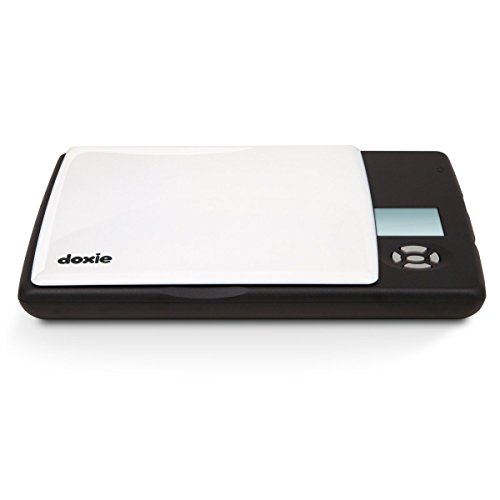
- •Doxie is lightweight and portable - about the size of a book - with batteries and memory so you can scan anywhere, no computer required.
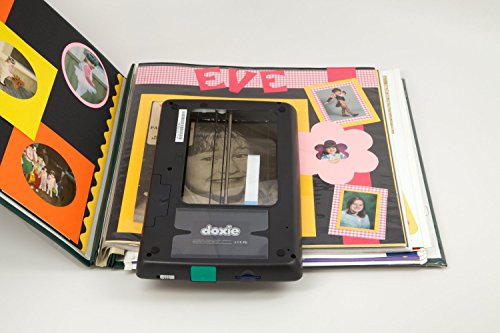
- •A unique removable lid lets you flip Doxie over and place it directly on your originals. Line up scans perfectly and see your scan as it happens with Doxie's transparent scanning window. It's a perfect photo scanner.
- •Doxie is built for capturing your history and creativity - scan photos, coins, ticket stubs, scrapbooks, Polaroids, letters, stamps, portraits, postcards, sketches, and pocket notebooks into digital files you can save and share. Doxie loves old albums, keepsakes, index cards, paper photos, even Field Notes and Moleskine brand pocket notebooks.
- •Included Doxie software lets you organize your scans and save digital copies to your desktop or to the cloud for instant sharing. Scans are ideal for use with Facebook, Dropbox, and more. You can even sync scans directly to iPad with Apple's iPad SD Card Reader (sold separately).
Doxie Flip - Cordless Flatbed Photo & Notebook Scanner w/Removable Lid
List Price: $254.61$229.15DEALYou Save: $25.46 (10%)
Free shippingFree Returns – 30 daysFree Order CancellationSecure Payment2–3 Days DeliveryGet It October 24, 2026In Stock (2)No marketing spamNo account requiredFulfilment by FedEx / Amazon / UPS / ShipwirePayPal / Card Buyer Protection
Customer Reviews
Reviews sourced from verified Amazon purchasers4.6
out of 5
Based on 10 reviews
5★
80%
4★
20%
3★
0%
2★
0%
1★
0%
Updated review after the first unit failed to start only after one use
Y. Xing•February 7, 2017
Update:
I have to say that I'm really impressed by the company's customer service! I would give their customer service 6 starts if I could. I was contacted very quickly by the manufacturer after my initial review about a defective product I received. They offered to send me a complementary brand new unit to have a chance to re-evaluate it, as well as a pack of Panasonic eneloop pro rechargeable batteries (2550mAh) with a charger to address the short battery life issue. And WOW, what a totally different experience! This time the unit turned on in one easy switch (vs the defective unit sluggish response and eventually refused to turn on), and the rechargeable battery lasted forever-I was too tired to wait until I could exhaust the power, but after 30 scans of 600dpi pictures, the indicator still showed a full charge. At least even after the batteries are gone, I won't have to worry about buying new ones, I could just recharge them. Also what's interesting is this new unit can fit all my different rechargeable batteries without any problem, while my own Duracell rechargeable could not fit into the previous defective unit.
In terms of the small scan area in my original review, my feeling is that you have to have a proper expectation to this unit-it is a portable device. I would say it is not meant for replacement of a desktop unit in terms of scale and capacity, but it is superior in other situations like taking it to a library, scanning old album which is a pain to take out each individual pictures. This time I tried the flip mode on my mom's 40 year old album and it was really fun to scan the fragile old pictures without worrying about damaging them!
Conclusion: Have the right exceptions and enjoy this versatile and portable little gadget. Also be prepared to spend a little more money on the eneloop pro rechargeable batteries, however, for you to enjoy this scanner, they are actually essential.
************************************************************************************************
Original review:
Not sure if it was because I bought a factory re-conditioned item, it came in with 4 empty alkaline batteries. Not a super big deal, it was $40 cheaper than the brand new one, so I just used my own batteries. But it burnt the batteries like crazy, 4 brand new AA batteries only lasted 80 scan. So I changed it to new set of batteries, but the unit failed to turn back on. So I have to return it. Ordered an Epson V19, no power cord, just USB cable powered, scan much bigger area. I'm way happier with the Epson than the Doxie Flip. Don't waste your money on a hype (tiny little scan area), bigger scan area is much more useful!
I have to say that I'm really impressed by the company's customer service! I would give their customer service 6 starts if I could. I was contacted very quickly by the manufacturer after my initial review about a defective product I received. They offered to send me a complementary brand new unit to have a chance to re-evaluate it, as well as a pack of Panasonic eneloop pro rechargeable batteries (2550mAh) with a charger to address the short battery life issue. And WOW, what a totally different experience! This time the unit turned on in one easy switch (vs the defective unit sluggish response and eventually refused to turn on), and the rechargeable battery lasted forever-I was too tired to wait until I could exhaust the power, but after 30 scans of 600dpi pictures, the indicator still showed a full charge. At least even after the batteries are gone, I won't have to worry about buying new ones, I could just recharge them. Also what's interesting is this new unit can fit all my different rechargeable batteries without any problem, while my own Duracell rechargeable could not fit into the previous defective unit.
In terms of the small scan area in my original review, my feeling is that you have to have a proper expectation to this unit-it is a portable device. I would say it is not meant for replacement of a desktop unit in terms of scale and capacity, but it is superior in other situations like taking it to a library, scanning old album which is a pain to take out each individual pictures. This time I tried the flip mode on my mom's 40 year old album and it was really fun to scan the fragile old pictures without worrying about damaging them!
Conclusion: Have the right exceptions and enjoy this versatile and portable little gadget. Also be prepared to spend a little more money on the eneloop pro rechargeable batteries, however, for you to enjoy this scanner, they are actually essential.
************************************************************************************************
Original review:
Not sure if it was because I bought a factory re-conditioned item, it came in with 4 empty alkaline batteries. Not a super big deal, it was $40 cheaper than the brand new one, so I just used my own batteries. But it burnt the batteries like crazy, 4 brand new AA batteries only lasted 80 scan. So I changed it to new set of batteries, but the unit failed to turn back on. So I have to return it. Ordered an Epson V19, no power cord, just USB cable powered, scan much bigger area. I'm way happier with the Epson than the Doxie Flip. Don't waste your money on a hype (tiny little scan area), bigger scan area is much more useful!
Another fantastic Doxie scanner.
Shoogle•December 8, 2016
No, they aren't paying me to say that. :) I've been using their document scanners for years, for full pages as well as photos. I'm in the process of scanning a ton of family photos, and the smaller ones can be problematic, especially if they're older and have frayed edges which can catch and tear. That's why this model is so great--you can safely scan single photos without the catch & tear problem, but if there's something in a book or magazine you want to get a copy of, this works perfectly for that too. Especially for scrapbooks where you can't get the photos out or you can't put them through a paper scanner. Example: I have a really old and delicate family photo which is glued to a thick card (probably used to go in a frame) and it's too thick for the document scanner and larger than the Flip's scanning area. I was able to scan it in 3 pieces using the Filp, and the Doxie software magically stitched them together for me. I've done that sort of thing manually in Photoshop for ages, and there's almost always a "seam" in the photo where the scans were fitted together, but the Doxie software was *flawless*--I can't even tell it was originally 3 photos, even by zooming in. I can't recommend this gadget highly enough, it's been incredibly useful and the price is just right. If you're on the fence about buying it, just get it already! :)
Love It!
Amazon Customer•October 4, 2016
This little gizmo has done everything it advertised! It is small, it doesn't need wires hanging off of it, it can be used as a regular scanner or flipped to scan pages that don't easily work on a traditional flatbed scanner. The software that comes with it is fast and easy to use; no, it isn't a full suite of photo manipulation tools, but it does the basics of crop, flip, and merge easily and intuitively.
Battery life is a bit unpredictable, but that's the fault of the batteries not the Doxie. Just be sure to have a spare set on hand, because once it is out of juice, it is out of juice. so have a spare set on hand. Also, be warned; do not leave batteries in the thing; the battery housing is not sealed and if you should have a battery failure in the device, you may have little flecks of the battery floating around inside, and showing up on your scans.
I have to say that customer service was awesome! The machine I received had a bad battery to start that had left little flecks inside and it was seriously messing up scans on a rush project. The Doxie folks got me a new one pronto.
I will add a wish here though: when you download your scans from the SD card, it stashes them into a hidden file until you process them into proper images; the processing is quick and easy, but if you've done a ton of scanning, it still takes time and I desperately wanted a backup of the unprocessed images. I know my way around my computer's operating system well enough to find the file and make a copy, but most folks probably wouldn't be able to do that. And, if, as in my case, you were going to lose access to the hard copies, that backup mattered.
Battery life is a bit unpredictable, but that's the fault of the batteries not the Doxie. Just be sure to have a spare set on hand, because once it is out of juice, it is out of juice. so have a spare set on hand. Also, be warned; do not leave batteries in the thing; the battery housing is not sealed and if you should have a battery failure in the device, you may have little flecks of the battery floating around inside, and showing up on your scans.
I have to say that customer service was awesome! The machine I received had a bad battery to start that had left little flecks inside and it was seriously messing up scans on a rush project. The Doxie folks got me a new one pronto.
I will add a wish here though: when you download your scans from the SD card, it stashes them into a hidden file until you process them into proper images; the processing is quick and easy, but if you've done a ton of scanning, it still takes time and I desperately wanted a backup of the unprocessed images. I know my way around my computer's operating system well enough to find the file and make a copy, but most folks probably wouldn't be able to do that. And, if, as in my case, you were going to lose access to the hard copies, that backup mattered.
For archiving old family photos and scrapbooks, it's hard to beat
lsmith1018•July 22, 2016
My great grandmothers photo albums and scrapbooks are mostly all glued to each page. The photos that aren't glued, are fixed to brittle pages. Additionally, My great grandmother doesn't have a computer or internet access. Before traveling to visit her, I did some research and the Doxie Flip was the perfect solution, without draining my bank account. After I ordered, I had issues with the first one. Doxie immediately sent me a replacement, no questions asked. After I reviewed my new one, I did a few practice scans, and it was extremely simple to use. On my trip, I went through albums page by page and quickly scanned everything I wanted to archive. I scanned photos, newspaper clips, letters, cards. For oversized objects, I scanned each photo in overlapping sections. When I returned home, I used the software to "stitch" the photos, and it turned out less complicated than I expected. I would definitely buy this product again!
A Genealogist's Dream!!
RCNorm•May 15, 2016
This COMPLETELY portable scanner is a family historian's dream! I do genealogy"Ž research for my family in my spare time and the Doxie Flip is something I've been searching for for a very long time! Its the perfect portable scanner that allows you to scan old photos and other important documents and/or keepsakes without your relatives having to fear that loaning you their photos will be lost or damaged, making it so much easier for them to share older photos and other memories, that they may otherwise have been reluctant to do. I've set my Doxie for 600 dpi as the default and while it takes a bit longer, the few seconds are oh so much worth it. I scanned a nearly 50 year old picture of one of my uncles and honestly, the scan looks better than the original! Thank you Doxie Flip!!! .
Page 1 of 2