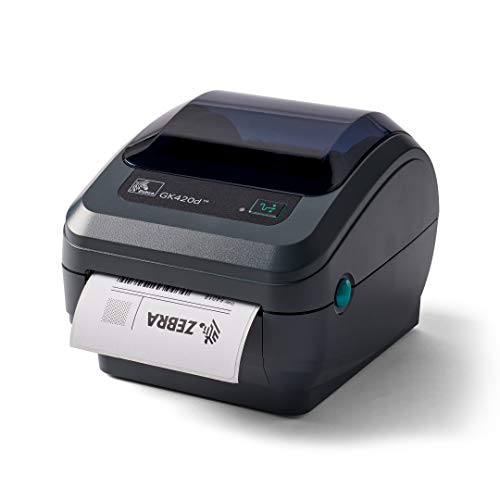
ZEBRA GK420d Direct Thermal Desktop Monochrome Printer Print Width of 4 in USB Serial and Parallel Port Connectivity GK42-202510-000


Key features
- •EASY TO USE: Connects via USB, serial, or parallel port and is compatible with direct thermal label rolls with 1 in core, max diameter of 5 in, and max media width of 4.25 in
- •NO INK OR TONER: Prints using direct thermal technology which eliminates the need for expensive ink or toner
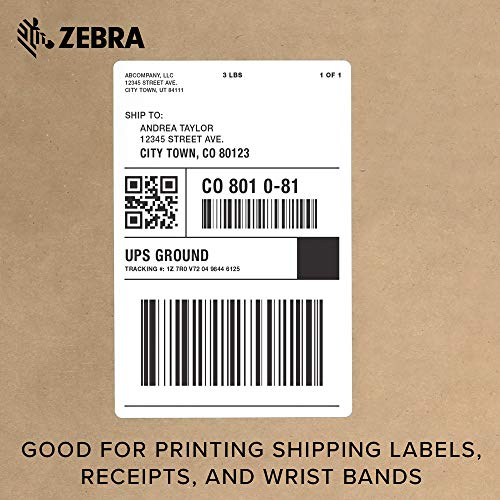
- •DEPENDABLE PERFORMANCE: Enterprise grade quality designed for durability and frequent use, the GK420d can create high quality address, shipping, mailing, file folder, barcode, and binder labels as well as name tags, wrist bands, and receipts
- •SAVE TIME AND MONEY: Prints 5 in/sec at 203 dpi, Energy Star approved, and on demand printing allows you to print exact quantities instead of wasting 8.5 x 11 sheets of labels
- •MAC AND PC: For use with Windows 10 and above, Mac OS X 10.6 Snow Leopard and above, and Linux systems using current CUPS printer drivers
ZEBRA GK420d Direct Thermal Desktop Monochrome Printer Print Width of 4 in USB Serial and Parallel Port Connectivity GK42-202510-000
List Price: $616.88$555.19DEALYou Save: $61.69 (10%)
Free shippingFree Returns – 30 daysFree Order CancellationSecure Payment2–3 Days DeliveryGet It October 26, 2026In Stock (9)No marketing spamNo account requiredFulfilment by FedEx / Amazon / UPS / ShipwirePayPal / Card Buyer Protection
Customer Reviews
Reviews sourced from verified Amazon purchasers4.5
out of 5
Based on 10 reviews
5★
70%
4★
30%
3★
0%
2★
0%
1★
0%
So far so good. Works with ShipStation, UPS and USPS
Amazon Customer✓ Verified Purchase•June 12, 2023
So far so good. Just received the printer today.
I'm Using Windows 10 and ShipStation.
Will work with bother UPS and USPS although the top boarders are just slightly cut off, but only by a few mm, it will not affect shipping.
ShipStation recommends you download their driver for any zebra printer. Since my windows computer is so slow (was purchased strictly for ShipStation) their recommended driver wouldn't download.
You pretty much plug and play with this printer, just set the printing preferences and you're good to go. I went ahead and installed the drivers on the disc that came with the printer since my computer recognized this printer as a zp450 after plugging it in and started printing labels. Installation was straight forward, although I doubt it was needed at all since this worked at first without installing the drivers!
I tried connecting to my Mac and followed ShipStations installation instructions but had no luck. You're best off getting a Dymo Printer just for Macs. But since I started a new clothing/accessories brand and will need to print labels to ship via UPS and USPS as well as UPC labels for my products, I had to purchase a PC designated for the thermal printers.
I'm Using Windows 10 and ShipStation.
Will work with bother UPS and USPS although the top boarders are just slightly cut off, but only by a few mm, it will not affect shipping.
ShipStation recommends you download their driver for any zebra printer. Since my windows computer is so slow (was purchased strictly for ShipStation) their recommended driver wouldn't download.
You pretty much plug and play with this printer, just set the printing preferences and you're good to go. I went ahead and installed the drivers on the disc that came with the printer since my computer recognized this printer as a zp450 after plugging it in and started printing labels. Installation was straight forward, although I doubt it was needed at all since this worked at first without installing the drivers!
I tried connecting to my Mac and followed ShipStations installation instructions but had no luck. You're best off getting a Dymo Printer just for Macs. But since I started a new clothing/accessories brand and will need to print labels to ship via UPS and USPS as well as UPC labels for my products, I had to purchase a PC designated for the thermal printers.
Too big
Vanibiss✓ Verified Purchase•May 31, 2023
Im sure is of great quality bevause is a good famous brand but it didn't worked for me. I couldn't get it to work. Not easy to install and kind of big.
Nice Printer
FL Night Owl✓ Verified Purchase•May 29, 2023
Prior to purchasing this I had to print my labels on a laser printer, cut them to size, and affix with tape. So this Zebra printer really saves a lot of time and certainly is more professional. For some reason I had problems getting the label to print correctly, but I phoned support and got immediate help. The tech walked me through a couple of changes in my set-up and everything has been fine since.
Before buying it I read some reviewers' comments on poor print quality. Although not laser quality, I've had no issues with the print quality being substandard. There are some adjustments, or choices, to make regarding print quality when setting up the printer for the first time, so perhaps it has to do with the choices there.
I wish I'd bought this a long time ago, but I'm glad I have it now.
Before buying it I read some reviewers' comments on poor print quality. Although not laser quality, I've had no issues with the print quality being substandard. There are some adjustments, or choices, to make regarding print quality when setting up the printer for the first time, so perhaps it has to do with the choices there.
I wish I'd bought this a long time ago, but I'm glad I have it now.
It will be printed on a blank paper
jay✓ Verified Purchase•May 23, 2023
I have bought gk420d from you guys
But until now, I used it well, but one day suddenly
It will be printed on a blank paper. Please help me
But until now, I used it well, but one day suddenly
It will be printed on a blank paper. Please help me
The Standard
David Toomey✓ Verified Purchase•May 23, 2023
I used to have a used ZP450, which sparked out on me a few months after buying it. This product is better because:
-- It has a plug with a surge-protector. I think this is why the last one zonked out on me.
-- This device is smaller than the ZP450. I don' t know why. I like this.
-- It isn't going to print as fast as an expensive Zebra, but it does print plenty fast enough for my volume.
-- The feed is accurate. I can't tell how many labels I wasted calibrating the other printer I had. This one just zips right into place on the first pass.
Although this was a bittersweet purchase for me, I don't regret it one bit. The print quality is better than my last device and I wish that I had bought this one first. These aren't cheap, but Zebra printers are the professional standard. They do exactly one thing (print labels) and do it very well.
-- It has a plug with a surge-protector. I think this is why the last one zonked out on me.
-- This device is smaller than the ZP450. I don' t know why. I like this.
-- It isn't going to print as fast as an expensive Zebra, but it does print plenty fast enough for my volume.
-- The feed is accurate. I can't tell how many labels I wasted calibrating the other printer I had. This one just zips right into place on the first pass.
Although this was a bittersweet purchase for me, I don't regret it one bit. The print quality is better than my last device and I wish that I had bought this one first. These aren't cheap, but Zebra printers are the professional standard. They do exactly one thing (print labels) and do it very well.
Page 1 of 2


