WEB POWER SWITCH WLCD SCREEN 10 OUTLETS
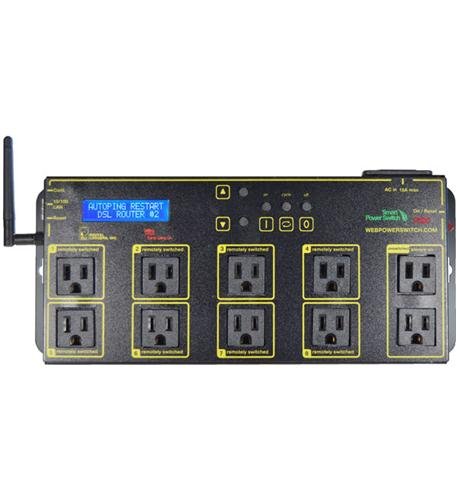
Key features
- •Latest model version 7 with updated firmware and interface.
- •Internal clock for programmed scheduling. Keypad for local outlet control. Ethernet for reliable remote control. Fully supports NTS syslog mobile devices.
- •Enable the \\\\\\\"Auto-Ping\\\\\\\" feature to intelligently reboot a locked-up AP router VoIP phone server camera or other device automatically even during WAN outages. Fully programmable using simple BASIC scripts
- •Eight individual circuits are switched with up to 15A of total power. Two unswitched outlets are also provided. 10/100 autosensing plug-and-play Ethernet connection with static IP allows reliable connection anywhere on your LAN WAN or over the Internet.
- •Multiple power-up recovery modes add safety and flexibility: timed sequential on all-off last state etc.. Lowest power draw of any competitive product 4 watts! Full 15A rating via convenient removable 14AWG power cord
BrandDIGITAL LOGGERS
CategoryPDUs
WEB POWER SWITCH WLCD SCREEN 10 OUTLETS
List Price: $294.77$265.29DEALYou Save: $29.48 (10%)
Free shippingFree Returns – 30 daysFree Order CancellationSecure Payment2–3 Days DeliveryGet It October 25, 2026In Stock (11)No marketing spamNo account requiredFulfilment by FedEx / Amazon / UPS / ShipwirePayPal / Card Buyer Protection
Customer Reviews
Reviews sourced from verified Amazon purchasers3.6
out of 5
Based on 10 reviews
5★
70%
4★
30%
3★
0%
2★
0%
1★
0%
Excellent value. Reliable.
edward b✓ Verified Purchase•August 15, 2023
This device is hands down the best value, which is how Digital Loggers' products are - typically priced disruptively low and aim to compete with the expensive enterprise grade products that cost 5-10x as much, which makes them affordable for smaller businesses on tight budgets like mine.
You can control every outlet individually and set up alarm conditions when something stops responding to a ping to cycle one or multiple outlets. It's not without its minor flaws, but it is reliable and well designed and suitable for professional use at consumer pricing. I also own a cheap Chinese product that's similar (4 outlets) but terrible web interface and buggy. This isn't the case here. This device also supports some basic scripting, but I haven't used it.
I use this to power some remote networking radio gear that would take a couple hours to drive to, in order power cycle. Every 2-3 months, this device detects a locked up network connection that prevents me from remotely rebooting it and automatically does it for me, before customers even know something went wrong. It can send output to a syslog server, so you can see what has happened.
One small "nice touch" feature is the ability to not just "Switch off" and "Switch on" an outlet from the web panel, is the "cycle" an outlet. This is key because if you are switching something off that breaks the network connection to the device, you won't be able to then switch it back on. This covers that scenario.
The display is nice, but not very useful. Using the buttons on the front panel, I somehow accidentally "locked" an outlet that I couldn't "unlock" using the web control panel. I had to physically go back to the device to fix this and it wasn't explained in the manual how to do this or what this feature was about. This almost pushes it down to 4-stars, but because of its pricepoint, I still give it 5.
If the folks at Digital Loggers read this review, I recommend you offer a small 1 or 2 outlet version without the display, and pass the savings along. Most of my applications only need one outlet and compressing it into a small cabinet would make it convenient for towers or outdoor cabinets.
You can control every outlet individually and set up alarm conditions when something stops responding to a ping to cycle one or multiple outlets. It's not without its minor flaws, but it is reliable and well designed and suitable for professional use at consumer pricing. I also own a cheap Chinese product that's similar (4 outlets) but terrible web interface and buggy. This isn't the case here. This device also supports some basic scripting, but I haven't used it.
I use this to power some remote networking radio gear that would take a couple hours to drive to, in order power cycle. Every 2-3 months, this device detects a locked up network connection that prevents me from remotely rebooting it and automatically does it for me, before customers even know something went wrong. It can send output to a syslog server, so you can see what has happened.
One small "nice touch" feature is the ability to not just "Switch off" and "Switch on" an outlet from the web panel, is the "cycle" an outlet. This is key because if you are switching something off that breaks the network connection to the device, you won't be able to then switch it back on. This covers that scenario.
The display is nice, but not very useful. Using the buttons on the front panel, I somehow accidentally "locked" an outlet that I couldn't "unlock" using the web control panel. I had to physically go back to the device to fix this and it wasn't explained in the manual how to do this or what this feature was about. This almost pushes it down to 4-stars, but because of its pricepoint, I still give it 5.
If the folks at Digital Loggers read this review, I recommend you offer a small 1 or 2 outlet version without the display, and pass the savings along. Most of my applications only need one outlet and compressing it into a small cabinet would make it convenient for towers or outdoor cabinets.
So far, a reliable and useful device
ComputerBastard ✓ Verified Purchase•August 13, 2023
I now have 2 of these Web Power switches and have been pleasantly surprised at how well they have performed. In my job, I do enterprise-level systems administration and so I wasn't expecting much from a consumer grade "smart" switch. Some of the reviews also suggest hardware reliability issues, but so far, I've not experienced this.
The unit is very easy to setup and straightforward. I use it to autoping and reboot a couple of troublesome IP cameras that have had a tendency to become unresponsive in a way that can only be resolved with a hard boot. Once the autoping feature is setup, it will cycle the designated outlet or outlets after a prescribed number of ping failures. Since deploying the Web Power switch, I have had ZERO problems with those cams, as the switch detects the problem and cycles the cams and/or injectors on-queue. Excellent!
Remote accessibility is easy and works well. The only caution is that I'm a little shaky on the security of these things, so I have a few suggestions:
1. Consider if you can restrict access to your internal subnet only.
2. If you must have remote access outside your LAN, setup the unit on an odd-ball port, and forward to this through your router.
3. Better still, if you have a newer router like the Asus AC3200, you can use the on-board VPN to permit remote connections to the internal subnet, whilst preventing other outside connections.
The autoping setup is slightly confusing, but here are a few tips:
1. Enter the IP address of the device you want to autoping and click "Add"
2. Setup the parameters below the new entry for how you want the autoping to behave (i.e., how many failures before cycle, time between pings, etc.). Then check the box next to the device you added in the first step, and click the "Apply" button.
3. Now look toward the second to the last column on the device and you will see a green check and a red "X". Click the green check (this is OK).
Once you click the "green check mark" it will be begin to autoping the added device. Once it reaches the default value of 10 successful ping responses, the autoping feature should be enabled. You can double check the Web Power log to confirm this.
So far the unit has kept its settings reliably on reboots, with no hiccups. The only downside thus far is the key pad on the device is a bit hard to use and somewhat slow to respond to user input.
Update 2:
These are still going strong and performing reliably after almost 2 years.
Update 1:
Both of my units have been performing flawlessly for several months. The autoping works really well. I use it to monitor a couple of fussy foscam cameras that need to be rebooted periodically. When these cease to respond, the web power switch cycles the power outlet and bingo, back on-line. I've had no problems with either cam since hooking them up to this.
The unit is very easy to setup and straightforward. I use it to autoping and reboot a couple of troublesome IP cameras that have had a tendency to become unresponsive in a way that can only be resolved with a hard boot. Once the autoping feature is setup, it will cycle the designated outlet or outlets after a prescribed number of ping failures. Since deploying the Web Power switch, I have had ZERO problems with those cams, as the switch detects the problem and cycles the cams and/or injectors on-queue. Excellent!
Remote accessibility is easy and works well. The only caution is that I'm a little shaky on the security of these things, so I have a few suggestions:
1. Consider if you can restrict access to your internal subnet only.
2. If you must have remote access outside your LAN, setup the unit on an odd-ball port, and forward to this through your router.
3. Better still, if you have a newer router like the Asus AC3200, you can use the on-board VPN to permit remote connections to the internal subnet, whilst preventing other outside connections.
The autoping setup is slightly confusing, but here are a few tips:
1. Enter the IP address of the device you want to autoping and click "Add"
2. Setup the parameters below the new entry for how you want the autoping to behave (i.e., how many failures before cycle, time between pings, etc.). Then check the box next to the device you added in the first step, and click the "Apply" button.
3. Now look toward the second to the last column on the device and you will see a green check and a red "X". Click the green check (this is OK).
Once you click the "green check mark" it will be begin to autoping the added device. Once it reaches the default value of 10 successful ping responses, the autoping feature should be enabled. You can double check the Web Power log to confirm this.
So far the unit has kept its settings reliably on reboots, with no hiccups. The only downside thus far is the key pad on the device is a bit hard to use and somewhat slow to respond to user input.
Update 2:
These are still going strong and performing reliably after almost 2 years.
Update 1:
Both of my units have been performing flawlessly for several months. The autoping works really well. I use it to monitor a couple of fussy foscam cameras that need to be rebooted periodically. When these cease to respond, the web power switch cycles the power outlet and bingo, back on-line. I've had no problems with either cam since hooking them up to this.
Turned on once and then died!-UPDATED
Ali Raza✓ Verified Purchase•August 5, 2023
Just received mine today. Turned it up to set IP and password. All good. Then moved it to my lounge where i want to use. Plugged it in, turned it on and its DEAD!!! The led is ON, no text and thats it.... Im at a loss of words...I thought this was a good quality product!
UPDATE July 10 2015: So two days later Martin, owner of digital logger, responded to my support ticket. His response was sincere and felt like he really did care about his products. What he did next was simply amazing and unheard of from any company. I won't get into specifics so that people don't end up taking advantage. All I can say is that I doubt any manufacturer out there would do anything like this to make up for their failed product. Simply due to that I'm raising my rating to 4 stars.
UPDATE July 10 2015: So two days later Martin, owner of digital logger, responded to my support ticket. His response was sincere and felt like he really did care about his products. What he did next was simply amazing and unheard of from any company. I won't get into specifics so that people don't end up taking advantage. All I can say is that I doubt any manufacturer out there would do anything like this to make up for their failed product. Simply due to that I'm raising my rating to 4 stars.
Excellent value
Andrew Johnson✓ Verified Purchase•August 1, 2023
Time will tell if it lasts, but this is the best product for the money that I could find.
I've set it up to auto-ping my Raspberry Pis, if one fails to respond to 3 pings in a row it will cycle the associated outlet which has the Pi as well as all the associated devices connected to it with a power strip. I can give the outlets friendly names so that I know which is which if I want to manually cycle stuff(Outlet 3, Shelf 0, Rpi2, 192.168.1.54) that sort of thing, and it has a log that tells you each time anything happens. I can remote into the web panel from anywhere by using Teamviewer to get into my network like I usually do and going from there.
Only things it's missing is emailed alerts and metering power by outlet(would be cool to be able to restart an outlet if power usage drops below N watts), but I bet I can make alerts work with the scripting language, if I can get it to kick off a batch or a shell script I can use blat or mail. Going to mess with that this week sometime.
I even have it pinging the gateway(which goes through the rack's main switch), and if that fails it will powercycle that switch that all the devices on the rack are connected to. How cool is that?
If power fails it will automatically resume the last power state and log it, and will stagger startup of the outlets with 10 seconds in between each one.
For the price, this one is a no-brainer.
I've set it up to auto-ping my Raspberry Pis, if one fails to respond to 3 pings in a row it will cycle the associated outlet which has the Pi as well as all the associated devices connected to it with a power strip. I can give the outlets friendly names so that I know which is which if I want to manually cycle stuff(Outlet 3, Shelf 0, Rpi2, 192.168.1.54) that sort of thing, and it has a log that tells you each time anything happens. I can remote into the web panel from anywhere by using Teamviewer to get into my network like I usually do and going from there.
Only things it's missing is emailed alerts and metering power by outlet(would be cool to be able to restart an outlet if power usage drops below N watts), but I bet I can make alerts work with the scripting language, if I can get it to kick off a batch or a shell script I can use blat or mail. Going to mess with that this week sometime.
I even have it pinging the gateway(which goes through the rack's main switch), and if that fails it will powercycle that switch that all the devices on the rack are connected to. How cool is that?
If power fails it will automatically resume the last power state and log it, and will stagger startup of the outlets with 10 seconds in between each one.
For the price, this one is a no-brainer.
Internet reset dream come true...
A. Armstrong✓ Verified Purchase•July 26, 2023
This thing is bitchin... We set up to stage power to Modem first, Router second and Network Switch third. You can program the time out between each of 8 outlets being switched on (there are ten outlets, but two are always on). For instance, Outlet one comes on, then 30 seconds later outlet two switches on... In our case, cable modem is plugged into outlet one and router is plugged into outlet four, hence, router turns on 1.5 minutes after the modem, giving modem time to sync up to the IP service before router starts interfacing to it. In addition, you can attach this power strip to the network via Cat5 and it will ping to an outside IP on a timed basis (you can se the IP you want pinged). If the ping faults, you can select outlets to re-boot. This eliminates having to physically reset the equipment on an internet outage. It also has surge protection built in and is constructed very well. You program it similarly to a router, accessing the bios through network IP address. Worth every penny.
Page 1 of 2


