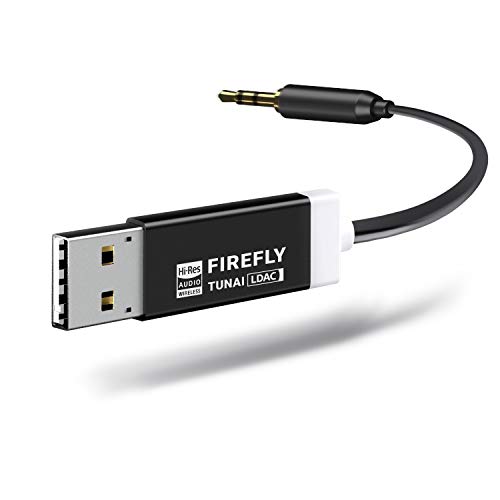
iSimple Hands-Free Calling and Music Streaming Kit with Control Button for Smartphones - Frustration-Free Packaging - Black
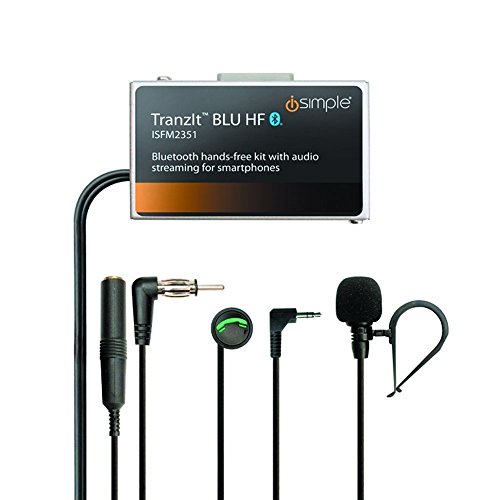



Key features
- •Hands-free calling
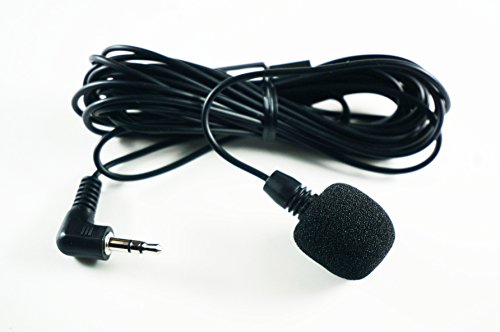
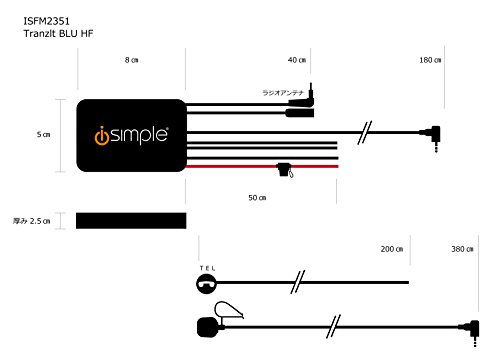
- •Wireless audio streaming.Visor clip. Flexible microphone placement options ensure that you can talk comfortably
- •Wireless control of music playback with control button
- •Launch your phone's voice recognition to: text, e-mail; get directions; call
- •3.5mm audio output for vehicles with auxiliary input
iSimple Hands-Free Calling and Music Streaming Kit with Control Button for Smartphones - Frustration-Free Packaging - Black
List Price: $187.55$168.80DEALYou Save: $18.75 (10%)
Free shippingFree Returns – 30 daysFree Order CancellationSecure Payment2–3 Days DeliveryGet It October 26, 2026In Stock (1)No marketing spamNo account requiredFulfilment by FedEx / Amazon / UPS / ShipwirePayPal / Card Buyer Protection
Customer Reviews
Reviews sourced from verified Amazon purchasers4.4
out of 5
Based on 10 reviews
5★
80%
4★
20%
3★
0%
2★
0%
1★
0%
Very Good but not Perfect
H. Kading✓ Verified Purchase•November 11, 2023
I would give this 5 stars based on how well it works and easy to install. Basically it's good enough I am going to buy a second one for another car. Call quality incoming and outgoing is very good. Streaming music is also very good although the volume requires turning your Bluetooth device pretty much all the way and then it's still only about 3/4 as loud as an FM station. But loud enough for us to use as is. The disconnect for the FM antenna so unwanted radio signals don't conflict with your BT input works flawlessly.
However, loses a star for the following reasons:
Install directions with user manual are at odds with the directions written on the back of the unit (friendly tech support told me to follow the directions in the user manual)
There's supposed to be an app you can download onto your smart phone to access the device settings, such as changing to another FM station. The app is supposed to be available for iPhone, Android and Windows phone.
I downloaded for my Windows Phone 8 and it comes down as a zip file. Well, you can't unzip files on a Windows Phone, it's not possible.
So I downloaded on my wife's iPhone and was able to open the app but it only has functionality to adjust settings for a steering wheel switch kit, no way to make it work for the ISFM2351, it's not on the menu. So I tried downloading it on my PC, tried to unzip it and my Norton stopped it because of a virus. Didn't try an Android device.
Was hoping with the app that maybe there was a setting to increase the volume (gain).
So, it works well enough as is with no adjustments but maybe it could be better with some tweaking. I don't know of any other devices (I looked really hard) that do everything this one does in a single unit.
However, loses a star for the following reasons:
Install directions with user manual are at odds with the directions written on the back of the unit (friendly tech support told me to follow the directions in the user manual)
There's supposed to be an app you can download onto your smart phone to access the device settings, such as changing to another FM station. The app is supposed to be available for iPhone, Android and Windows phone.
I downloaded for my Windows Phone 8 and it comes down as a zip file. Well, you can't unzip files on a Windows Phone, it's not possible.
So I downloaded on my wife's iPhone and was able to open the app but it only has functionality to adjust settings for a steering wheel switch kit, no way to make it work for the ISFM2351, it's not on the menu. So I tried downloading it on my PC, tried to unzip it and my Norton stopped it because of a virus. Didn't try an Android device.
Was hoping with the app that maybe there was a setting to increase the volume (gain).
So, it works well enough as is with no adjustments but maybe it could be better with some tweaking. I don't know of any other devices (I looked really hard) that do everything this one does in a single unit.
Like many people with an older model vehicle
Ric✓ Verified Purchase•November 6, 2023
Like many people with an older model vehicle, the audio system on my 2003 GMC Sierra 4x4 does not have an aux port, let alone Bluetooth capability. The truck still looks and runs like the day I bought it and it does have the premium Bose 6-Speaker 6-CD changer head unit. That system sounds great and I did not want to replace it with a touch screen audio system with Bluetooth capability primarily because I don't like to replace a very good OEM sound system and it would have been costly. In my case close to $1000.00 with the appropriate harnesses and modules for full steering wheel (audio control) functionality.
Had been using a simple FM transmitter plugged into my cigarette lighter and it works ok out in the middle of nowhere (I70 through Utah or the Loneliest Road in America, I50 through Nevada) but anytime I get into a major metro area I'd have to constantly fiddle with it to get a clear FM channel. Consequently I was looking for a better solution to stream my music especially since I will be driving from Colorado to the S.F. Bay area again this summer.
After a fair bit of research and reading a ton of reviews I settled on the TranzitBLU HF and I am happy with the choice. Sound quality is excellent and call quality is very good. (Please note that all of the 120+ CD's I have on my iPhone have been ripped to the CD-Quality .aiff format). My daughter has most of her songs in mp3 or mp4 format and there is a sound quality difference, but nothing that isn't to be expected with playing "lossey" formatted music. In any case her music still sounds good, just not CD quality good).
Some people have reported poor sound quality and overall functionality but I suspect that may have to do more with the installation, the music format used and or the head unit to which this unit is mated too.
Some install notes:
1.) You will need to buy the Metra 40-GM30 Antenna Adapter kit if you have a GM vehicle. Kits are available for other vehicles.
2.) If at all possible install the unit under the center console as opposed to buried in the dash behind the head unit. It will make trouble shooting much easier if necessary.
3.) If possible solder power, ground, and control button wires and insulate with heat shrink tubing. Butt connectors are ok, but for heaven's sake avoid those inline snap together splice connectors which many big box audio installers tend to use to save time when installing electronics.
4.) Make sure of a good dedicated switched power connection and a solid dedicated chassis ground connection. Many sound quality issues can be attributed to poor ground.
5.) Install the control button in a convenient easy to reach location. In my case it was on the left rear wall of the cup holder console (the actual cup holders are on the right side of the console).
6.) Optional "“ I installed a small blue LED master on/off switch to power the unit. This was done for two reasons. 1.) There are times when I simply want to get in my truck and drive without any distractions whatsoever so there is no need to have the unit powered on constantly searching for a Bluetooth connection. 2.) The user manual states that "when the unit is disengaged the isfm2351 is still connected to your Bluetooth device for hands free calling". I have found that not necessarily to be true (at least with my iPhone 7 ios 11.3.1). Disengaging the unit essentially renders the control button inoperable, however my phone still displays the small headphone icon in the upper right corner next to battery percentage i.e. the phone still thinks it's connected to an external speaker so while the "Hey Siri" command works there is no audio output because the phone thinks it is connected to an external speaker which has been turned off . Consequently when listening to a regular radio channel for news, weather, traffic, sports etc. I simply switch the unit off and use the native VR functionality of the phone i.e. ("Hey Siri") to make and receive calls or texts, get directions etc.
7.) If your vehicle has steering wheel controls for Volume and mute they will work fine. Seek and Source buttons not so much. Seek will simply "seek" another FM station and "source" will simply change the source (i.e. FM to AM to CD etc.). Hitting either of those effectively disengages the TranzitBLU HF. I knew that going in so it wasn't a deal breaker for me "“ just thought I'd mention it.
Overall I am very pleased with the TranzitBLU HF. For less than a hundred bucks I was able to add hands free calling and Bluetooth streaming to my existing audio system. Attainable volume levels are comparable to playing CD and on my OEM Bose anything over 80% exceeds my comfort level. The system effectively mutes music when making or receiving a call and when Siri kicks in to update directions while driving. Another nice side benefit I forgot to mention is that if your stereo has RDS capability song information will be displayed on the head unit display while playing. Caller ID will also display on the head unit display when receiving a call. Would highly recommend to anyone wanting to add hands free calling and Bluetooth functionality to an older car stereo system.
Had been using a simple FM transmitter plugged into my cigarette lighter and it works ok out in the middle of nowhere (I70 through Utah or the Loneliest Road in America, I50 through Nevada) but anytime I get into a major metro area I'd have to constantly fiddle with it to get a clear FM channel. Consequently I was looking for a better solution to stream my music especially since I will be driving from Colorado to the S.F. Bay area again this summer.
After a fair bit of research and reading a ton of reviews I settled on the TranzitBLU HF and I am happy with the choice. Sound quality is excellent and call quality is very good. (Please note that all of the 120+ CD's I have on my iPhone have been ripped to the CD-Quality .aiff format). My daughter has most of her songs in mp3 or mp4 format and there is a sound quality difference, but nothing that isn't to be expected with playing "lossey" formatted music. In any case her music still sounds good, just not CD quality good).
Some people have reported poor sound quality and overall functionality but I suspect that may have to do more with the installation, the music format used and or the head unit to which this unit is mated too.
Some install notes:
1.) You will need to buy the Metra 40-GM30 Antenna Adapter kit if you have a GM vehicle. Kits are available for other vehicles.
2.) If at all possible install the unit under the center console as opposed to buried in the dash behind the head unit. It will make trouble shooting much easier if necessary.
3.) If possible solder power, ground, and control button wires and insulate with heat shrink tubing. Butt connectors are ok, but for heaven's sake avoid those inline snap together splice connectors which many big box audio installers tend to use to save time when installing electronics.
4.) Make sure of a good dedicated switched power connection and a solid dedicated chassis ground connection. Many sound quality issues can be attributed to poor ground.
5.) Install the control button in a convenient easy to reach location. In my case it was on the left rear wall of the cup holder console (the actual cup holders are on the right side of the console).
6.) Optional "“ I installed a small blue LED master on/off switch to power the unit. This was done for two reasons. 1.) There are times when I simply want to get in my truck and drive without any distractions whatsoever so there is no need to have the unit powered on constantly searching for a Bluetooth connection. 2.) The user manual states that "when the unit is disengaged the isfm2351 is still connected to your Bluetooth device for hands free calling". I have found that not necessarily to be true (at least with my iPhone 7 ios 11.3.1). Disengaging the unit essentially renders the control button inoperable, however my phone still displays the small headphone icon in the upper right corner next to battery percentage i.e. the phone still thinks it's connected to an external speaker so while the "Hey Siri" command works there is no audio output because the phone thinks it is connected to an external speaker which has been turned off . Consequently when listening to a regular radio channel for news, weather, traffic, sports etc. I simply switch the unit off and use the native VR functionality of the phone i.e. ("Hey Siri") to make and receive calls or texts, get directions etc.
7.) If your vehicle has steering wheel controls for Volume and mute they will work fine. Seek and Source buttons not so much. Seek will simply "seek" another FM station and "source" will simply change the source (i.e. FM to AM to CD etc.). Hitting either of those effectively disengages the TranzitBLU HF. I knew that going in so it wasn't a deal breaker for me "“ just thought I'd mention it.
Overall I am very pleased with the TranzitBLU HF. For less than a hundred bucks I was able to add hands free calling and Bluetooth streaming to my existing audio system. Attainable volume levels are comparable to playing CD and on my OEM Bose anything over 80% exceeds my comfort level. The system effectively mutes music when making or receiving a call and when Siri kicks in to update directions while driving. Another nice side benefit I forgot to mention is that if your stereo has RDS capability song information will be displayed on the head unit display while playing. Caller ID will also display on the head unit display when receiving a call. Would highly recommend to anyone wanting to add hands free calling and Bluetooth functionality to an older car stereo system.
Sounds clear
Randall Harrison✓ Verified Purchase•October 12, 2023
It doesn't connect automaticly when I get in range. I have to connect with Bluetooth before I can use it. The volume has to be adjusted for each song. I don't have to this this with other devices using the same playlist.
ISimple Tranzit HF is Amazing!
RLR✓ Verified Purchase•September 3, 2023
My Murano didn't have an aux in, so after reading all the reviews I decided to try out the iSimple Hands-Free Kit. I must admit that I am quite impressed! The install took about an hour and looks absolutely professional.
I had to remove the dash console to get to the rear of the radio. There are plenty of YouTube videos to show how this is done.
The next issue was to find switched power. A quick internet search helped me identify which wires on the existing radio to splice into for switched power.
The microphone wire is very long and it was easy to run it from the center inside the dash, to the drivers side A pillar, then tuck inside the headliner all the way to the center right above the rear view mirror.
Finally I had to figure out where to locate the button. I simply mounted it centered right on the center dash console just below the A/C vent. The wire is very thin and comes right between the A/C vent and the aluminum console, then the button sticks on right at the edge where the two meet. There's no wire showing and most importantly there was NO drilling required!!
I downloaded the Android app to control it and tuned it to my wife's favorite music station, that way when she's driving the car the radio will be on her station. For me I use iHeart radio on my android phone and can listen to all of my favorite stations without having to re-tune the radio.
Once paired through your phones bluetooth connection, all your sounds go through your factory speakers and in my Murano with the Bose sound system, it sounds absolutely AWESOME!
It's pretty cool talking to my phone and having "the car" respond! "OK Google - Call my wife's mobile", "OK Google - navigate to Tampa International Airport", etc... I can have the radio turned up, and it automatically mutes the radio and I hear speech navigation or phone conversations right through the stereo. As soon as my call is over, or I've made that Left Turn that navigation asked for, it "automagically" returns to my normal radio listening.
I highly recommend this to anyone who wants a "Factory" type of hands-free in their car, but doesn't have an AUX-in or bluetooth on their factory radio!
I had to remove the dash console to get to the rear of the radio. There are plenty of YouTube videos to show how this is done.
The next issue was to find switched power. A quick internet search helped me identify which wires on the existing radio to splice into for switched power.
The microphone wire is very long and it was easy to run it from the center inside the dash, to the drivers side A pillar, then tuck inside the headliner all the way to the center right above the rear view mirror.
Finally I had to figure out where to locate the button. I simply mounted it centered right on the center dash console just below the A/C vent. The wire is very thin and comes right between the A/C vent and the aluminum console, then the button sticks on right at the edge where the two meet. There's no wire showing and most importantly there was NO drilling required!!
I downloaded the Android app to control it and tuned it to my wife's favorite music station, that way when she's driving the car the radio will be on her station. For me I use iHeart radio on my android phone and can listen to all of my favorite stations without having to re-tune the radio.
Once paired through your phones bluetooth connection, all your sounds go through your factory speakers and in my Murano with the Bose sound system, it sounds absolutely AWESOME!
It's pretty cool talking to my phone and having "the car" respond! "OK Google - Call my wife's mobile", "OK Google - navigate to Tampa International Airport", etc... I can have the radio turned up, and it automatically mutes the radio and I hear speech navigation or phone conversations right through the stereo. As soon as my call is over, or I've made that Left Turn that navigation asked for, it "automagically" returns to my normal radio listening.
I highly recommend this to anyone who wants a "Factory" type of hands-free in their car, but doesn't have an AUX-in or bluetooth on their factory radio!
Great value to add Bluetooth to older stereo
Eric✓ Verified Purchase•August 26, 2023
Awesome upgrade for an older stock stereo in 2003 Accord. Bought this to be able to connect our phone to an older car stereo without BT/AUX and after installed our Android phones (Nexus 5x and Moto X) connect immediately after turning the car on (note only one phone can be connected at a time).
We haven't had any major issues in over one month. I will say when the Bluetooth volume on the Nexus 5x is al the way up the sound is distorted but it's probably because of the phone EQ. Volume at 75% is great and volume on Moto X at 100% is great. The overall Bluetooth volume is quieter than other sources but that's not a big issue. Cars around the one with the module installed aren't able to listen to what it's playing, which is helpful especially when talking on the phone through the speakers. I'm guessing that's due to how the FM signal is injected directly into the antenna cable. I tested this in our garage with a second car right next to the one with the module installed and tuned to the same frequency.
It took about 4 hours to completely install the module and neatly route the mic wire up the front driver pillar to near the rearview mirror. I ended up splicing into the stereo's remote wire for power and was able to connect the ground to a bolt that other wires are grounded to. The module programming via the smartphone app was simple. The app isn't spectacular, but it works well and doesn't have ads or connect out to other unknown services (phone firewall showed zero connections to internet).
The mic placed above the rearview mirror picks up both the driver and passenger voice well so the person on the other end can understand pretty easily. The green next button is great when switching songs or turning off the module to listen to the radio. I haven't noticed any FM radio degradation when the module is powered off - though there certainly is when it's powered on (by design).
Overall this was a great addition to our car. Wish it was a little cheaper so I could add it to our other one we don't drive much!
We haven't had any major issues in over one month. I will say when the Bluetooth volume on the Nexus 5x is al the way up the sound is distorted but it's probably because of the phone EQ. Volume at 75% is great and volume on Moto X at 100% is great. The overall Bluetooth volume is quieter than other sources but that's not a big issue. Cars around the one with the module installed aren't able to listen to what it's playing, which is helpful especially when talking on the phone through the speakers. I'm guessing that's due to how the FM signal is injected directly into the antenna cable. I tested this in our garage with a second car right next to the one with the module installed and tuned to the same frequency.
It took about 4 hours to completely install the module and neatly route the mic wire up the front driver pillar to near the rearview mirror. I ended up splicing into the stereo's remote wire for power and was able to connect the ground to a bolt that other wires are grounded to. The module programming via the smartphone app was simple. The app isn't spectacular, but it works well and doesn't have ads or connect out to other unknown services (phone firewall showed zero connections to internet).
The mic placed above the rearview mirror picks up both the driver and passenger voice well so the person on the other end can understand pretty easily. The green next button is great when switching songs or turning off the module to listen to the radio. I haven't noticed any FM radio degradation when the module is powered off - though there certainly is when it's powered on (by design).
Overall this was a great addition to our car. Wish it was a little cheaper so I could add it to our other one we don't drive much!
Page 1 of 2