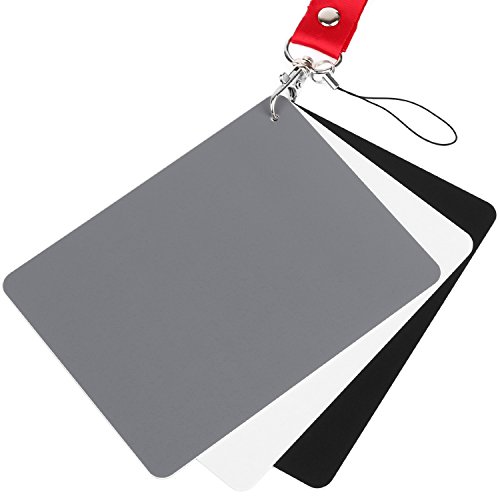
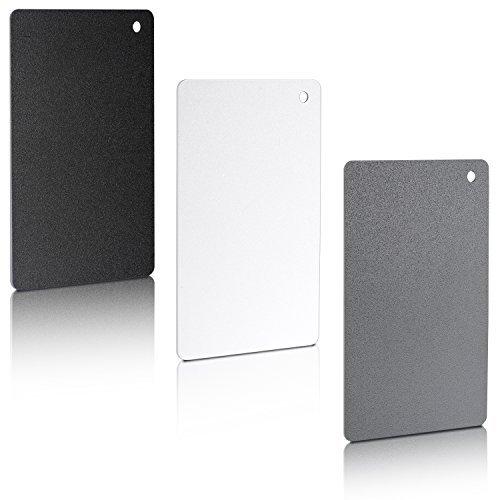
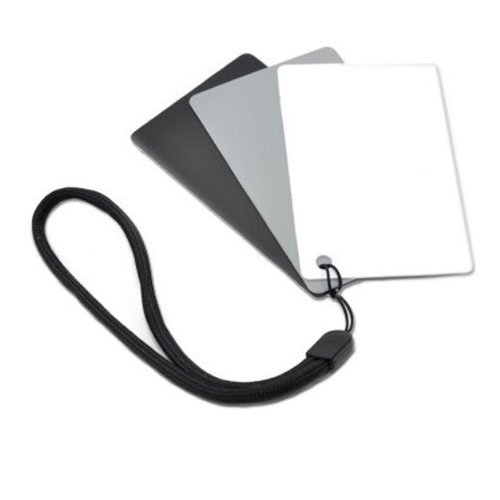
Lightdow 12 x 12 Inch (30 x 30 cm) White Balance 18% Gray Reference Reflector Grey Card with Carry Bag [Folded Version]
![Lightdow 12 x 12 Inch (30 x 30 cm) White Balance 18% Gray Reference Reflector Grey Card with Carry Bag [Folded Version]](https://m.media-amazon.com/images/I/31GeGGNhEvL._SL500_.jpg)
![Lightdow 12 x 12 Inch (30 x 30 cm) White Balance 18% Gray Reference Reflector Grey Card with Carry Bag [Folded Version]](https://m.media-amazon.com/images/I/31K6a1whInL._SL500_.jpg)
![Lightdow 12 x 12 Inch (30 x 30 cm) White Balance 18% Gray Reference Reflector Grey Card with Carry Bag [Folded Version]](https://m.media-amazon.com/images/I/41CSLjO7o0L._SL500_.jpg)
![Lightdow 12 x 12 Inch (30 x 30 cm) White Balance 18% Gray Reference Reflector Grey Card with Carry Bag [Folded Version]](https://m.media-amazon.com/images/I/41JQXei3KxL._SL500_.jpg)
![Lightdow 12 x 12 Inch (30 x 30 cm) White Balance 18% Gray Reference Reflector Grey Card with Carry Bag [Folded Version]](https://m.media-amazon.com/images/I/4107csWLHVL._SL500_.jpg)
![Lightdow 12 x 12 Inch (30 x 30 cm) White Balance 18% Gray Reference Reflector Grey Card with Carry Bag [Folded Version]](https://m.media-amazon.com/images/I/41d7O17an7L._SL500_.jpg)
![Lightdow 12 x 12 Inch (30 x 30 cm) White Balance 18% Gray Reference Reflector Grey Card with Carry Bag [Folded Version]](https://m.media-amazon.com/images/I/41vi-u8wGuL._SL500_.jpg)
Key features
- •Gray side: Reflectance 17.8%; Density 0.74
- •for Max. deviation of reflectance: 2%
- •for Max. error in exposure measurements: 1/8 of F-stop
- •This handy double sided pop up 18% grey/white card simplifies the complex technical issues surrounding exposure and color correction when working in different lighting conditions. It provides a major benefit when working under pressure at events such as weddings or fashion shows.
- •Backed with Lightdow 90-Day Hassle Free Return & Replacement Warranty for Quality-Related Issue.
Lightdow 12 x 12 Inch (30 x 30 cm) White Balance 18% Gray Reference Reflector Grey Card with Carry Bag [Folded Version]
List Price: $29.08$26.17DEALYou Save: $2.91 (10%)
Free shippingFree Returns – 30 daysFree Order CancellationSecure Payment2–3 Days DeliveryGet It October 25, 2026In Stock (1)No marketing spamNo account requiredFulfilment by FedEx / Amazon / UPS / ShipwirePayPal / Card Buyer Protection
Customer Reviews
Reviews sourced from verified Amazon purchasers4.6
out of 5
Based on 10 reviews
5★
70%
4★
30%
3★
0%
2★
0%
1★
0%
Does what it's suppose to do cheaply
Kindle Customer•April 30, 2017
Does what it suppose to do cheaply. I can set my White Balance within Rawtherapee or Nikon's raw image editor to a certain degree of accuracy, attaining better over all color throughout the default image. (Albeit using the previously mentioned tools, it is somewhat awkward to migrate white balance settings to and fro images. Rawtherapee adheres to pp3 files, while Nikon's raw image editor uses a separate preset menu.)
However if you can afford the $80 X-Rite ColorChecker Passport Photo (MSCCPP), then purchase the X-Rite Passport instead as the X-Rite Passport tool has likely far better accurate color patches, multiple toned white patches, and 24+ color patches for color calibration. The X-Rite tool can also create a DCP profile for you camera, and creating DCP (eg. ICC) profiles is really required if using third party raw image editors. If you're satisfied with your camera manufacturer's raw image editor, then ignore the more expensive X-Rite tools and just use this cheaper grey patch for setting at least your white balance, making a surprisingly significant 60-80% difference in overall image color casts.
If you're just playing around with TIFF/JPEG images or are on an extremely tight budget, then this cheaper tool will suffice.
As for me, I additionally purchased the X-Rite Passport as I typically use Linux third party raw image editors (eg. Rawtherapee) and recently advised there is no default color profile submitted for the Nikon D5600 camera as of yet. I'm also seeing significant color inconsistencies between Rawtherapee and Nikon's raw image editors (eg. ViewNX-i, Capture NX-D, ...), although this grey patch did make significant synchronization results between the raw image editors, I'm still seeing some color anomalies and hoping the X-Rite Passport resolves these remaining anomalies.
PROS
1) Very affordable.
2) Grey side does significantly aide setting a raw image's white balance within Rawtherapee or other raw image editors.
3) Adequate if you use and are satisfied with your camera manufacturer's raw editor.
CONS
1) Not sure how long this Lightdow will last, in comparison to the X-Rite Passport.
2) Limited application, only grey and white colored patches.
3) The white side has significant threading texture, unlike the X-Rite color patches.
However if you can afford the $80 X-Rite ColorChecker Passport Photo (MSCCPP), then purchase the X-Rite Passport instead as the X-Rite Passport tool has likely far better accurate color patches, multiple toned white patches, and 24+ color patches for color calibration. The X-Rite tool can also create a DCP profile for you camera, and creating DCP (eg. ICC) profiles is really required if using third party raw image editors. If you're satisfied with your camera manufacturer's raw image editor, then ignore the more expensive X-Rite tools and just use this cheaper grey patch for setting at least your white balance, making a surprisingly significant 60-80% difference in overall image color casts.
If you're just playing around with TIFF/JPEG images or are on an extremely tight budget, then this cheaper tool will suffice.
As for me, I additionally purchased the X-Rite Passport as I typically use Linux third party raw image editors (eg. Rawtherapee) and recently advised there is no default color profile submitted for the Nikon D5600 camera as of yet. I'm also seeing significant color inconsistencies between Rawtherapee and Nikon's raw image editors (eg. ViewNX-i, Capture NX-D, ...), although this grey patch did make significant synchronization results between the raw image editors, I'm still seeing some color anomalies and hoping the X-Rite Passport resolves these remaining anomalies.
PROS
1) Very affordable.
2) Grey side does significantly aide setting a raw image's white balance within Rawtherapee or other raw image editors.
3) Adequate if you use and are satisfied with your camera manufacturer's raw editor.
CONS
1) Not sure how long this Lightdow will last, in comparison to the X-Rite Passport.
2) Limited application, only grey and white colored patches.
3) The white side has significant threading texture, unlike the X-Rite color patches.
It does what it's supposed to so no complaints
Nicholas Calderone•April 10, 2017
I needed an option to get my videos and photos looking spot on but had never used a white card before so I researched how they effected lighting and decided it was time to start using one. I found that using a card takes just a minute of time but helps with the white balance so that minute extra is worth it.
Anyways the card folds up and comes with a nice pouch to keep it in. It's light weight and easy to take with you anywhere you plan on filming. It's doing the trick for me and I don't have any complaints.
Anyways the card folds up and comes with a nice pouch to keep it in. It's light weight and easy to take with you anywhere you plan on filming. It's doing the trick for me and I don't have any complaints.
Excellent Grey Card and Very Portable. Must Have... Great Buy
ThePandaPhotographer•February 1, 2017
Very compact and small but once you open the grey card it amazing so far, I will have to continue this review 30 days from now to see the overall quality of the grey card. Yes, it will come in a small pouch case for travel purposes and you can fit it anywhere in your backpack or small bag. It's that small. Good for video color balancing your footage and also Photo-shoots before taking your images to lightroom or photoshop or video before taking it to Final Cut or Adobe PP.
I will keep you posted on the durable on this Grey Card
I will keep you posted on the durable on this Grey Card
Great tool for manual white balancing.
Alice•January 9, 2017
I bought this to help correct the white balance of my indoor photos. Works great and made a huge improvement in my photos. Trying to correct the yellow-toned light as a super amateur after importing the photo to my software tended not to work so well, but now, I only have to adjust the highlights/midtones/shadows instead of fiddling with color temperatures.
I love how this can be folded into a small packet, but since I use it so much, I just keep it expanded on a shelf for storage.
I love how this can be folded into a small packet, but since I use it so much, I just keep it expanded on a shelf for storage.
An essential component for growing photographers.
Duncan Brown•November 27, 2016
Works exactly as described. Based on my tests, I'm going to use this for most of the photos I really care about. Also, be sure to use it as an incident light meter in mixed-light situations--that is, hold it so that the light source you're photographing is falling on it just as it is on your photo subject.
This is one of the biggest improvements in my photography, which helps my new almost exclusive use of Manual Mode more productive and reliable, so that I get the right image in my camera and don't need to shape it afterward in Irfanview or Photoshop.
This also encourages you to learn how, on your DSLR camera, to adjust add custom light balance quickly and automatically. This is an essential skill if your want to move beyond snapshots
This is one of the biggest improvements in my photography, which helps my new almost exclusive use of Manual Mode more productive and reliable, so that I get the right image in my camera and don't need to shape it afterward in Irfanview or Photoshop.
This also encourages you to learn how, on your DSLR camera, to adjust add custom light balance quickly and automatically. This is an essential skill if your want to move beyond snapshots
Page 1 of 2