Royal Digital Password Vault (PV1)
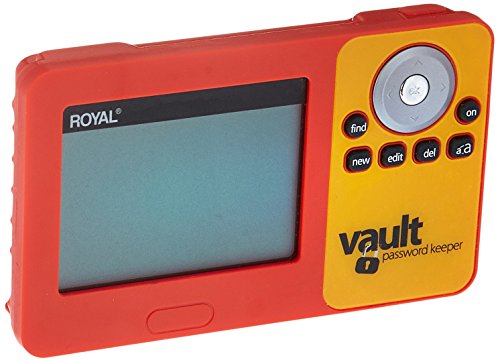


Key features
- •Stores up to 3000 websites, user names and passwords
- •User-selected master password prevents unauthorized access
- •6-line display with user-selectable screen fonts for easy viewing
Royal Digital Password Vault (PV1)
List Price: $154.35$138.92DEALYou Save: $15.43 (10%)
Free shippingFree Returns – 30 daysFree Order CancellationSecure Payment2–3 Days DeliveryGet It October 25, 2026In Stock (1)No marketing spamNo account requiredFulfilment by FedEx / Amazon / UPS / ShipwirePayPal / Card Buyer Protection
Customer Reviews
Reviews sourced from verified Amazon purchasers3.4
out of 5
Based on 10 reviews
5★
80%
4★
20%
3★
0%
2★
0%
1★
0%
Lifesaver
Muddy•August 14, 2017
I'm a gadget man, and at first, I thought "well this seems cheap" BUT- not actually!
Royal put a LOT of thought into this little guy. You can type all the symbols (in related keyboard spots). It warns of low battery EARLY. Keeps everything. Has VERY generous field sizes. You can put info in ANY field. Plenty of fields.
ENLARGE button is a GREAT IDEA for older folks. It's great! Price is right. Uses standard AAAs. Thanks Royal!
I noted the removed usb option (security)
Probably best!
Royal put a LOT of thought into this little guy. You can type all the symbols (in related keyboard spots). It warns of low battery EARLY. Keeps everything. Has VERY generous field sizes. You can put info in ANY field. Plenty of fields.
ENLARGE button is a GREAT IDEA for older folks. It's great! Price is right. Uses standard AAAs. Thanks Royal!
I noted the removed usb option (security)
Probably best!
A Must Have for Password Security
djhack•January 15, 2017
Most people can't remember all the passwords we have to use each day. I have put passwords into apps on my phone and had my phone crash. I don't trust cloud based password keepers. You don't want your passwords out on the internet, why put them there? Simiple and easy to use. It stores passwords away from prying internet eyes! Plenty of fields for each password record, and has handy suggestions as to what to enter. Seems pretty well built. Keyboard is small but responsive. Search feature is nice. Takes normal AAA batteries too!
The best and easiest to use that I have found.
rabbitmandrew•August 30, 2015
This is a great product. Yes it could use improvements, however from my experience in use of others, no one has the updates to which I refer, so more on those laters.
First, I have used the Passwrd vault by ReZone which is supposed to be very highly rated. However the ReZone item doesn't have numbers separetly, rather they are printed on the upper two rows of the keyboard in very small type on what is a small button anyway. You have to find the number button to switch the device from letters to numbers. That device is black so it adds to the general blackness of all of it. Moreover, it will only take 3 lines of type and a note area. Now I explain another product to point out the advantages of this item.
1. This item is orange so even if the screen is dark the bright orange color in light lends a brightness to the screen.
2. The keyboard is also easy to see because of the orange color; and it is a full QWERTY keyboard, complete with the numbers on the side.
3. The device even has a .com and a .org. It also an "@" button that is easy to find.
4. The device allows for many rows for each entry. So you can add URL plus the website.
5. The password is easy to put in and the item allows any word, number, and character. The ReZone about which I'm using for comparison, will only allow you to use numbers, and it has to be 9 #'s only making it a difficult to remember.
Now yes it is true, it is time consuming and tiring to have to put all that info in. But they are all like that. So at least get one that makes the tedium easy as possible. So in conclusion this one is the best one, and the easiest one I have used yet. And the price is reasonable.
First, I have used the Passwrd vault by ReZone which is supposed to be very highly rated. However the ReZone item doesn't have numbers separetly, rather they are printed on the upper two rows of the keyboard in very small type on what is a small button anyway. You have to find the number button to switch the device from letters to numbers. That device is black so it adds to the general blackness of all of it. Moreover, it will only take 3 lines of type and a note area. Now I explain another product to point out the advantages of this item.
1. This item is orange so even if the screen is dark the bright orange color in light lends a brightness to the screen.
2. The keyboard is also easy to see because of the orange color; and it is a full QWERTY keyboard, complete with the numbers on the side.
3. The device even has a .com and a .org. It also an "@" button that is easy to find.
4. The device allows for many rows for each entry. So you can add URL plus the website.
5. The password is easy to put in and the item allows any word, number, and character. The ReZone about which I'm using for comparison, will only allow you to use numbers, and it has to be 9 #'s only making it a difficult to remember.
Now yes it is true, it is time consuming and tiring to have to put all that info in. But they are all like that. So at least get one that makes the tedium easy as possible. So in conclusion this one is the best one, and the easiest one I have used yet. And the price is reasonable.
Great product.
Terry J. Tampa•July 14, 2015
The Password Vault is great. It was exactly what I needed and is easy to use. While it gives you a format for the entry, you can enter whatever you want. This was particularly helpful to me because some of the passwords, like PINs, don't follow the format, which is more applicable to on-line account log on. I was also able to combine PINs for multiple bank accounts this way which allow me to have all my accounts for a bank under one entry. I'm very impressed with this product.
Perfect! Try it out!
StephieAnn•May 23, 2015
I had NO clue that there was an actual password coded private electronic device! I LOVE IT!! My password necessary to get into my passwords on battery operated device - info still there when new batteries necessary! I love that it is not an "app," or any ability to be accesed with wifi etc. exactly what I wanted! I do know, however, that I personally, will still have them written down as backup, but I can do that in code! I just can't get over the new way of "safety" In storing them on phone or computer! Crazy!
Page 1 of 2


