Dotz Cord ID Pro Cord & Cable Identification System- Cord Labels for Organize Cords, Chargers & Wires at Home or Office- Cords Identifiers Keep Your Setup Neat, Tangle-Free & Easy to Manage-DCI171M-C




Key features
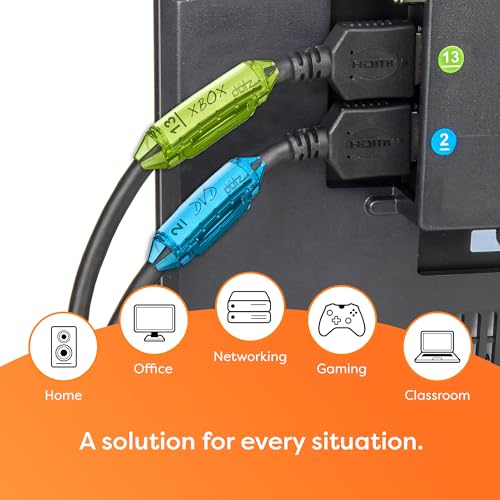
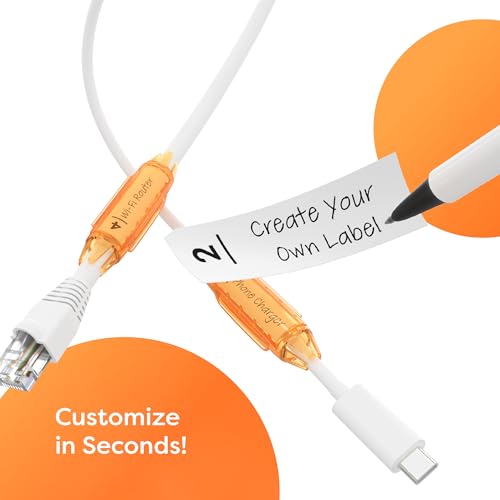
- •Easily identify cables with Dotz Cord Id Pro cable identification system
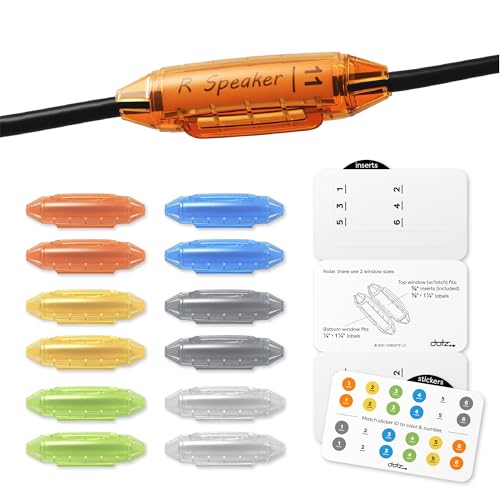
- •Each pack includes 2 each of orange, yellow, lime, blue, clear and grey cable identifiers (12 total); 12 device stickers and 12 customizable inserts
- •Cord identifiers universally fit cables from 1/8 inches (3.2 mm) to 3/8 inches (9.5 mm)
- •Perfect for organizing computer cord labels, charger cord labels, electrical cord labels and more
- •Resistant to degradation due to dust, dirt, moisture and heat
- •Colorful and highly visible, easy to use and reuse
Dotz Cord ID Pro Cord & Cable Identification System- Cord Labels for Organize Cords, Chargers & Wires at Home or Office- Cords Identifiers Keep Your Setup Neat, Tangle-Free & Easy to Manage-DCI171M-C
List Price: $25.20$22.68DEALYou Save: $2.52 (10%)
Free shippingFree Returns – 30 daysFree Order CancellationSecure Payment2–3 Days DeliveryGet It October 27, 2026In Stock (6)No marketing spamNo account requiredFulfilment by FedEx / Amazon / UPS / ShipwirePayPal / Card Buyer Protection
Customer Reviews
Reviews sourced from verified Amazon purchasers4.4
out of 5
Based on 10 reviews
5★
70%
4★
20%
3★
0%
2★
10%
1★
0%
Amazing Product. The best! In network business for years. This beats all other labeling hands down
Niko Alexandrou✓ Verified Purchase•March 21, 2018
If you have any kind of cable labeling needs (as a business or in your home), this is the product for you. It fits multiple sizes of cable so you you don't have to keep more than one size around. You can get them in CLEAR, our preference or multi-color.
We use a label maker (specifically DYMO 160, DYMO 280 and DYMO LabelManager PnP) and print out our labels, either ahead of time or on-site, for these cable marker. As a company we don't even bother with the included paper labels. We use 1/4 inch tape for the "thin" side or 3/8 inch tape for the "fatter" side. Both are available from DYMO and other sources on Amazon and elsewhere. I should also mention that we love, love, love the DYMO 280 (nothing wrong with the 160 either) as well as the desktop-base LabelManager PnP. You can find them all at ridiculously low prices either on AMZON or at Staples (on sale) - I picked up one at STAPLES three weeks ago for $20!!!!!!!!!!
Could not love this product more
We use a label maker (specifically DYMO 160, DYMO 280 and DYMO LabelManager PnP) and print out our labels, either ahead of time or on-site, for these cable marker. As a company we don't even bother with the included paper labels. We use 1/4 inch tape for the "thin" side or 3/8 inch tape for the "fatter" side. Both are available from DYMO and other sources on Amazon and elsewhere. I should also mention that we love, love, love the DYMO 280 (nothing wrong with the 160 either) as well as the desktop-base LabelManager PnP. You can find them all at ridiculously low prices either on AMZON or at Staples (on sale) - I picked up one at STAPLES three weeks ago for $20!!!!!!!!!!
Could not love this product more
Extremely effective cable ID solution...
Raven✓ Verified Purchase•January 3, 2017
I own a lot of electronics. Probably too many. But I'm a geek and I love my tech toys. I LOVE these little items. I no longer have to play "let's see what goes out when I unplug this cable" when I'm trying to power cycle an electronic device that is acting up or when I need to relocate a device to a different area of my home. I am so happy with how easy to install these were and how easily read the labels inside each clip was. Having the colored dots to also help identify things was just that little bit of icing on the cake. Now I can easily tell which is the power cord to my PS3, PS4 or XBox One. I no longer have to guess at which cable is which for the multi-monitor setup for my gaming PC...as I've got them all easily labeled and color coded as well.
It's one of those things that 99% of the time, most people will likely never need to worry about...but that 1% of the time you have to deal with figuring out which cable goes where...you'll be patting yourself on the back for ordering these simple, effective and quite brilliant little pieces of plastic goodness. I honestly wish now I'd have opted for the 100-pack instead of the 12-pack.
I've included pics as an example. At my computer desk, I have multiple devices plugged in to a power strip. The strip itself resides in a recessed area under the main part of the desk, above a drawer. The strip is as far forward as it will reach. Without the ID tags, I was stuck having to reach back and grab something, unplug it and then check and see what doesn't have power. Thanks to a color coded dot on each device I can know that if I need to unplug my 3rd monitor, it's the green plug. The 1st one is the yellow plug, etc. It's so much more convenient now to deal with my cables.
Pros -
Simple to use...just use a fingernail (or dime/etc. if you have short nails) to pop it open. Write down device name on the included labels. Push labels into clip with ya fingernail or a closed pen or something. Snap the clip shut around cable. That's it. Takes all of 30 seconds per cable including the time writing on the labels. You can optionally (I'd recommend it if they're in locations that make it hard to read the labels) put the (included) small color coded dots on the devices themselves. I personally put the dots along the top of TV's/monitors & sides of other things to make it easy to glance over and see what color is connected to it.
Makes identifying cables a breeze.
Cons -
The ONLY con I can see is one of personal preference...I simply wish they had about double the amount of colors available to make it that much easier to identify things if you have a large power strip and such. But seriously, these things are awesome, even with just the 6 colors available.
It's one of those things that 99% of the time, most people will likely never need to worry about...but that 1% of the time you have to deal with figuring out which cable goes where...you'll be patting yourself on the back for ordering these simple, effective and quite brilliant little pieces of plastic goodness. I honestly wish now I'd have opted for the 100-pack instead of the 12-pack.
I've included pics as an example. At my computer desk, I have multiple devices plugged in to a power strip. The strip itself resides in a recessed area under the main part of the desk, above a drawer. The strip is as far forward as it will reach. Without the ID tags, I was stuck having to reach back and grab something, unplug it and then check and see what doesn't have power. Thanks to a color coded dot on each device I can know that if I need to unplug my 3rd monitor, it's the green plug. The 1st one is the yellow plug, etc. It's so much more convenient now to deal with my cables.
Pros -
Simple to use...just use a fingernail (or dime/etc. if you have short nails) to pop it open. Write down device name on the included labels. Push labels into clip with ya fingernail or a closed pen or something. Snap the clip shut around cable. That's it. Takes all of 30 seconds per cable including the time writing on the labels. You can optionally (I'd recommend it if they're in locations that make it hard to read the labels) put the (included) small color coded dots on the devices themselves. I personally put the dots along the top of TV's/monitors & sides of other things to make it easy to glance over and see what color is connected to it.
Makes identifying cables a breeze.
Cons -
The ONLY con I can see is one of personal preference...I simply wish they had about double the amount of colors available to make it that much easier to identify things if you have a large power strip and such. But seriously, these things are awesome, even with just the 6 colors available.
Dotz Cord ID Pro 100 Count Bag
R Whittaker✓ Verified Purchase•October 16, 2016
The Cord IDs are a major time saver and stress remover for me before an event setup.
I have a portable sever that 8 people connect to via 16 USB cables (8 mice, 8 keyboards) and 8 video cards. This takes a combination of USB extension and video extension cables and USB hubs. I take this server to events and need to setup before the event begins. Each USB and video cable MUST go back in the exact same port. You can imagine the challenge especially under a time constraint. With the cord IDs I simply match the "circle number" with the matched cable ending number making event setup a snap.
While it doesn't really matter what colors you use, I made all video cables blue, all USB orange. If I had more time, I could've color coded tables.
Even if this 8 person direct connection server never moved, I would be glad to use the Dotz Cord ID just to make maintenance easier.
I would be very glad to order this again.
TIP: After doing over 50 of these, I got the hang of it. Just lay the label in the display side and put the cable over the label and close the lid, letting the cable do the work.
THIN CABLES?: For thin cables, like audio out, you may need to tape the label or do what I did and simply wad up a few bits of paper which pushes against the wire and label holding it in place. Another solution would be to snake a small cable inside the plastic ID cord. You could also run another wire (cut just for this purpose) inside the plastic ID cord to fill up the space.
The picture is during the event. For clarity, I'll try to update the picture before the event begins, with normal lighting.
I have a portable sever that 8 people connect to via 16 USB cables (8 mice, 8 keyboards) and 8 video cards. This takes a combination of USB extension and video extension cables and USB hubs. I take this server to events and need to setup before the event begins. Each USB and video cable MUST go back in the exact same port. You can imagine the challenge especially under a time constraint. With the cord IDs I simply match the "circle number" with the matched cable ending number making event setup a snap.
While it doesn't really matter what colors you use, I made all video cables blue, all USB orange. If I had more time, I could've color coded tables.
Even if this 8 person direct connection server never moved, I would be glad to use the Dotz Cord ID just to make maintenance easier.
I would be very glad to order this again.
TIP: After doing over 50 of these, I got the hang of it. Just lay the label in the display side and put the cable over the label and close the lid, letting the cable do the work.
THIN CABLES?: For thin cables, like audio out, you may need to tape the label or do what I did and simply wad up a few bits of paper which pushes against the wire and label holding it in place. Another solution would be to snake a small cable inside the plastic ID cord. You could also run another wire (cut just for this purpose) inside the plastic ID cord to fill up the space.
The picture is during the event. For clarity, I'll try to update the picture before the event begins, with normal lighting.
ID Pro Cord Identifiers are a must for any gamer / entertainment center!
Sharon✓ Verified Purchase•June 16, 2016
I am a Hard Core Gamer and having multiple systems all plugged in, or in my case not enought outlets for them on both the TV / Wall Outlet can get frustrating. Not knowing which cord goes to what and fussing with them makes you even more frustrated when all you want to do is play. This solved the problem. Color Coded (Two of each color) allows you to put one on the power cord and one on the HDMI cord as well. The paper inserts work really well as you can write on them what system they go to and then insert them into each snap on identifier. No more hassles now that I have all my stuff marked. Happy gaming days ahead for me. Mind you these could also be used for entertainment centers with alot of components as well. Such a wonderful idea!
Great Cable Identifiers for Cables in Use or in Storage
Mitch✓ Verified Purchase•September 30, 2015
These little guys work wonders for people with a lot of plug-ins on their computer, or a massive amount of devices in an entertainment center, or just a bunch of cords around the house (in use, or not in use). They fit up to a very ample gauge of wire, big enough that anything you'll be using it for, it should fit just fine. The ends essentially hug the cord with small protruding spikes that attempt to hold the piece in place. They could probably fit on up to about 4 AWG cabling (don't hold me to that).
They're smallish, but they hug the shape of the cable (wrapping around it), unlike the disk-shaped cord identifiers, making it easier to put these on cables that are simply in storage in a drawer/bin for easy identification at a later time. The separate colors are a really nice bonus for when you've got a bunch of cords all next to each other bundled around. The small inserts work well, easy to fit in the identifiers, and easy to read once they're in there (provided you have neat handwriting and can write small). There are also small stickers that are numbered and color coded to go with the identifiers, but I don't really see the need once you've already got the identifiers and labels on there, it seems a bit much.
Liked these so much I ended up with 3 packs of them for cords around the house to make sure that me or anyone else never has any trouble plugging/unplugging the right cable anymore.
They're smallish, but they hug the shape of the cable (wrapping around it), unlike the disk-shaped cord identifiers, making it easier to put these on cables that are simply in storage in a drawer/bin for easy identification at a later time. The separate colors are a really nice bonus for when you've got a bunch of cords all next to each other bundled around. The small inserts work well, easy to fit in the identifiers, and easy to read once they're in there (provided you have neat handwriting and can write small). There are also small stickers that are numbered and color coded to go with the identifiers, but I don't really see the need once you've already got the identifiers and labels on there, it seems a bit much.
Liked these so much I ended up with 3 packs of them for cords around the house to make sure that me or anyone else never has any trouble plugging/unplugging the right cable anymore.
Page 1 of 2