Nyko Media Remote - Xbox One



Key features
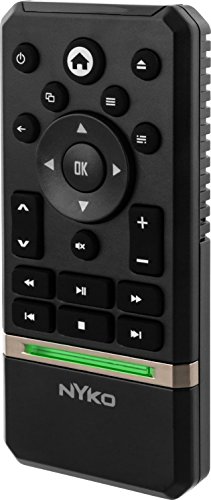
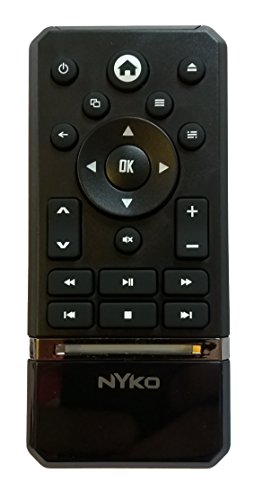
- •Allows for complete control of Xbox One and most apps including One Guide, Netflix, Hulu Plus, Amazon Instant and more
- •Dedicated controls like "Play", "Pause", "Fast Forward" and more allow for easy playback of streaming and physical media
- •Powers the Xbox One on and off
- •Can control volume, channels and power on the TV
- •Powered by two AAA batteries (not included)
Nyko Media Remote - Xbox One
List Price: $43.48$39.13DEALYou Save: $4.35 (10%)
Free shippingFree Returns – 30 daysFree Order CancellationSecure Payment2–3 Days DeliveryGet It October 25, 2026In Stock (1)No marketing spamNo account requiredFulfilment by FedEx / Amazon / UPS / ShipwirePayPal / Card Buyer Protection
Customer Reviews
Reviews sourced from verified Amazon purchasers4.1
out of 5
Based on 10 reviews
5★
50%
4★
20%
3★
0%
2★
20%
1★
10%
Two years old and going strong
Michael Kearney•August 8, 2017
I originally purchased this item almost two years ago, and the plastic feel led me to leave a 4 star review initially. However, almost two years later the remote is working strong (on the original batteries, too) and has no issues whatsoever. I am going to be buying a second one to gift to a friend who recently set up his Xbox system as a home entertainment system, because this remote worked so well for me.
I would easily recommend this to anyone who wants an easier way to enjoy Xbox media.
I would easily recommend this to anyone who wants an easier way to enjoy Xbox media.
Xbox only
T_Casey•July 31, 2017
It does control the xbox one, as it says.
However, for about the same amount of money, there are several remotes available that will also control the TV volume so you don't have to pick up a separate remote just to change the volume. Universal remotes designed for streaming boxes (like the Xbox One) are now a thing. This Nyko remote just sits on the shelf collecting dust now.
However, for about the same amount of money, there are several remotes available that will also control the TV volume so you don't have to pick up a separate remote just to change the volume. Universal remotes designed for streaming boxes (like the Xbox One) are now a thing. This Nyko remote just sits on the shelf collecting dust now.
Annoying POS - A Rated PG Rant
Kelly D.•July 13, 2016
I don't know if there's a bad batch of these little so-and-sos out there or what, but the remote that I got was such a POS that I was tempted to take it out and shoot it after the first few attempts at use.
That was after changing the stupid batteries twice, wiping down the wretched contacts, dusting the living stuff out of the Xbox itself, rearranging my entire f'n TV setup and even licking the gosh darned batteries.
I shouldn't have been so cheap and just bought the firetrucking real Microsoft branded remote.
That was after changing the stupid batteries twice, wiping down the wretched contacts, dusting the living stuff out of the Xbox itself, rearranging my entire f'n TV setup and even licking the gosh darned batteries.
I shouldn't have been so cheap and just bought the firetrucking real Microsoft branded remote.
Awesome, a must have for streaming on your Xbox.
Lori Marie•April 2, 2016
We cut the cord in our household recently, so it's Netflix and Prime video for us. We watch a lot of it using the Xbox and were quickly becoming annoyed at having to turn on the controller every time it asked us if we were still watching, or needed the pause the show. At first we contemplated getting a Kinect, so we could order it around, but the price on that didn't seem worth it, since we were unlikely to ever get any game that needed it. Originally we found the Microsoft branded remote, and that had some terrible reviews and was overpriced, but this one showed up and we have many off brand controllers and accessories from this brand over the years, so we figured we've give it a shot, for under $15 it seemed like a deal.
Straight out of the box, with fresh batteries in, we loved it. With no pairing or anything else we turned on the Xbox, navigated to Netflix and was watching a show with no issues. From the couch to the Xbox is about 8ft and it works instantly with no delay. The ONLY problem we've had is that if you pause it with the play/pause button, it doesn't want to play with it as well, so you need to instead press okay. We generally just use okay anyways, since it pauses and plays just fine. We've used it in Prime Video, Netflix, and just navigating the menu. It also works pretty well in YouTube, minus the play button, but that isn't even an issue and I still give this 5 stars.
Straight out of the box, with fresh batteries in, we loved it. With no pairing or anything else we turned on the Xbox, navigated to Netflix and was watching a show with no issues. From the couch to the Xbox is about 8ft and it works instantly with no delay. The ONLY problem we've had is that if you pause it with the play/pause button, it doesn't want to play with it as well, so you need to instead press okay. We generally just use okay anyways, since it pauses and plays just fine. We've used it in Prime Video, Netflix, and just navigating the menu. It also works pretty well in YouTube, minus the play button, but that isn't even an issue and I still give this 5 stars.
Keep your controller charging for games, great for multimedia use!
Phillip Jones•April 2, 2016
We use our Xbox One as a gaming machine, but even more heavily as a multi-media tool. We use it the most to watch Netflix or SlingTV. This remote worked immediately out of the box - no syncing or setup required. There is a slight learning curve, but the buttons are easy to understand with minimal use. The remote is a bit light and cheap, but still seems durable enough to sustain drops from small heights, maybe hip level. The light on the bottom blinks every time you push a key, and as a guy I find pretty lights fun.
I have comfortable use of fast forward, rewind, play/pause, Xbox One home, menu button (can be used to close out apps if they are not functioning correctly). Although I see a lot of complaints the unit did come with volume up/down buttons and it worked immediately with my Phillips Magnavox home theater. I have not used the channel up/down buttons.
Biggest asset is that I can keep my Xbox One controller on it's charger for actual game use. Biggest drawback is the sensitivity. I am approximately 6 feet away from my Xbox One with little obstruction if any, and some times it takes multiple clicks for it to function. For the price and functionality I am still a happy customer.
I have comfortable use of fast forward, rewind, play/pause, Xbox One home, menu button (can be used to close out apps if they are not functioning correctly). Although I see a lot of complaints the unit did come with volume up/down buttons and it worked immediately with my Phillips Magnavox home theater. I have not used the channel up/down buttons.
Biggest asset is that I can keep my Xbox One controller on it's charger for actual game use. Biggest drawback is the sensitivity. I am approximately 6 feet away from my Xbox One with little obstruction if any, and some times it takes multiple clicks for it to function. For the price and functionality I am still a happy customer.
Page 1 of 2


