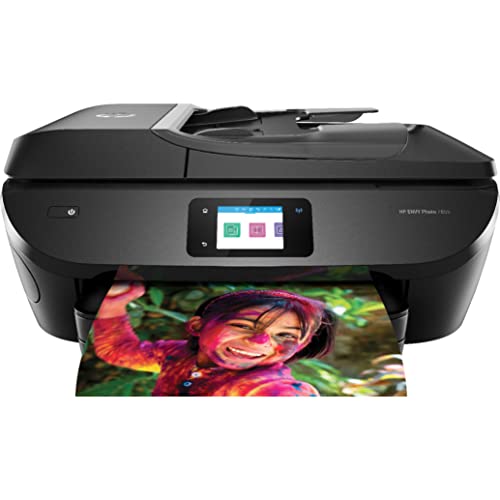
HP Envy 5535 e-All-in-One Printer


Key features
- •3-in-1 photo printer, scanner, and copier
- •Features wireless direct and local Wi-Fi connectivity for mobile printing. Supports printing from most smartphones and tablets using these operating systems: Android, iOS, Blackberry, Symbian, Windows 8, Windows RT.
- •Easily produce borderless, lab-quality photos and laser-sharp documents
- •Easy printing, scanning, and copying-with quick setup and straightforward operation
- •Works with both Windows and Mac
HP Envy 5535 e-All-in-One Printer
List Price: $581.99$523.79DEALYou Save: $58.20 (10%)
Free shippingFree Returns – 30 daysFree Order CancellationSecure Payment2–3 Days DeliveryGet It October 25, 2026In Stock (6)No marketing spamNo account requiredFulfilment by FedEx / Amazon / UPS / ShipwirePayPal / Card Buyer Protection
Customer Reviews
Reviews sourced from verified Amazon purchasers4.0
out of 5
Based on 10 reviews
5★
60%
4★
20%
3★
0%
2★
10%
1★
10%
Quit working after a few months
Nancy✓ Verified Purchase•March 23, 2017
I've had the printer for 8 months, but only started using it about 5 months ago. In that time I've scanned maybe 30 documents, made about 10 copies and printed perhaps 30 pages. It worked great! The printer was easy to set up and I was really pleased with the quality. A few days ago, I was printing a page and the printer stopped and displayed the words "carriage jam." I followed the instructions loaded in the printer to fix the problem. No luck. Now when I try to print, I get an error message that alternates between carriage jam and paper jam. I can see very well into the bowels of the printer and there are no bits of paper stuck anywhere. The ink cartridges are well seated and secure. I found additional instructions on the HP site and tried to troubleshoot, but without any success. So now the question is whether or not the approximately 70 usages I got from this printer are worth the $80 I paid for it. I don't think it is. Therefore I'm giving it a low rating although I really was pleased with the printer initially.
What is great about this printer is that after you have everything ...
Arman✓ Verified Purchase•January 16, 2017
I was surprised to see so many 1 star reviews about the printer not working. I purchased this printer in the summer of 2016 and have had no such issues. This is actually my first printer I have owned because I have always used a printer at my school or apartment office center but now that I live in a rental home, I could not hold out any longer. I did a lot of research as I mainly print for shipping labels, forms, and other miscellaneous pages.
What is great about this printer is that after you have everything set-up with the WiFi feature it is really a breeze to print from your laptop and scan pictures/documents.
Ink Cartridge Refill Tip: Go to Costco and they will refill it for a cheaper price than about anywhere else. It took about 20 minutes to refill, but it depends on how busy they are.
What is great about this printer is that after you have everything set-up with the WiFi feature it is really a breeze to print from your laptop and scan pictures/documents.
Ink Cartridge Refill Tip: Go to Costco and they will refill it for a cheaper price than about anywhere else. It took about 20 minutes to refill, but it depends on how busy they are.
but it has proven to have been a great investment. It is extremely easy to use
Jessie Payne✓ Verified Purchase•August 28, 2016
I was skeptical with an HP printer, but it has proven to have been a great investment. It is extremely easy to use, and I love that I can print from the HP app on my phone or by sending an email to the unique address it gives you. Perfect wireless capabilities - we have never had a problem with it. I purchased extra ink along with it, but I haven't had to use it yet and we have had the printer for three months.
It was really easy to setup and it works really well
Cletus✓ Verified Purchase•August 27, 2016
It was really easy to setup and it works really well. Loved the capability to print on both sides. Scanning was easy.
My only issue that I have discovered (and it is common with network printers) is sometimes the printer will show "off-line" on my computer even though the printer is on and connected to the Wifi network and won't print the document. When this happens, I either have to reboot my computer or the printer for the printer to actually print my document. Otherwise, very pleased, so far.
My only issue that I have discovered (and it is common with network printers) is sometimes the printer will show "off-line" on my computer even though the printer is on and connected to the Wifi network and won't print the document. When this happens, I either have to reboot my computer or the printer for the printer to actually print my document. Otherwise, very pleased, so far.
IT DIDNT PRINT!
J. Daily✓ Verified Purchase•April 4, 2016
Looks good, sounds good, the problem is it doesn't PRINT! Spent hours troubleshooting this and I still can't get it to print. Would LOVE to send it back but I don't have a printer to print a return label. Might try another printer and if it works I could return it. Good luck if you order this printer!
Page 1 of 2