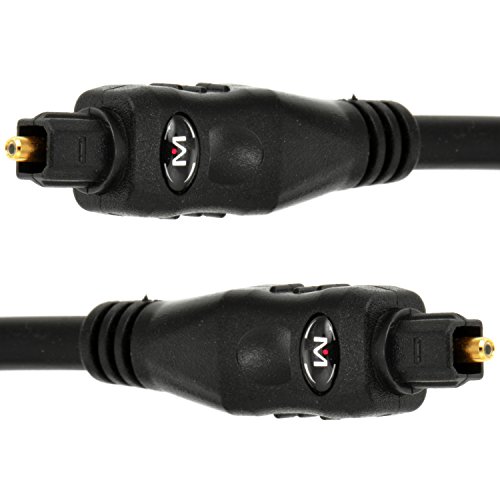
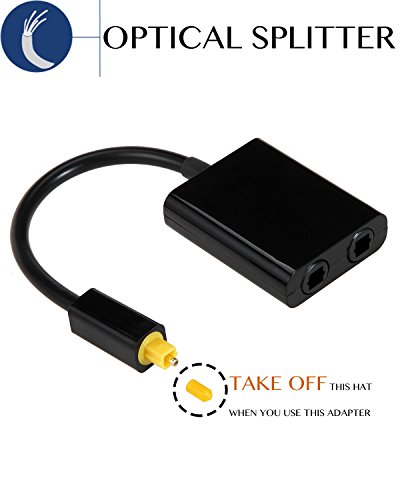
Optical Cable Splitter, VIMVIP Toslink Digital Fiber Optical Audio Splitter 2 Way in/Out Optical Splitter Adapter(Black)



Key features
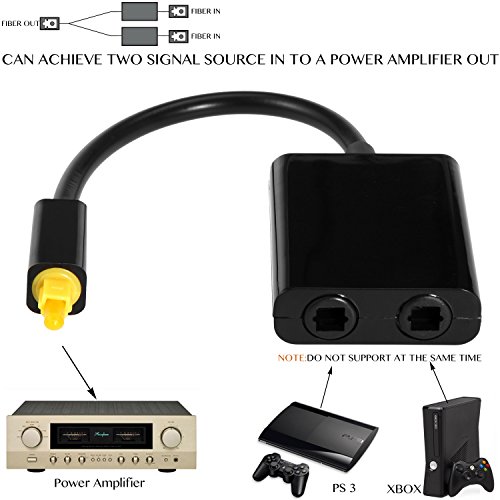
- •【Application】: This 1 in 2 out optical splitter is compatible with CD/DVD/PS3/PS4/Xbox 360/Xbox one/Xbox One S.
- •【1 in 2 Out】: VIMVIP TosLink 1 x 2 Optical Audio Splitter Adapter allows you to connect one toslink optical digital audio source and split into two different receiving devices such as a A/V receiver and a television.
- •【Well Made】: The optical cable splitter adopted 24k Gold Connector, low-loss Fiber optic, low-jitter synthetic fiber and metal connectors bring excellent sound quality experience. Ideal optical digital splitter adapter for connecting your CD player, DVD player, or other digital audio source to both of your receiver and recorder.
- •【Note】: The digital optical fiber splitter supports 1 male input to 2 female outputs at the same time; But please note that it can't support 2 female input to 1 male out at the same time. when 2 female inputs to 1 male output, please turn off one female inputs device, because 2 female inputs can't work at the same time, otherwise this optical audio splitter will interfere and cause noise.
- •【What You Get】: 1x VIMVIP Toslink Digital Fiber Optical Audio Splitter 2 Way in/out Optical Splitter Adapter(Black); And our friendly 12 months warranty service.
BrandVIMVIP
CategoryFiber Optic Cables
Optical Cable Splitter, VIMVIP Toslink Digital Fiber Optical Audio Splitter 2 Way in/Out Optical Splitter Adapter(Black)
List Price: $17.44$15.70DEALYou Save: $1.74 (10%)
Free shippingFree Returns – 30 daysFree Order CancellationSecure Payment2–3 Days DeliveryGet It October 25, 2026In Stock (1)No marketing spamNo account requiredFulfilment by FedEx / Amazon / UPS / ShipwirePayPal / Card Buyer Protection
Customer Reviews
Reviews sourced from verified Amazon purchasers3.6
out of 5
Based on 10 reviews
5★
50%
4★
40%
3★
0%
2★
0%
1★
10%
Almost Sent Back!!!!
florida Bill•August 4, 2017
Works great but I was seconds away from a bad review because I could not get the device to snap in.
It's brightly yellow colored on the end. The tip is protected with a same color small plastic tip. I just noticed the small tip when I was getting ready to blast a bad review. I removed the plastic tip and the device plugged ring in.
Do not be a dummy like me!!!!!!
It's brightly yellow colored on the end. The tip is protected with a same color small plastic tip. I just noticed the small tip when I was getting ready to blast a bad review. I removed the plastic tip and the device plugged ring in.
Do not be a dummy like me!!!!!!
Works great, in certain configurations
R. Blackwood•July 2, 2017
Got this so I could connect my Surround Sound and Bluetooth transmitter (for headphones) to my TV.
It works great, but only in certain configurations
I initially unplugged the cable (to my surround sound) from my TV and plugged it into the splitter, then plugged the splitter into the TV. I took the super cheap looking cable it came with, and ran that to a Digital to Analog Converter for the bluetooth transmitter. And the bluetooth worked great, but I couldn't get any audio out of my surround sound (with the original cable I was using direct from the TV before).
After doing a bit of troubleshooting I ended up swapping the cables
So I had the crappy cable this came with going to the surround sound, and my nice original cable going to the bluetooth, and they both worked great.
I tried swapping them back, and again, the surround sound wouldn't work. I have no clue how this is possible.
So, if you have any issue with this, try using the cheap looking cable to comes with and swap cables around.
As other people have mentioned, this really only works for 1 output going to 2 devices. You could use it the other way, but only if you have 1 device transmitting at a time (turn off the XBOX, and turn on the BluRay).
It works great, but only in certain configurations
I initially unplugged the cable (to my surround sound) from my TV and plugged it into the splitter, then plugged the splitter into the TV. I took the super cheap looking cable it came with, and ran that to a Digital to Analog Converter for the bluetooth transmitter. And the bluetooth worked great, but I couldn't get any audio out of my surround sound (with the original cable I was using direct from the TV before).
After doing a bit of troubleshooting I ended up swapping the cables
So I had the crappy cable this came with going to the surround sound, and my nice original cable going to the bluetooth, and they both worked great.
I tried swapping them back, and again, the surround sound wouldn't work. I have no clue how this is possible.
So, if you have any issue with this, try using the cheap looking cable to comes with and swap cables around.
As other people have mentioned, this really only works for 1 output going to 2 devices. You could use it the other way, but only if you have 1 device transmitting at a time (turn off the XBOX, and turn on the BluRay).
Twas wishful thinking
Chace 1693•May 21, 2017
Against the odds, I bought and hope this would work. I've bought many bargains, but this time I bought myself a lesson. I did not have the opportunity to test within 30 days so I could not return and lost the purchase $$$. This TOS Splitter would work just a little sometime if you giggled it, but even then the audio was broken and scratchy. Would not work at all without the giggling. Both out ports same none performance. I'm chunking in the trash after this review. So just move on to one of the powered ones that work and skip this one (and those that look like it).
Works great with exception of an unsecure connection
Brett!•December 31, 2016
I purchased this item to fork two Toslink audio inputs (PS3 and TV) into a single AV receiver. The device works great for this function. The only audio I use on the TV is for an Amazon Firestick. I haven't experienced any audio overlap issues since I don't use the Firestick or PS3 simultaneously. The PS3 correctly outputs DD surround sound, but unfortunately the TV only outputs stereo, which is not the fault of the splitter. I'm not an audiophile, but haven't noticed any issues in degradation of sound quality. My only issue is that the splitter does not securely snap into the AV receiver like my other Toslink cables, so it may fall out should I move the receiver to dust or adjust any connections. Since I don't move it around frequently, it hasn't been a problem thus far. If it weren't for the loose input connection, then I'd give the splitter 5 stars. In the two input connections are secure, so it seems to be a function of each respective male connector.
Pros: Functions perfect for forking two audio inputs to one receiver (not used simultaneously)
Cons: Connection for male connector to AV receiver is borderline unacceptable and does not snap in, but does not appear to affect performance.
Pros: Functions perfect for forking two audio inputs to one receiver (not used simultaneously)
Cons: Connection for male connector to AV receiver is borderline unacceptable and does not snap in, but does not appear to affect performance.
Lifesaver for hooking up Multiple Optical Units
CycoChris•October 3, 2016
This might be the best device I have come across for hooking up two devices to one optical input. I have this hooked up running an optical cable from my Samsung TV to my sound bar and also a Chromecast Audio. When the TV is playing sound I can hear that audio but when I cast music to the Chromecast Audio that device takes over even with the TV on. In order to get the TV sound back all I need to do is stop casting from the music app I am in. I had to ding a star because the end is not a tight fit and doesn't snap into place like most optical cables.
Page 1 of 2