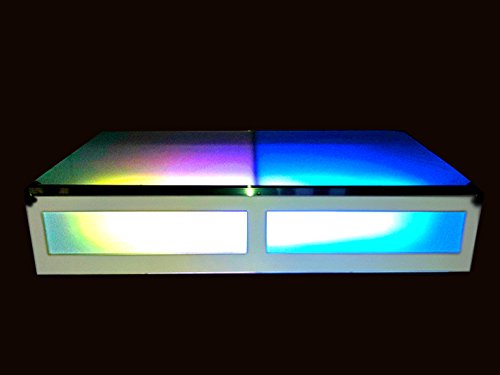
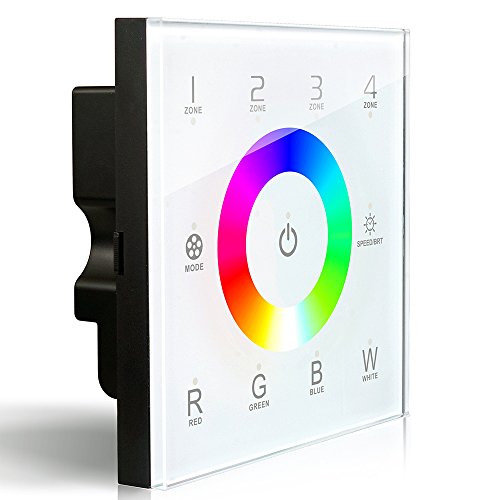
LEDENET DX8 RGBW Wireless 2.4GHz DMX512 Console Master Touch Panel RF Dimmer Controller Wall-Mounted 4 Zones Control RGB RGBW RGBWW LED Strip Lights Panel Lamps



Key features
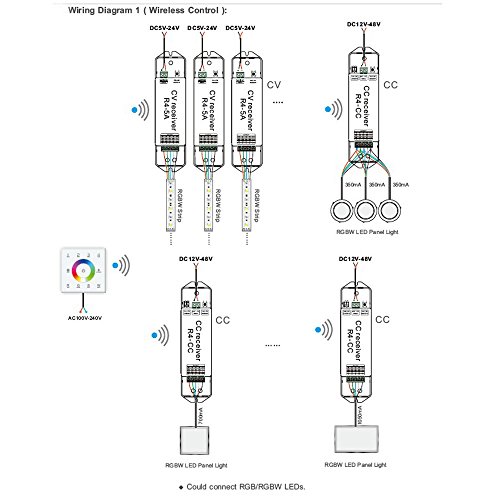
- •Support multi-zones control. Based on 2.4GHz: Controller control the LEDs by the wireless zones receiver, base on 2.4GHz wireless control, no wiring trouble, user experience the free and fun of the wireless control!
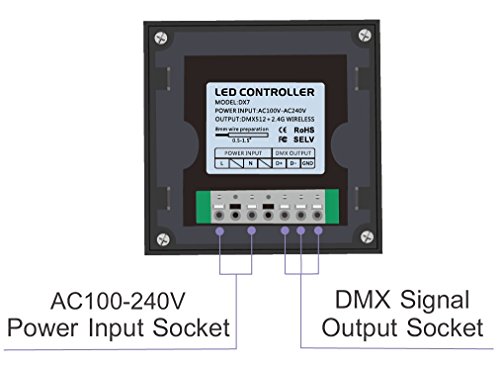
- •DMX512 Output: Support DMX512 output, can be used as a master, control DMX lamps. T-PWM dimming technology/ 4096 gray scale. Support several panels to achieve multi-connected control.
- •High-grade tempered glass panel. LED night indicator. Installed in standard 86 boxes (separately sold, ASIN: B00Q3LYSR6)
- •Latest human detection design. Capacitive touching sensor. Humanized touch circle. Touching along with chord music.
- •NOTE: DX8 is ONLY suitable for the receivers, R4-5A (ASIN: B00PYECABE) and R4-CC (ASIN: B00PYECA9G). If you want to control RGB/RGBW LED strip by DX8 touch panel, you need R4-5A CV receiver (ASIN: B00PYECABE). If you want to control RGB/RGBW LED panel light by DX8 touch panel, you need R4-CC CC Receiver (ASIN: B00PYECA9G).
LEDENET DX8 RGBW Wireless 2.4GHz DMX512 Console Master Touch Panel RF Dimmer Controller Wall-Mounted 4 Zones Control RGB RGBW RGBWW LED Strip Lights Panel Lamps
List Price: $82.10$73.89DEALYou Save: $8.21 (10%)
Free shippingFree Returns – 30 daysFree Order CancellationSecure Payment2–3 Days DeliveryGet It October 26, 2026In Stock (1)No marketing spamNo account requiredFulfilment by FedEx / Amazon / UPS / ShipwirePayPal / Card Buyer Protection
Customer Reviews
Reviews sourced from verified Amazon purchasers3.5
out of 5
Based on 8 reviews
5★
38%
4★
63%
3★
0%
2★
0%
1★
0%
Very nice looking. Seems sturdy and well built
Amazon Customer✓ Verified Purchase•May 26, 2017
Very nice looking. Seems sturdy and well built. Still waiting to get it functioning with the required R4-5A controller. Wish it had wifi built in so that you don't need the wifi-104.
Works well, but has some quirks
techman✓ Verified Purchase•May 10, 2017
The unit works well, but there are a couple things that could be better.
- The brightness control is not ideal. The brightness button on the right can either be pressed multiple times to step through the brightness levels, which are so subtle that it's hard to tell if it did anything ( requires many touches to go through full range ), or it can be held down to fade through the brightness levels. The problem is that holding the button down "zooms" too quickly through the brightness levels, it's hard to stop it where you want it. There is also no way to control if the lights will get brighter or dimmer, you need to cycle through the ranges: full bright --> full dim --> full bright --> full dim. It would have been better if the color wheel could be used to adjust brightness after the brightness button is pressed, but no.
- There is no brightness control for the white channel. It is only ever on or off. Using the brightness button will fade the R, G, and B channels only. If the white channel is on, the brightness will fade from pastel color to white, never dim. If the white channel is off, then the brightness will fade from bright color to dim color, but never fully off.
- It took me while to figure out that the White LEDs behave in a special way. When you move through the color wheel, the white is always on and included, which results in all pastel colors. I couldn't figure out why you couldn't get pure Blue or Red or Green. To disable the white channel, you need to toggle the "W" button. Then spinning the color wheel results in RGB mixing without white, and you can get pure Red or Green or Blue. This also means that if you have RGBWW lights ( warm white ), spinning to the white section of the color wheel will result in RGBWW all on simultaneously, which is a natural white, or all RGB on simultaneously which is a cool white, depending on the "W" button toggle. There is no easy setting to get only the WW lights on, so there is no true warm white, unless you manually toggle off the Red and the Green and the Blue LEDs using the "R","G", and "B" buttons. Touching the color wheel forces the RGB mix again, so it is really cumbersome to force only the WW LEDs on. You would think that holding down the "R", "G", "B", or "W" buttons would switch to those pure colors, but no. They are strictly toggles, so you can get lost trying to figure out which channels are actually active while trying to force a pure color. To summarize: The "W" includes or excludes the white channel from the color wheel. The "R", "G", and "B" buttons toggle the channels, but are overridden the moment the color wheel is touched. There is NO single button press that guarantees that you will get pure Red or Blue or Green or White. For example, to get pure blue, spin the wheel to blue, then if it's not pure blue, toggle off the "W" button to turn off white. To get pure WW, spin the color wheel to the white area, then toggle off the "R", "G", and "B" channels. If everything turns off, then toggle the "W" back on. It gets confusing if you really want an exact color.
- There are small indicator lights for the "R", "G", "B", and "W" buttons, but they don't indicate which channels are active. They only flash momentarily as a confirmation when you press the buttons, which seems wrong. Nothing tells you if a channel is off or on for a given color mix.
- The brightness control is not ideal. The brightness button on the right can either be pressed multiple times to step through the brightness levels, which are so subtle that it's hard to tell if it did anything ( requires many touches to go through full range ), or it can be held down to fade through the brightness levels. The problem is that holding the button down "zooms" too quickly through the brightness levels, it's hard to stop it where you want it. There is also no way to control if the lights will get brighter or dimmer, you need to cycle through the ranges: full bright --> full dim --> full bright --> full dim. It would have been better if the color wheel could be used to adjust brightness after the brightness button is pressed, but no.
- There is no brightness control for the white channel. It is only ever on or off. Using the brightness button will fade the R, G, and B channels only. If the white channel is on, the brightness will fade from pastel color to white, never dim. If the white channel is off, then the brightness will fade from bright color to dim color, but never fully off.
- It took me while to figure out that the White LEDs behave in a special way. When you move through the color wheel, the white is always on and included, which results in all pastel colors. I couldn't figure out why you couldn't get pure Blue or Red or Green. To disable the white channel, you need to toggle the "W" button. Then spinning the color wheel results in RGB mixing without white, and you can get pure Red or Green or Blue. This also means that if you have RGBWW lights ( warm white ), spinning to the white section of the color wheel will result in RGBWW all on simultaneously, which is a natural white, or all RGB on simultaneously which is a cool white, depending on the "W" button toggle. There is no easy setting to get only the WW lights on, so there is no true warm white, unless you manually toggle off the Red and the Green and the Blue LEDs using the "R","G", and "B" buttons. Touching the color wheel forces the RGB mix again, so it is really cumbersome to force only the WW LEDs on. You would think that holding down the "R", "G", "B", or "W" buttons would switch to those pure colors, but no. They are strictly toggles, so you can get lost trying to figure out which channels are actually active while trying to force a pure color. To summarize: The "W" includes or excludes the white channel from the color wheel. The "R", "G", and "B" buttons toggle the channels, but are overridden the moment the color wheel is touched. There is NO single button press that guarantees that you will get pure Red or Blue or Green or White. For example, to get pure blue, spin the wheel to blue, then if it's not pure blue, toggle off the "W" button to turn off white. To get pure WW, spin the color wheel to the white area, then toggle off the "R", "G", and "B" channels. If everything turns off, then toggle the "W" back on. It gets confusing if you really want an exact color.
- There are small indicator lights for the "R", "G", "B", and "W" buttons, but they don't indicate which channels are active. They only flash momentarily as a confirmation when you press the buttons, which seems wrong. Nothing tells you if a channel is off or on for a given color mix.
Impressed. The best, simplest implementation for accent lighting control.
Ski Ski✓ Verified Purchase•February 6, 2017
The best looking and functional light control for residential or business (not sure if it's UL listed for allowed commercial use). It's a DMX console, so you can you any standard DMX decoder to integrate your LED strips, stage lights, projectors, etc. (RGBW control only of course). Or use their RF controllers if you don't want to run CAT5 or native XLR cables.
Takes line voltage (110-240V AC) directly. This can be a blessing if installing in room lighting situations typically, next to or instead of line switches. Eliminates having an adjacent power adapter -- save those to drive your controlled lights.
Takes line voltage (110-240V AC) directly. This can be a blessing if installing in room lighting situations typically, next to or instead of line switches. Eliminates having an adjacent power adapter -- save those to drive your controlled lights.
This is a great controller for our led setup around our pool
William C. Davis✓ Verified Purchase•August 21, 2016
This is a great controller for our led setup around our pool. Only one complaint the dimmer does not work for the white lights, only the RGB. It would be nice to dim the W so that the RGB when on, could be more visible as the W, when on, tends to out shine the colored lights. Otherwise we love it!
Four Stars
Jill C✓ Verified Purchase•June 28, 2016
love it... mounting was a trick but love it !
Page 1 of 2