NETGEAR WiFi Mesh Range Extender EX7000 - Coverage up to 2100 sq.ft. and 35 Devices with AC1900 Dual Band Wireless Signal Booster & Repeater (up to 1900Mbps Speed), Plus Mesh Smart Roaming



Key features
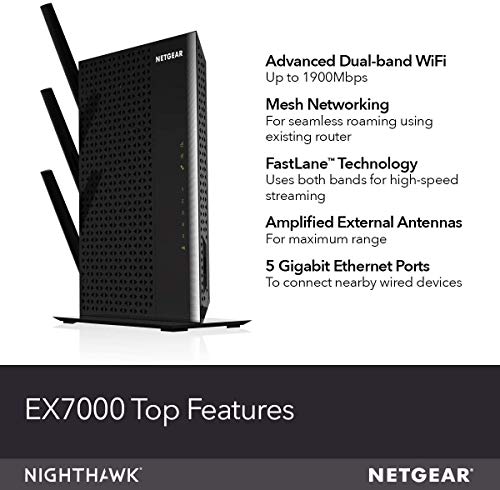
- •EXTENDED WIRELESS COVERAGE: Adds WiFi range coverage up to 1800 sq ft, and connects up to 30 devices such as laptops, smartphones, speakers, IP cameras, tablets, IoT devices, and more
- •SEAMLESS SMART ROAMING: Uses your existing network SSID name so you never get disconnected as you move around your home or office
- •AC1900 WIFI SPEED: Provides up to 1900Mbps performance using dual band and patented FastLane(TM) technology for demanding HD streaming and online gaming
- •UNIVERSAL COMPATIBILITY: Works with any wireless router, gateway, or cable modem with WiFi
- •WIRED ETHERNET PORTS: Simply plug in game consoles, streaming players, or other wired devices into the 5 Gigabit ports for maximum speed
- •SAFE & SECURE: Supports WEP and WPA/WPA2 wireless security protocols
NETGEAR WiFi Mesh Range Extender EX7000 - Coverage up to 2100 sq.ft. and 35 Devices with AC1900 Dual Band Wireless Signal Booster & Repeater (up to 1900Mbps Speed), Plus Mesh Smart Roaming
List Price: $120.89$108.80DEALYou Save: $12.09 (10%)
Free shippingFree Returns – 30 daysFree Order CancellationSecure Payment2–3 Days DeliveryGet It October 26, 2026In Stock (1)No marketing spamNo account requiredFulfilment by FedEx / Amazon / UPS / ShipwirePayPal / Card Buyer Protection
Customer Reviews
Reviews sourced from verified Amazon purchasers4.0
out of 5
Based on 10 reviews
5★
20%
4★
10%
3★
20%
2★
30%
1★
20%
Easy setup, lots of devices connected
AGonzales7✓ Verified Purchase•January 17, 2018
Bought this after buying a smart thermostat that required a strong WiFi connection. Our house is L shaped with the 75mbps WiFi setup on one end and the new thermostat on the other. My bedroom is right next to the thermostat and my phone and smart TV had trouble keeping the WiFi connection so this extender is helping with 3 to 4 different devices. So far so good. Setup was very easy and since we have both 2.4 and 5 GHz (not sure what the actual term is) it gives off 2 separate signals. Now we have three different networks with multiple devices (DirecTV, desktop computer, 6 smartphones, 2 smart TVs, Echo Dot, thermostat) connected to each, and even though they generate from the primary WiFi network, every device seems to be working much better.
Don't recommend, and Netgear's warranty is garbage
Caticus.Jack✓ Verified Purchase•January 3, 2018
I bought this extender to match the speeds of my Netgear Nighthawk router. When streaming on the 5gHz band, this thing will randomly shut down. Netgear customer service is outsourced to a different country and it it sometimes hard to understand them. It was obvious this extender was defective, yet Netgear tried to charge me for "technical support" even thought the product is still under warranty. After arguing, they finally agreed to RMA it. Two days later I got an automated email saying my RMA has been cancelled with no explanation, so now I have to jump through all the hoops again. Save yourself some trouble and go with a brand known for better customer service in case you need to use it.
Worked fine for 30 days but then.....
Bob Humphreys✓ Verified Purchase•August 19, 2017
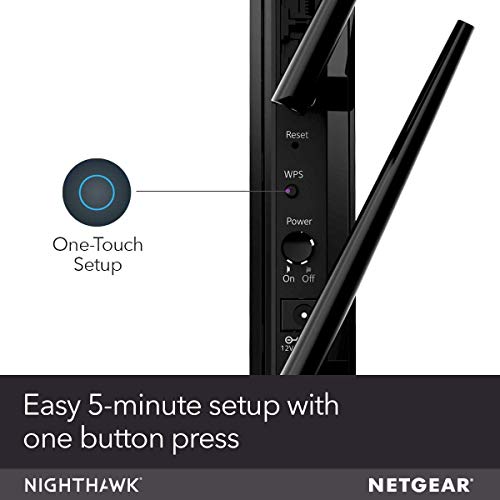
Easy 5 minute setup and now I have no dead spots anywhere in or around my house. Although not mentioned anywhere except in a few obscure reviews, you need to be aware that with any of these "range extenders" or repeaters, you are trading bandwidth for coverage. Because in repeater mode they re-transmit the signal from your wireless router, the speed of your connection will be about half of what the router is putting out. This is fine if your ISP is giving you enough bandwidth to start with. In my case, my router is putting out a little over 100 mps and this range extender is pumping about 60 mps to the formerly dead spots in my home.
**** Update 9/13/2017 - I guess I should have waited longer to review this range extender. After about 30 days, you cannot connect to this extender on the 2,4 gz band. It is putting out a signal but it will not allow a connection and rejects the logon credentials. Redoing the setup will allow a connection for a day or two but then it starts rejecting connections all over again. It is configured in normal mode (not Fastlane) using the same login credentials as the parent router and there is no problem at all with connecting through the 5gz band.
I have contacted Netgear customer support but based on other customer comments I don't expect any response this century.
I have downgraded my review to 3 stars. I might have gone lower but it works well on the 5gz band and was awesome until this problem showed up. I will update again if Netgear ever resolves the problem.
**** Update 9/13/2017 - I guess I should have waited longer to review this range extender. After about 30 days, you cannot connect to this extender on the 2,4 gz band. It is putting out a signal but it will not allow a connection and rejects the logon credentials. Redoing the setup will allow a connection for a day or two but then it starts rejecting connections all over again. It is configured in normal mode (not Fastlane) using the same login credentials as the parent router and there is no problem at all with connecting through the 5gz band.
I have contacted Netgear customer support but based on other customer comments I don't expect any response this century.
I have downgraded my review to 3 stars. I might have gone lower but it works well on the 5gz band and was awesome until this problem showed up. I will update again if Netgear ever resolves the problem.
maybe not, totally now!
DudesGhost✓ Verified Purchase•April 4, 2017
This awesome extender looked that it would dramatically improve the performance of wifi deficiencies in my house. This was to replace the ex6200 that finally died after many years of faithful and uneventful service. I've installed all the electronic thingys at my house so I thought that this would be a breeze. It seems that this unit will have to be returned as it cannot be made to function correctly as an extender. And, to get phone support of the device it has to be installed and registered. HAHA. I get it to install correctly but must be able to connect to it wirelessly. Upon trying to connect to it, even though it is still in the same room as the originating router, my device, a new Samsung phone, tells me that the password/passkey for the device (which I purposefully copied from the originating router) is incorrect. ughhh. I give up!
If I should get this to work I'll repost a more positive review.
Edited 4-10-17
Ok, sorry for that. I was able to get it to install and even update the firmware and connected to my original wifi network. It has soooo much better coverage/extending abilities. There is even a page on extender configuration to limit the power (100%, 75%, 50%) of the extender so as not to interfere with the originating wifi signal. My kids can now wander the house doing whatever they were doing on their wifi devices. I had mainly gotten this as I was having problems with the signal getting to my Roku downstairs thru concrete. Now there is never any buffering and I can/could wifi up to 4K video. You also have the option to change the wifi band (2.4 or 5GHz) on the Ethernet port out.
It seems that to configure the extender, the install wizard app says to use any wifi able device to connect for installation, and that is not true as the compute power is beyond my new Samsung GS7 phone. My newer desktop was able to do everything in seconds. There was none of the authentication problems that I had encountered before. I feel a little foolish as I had spent so long trying to get it to install correctly but using only one way. I have no problems recommending this device to extend or even to be an Access Point (there's a switch).
My only beef with the way Amazon sells Netgear anything is that they lump all the reviews together for all devices.
If I should get this to work I'll repost a more positive review.
Edited 4-10-17
Ok, sorry for that. I was able to get it to install and even update the firmware and connected to my original wifi network. It has soooo much better coverage/extending abilities. There is even a page on extender configuration to limit the power (100%, 75%, 50%) of the extender so as not to interfere with the originating wifi signal. My kids can now wander the house doing whatever they were doing on their wifi devices. I had mainly gotten this as I was having problems with the signal getting to my Roku downstairs thru concrete. Now there is never any buffering and I can/could wifi up to 4K video. You also have the option to change the wifi band (2.4 or 5GHz) on the Ethernet port out.
It seems that to configure the extender, the install wizard app says to use any wifi able device to connect for installation, and that is not true as the compute power is beyond my new Samsung GS7 phone. My newer desktop was able to do everything in seconds. There was none of the authentication problems that I had encountered before. I feel a little foolish as I had spent so long trying to get it to install correctly but using only one way. I have no problems recommending this device to extend or even to be an Access Point (there's a switch).
My only beef with the way Amazon sells Netgear anything is that they lump all the reviews together for all devices.
Easy Setup, effective, good reach!
Tetters✓ Verified Purchase•February 22, 2017
The AC 1900 has done everything I hoped it would. Our whole house has coverage now and this is a large place. I do wish it picked up our guest Network as well but it only does two networks: the 2.4 GHz and the 5 GHz Networks emanating from our main router. Most every range extender I have looked at is unable to pick up a third- Guest Network which many routors, including Netgear home routers have nowadays. So I bought another smaller extender to extend our guest Network.
In addition to two Smart TVs we often have four or five other devices being served by this extender and it handles the traffic fine.
One disappointment is that when I want to change settings on the extender, I cannot get the Netgear Genie app on my Android to connect to the extender. Apparently a web browser is the only way, which I do on my smartphone. So the Netgear Genie app seems to be only able to connect to the main router. I have used the browser-based interface to make changes to the AC 1900 and it works fine.
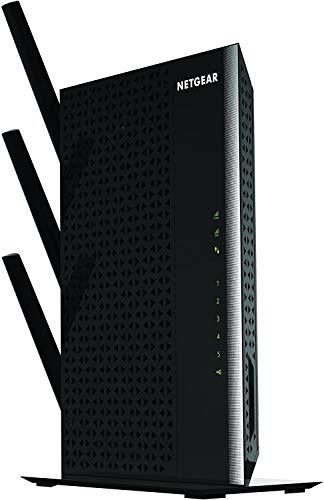
I also enjoy the visual appearance of the AC 1900 Nighthawk range extender with its 3 antennas. It gives me the confidence that it's doing a great job!
In addition to two Smart TVs we often have four or five other devices being served by this extender and it handles the traffic fine.
One disappointment is that when I want to change settings on the extender, I cannot get the Netgear Genie app on my Android to connect to the extender. Apparently a web browser is the only way, which I do on my smartphone. So the Netgear Genie app seems to be only able to connect to the main router. I have used the browser-based interface to make changes to the AC 1900 and it works fine.
I also enjoy the visual appearance of the AC 1900 Nighthawk range extender with its 3 antennas. It gives me the confidence that it's doing a great job!
Page 1 of 2