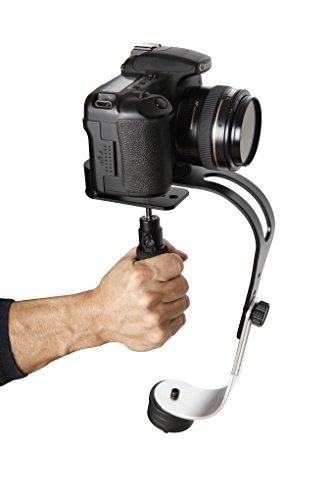
The Official Roxant Pro Video Camera Stabilizer Limited Edition (Midnight Black) with Low Profile Handle for GoPro, Smartphone, Canon, Nikon - or Any Camera up to 2.1 lbs. - Comes with Phone Clamp.


Key features
- •LIMITED EDITION "Midnight Black" EDITION - Don't be fooled by imitations. Roxant is the only authorized seller of our brand. If it's not in our box, it's not a ROXANT.
- •Our superior design and construction provide "pro style" stabilization with less motion and shake compared to other handheld stabilizers. - The lower arm comes with NO SLIP GRIP which eliminates lower arm swing.
- •For use with Point and Shoot, DSLRs, Video Cameras, GoPros, Smartphone and any other camera up to 2.1 lbs Elite Low Profile Comfort Handle Edition - with a lower center of balance making stabilization even easier. (Comes With Phone Clamp.)
- •Great for indie film makers looking to move their films to the next level! Shoot smooth motion shots in tight spaces, on stairs, through crowds, in cars, walking/running/skating etc.
- •LIFETIME Email Support + Free Video Tutorials
The Official Roxant Pro Video Camera Stabilizer Limited Edition (Midnight Black) with Low Profile Handle for GoPro, Smartphone, Canon, Nikon - or Any Camera up to 2.1 lbs. - Comes with Phone Clamp.
List Price: $98.28$88.45DEALYou Save: $9.83 (10%)
Free shippingFree Returns – 30 daysFree Order CancellationSecure Payment2–3 Days DeliveryGet It October 26, 2026In Stock (1)No marketing spamNo account requiredFulfilment by FedEx / Amazon / UPS / ShipwirePayPal / Card Buyer Protection
Customer Reviews
Reviews sourced from verified Amazon purchasers3.8
out of 5
Based on 10 reviews
5★
50%
4★
50%
3★
0%
2★
0%
1★
0%
My experience with the Roxant Pro Stablizer
Ed Squire✓ Verified Purchase•July 13, 2023
The OFFICIAL ROXANT PRO video camera stabilizer for GoPro, Smartphone, Canon, Nikon - or any camera up to 2.1 lbs. I'm a novice filmmaker and I've never written a product review before. I'm doing so now because I'm really impressed with the product and the company as a whole. They really care about customer satisfaction and producing a high-quality product. I started producing videos on a weekly basis on my YouTube channel in April 2018 (search metoowhatnow if you're interested).
QUALITY OF CONSTRUCTION AND FEEL:
It's excellent. Every detail of the stabilizer seems to have been put through good quality control. There's nothing cheap that's going to fall off and break. I love the look and feel of the Roxant Pro. It has a comfortable handle and when it's balanced, it feels like a natural extension of my arm. I don't find the weight to be a problem. But I'm not shooting for hours at a time, which could make a difference. But if I try to use my Canon 70d, which is my mistake because it's over the recommended weight of 2.1 pounds, not only does it get a little heavy, but also it's almost impossible to balance. And it shouldn't. It's not supposed to.
BALANCING:
Balancing the stabilizer involved a lot of pain and frustration. However, this would've been reduced if I took time to properly read the instructions. My advice. READ THE INSTRUCTIONS!! Slow down and do NOT assume you can unwrap the product, snap-on your camera and start running around your house producing perfectly stable and fluid results like many videos show on YouTube. Maybe some people are lucky, but I tried to fast track it. Not a good idea. I highly recommend (as does Roxant) watching the Otis Original channel on YouTube. He wastes no time teaching you how to balance the product with pretty much every camera type the Roxant Pro is designed for.
Listen to Otis when he says that it only takes a fraction of an adjustment to get to that perfect place of balance. It really is a highly sensitive and accurate product, so the balancing process is naturally going to be sensitive and require accuracy.
I have 5 cameras (GoPro 3+, Canon 70D, Nikon D5300, Canon PowerShot SX610 HS and an iPhone6s) I've had success with the PowerShot, Nikon, and my iPhone. The GoPro and Canon, not so much. But again, they're not within the weight limit the product was designed for.
I'm still learning how to use it. Like most nubes, and especially when it comes to the world of camera stabilizers, I'm a little frustrated with the learning curve. But the more I understand the technicalities of the product, and it's proper application, I'm ok with the process and I'm seeing drastic improvements. Did I mention? READ THE INSTRUCTIONS!
CONCLUSION:
I love product and highly recommend it. The price point is good. I think it stacks on top of every other product in the same category of mechanical stabilizers for the weight ranged it's designed for. I'm using it regularly, which is a good sign.
Stabilizers that don't have motors are difficult to learn to use. It's the nature of the beast. But I do think the Roxant is the best way to go for mechanical stabilizers.
Just make sure you understand what it's designed for, it's capabilities, and limitations before you buy it. But this is just good common shopping sense anyway. It's more of a challenge when things are technical and have specific applications, plus, having a wide range of similar products doesn't make it any easier.
QUALITY OF CONSTRUCTION AND FEEL:
It's excellent. Every detail of the stabilizer seems to have been put through good quality control. There's nothing cheap that's going to fall off and break. I love the look and feel of the Roxant Pro. It has a comfortable handle and when it's balanced, it feels like a natural extension of my arm. I don't find the weight to be a problem. But I'm not shooting for hours at a time, which could make a difference. But if I try to use my Canon 70d, which is my mistake because it's over the recommended weight of 2.1 pounds, not only does it get a little heavy, but also it's almost impossible to balance. And it shouldn't. It's not supposed to.
BALANCING:
Balancing the stabilizer involved a lot of pain and frustration. However, this would've been reduced if I took time to properly read the instructions. My advice. READ THE INSTRUCTIONS!! Slow down and do NOT assume you can unwrap the product, snap-on your camera and start running around your house producing perfectly stable and fluid results like many videos show on YouTube. Maybe some people are lucky, but I tried to fast track it. Not a good idea. I highly recommend (as does Roxant) watching the Otis Original channel on YouTube. He wastes no time teaching you how to balance the product with pretty much every camera type the Roxant Pro is designed for.
Listen to Otis when he says that it only takes a fraction of an adjustment to get to that perfect place of balance. It really is a highly sensitive and accurate product, so the balancing process is naturally going to be sensitive and require accuracy.
I have 5 cameras (GoPro 3+, Canon 70D, Nikon D5300, Canon PowerShot SX610 HS and an iPhone6s) I've had success with the PowerShot, Nikon, and my iPhone. The GoPro and Canon, not so much. But again, they're not within the weight limit the product was designed for.
I'm still learning how to use it. Like most nubes, and especially when it comes to the world of camera stabilizers, I'm a little frustrated with the learning curve. But the more I understand the technicalities of the product, and it's proper application, I'm ok with the process and I'm seeing drastic improvements. Did I mention? READ THE INSTRUCTIONS!
CONCLUSION:
I love product and highly recommend it. The price point is good. I think it stacks on top of every other product in the same category of mechanical stabilizers for the weight ranged it's designed for. I'm using it regularly, which is a good sign.
Stabilizers that don't have motors are difficult to learn to use. It's the nature of the beast. But I do think the Roxant is the best way to go for mechanical stabilizers.
Just make sure you understand what it's designed for, it's capabilities, and limitations before you buy it. But this is just good common shopping sense anyway. It's more of a challenge when things are technical and have specific applications, plus, having a wide range of similar products doesn't make it any easier.
Roxant? More like Rocks Ant!...That makes no sense. I am a silly man with an awesome product.
Dan Watson✓ Verified Purchase•July 7, 2023
Let me tell you my thoughts on your awesome, science fiction looking handle. Out of the box, right away, I was awestruck at the build quality. I am a sculptor and an artist that fiddles around with machining and precision crafting. So seeing a carefully machined, aluminum bit of sexiness, right as I opened it, was a moment of reverent pause. Having carefully constructed a planetary sized ego, centered around me as the main character on my show, I am largely grateful that this beautifully milled, crimson scene-stealer will not be on film, competing with my looks. Because, and let me be honest, with my face that was obviously built for radio only, I don't need the competition.
Moving on to the quality of the construction. Zip, bam, pow! That's the sound effects and speed at which I put it together. Quick as a cat, the mobile of sculptural perfection dangled from my hand and swayed, mesmerizing anyone who dared look upon it. Tilted this way and that, the gimbal would not be fooled, because like most inanimate objects, it was wiser and cagier than myself. As I mounted my GoPro to it, I ignored the angelic choir sounds that emanated from the joining. Carefully, oh so carefully, I tweaked and poked and prodded and pleaded and finally, I was able to balance it. Like the Sistine Chapel, I too had achieved perfection
In short; awesome first impression, both with design and quality of build. Super solid and comfortable gear to operate. Color is spectacular and is very eye-catching. I cannot say enough great things about it, save for one thing. My ability to read bold text. I was about to say that I really wish instead of the text instructions for tuning it, that you just direct people to the much easier video ones online. Then, I noticed the big bold text at the top of the sheet, almost as if Roxant knew what I was thinking"¦.GET OUT OF MY HEAD ROXANT!
I am very excited to run this stabilizer through its paces. I started up a podcast/film blog based around interesting ideas, stories or inventions (Think, Ripley's Believe It or Not). To record on location, I bought a GoPro Hero4 and will be testing its limits as we explore haunted houses, follow along with a ship hull cleaner and see what running in the middle of a huge Zombie dash feels like. And you know who is going to be there with us, providing clear and smooth films? The good ol' Roxant Stabilizer.
My last thoughts go towards the customer service for Roxant! Such a personal outreach and they have that small business validity to them. If I wasn't such a diva, I might even think that their people are better than myself. But that is foolish of course, because I am such a diva and though Roxant it mighty, and their Stabilizer is awesome, and their customer service is.....who am I kidding, Roxant will take over the world and is probably making Skynet right now. So embrace the Roxant and your new robot overlords, for they are awesome.
(All opinions and statements made by the author are his own and are clearly a plea for attention and to save his soul from the upcoming apocalypse. Try the Stabilizer, join the Roxant and be well.)
Moving on to the quality of the construction. Zip, bam, pow! That's the sound effects and speed at which I put it together. Quick as a cat, the mobile of sculptural perfection dangled from my hand and swayed, mesmerizing anyone who dared look upon it. Tilted this way and that, the gimbal would not be fooled, because like most inanimate objects, it was wiser and cagier than myself. As I mounted my GoPro to it, I ignored the angelic choir sounds that emanated from the joining. Carefully, oh so carefully, I tweaked and poked and prodded and pleaded and finally, I was able to balance it. Like the Sistine Chapel, I too had achieved perfection
In short; awesome first impression, both with design and quality of build. Super solid and comfortable gear to operate. Color is spectacular and is very eye-catching. I cannot say enough great things about it, save for one thing. My ability to read bold text. I was about to say that I really wish instead of the text instructions for tuning it, that you just direct people to the much easier video ones online. Then, I noticed the big bold text at the top of the sheet, almost as if Roxant knew what I was thinking"¦.GET OUT OF MY HEAD ROXANT!
I am very excited to run this stabilizer through its paces. I started up a podcast/film blog based around interesting ideas, stories or inventions (Think, Ripley's Believe It or Not). To record on location, I bought a GoPro Hero4 and will be testing its limits as we explore haunted houses, follow along with a ship hull cleaner and see what running in the middle of a huge Zombie dash feels like. And you know who is going to be there with us, providing clear and smooth films? The good ol' Roxant Stabilizer.
My last thoughts go towards the customer service for Roxant! Such a personal outreach and they have that small business validity to them. If I wasn't such a diva, I might even think that their people are better than myself. But that is foolish of course, because I am such a diva and though Roxant it mighty, and their Stabilizer is awesome, and their customer service is.....who am I kidding, Roxant will take over the world and is probably making Skynet right now. So embrace the Roxant and your new robot overlords, for they are awesome.
(All opinions and statements made by the author are his own and are clearly a plea for attention and to save his soul from the upcoming apocalypse. Try the Stabilizer, join the Roxant and be well.)
Needs better balance instruction.
Steelblade✓ Verified Purchase•July 2, 2023
I gave it 4 stars because it DOES work. Be wary, though, it is NOT easy to balance. The overall instruction is hopelessly generic. 'Find the center of balance on the camera'? How? 'Play with it a bit'? Sure glad THAT one was 'detailed'. I was able to get mine to balance but it was more luck than knowing what I was doing. It would lean forward, so I would move the camera in the mount to compensate, but now there is no side to side groove to correct that, have to move it back again, balance the side to side and now it's leaning forward again.
More grooves, Roxant.
The weights on the bottom can be moved up and down. Why? Is it so the weight can be lower? Or is it a way of moving it back and forth under the camera? Is the weight supposed to be under the center of balance on the camera? THAT is something that should have been in the instruction.
The weights? Should they be MORE than the camera? Less? About the same?
I used all 3 weights on mine, they come to about 1.25 Lb. according to my kitchen scale while my camera with lense comes to 1.75 Lb. The weight was nearly all the way down, and yes, it seems to be roughly under the camera's center of balance. For me, the camera had to sit in far left of the center groove, and the bottom weight was swung ever so slightly to the left.
So, DON'T try to balance both axis at once. Set the camera dead center (pointed correctly forward the way you plan to use it) and see if which way it leans. Work on front to back using the handle position first. Don't worry if it's not perfect yet, too soon for that. I just put my finger in the center of the 5 handle holes and held it up like that. Does it lean forward? Try the next hole forward. Ditto leaning back. If none of them work reasonably close, IE it still wants to fall over completely, try the next T intersection. There are only 3 side to side grooves (should be at least 5), I ended up using the center groove and the second handle hole from the front. If it STILL won't balance, try removing 1 of the weights and repeat. When it's reasonably close, attach the handle to the hole that works best for you.
Now that front back lean is reasonably close, we can start side to side. Don't swing the bottom weights, use the grooves first. This is decision time. Does it lean REALLY far side to side, or only a little? If it's only a few degrees, then go ahead and swing the weight, that will be enough. If was about to fall off your finger, then you want to slide it in the groove. If you use the groove (and if you have to, then it's best to use them) it limits the range of forward back balance. Ditto moving the camera forward and back away from the side to side groove. This is why you want to know early if you have to use the side to side groove, that limit is more harsh than the front back groove.
Now you should have side to side balanced. If you have to use the very end of the groove like I did, NOW you can swing the weight on bottom a little bit right or left. Now we start moving the weights up and down to fine tune the front back balance. All the way up AND down and it still leans the same direction? Take off a weight. There are 3, try 2, then 1. You MIGHT have to start all over at this point, but I have my fingers crossed for you. :)
Now that you've balanced it and set it down, you just noticed when you picked it up that it's not balanced anymore. That's OK, most likely the weights shifted, just fine tune the up down and side to side swing a little. The more you practice, the easier this will get.
Once balanced, the shots look great. Very smooth. If it's rough, but the balance is good, try WD40 in the gimbal.
More grooves, Roxant.
The weights on the bottom can be moved up and down. Why? Is it so the weight can be lower? Or is it a way of moving it back and forth under the camera? Is the weight supposed to be under the center of balance on the camera? THAT is something that should have been in the instruction.
The weights? Should they be MORE than the camera? Less? About the same?
I used all 3 weights on mine, they come to about 1.25 Lb. according to my kitchen scale while my camera with lense comes to 1.75 Lb. The weight was nearly all the way down, and yes, it seems to be roughly under the camera's center of balance. For me, the camera had to sit in far left of the center groove, and the bottom weight was swung ever so slightly to the left.
So, DON'T try to balance both axis at once. Set the camera dead center (pointed correctly forward the way you plan to use it) and see if which way it leans. Work on front to back using the handle position first. Don't worry if it's not perfect yet, too soon for that. I just put my finger in the center of the 5 handle holes and held it up like that. Does it lean forward? Try the next hole forward. Ditto leaning back. If none of them work reasonably close, IE it still wants to fall over completely, try the next T intersection. There are only 3 side to side grooves (should be at least 5), I ended up using the center groove and the second handle hole from the front. If it STILL won't balance, try removing 1 of the weights and repeat. When it's reasonably close, attach the handle to the hole that works best for you.
Now that front back lean is reasonably close, we can start side to side. Don't swing the bottom weights, use the grooves first. This is decision time. Does it lean REALLY far side to side, or only a little? If it's only a few degrees, then go ahead and swing the weight, that will be enough. If was about to fall off your finger, then you want to slide it in the groove. If you use the groove (and if you have to, then it's best to use them) it limits the range of forward back balance. Ditto moving the camera forward and back away from the side to side groove. This is why you want to know early if you have to use the side to side groove, that limit is more harsh than the front back groove.
Now you should have side to side balanced. If you have to use the very end of the groove like I did, NOW you can swing the weight on bottom a little bit right or left. Now we start moving the weights up and down to fine tune the front back balance. All the way up AND down and it still leans the same direction? Take off a weight. There are 3, try 2, then 1. You MIGHT have to start all over at this point, but I have my fingers crossed for you. :)
Now that you've balanced it and set it down, you just noticed when you picked it up that it's not balanced anymore. That's OK, most likely the weights shifted, just fine tune the up down and side to side swing a little. The more you practice, the easier this will get.
Once balanced, the shots look great. Very smooth. If it's rough, but the balance is good, try WD40 in the gimbal.
Great budget alternative, but probably not for camcorders, only DSLRs
Kelsey Ruth✓ Verified Purchase•July 1, 2023
I use a Canon XA10 compact HD camcorder. I wanted a gimbal/stabilizer for it, but the one made for it by Canon is $165. I'm only a beginner/hobbyist videographer so I couldn't justify that price. This is a great alternative.
The Canon XA10 weighs in at 1lb 6oz without the extra handle, and at 1lb 12oz with it. So either configuration fits the weight limit for this stabilizer.
I've never used any equipment like this before so the video tutorials on understanding and how to balance a camera on it was extremely helpful. The stabilizer seems well made and good quality.
I am only deducting a star because I think this stabilizer might not be meant for camcorders, only dslrs, point and shoot style cameras, and actions cameras like gopro, not "any camera under 2.1lbs."
I havent been able to get it perfectly balanced. I know it will take some practice, but I've gotten extremely close to getting it balanced that I felt I should have had it. But never couldnt quite get it. I think this is because the weight of a camcorder is distributed differently than a DSLR, which this is primarily made for.
A DSLR is more blocky in profile and bulk of the weight has a more centralized point. A camcorder is longer, and the weight distributed fairly evenly along its length. And while there will be a balance point somewhere (as all objects have), the weight doesnt sit around that point. I think this is preventing me from getting it as close to perfectly balanced as i can.
Because of the price difference between this and the one made for my camera, I'm willing to keep working with it and see if i can master it, but I dont have high hopes. I did a test shoot with it while I had it balanced as close as I could, and it did improve the fluidity of my video, but its balanced so precariously that I think i will always have to shoot 2-handed to keep it from turning.
The Canon XA10 weighs in at 1lb 6oz without the extra handle, and at 1lb 12oz with it. So either configuration fits the weight limit for this stabilizer.
I've never used any equipment like this before so the video tutorials on understanding and how to balance a camera on it was extremely helpful. The stabilizer seems well made and good quality.
I am only deducting a star because I think this stabilizer might not be meant for camcorders, only dslrs, point and shoot style cameras, and actions cameras like gopro, not "any camera under 2.1lbs."
I havent been able to get it perfectly balanced. I know it will take some practice, but I've gotten extremely close to getting it balanced that I felt I should have had it. But never couldnt quite get it. I think this is because the weight of a camcorder is distributed differently than a DSLR, which this is primarily made for.
A DSLR is more blocky in profile and bulk of the weight has a more centralized point. A camcorder is longer, and the weight distributed fairly evenly along its length. And while there will be a balance point somewhere (as all objects have), the weight doesnt sit around that point. I think this is preventing me from getting it as close to perfectly balanced as i can.
Because of the price difference between this and the one made for my camera, I'm willing to keep working with it and see if i can master it, but I dont have high hopes. I did a test shoot with it while I had it balanced as close as I could, and it did improve the fluidity of my video, but its balanced so precariously that I think i will always have to shoot 2-handed to keep it from turning.
A very good choice
elfstone✓ Verified Purchase•June 18, 2023
First off, I'm a purely amateur video taker and a complete newbie when it comes to stabilizers.
This stabilizer seems to work well. I did add a bit of mineral oil and the gimbal and I recommend you do that right away - the gimbal is actually very smooth and doesn't squeak afterwards.
Set up is quite intuitive - handle goes into the gimbal unit, the silver part of the frame screws forward of the black part at an adjustable height, the camera screws on top. No way to make a mistake.
It certainly works with a GoPro with one weight or thereabouts. It also works fairly well for my Nikon D3200. It's actually a little more difficult to find the sweet spot for the Nikon but here's a tip: the battery places the Nikon's center of balance way to the right, so mount it as far to the left as you can and you'll have an easier time!
Make no mistake - it's a little tricky to figure out the exact balance for your camera, and that right balance WILL change when you change anything about the camera (e,g, your lens, and even if you add or remove a lens hood), but that is the nature of the beast. The same process of fine balancing is involved with all stabilizers, even the motorized ones as far as I can see on YouTube. Make sure you watch one or many YouTube videos on how to achieve the proper balance! What helps the most, is the number of available combinations to vary the settings.
Yes, the combinations are numerous with this unit: the mounting screw can be moved forward and backward, and in several given positions it can be moved left-right. The handle can be moved forward and backward, frame is "extensible" with a sliding screw which also allows for more control, and of course you can vary the number of weights and, if you are so inclined, you can add smaller weights in the form of appropriately sized nuts or washers for finer control.
You know you're done when if you tilt it all the way to one side, it doesn't swing back but rather comes to vertical very slowly. Also when you hold it straight is sort of stays there, and doesn't "want" to lean forward, backward or tilt in any direction. If it does, use common sense or, better yet, YouTube videos to figure out how to tweak the balance further. It's okay if it turns a little as you move it around, that can't be fully avoided. If it's balanced, though, you can run jump and pretty much do anything within certain limits and the camera will not shake or turn uncontrollably.
All in all, for the price, it does a great job. I tried several other products, and it seems to me that any meaningful step up in quality / function involves a really steep step up in price so this product is quite well placed. I didn't get better results with more expensive units that have a similar shape. I did get better results with larger, heavier stabilizers that look like long poles with handles, but for my purposes this is sufficient and I can't walk around with those, there's just no way. If you shoot video casually but are sick of shakiness and fed up with the warpy look of software "stabilized" video, this is probably the best choice.
I was also very happy with the vendor's customer care - they proactively sent me hints and links to video tips and made sure I was using it correctly.
This stabilizer seems to work well. I did add a bit of mineral oil and the gimbal and I recommend you do that right away - the gimbal is actually very smooth and doesn't squeak afterwards.
Set up is quite intuitive - handle goes into the gimbal unit, the silver part of the frame screws forward of the black part at an adjustable height, the camera screws on top. No way to make a mistake.
It certainly works with a GoPro with one weight or thereabouts. It also works fairly well for my Nikon D3200. It's actually a little more difficult to find the sweet spot for the Nikon but here's a tip: the battery places the Nikon's center of balance way to the right, so mount it as far to the left as you can and you'll have an easier time!
Make no mistake - it's a little tricky to figure out the exact balance for your camera, and that right balance WILL change when you change anything about the camera (e,g, your lens, and even if you add or remove a lens hood), but that is the nature of the beast. The same process of fine balancing is involved with all stabilizers, even the motorized ones as far as I can see on YouTube. Make sure you watch one or many YouTube videos on how to achieve the proper balance! What helps the most, is the number of available combinations to vary the settings.
Yes, the combinations are numerous with this unit: the mounting screw can be moved forward and backward, and in several given positions it can be moved left-right. The handle can be moved forward and backward, frame is "extensible" with a sliding screw which also allows for more control, and of course you can vary the number of weights and, if you are so inclined, you can add smaller weights in the form of appropriately sized nuts or washers for finer control.
You know you're done when if you tilt it all the way to one side, it doesn't swing back but rather comes to vertical very slowly. Also when you hold it straight is sort of stays there, and doesn't "want" to lean forward, backward or tilt in any direction. If it does, use common sense or, better yet, YouTube videos to figure out how to tweak the balance further. It's okay if it turns a little as you move it around, that can't be fully avoided. If it's balanced, though, you can run jump and pretty much do anything within certain limits and the camera will not shake or turn uncontrollably.
All in all, for the price, it does a great job. I tried several other products, and it seems to me that any meaningful step up in quality / function involves a really steep step up in price so this product is quite well placed. I didn't get better results with more expensive units that have a similar shape. I did get better results with larger, heavier stabilizers that look like long poles with handles, but for my purposes this is sufficient and I can't walk around with those, there's just no way. If you shoot video casually but are sick of shakiness and fed up with the warpy look of software "stabilized" video, this is probably the best choice.
I was also very happy with the vendor's customer care - they proactively sent me hints and links to video tips and made sure I was using it correctly.
Page 1 of 2