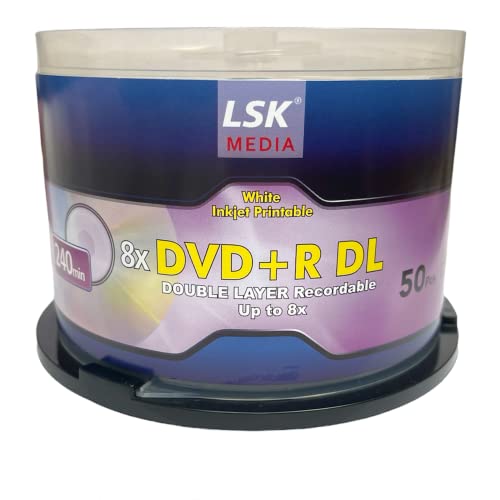
PHILIPS DVD+R 8.5G INKJET DUAL, LAYER,CAKE BOX, 50PKS, 600/CRN A2

Key features
- •Each spindle contains 50 pieces of 8.5 gigabytes double layered 8x write-speed DVD+R white inkjet printable discs
- •Stores 8.5 gigabytes of data or up to 240 minutes of TV and Video
- •Vibrant full color, high resolution, photo-quality printing
- •Absorbing ink and drying fast
- •Compatible with most inkjet disc printers and leading DVD+R DL drives manufacturers. Ideal for disc duplication
PHILIPS DVD+R 8.5G INKJET DUAL, LAYER,CAKE BOX, 50PKS, 600/CRN A2
List Price: $58.84$52.96DEALYou Save: $5.88 (10%)
Free shippingFree Returns – 30 daysFree Order CancellationSecure Payment2–3 Days DeliveryGet It October 25, 2026In Stock (1)No marketing spamNo account requiredFulfilment by FedEx / Amazon / UPS / ShipwirePayPal / Card Buyer Protection
Customer Reviews
Reviews sourced from verified Amazon purchasers4.4
out of 5
Based on 10 reviews
5★
60%
4★
40%
3★
0%
2★
0%
1★
0%
Great Quality
Chris✓ Verified Purchase•October 7, 2023
Video editing I thought I had just come to accept the fact that half of the disks I attempt to burn in the dual layer format just get thrown out as bad copies. Than I tried Philips. I wish I tried these before all the money I wasted on Verbatim and Memorex. I've burned over 100 of these Philips brand dual layer DVD's and have not thrown 1 away. All were good burns, using the same burner that trashed so many other brands DVDs. No problems burning, no problems reading, paper holds a good quality image that my clients are definitely happy with. My new favorite brand. I don't see myself switching any time soon.
I had excellent results with the very reasonably priced Philips DVD+R 8.5gb
Lancelot✓ Verified Purchase•September 29, 2023
The printed DVD's look marvelous, without running ink and very detailed pictures and graphics.
I am burning at 8x as the product is rated and that take 12-15 minutes for max data as indicated in the product description so no complaints here.
I am also very happy with burning failure rate, which would have been zero had I not made two setup errors. For that reason they are contributable to my, not to be too hard on myself, lack of common sense.
I can recommend the Philips DVD+R 8.5gb inkjet hub printable media discs wholeheartedly without reservations and have reordered already.
February 14, 2013 update: I am on the third 50 PKS CAKE BOX. I burned 115 (rough estimate) disks and only one (1) unusable burn was caused by product failure.
I am still very happy with the product and will definitely order again.
I am burning at 8x as the product is rated and that take 12-15 minutes for max data as indicated in the product description so no complaints here.
I am also very happy with burning failure rate, which would have been zero had I not made two setup errors. For that reason they are contributable to my, not to be too hard on myself, lack of common sense.
I can recommend the Philips DVD+R 8.5gb inkjet hub printable media discs wholeheartedly without reservations and have reordered already.
February 14, 2013 update: I am on the third 50 PKS CAKE BOX. I burned 115 (rough estimate) disks and only one (1) unusable burn was caused by product failure.
I am still very happy with the product and will definitely order again.
Good Discs
Arturo Guerrero✓ Verified Purchase•September 22, 2023
I have not had a bad burn yet. The printable area covers nearly the whole disc, more printable surface than most discs I have purchased. The only bad thing about the discs is the little Phillips watermark on the disc. Its only noticeable when you look closely at the disc.
Works for me
Dustin✓ Verified Purchase•September 8, 2023
I'm not very experienced in the ways of DVD burning, but these discs get the job done. I've been converting VHS movies to mp4 files on my PC, and I needed to back them up to DVD permanently in case of a hard drive failure. After spending a couple of hours doing research and comparing products/prices on Amazon and retail stores, I went with these. My first burn was probably the toughest, as I chose to burn my converted version of "The Patriot" to DVD. It's the longest and largest mp4 file I had. I used Daniusoft DVD Creator as my burning software. Because this was such a large file and I had no other way to shrink it without further reducing the quality, I had to use the D9 setting in conjunction with the "Standard" quality setting. Despite this and it taking two hours to burn, the results are impressive. It looks and sounds nearly as good as the original VHS tape, and my 10+ year old DVD player handled it with no problem. It even upscales the 4:3 DVD to fit our 16:9 widescreen without significant quality loss or picture cutoff. Overall, these discs appear to be a great value and I am pleased with the results. I've burned several now and still haven't created any coasters. When purchasing DVDs, remember that you need a drive that is capable of burning a Dual Layer DVD, and to also review your program settings to make sure the file will fit the DVD or that the program can even burn those file types. I'm no pro at DVD editing, but my experience working on computers tells me that the people who are having trouble and complain on here are just having software or hardware issues. These could be fixed with a 20 dollar investment in a Dual Layer capable drive, or if you have a dinosaur machine, an upgrade to a new computer. Quality burning software may help too, I'm getting by just fine with the free Windows DVD Maker and the not so free Daniusoft DVD Creator.
All DVDs burned perfectly
Brendan✓ Verified Purchase•September 5, 2023
I was pleasantly surprised.
I had read reviews, warning that a number of these discs fail to burn properly.
Because the price was so good, I decided to give it a try anyway.
I do a lot of burning video to DVD and i am very retentive about quality control.
Even if a burn is successful, I play the disc to make sure.
I have already used more than half the DVDs and, so far, I have not had a single write error.
Every disc burned perfectly.
I am always extra cautious when using dual layer discs, and make sure to stick with reliable programs and i don't mess with the write speed.
100% success rate so far.
i will be reordering.
I had read reviews, warning that a number of these discs fail to burn properly.
Because the price was so good, I decided to give it a try anyway.
I do a lot of burning video to DVD and i am very retentive about quality control.
Even if a burn is successful, I play the disc to make sure.
I have already used more than half the DVDs and, so far, I have not had a single write error.
Every disc burned perfectly.
I am always extra cautious when using dual layer discs, and make sure to stick with reliable programs and i don't mess with the write speed.
100% success rate so far.
i will be reordering.
Page 1 of 2
Related products



M-DISC 4.7GB DVD+R Permanent Data Archival Backup Blank Disc Media - 50 Pack
List: $289.55$260.60DEAL