Studio One 3 Professional Upgrade from Studio One Artist 3 (License Code + Quick Start)
Key features
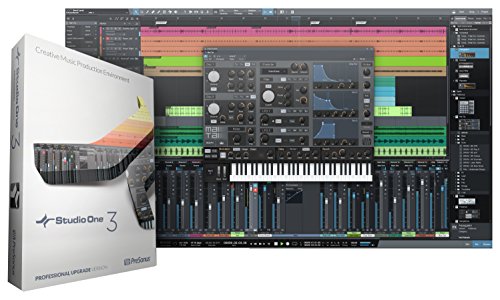
- •Elegant single-window work environment with powerful drag-and-drop functionality, multi-touch support, unlimited audio and Instrument tracks, virtual instruments, buses, and FX channels
- •Content browser lets you search, find, preview, and drag-and-drop tempo-matched loops, samples, effects, instruments, presets, and more
- •NEW Presence XT expandable sampler and Mai Tai polyphonic, analog modeling synth; includes 36 64-bit Native Effects, and 5 virtual instruments in all
- •Native Fat Channel plug-in from StudioLive AI mixers includes low-pass filter, gate, compressor, parametric EQ, and limiter
- •Product will be delivered in a box that contains a Quick Start Guide and a License Code Card. The software can be accessed once the license code is registered via a user account at my.presonus.com
- •Software accessed via license key upon registration with manufacturer
Studio One 3 Professional Upgrade from Studio One Artist 3 (License Code + Quick Start)
List Price: $436.43$392.79DEALYou Save: $43.64 (10%)
Free shippingFree Returns – 30 daysFree Order CancellationSecure Payment2–3 Days DeliveryGet It October 25, 2026In Stock (1)No marketing spamNo account requiredFulfilment by FedEx / Amazon / UPS / ShipwirePayPal / Card Buyer Protection
Customer Reviews
Reviews sourced from verified Amazon purchasers4.2
out of 5
Based on 10 reviews
5★
60%
4★
30%
3★
0%
2★
10%
1★
0%
Great for Songwriters!
db3•October 7, 2017
Great for songwriters! I've been around long enough to have tried Cubase and Ableton for a few years, and have test driven a few other DAWs as well. Studio One 3 Professional is by far the best for my workflow.
Pros:
- Professional Version (unlike the Prime and Artist Versions) works well with 3rd party plugins. No limitations.
- Arranger Track is a game changer for me. It now takes just a minute to do the same songwriter editing that used to take hours in Ableton!
- Excellent bundled plugins and instruments. Cover a wide variety of sounds. Complementary to 3rd party plugins.
- Easy to use. Every DAW has a learning curve. Studio One is designed to be intuitive, less learning curve.
- Mastering Screen is a whole new ball game, takes it to the next level.
- Melodyne is a plus.
Cons
- Used to be a little CPU hungry, but the last few updates seem to have lessened that significantly.
Overall I'm extremely happy with Studio One 3 Professional. Can't see myself going back to Ableton or Cubase anytime soon. Studio One 3 has everything I need.
Pros:
- Professional Version (unlike the Prime and Artist Versions) works well with 3rd party plugins. No limitations.
- Arranger Track is a game changer for me. It now takes just a minute to do the same songwriter editing that used to take hours in Ableton!
- Excellent bundled plugins and instruments. Cover a wide variety of sounds. Complementary to 3rd party plugins.
- Easy to use. Every DAW has a learning curve. Studio One is designed to be intuitive, less learning curve.
- Mastering Screen is a whole new ball game, takes it to the next level.
- Melodyne is a plus.
Cons
- Used to be a little CPU hungry, but the last few updates seem to have lessened that significantly.
Overall I'm extremely happy with Studio One 3 Professional. Can't see myself going back to Ableton or Cubase anytime soon. Studio One 3 has everything I need.
Some Unique and Well Thought-Out Features
frankp93✓ Verified Purchase•June 3, 2016
I prefer to focus here on specific features "“ cloud integration, the Scratch Pad and the Project Page mastering tools that really set Studio One apart for me in terms of improved workflow.
I'd encourage anyone more interested in how Studio One implements traditional DAW functionality to check out online tutorials and demos. I think the core feature set and UX is comparable to DAWS such as Cubase, Logic and Sonar more so than say Ableton and Reason. The Studio One interface is still a bit menu-heavy for my taste but it's attractive, easy on the eyes and the keyboard shortcuts make it comfortable to navigate once you're familiar.
Seamless web integration "“ particularly with SoundCloud "“ is a key part of Studio One's user experience. The initial screen includes (by default) a feed of product-related ads for ad-ons, related tools, controllers, sound packs etc., as well as online demos and tutorials. Although there's an ample manual, PreSonus is acknowledging that many users pick up software skills by watching others and/or simply diving in, rather than methodically studying large texts.
Any available Studio One upgrades are clearly flagged and can be downloaded immediately and installed without leaving the application (unless of course a major revision requires it). In addition to convenience I think this reflects the industry trend towards software subscriptions rather than one time purchase.
The "˜units of measure' in Studio One are the Song and the Project "“ projects being an "˜album' made from one or more songs. The final outcome can be a CD (Red Book audio or mp3), a digital image or file stored locally or deployed as a digital release "“ all of this done from within Studio One.
The Scratch Pad function is something I've wished for in other DAWs for some time. Working with multiple versions of individual tracks within a project has long been standard "“ not just in software but going back to the earliest automated digital mixing boards. However manipulating synchronized groups of tracks and entire slices of arrangements has typically involved ad-hoc version control: saving and restoring entire projects, awkward cut and paste and copying files around, etc. It's been doable but in my opinion never as seamless as it should be.
Studio One's Scratch Pad function acknowledges this aspect of production workflow as "˜first-class functionality'. Scratch Pad allows you to extract and interact with snapshots of your arrangement: copying not just to one but any number of scratch pads where you them modify them and easily call them up and A-B against your working arrangement.
It's an easy-to-use way to try out arrangement-scale changes and compare them non-destructively against your working arrangement. Then if you choose you can swap in your modified version or simply discard it. All versions are stored within the Song's files with no need to reload anything. A great idea and I think a logical extension of how people work with the materials of software-based music production.
I find the Project Page mastering functions as intuitive as any I've come across. Instead of freezing a mix and importing it into a separate mastering suite, Studio One let's you gather songs directly into your project and, from the Project Page, apply effects, levels, fades/cross fades individually or project-wide. The visual timeline metaphor so familiar to song production is applied here to the collection of songs. Instead of individual instrument tracks in a "˜rack view', you have individual songs "“ it just makes sense.
And once you've added a song to a project, it's not frozen: you can easily return to the song view and work on it further. Any subsequent changes you make to the mix on the song page are automatically propagated into the project "“ the wall between song and mastered project is essentially gone.
There's still no substitute for ears but the visual feedback and care PreSonus took with the UX makes all of this so much easier. Anyone intimidated by the "˜black art' aspect of mastering should have no fear.
Performance-wise, I recommend a pretty robust machine for Studio One. On a 2.9 Ghz HP Pavilion running 64-bit Win7 with 6GB of RAM and an EMU PCI soundcard I'm unable to play the sample projects without a lot of audio buffer tweaking and ultimately muting some tracks. I can create smaller audio recording-based projects of 4-6 tracks with no problem and MIDI projects with even more. But if you're working with large numbers of plug-ins and real time audio rendering you'll need the horsepower.
For someone like myself whose recording experience spans the analog/digital divide it's interesting to recall back when vendors recommended disconnecting DAW-dedicated computers from the internet to avoid malware and background process activity "“ not to mention the inevitable easy distraction (still an issue, IMO).
Obviously things have changed in terms of how people educate themselves, collaborate and perform actual music production. PreSonus signals with Studio One they get it and there's no point pretending otherwise.
I'd encourage anyone more interested in how Studio One implements traditional DAW functionality to check out online tutorials and demos. I think the core feature set and UX is comparable to DAWS such as Cubase, Logic and Sonar more so than say Ableton and Reason. The Studio One interface is still a bit menu-heavy for my taste but it's attractive, easy on the eyes and the keyboard shortcuts make it comfortable to navigate once you're familiar.
Seamless web integration "“ particularly with SoundCloud "“ is a key part of Studio One's user experience. The initial screen includes (by default) a feed of product-related ads for ad-ons, related tools, controllers, sound packs etc., as well as online demos and tutorials. Although there's an ample manual, PreSonus is acknowledging that many users pick up software skills by watching others and/or simply diving in, rather than methodically studying large texts.
Any available Studio One upgrades are clearly flagged and can be downloaded immediately and installed without leaving the application (unless of course a major revision requires it). In addition to convenience I think this reflects the industry trend towards software subscriptions rather than one time purchase.
The "˜units of measure' in Studio One are the Song and the Project "“ projects being an "˜album' made from one or more songs. The final outcome can be a CD (Red Book audio or mp3), a digital image or file stored locally or deployed as a digital release "“ all of this done from within Studio One.
The Scratch Pad function is something I've wished for in other DAWs for some time. Working with multiple versions of individual tracks within a project has long been standard "“ not just in software but going back to the earliest automated digital mixing boards. However manipulating synchronized groups of tracks and entire slices of arrangements has typically involved ad-hoc version control: saving and restoring entire projects, awkward cut and paste and copying files around, etc. It's been doable but in my opinion never as seamless as it should be.
Studio One's Scratch Pad function acknowledges this aspect of production workflow as "˜first-class functionality'. Scratch Pad allows you to extract and interact with snapshots of your arrangement: copying not just to one but any number of scratch pads where you them modify them and easily call them up and A-B against your working arrangement.
It's an easy-to-use way to try out arrangement-scale changes and compare them non-destructively against your working arrangement. Then if you choose you can swap in your modified version or simply discard it. All versions are stored within the Song's files with no need to reload anything. A great idea and I think a logical extension of how people work with the materials of software-based music production.
I find the Project Page mastering functions as intuitive as any I've come across. Instead of freezing a mix and importing it into a separate mastering suite, Studio One let's you gather songs directly into your project and, from the Project Page, apply effects, levels, fades/cross fades individually or project-wide. The visual timeline metaphor so familiar to song production is applied here to the collection of songs. Instead of individual instrument tracks in a "˜rack view', you have individual songs "“ it just makes sense.
And once you've added a song to a project, it's not frozen: you can easily return to the song view and work on it further. Any subsequent changes you make to the mix on the song page are automatically propagated into the project "“ the wall between song and mastered project is essentially gone.
There's still no substitute for ears but the visual feedback and care PreSonus took with the UX makes all of this so much easier. Anyone intimidated by the "˜black art' aspect of mastering should have no fear.
Performance-wise, I recommend a pretty robust machine for Studio One. On a 2.9 Ghz HP Pavilion running 64-bit Win7 with 6GB of RAM and an EMU PCI soundcard I'm unable to play the sample projects without a lot of audio buffer tweaking and ultimately muting some tracks. I can create smaller audio recording-based projects of 4-6 tracks with no problem and MIDI projects with even more. But if you're working with large numbers of plug-ins and real time audio rendering you'll need the horsepower.
For someone like myself whose recording experience spans the analog/digital divide it's interesting to recall back when vendors recommended disconnecting DAW-dedicated computers from the internet to avoid malware and background process activity "“ not to mention the inevitable easy distraction (still an issue, IMO).
Obviously things have changed in terms of how people educate themselves, collaborate and perform actual music production. PreSonus signals with Studio One they get it and there's no point pretending otherwise.
+ ½ *: For Professional Audio
Bass Cadet✓ Verified Purchase•November 16, 2015
A few months ago, I bought a PreSonus AudioBox iTwo box. It comes with a copy of Studio One Artist, which is a slightly less featured version of this program. For me, though, it hits the sweet spot of price and features for a DAW.
I found S1's controls quite usable and easy to configure. The control panel is handy and easy to maneuver. Since I do not use many plug-ins, I have not really used most of the additional Pro features over the Artist version.
The mixer almost works the way I would want running on a touchscreen i5 Windows 10 laptop. It is possible to control two faders simultaneously and four using two hands. But I missed almost as much as I was able to run the faders with just one hand. Maybe I just need more practice but the spacing is tight. A touchscreen definitely can't compare to physical faders on a real mixer (e.g. my Spirit Folio F1) but having a complete audio workstation on a laptop is amazing.
My current interests are primarily with recording recitals and editing sound for video. While this software can be used for these purposes, it is not ideally suited. For one, it does not output multichannel surround formats. It is pretty much fixed to stereo. Combining and assigning tracks would have to be done in another program although editing tracks individually is certainly doable. It also understandably does not handle SMPTE timecode.
For all PreSonus products, I definitely recommend visiting the forum and watching the instructional videos.
I found S1's controls quite usable and easy to configure. The control panel is handy and easy to maneuver. Since I do not use many plug-ins, I have not really used most of the additional Pro features over the Artist version.
The mixer almost works the way I would want running on a touchscreen i5 Windows 10 laptop. It is possible to control two faders simultaneously and four using two hands. But I missed almost as much as I was able to run the faders with just one hand. Maybe I just need more practice but the spacing is tight. A touchscreen definitely can't compare to physical faders on a real mixer (e.g. my Spirit Folio F1) but having a complete audio workstation on a laptop is amazing.
My current interests are primarily with recording recitals and editing sound for video. While this software can be used for these purposes, it is not ideally suited. For one, it does not output multichannel surround formats. It is pretty much fixed to stereo. Combining and assigning tracks would have to be done in another program although editing tracks individually is certainly doable. It also understandably does not handle SMPTE timecode.
For all PreSonus products, I definitely recommend visiting the forum and watching the instructional videos.
Phenomenal Resource for Recording
Sarah B.✓ Verified Purchase•November 16, 2015
I consider myself to be an amateur recording artist. Last year, I worked on an instrumental Christmas Album that I recorded using Garage Band and my midi keyboard.
It goes without saying that this software blows Garage Band out of the water. The variety of voicings and samples and effects really gives you a world of musical options at your finger tips.
I was able to set up my midi keyboard without any difficulty (I use a Casio CDR-230). I looked up a tutorial on YouTube on how to set it up in Studio One and I didn't have any trouble at all.
I feel like a lot of the layout is intuitive. There is a LOT that you can do with your tracks in regards to editing and mixing. I love being able to go in and change wrong midi notes or adjust the pitch of vocals using Melodyne.
It does take a while (for me it took about 4 hours to download EVERYTHING) and a bit of space (over 25 GB) to load onto your computer. It comes with a download key card, so its easy to load onto a device that doesn't have a CD-Rom drive.
In terms of usability, I've used a few different DAWs in the past and I find this one to be pretty user friendly. I love the abilty to color code tracks. It makes it very easy to visually group your different instruments.
There are some helpful tutorials and videos onine that I watched to help me with the basics of learning this software.
This pretty much has everything you could need to produce professional quality recording. The instrument voices, samples, and loops sound phenomenal. The layout is easy enough for a novice to use, but a professional will feel right at home.
I feel like this software is a tremendous resource for the at home recording artist. I've already started working on my next instrumental album and Studio One is really helping me create something that is polished and professional.
I love it and would absolutely recommend it.
It goes without saying that this software blows Garage Band out of the water. The variety of voicings and samples and effects really gives you a world of musical options at your finger tips.
I was able to set up my midi keyboard without any difficulty (I use a Casio CDR-230). I looked up a tutorial on YouTube on how to set it up in Studio One and I didn't have any trouble at all.
I feel like a lot of the layout is intuitive. There is a LOT that you can do with your tracks in regards to editing and mixing. I love being able to go in and change wrong midi notes or adjust the pitch of vocals using Melodyne.
It does take a while (for me it took about 4 hours to download EVERYTHING) and a bit of space (over 25 GB) to load onto your computer. It comes with a download key card, so its easy to load onto a device that doesn't have a CD-Rom drive.
In terms of usability, I've used a few different DAWs in the past and I find this one to be pretty user friendly. I love the abilty to color code tracks. It makes it very easy to visually group your different instruments.
There are some helpful tutorials and videos onine that I watched to help me with the basics of learning this software.
This pretty much has everything you could need to produce professional quality recording. The instrument voices, samples, and loops sound phenomenal. The layout is easy enough for a novice to use, but a professional will feel right at home.
I feel like this software is a tremendous resource for the at home recording artist. I've already started working on my next instrumental album and Studio One is really helping me create something that is polished and professional.
I love it and would absolutely recommend it.
Powerful, Flexible, Intuitive. Really Good!
12XU✓ Verified Purchase•November 1, 2015
I don't know how you work. I don't know how you think. But I know that for me, and I built my first midi-based studio in 1985 before becoming a professional recording engineer for over a decade, I really like the way Studio One works.
Obviously, this stuff is subjective, but it works the way I think. The ability to drag and drop arrangements, the scratch pad feature (which is amazing - I'm always thinking of something new to work on in the middle of a project), the easy access to plug-ins - for some reason it works in a way that meshes with the way my brain wants to engineer from way back in the all-analog days. Can't explain it better than that.
As someone else said though, DAWs are very personal, and getting to know them and being comfortable on them is a huge part of what makes them good or bad for someone. That and sound quality of course, which I'm happy to say is excellent. I was able to get very low latency with a couple of different audio interfaces, and didn't suffer any of the MIDI glitches that another reviewer mentioned. The end product in each of my test projects was quite good.
The effect plugins and included instruments are quite good, but not the best on the market. Not surprising, as this entire package sells for less than many plugins. While you may eventually want to add some high-end VSTs to the system, the ones that ship (um, are downloaded) as a part of the Professional version are entirely serviceable. I suspect that if you need better instruments off the bat you're already locked in with a DAW and unlikely to switch. While I think Studio One can hang with the big boys, switching late in the game is tough. Thus, for most shoppers, you'll have more than enough to play with for quite a while.
Finally, a quick note about the box, and the downloads. I find it somewhat ridiculous to produce, print, and sell a box that in all likelihood will be shipped out from distributor to customer, that simply contains a plastic card with a serial number on it. No manual whatsoever, and no additional DVD-based instruments (as Ableton included with Live 8 boxed version, and 9 as well for all I know - I just own 8). Then you download the program, which takes a while, then you download all the instruments and plugins, which takes a loooooong while, then you download the manual and demos which, you guessed it, take even longer. After all that, it doesn't auto-install the manual and demos either - it says they're downloaded but they don't appear. You have to drag and drop the zip files onto the program window to install them, which is absurd - particularly since the freaking manual is one of those things.
But. Those hiccups aside, I really dig this program. When I'm thinking in blocks of music or patterns, I might fire up Ableton. But when I'm thinking linearly, even a little bit, Studio One is my new go-to DAW. A great choice.
Obviously, this stuff is subjective, but it works the way I think. The ability to drag and drop arrangements, the scratch pad feature (which is amazing - I'm always thinking of something new to work on in the middle of a project), the easy access to plug-ins - for some reason it works in a way that meshes with the way my brain wants to engineer from way back in the all-analog days. Can't explain it better than that.
As someone else said though, DAWs are very personal, and getting to know them and being comfortable on them is a huge part of what makes them good or bad for someone. That and sound quality of course, which I'm happy to say is excellent. I was able to get very low latency with a couple of different audio interfaces, and didn't suffer any of the MIDI glitches that another reviewer mentioned. The end product in each of my test projects was quite good.
The effect plugins and included instruments are quite good, but not the best on the market. Not surprising, as this entire package sells for less than many plugins. While you may eventually want to add some high-end VSTs to the system, the ones that ship (um, are downloaded) as a part of the Professional version are entirely serviceable. I suspect that if you need better instruments off the bat you're already locked in with a DAW and unlikely to switch. While I think Studio One can hang with the big boys, switching late in the game is tough. Thus, for most shoppers, you'll have more than enough to play with for quite a while.
Finally, a quick note about the box, and the downloads. I find it somewhat ridiculous to produce, print, and sell a box that in all likelihood will be shipped out from distributor to customer, that simply contains a plastic card with a serial number on it. No manual whatsoever, and no additional DVD-based instruments (as Ableton included with Live 8 boxed version, and 9 as well for all I know - I just own 8). Then you download the program, which takes a while, then you download all the instruments and plugins, which takes a loooooong while, then you download the manual and demos which, you guessed it, take even longer. After all that, it doesn't auto-install the manual and demos either - it says they're downloaded but they don't appear. You have to drag and drop the zip files onto the program window to install them, which is absurd - particularly since the freaking manual is one of those things.
But. Those hiccups aside, I really dig this program. When I'm thinking in blocks of music or patterns, I might fire up Ableton. But when I'm thinking linearly, even a little bit, Studio One is my new go-to DAW. A great choice.
Page 1 of 2