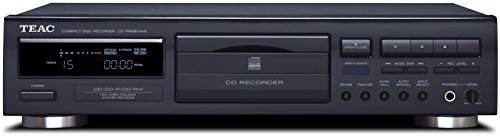
Teac CD-RW890MK2-BTEAC CD-RW890MK2 Home Audio CD Recorder - Black
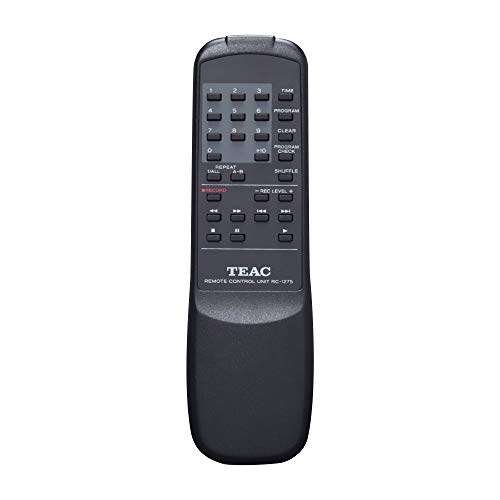
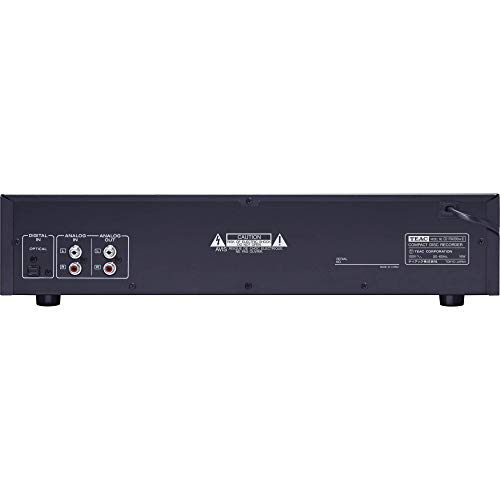

Key features
- •CD RECORDER. The CD-RW890MKII is capable of recording to audio CD-R/RW media from both analog and digital audio sources and functions as a full-featured CD player, with multiple playback modes and a S/PDIF optical output.
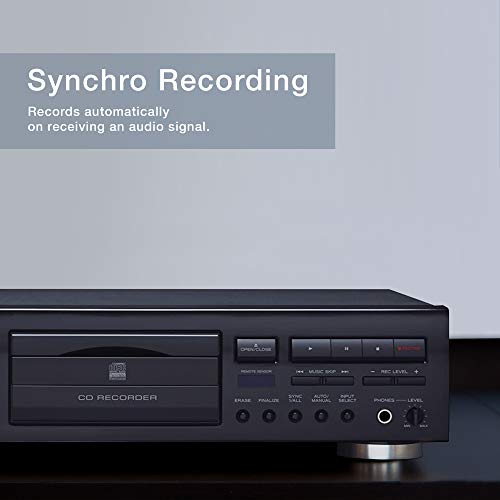
- •AUTO TRACK. Auto track detects silent intervals when dubbing records or cassettes to CD-R/RW, automatically incrementing track numbers. This reduces time and labor associated with manually assigning individual track numbers.
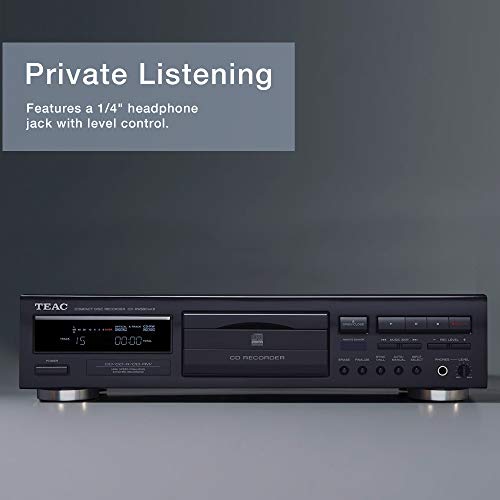
- •AUDIO QUALITY. Synchro recording starts automatically at the beginning of a track and halts when the signal stops. A center CD drive minimizes vibrations. Display and power switch are on the left, control buttons and headphone jack are on the right.
- •FUNCTIONS. Center-mounted Drive Mechanism. FL Display with Level Meter. Unbalanced Audio Input and Output.
- •FEATURES: 120V AC, 60Hz (US). Weight: 9.9 lbs. Dimensions: (W x H x D): 17-1/8" x 4-15/16" x 11-11/16" (435 x 100 x 295 mm).
Teac CD-RW890MK2-BTEAC CD-RW890MK2 Home Audio CD Recorder - Black
List Price: $496.52$446.87DEALYou Save: $49.65 (10%)
Free shippingFree Returns – 30 daysFree Order CancellationSecure Payment2–3 Days DeliveryGet It October 25, 2026In Stock (3)No marketing spamNo account requiredFulfilment by FedEx / Amazon / UPS / ShipwirePayPal / Card Buyer Protection
Customer Reviews
Reviews sourced from verified Amazon purchasers3.8
out of 5
Based on 10 reviews
5★
10%
4★
20%
3★
40%
2★
0%
1★
30%
The led level does not record loud enough to be enjoyable during playback.
Lee Freese•February 14, 2018
This is a piece of junk -- surprising for a TEAC product. The led level mechanism is so poorly engineered that it is impossible to reach even the middle of the scale (assuming my unit is not defective). This results in a playback level that swings widely from one track to the next -- there being no way to even out the led level of the tracks without completely obscuring some of the softer tracks. It also makes listing to a CD while traveling in a car virtually impossible because the car CD volume won't go loud enough. Another major defect is this: Wishing to erase a track -- say, track 8 -- one has to erase every track that follows it. One cannot pick out track 8 and erase just it. The result here is that all the remaining tracks need to be re-recorded -- a very laborious process. Finally, the unit will merge multiple tracks into one unless the stop button is pressed after each recording. Yet, a short space between the recorded tracks was enough to separate tracks on virtually all CD recorders in use going back twenty years. But the big drawback here is the low limit to the led level. It renders the machine mostly worthless. I just hope I am able to return this to the seller.
The audio specs are also not as good as I would expect this far into the development ...
Mevansdude•January 27, 2018
This unit DOES make decent CD recordings and for the money you really can't complain, but there are a few issues you might want to know about. I wish I'd had the chance to demo this unit before I bought it, so maybe I can at least warn you so that if you want to spend a bit more to get increased features you can decided if you need to or not. One big problem with this deck is the level meters only have a few segments, so it can be very hard to keep from going over zero db unless you spend a lot of time reviewing the source media very closely before committing to record. I am used to much higher resolution level meters such as those found on my SV-3700 DAT deck and Nakamichi tape deck, which admittedly are much more expensive boxes than the Teac. Another issue I've noticed is this box is very slow - slow to load, slow to read, just plain slow. Also, the display has very limited information, such as not showing time remaining on disc during a recording and other stats in real time. The audio specs are also not as good as I would expect this far into the development of CD technology, although still acceptable. The construction is very good with a metal cabinet and very solid controls. I do think if I tried recording on one, I would have opted for one of the more professional-quality Teac units.
"Sticky" buttons
Samuel c Floyd•March 1, 2017
This machine makes very nice CDs and would would be great if you only intend to dub whole discs. However, the Play and Pause buttons do not work immediately 100% of the time. These are critical functions when recording individual selections from other discs.
Large Compact Disc Recorder, with some odd problems
Stanley Kohl;•June 28, 2016
Update, 30 July 2017: In addition to the issues mentioned below, within the first year the number of "COM ERROR" problems increased to the point where I mostly stopped using the TEAC, and went back to my 18-year old Philips recorders. I'm not changing the rating from 3-star at this time, since it may happen on only a few of these and I haven't determined the cause, though other reviews have noted the same problem.
The TEAC CD-RW890 mkII is large enough to contain a second drive, maybe a 3-disc changer, but requires an external player to dub CDs. The mix of features is odd, operation is somewhat awkward and some functions don't work very well. But I'm not rating the TEAC lower than a 3-star "OK" because it is fairly inexpensive, and makes good-sounding recordings on available CD-R discs.
The TEAC accepted all of the "Music" CD-Rs I tried, including those that were rejected by my Philips recorders. "Music" or "Digital Audio" discs are the type specified in the manual, and should have better compatibility since the light-sensitive dye can be optimized for the lower speeds used in stand-alone recorders. But whether by design or oversight, the TEAC also works with at least some "data" CD-Rs.
Of the two features advertised on the front panel, "High Speed Finalizing" works well, getting the job done in less than a minute, but "Synchro Recording" is another matter. While I don't expect good results from any scheme designed to automatically place track markers based on sound levels, this one at least has an interesting implementation, being triggered by the start of sound, rather than when things go silent, which should help avoid extra track markers. To make up for the time it takes to access the disc, delayed audio in a buffer is written at high speed until it catches up with the real-time input, when recording can continue at normal speed. But the high-speed writing is done any time a track is added, whether or not "Synchro Recording" has been selected. While this also makes possible precise cueing in "manual" mode when dubbing individual tracks, it would help if the function could be turned off because it has undesirable side effects, one of which is mentioned in the Owner's Manual:
When track numbers are added to continuous music such as live
performances, the sound is cut a moment.
If a disc recorded with this unit is played with another player,
noises may occur when the track changes.
The "noises" are less likely when the track change is during a silence, but otherwise can be as loud as a moderate scratch in a vinyl record. This is not only a "noise" but also a disturbance in time, and TEAC's solution was to cover it up by blanking the sound on playback for about a tenth of a second at track changes, which will happen with any disc played on the machine. While not a major issue for non-critical listening it shouldn't be necessary. But a worse problem can show up about twelve seconds after the track marker, at the other end of the piece written at high speed. While the transition is "noise" free, occasionally it is at the wrong point, causing a "jump" of a few seconds in the recording. I had this happen three times in about two dozen discs recorded on the machine; not often, but disasterous when it occurs.
The high-speed writing of "Synchro Recording" has other effects. The minimum track length is increased to 10 seconds instead of the usual four, an issue if a short silence is desired between "songs" since there is no "3-second blank" feature, often found on CD recorders and with computer disc-burning programs. I also believe the high-speed writing is responsible for the disc becoming "Full" with about five seconds of remaining time displayed on the counter.
Of concern mostly to those desiring high-end audio "enhancement" the Owner's Manual warns against use of "stabilizers" and it would likely be best to avoid anything with this feature built in, such as Fuji Pro discs, since rotational speed has to change rapidly for the high-speed recording to work.
As for the intended purpose of "Synchro Recording" I was unable to get automatic track changes while dubbing an LP, likely due to low-level noise in the amplifier or record surface. It worked better with a digital dub of a CD, but only when the track separations were short. Recording stops, according to the Manual, when the silence between tracks exceeds five seconds.
The mode in which the TEAC powers up assumes users mostly want to copy from digital sources, yet there is only an optical digital input, and no digital outputs. To make a digital copy of a CD, a player with an optical output is required, along with an optical cable. Sample-rate conversion from 48K and 32K sources is provided, with the rate automatically selected, useful for tasks such as digital recording of sound from a DVR, which might be used as a backup. And with optical-disc recording it is best to have a backup for one-time events, since even if the equipment works properly, a short power outage will lose whatever was recorded, at least back to the last track change.
If analog source and manual operation are desired, it takes some button-pressing to get there, but the pattern isn't hard to learn. Of greater irritation, the recording level, active only in analog mode, gets reset to "0 dB" when the "Stop" button is pressed, so make a note of where it was if you want to resume recording. The level is adjusted with up/down buttons in 1 dB steps, the response slow enough that it isn't useful for "fading out" a selection. And the recording level indicator, while accurate, has a very slow response, making it hard to measure the peak levels to avoid distortion.
I'm willing to give the recorder the benefit of the doubt on at least some of the all-too-frequent "COM ERROR" and "REC ERROR" crashes, since these could easily be due to disc problems, resembling those I've seen with my Philips recorders. But this doesn't excuse troubles that appear to be software-related, like the disc tray being reluctant to open, or slow action when trying to put the machine into "Stop" or "Pause" with the front-panel buttons.
There are also minor issues with using the TEAC as a player, including a long loading time even for commercial CDs. The "scan" mode is not very smooth, and if either forward or reverse buttons are briefly pressed, the machine tends to lock up. And when scanning backwards through a track change, for tasks like checking for the above-mentioned "jumps" in the recording, it sometimes goes to the beginning of the track. But it will play most discs, even one I had that would only work with skipping and noise on other machines.
I much prefer the operation of my old Philips recorders when I can find compatible discs, but for those other times, despite its occasionally erratic behavior, the TEAC is useful when operated with knowledge of its limitations. The TASCAM "Professional" recorders would likely avoid some of the problems of the TEAC, but they are more expensive.
The TEAC CD-RW890 mkII is large enough to contain a second drive, maybe a 3-disc changer, but requires an external player to dub CDs. The mix of features is odd, operation is somewhat awkward and some functions don't work very well. But I'm not rating the TEAC lower than a 3-star "OK" because it is fairly inexpensive, and makes good-sounding recordings on available CD-R discs.
The TEAC accepted all of the "Music" CD-Rs I tried, including those that were rejected by my Philips recorders. "Music" or "Digital Audio" discs are the type specified in the manual, and should have better compatibility since the light-sensitive dye can be optimized for the lower speeds used in stand-alone recorders. But whether by design or oversight, the TEAC also works with at least some "data" CD-Rs.
Of the two features advertised on the front panel, "High Speed Finalizing" works well, getting the job done in less than a minute, but "Synchro Recording" is another matter. While I don't expect good results from any scheme designed to automatically place track markers based on sound levels, this one at least has an interesting implementation, being triggered by the start of sound, rather than when things go silent, which should help avoid extra track markers. To make up for the time it takes to access the disc, delayed audio in a buffer is written at high speed until it catches up with the real-time input, when recording can continue at normal speed. But the high-speed writing is done any time a track is added, whether or not "Synchro Recording" has been selected. While this also makes possible precise cueing in "manual" mode when dubbing individual tracks, it would help if the function could be turned off because it has undesirable side effects, one of which is mentioned in the Owner's Manual:
When track numbers are added to continuous music such as live
performances, the sound is cut a moment.
If a disc recorded with this unit is played with another player,
noises may occur when the track changes.
The "noises" are less likely when the track change is during a silence, but otherwise can be as loud as a moderate scratch in a vinyl record. This is not only a "noise" but also a disturbance in time, and TEAC's solution was to cover it up by blanking the sound on playback for about a tenth of a second at track changes, which will happen with any disc played on the machine. While not a major issue for non-critical listening it shouldn't be necessary. But a worse problem can show up about twelve seconds after the track marker, at the other end of the piece written at high speed. While the transition is "noise" free, occasionally it is at the wrong point, causing a "jump" of a few seconds in the recording. I had this happen three times in about two dozen discs recorded on the machine; not often, but disasterous when it occurs.
The high-speed writing of "Synchro Recording" has other effects. The minimum track length is increased to 10 seconds instead of the usual four, an issue if a short silence is desired between "songs" since there is no "3-second blank" feature, often found on CD recorders and with computer disc-burning programs. I also believe the high-speed writing is responsible for the disc becoming "Full" with about five seconds of remaining time displayed on the counter.
Of concern mostly to those desiring high-end audio "enhancement" the Owner's Manual warns against use of "stabilizers" and it would likely be best to avoid anything with this feature built in, such as Fuji Pro discs, since rotational speed has to change rapidly for the high-speed recording to work.
As for the intended purpose of "Synchro Recording" I was unable to get automatic track changes while dubbing an LP, likely due to low-level noise in the amplifier or record surface. It worked better with a digital dub of a CD, but only when the track separations were short. Recording stops, according to the Manual, when the silence between tracks exceeds five seconds.
The mode in which the TEAC powers up assumes users mostly want to copy from digital sources, yet there is only an optical digital input, and no digital outputs. To make a digital copy of a CD, a player with an optical output is required, along with an optical cable. Sample-rate conversion from 48K and 32K sources is provided, with the rate automatically selected, useful for tasks such as digital recording of sound from a DVR, which might be used as a backup. And with optical-disc recording it is best to have a backup for one-time events, since even if the equipment works properly, a short power outage will lose whatever was recorded, at least back to the last track change.
If analog source and manual operation are desired, it takes some button-pressing to get there, but the pattern isn't hard to learn. Of greater irritation, the recording level, active only in analog mode, gets reset to "0 dB" when the "Stop" button is pressed, so make a note of where it was if you want to resume recording. The level is adjusted with up/down buttons in 1 dB steps, the response slow enough that it isn't useful for "fading out" a selection. And the recording level indicator, while accurate, has a very slow response, making it hard to measure the peak levels to avoid distortion.
I'm willing to give the recorder the benefit of the doubt on at least some of the all-too-frequent "COM ERROR" and "REC ERROR" crashes, since these could easily be due to disc problems, resembling those I've seen with my Philips recorders. But this doesn't excuse troubles that appear to be software-related, like the disc tray being reluctant to open, or slow action when trying to put the machine into "Stop" or "Pause" with the front-panel buttons.
There are also minor issues with using the TEAC as a player, including a long loading time even for commercial CDs. The "scan" mode is not very smooth, and if either forward or reverse buttons are briefly pressed, the machine tends to lock up. And when scanning backwards through a track change, for tasks like checking for the above-mentioned "jumps" in the recording, it sometimes goes to the beginning of the track. But it will play most discs, even one I had that would only work with skipping and noise on other machines.
I much prefer the operation of my old Philips recorders when I can find compatible discs, but for those other times, despite its occasionally erratic behavior, the TEAC is useful when operated with knowledge of its limitations. The TASCAM "Professional" recorders would likely avoid some of the problems of the TEAC, but they are more expensive.
This unit works great I have have used it in several setups now ...
aksound•March 19, 2016
This unit works great I have have used it in several setups now and each time it preforms well the cd sound great and the operation of the unit is very simple. would be great if you could get this in a rack style or some little kit to make it rack mountable.
Page 1 of 2