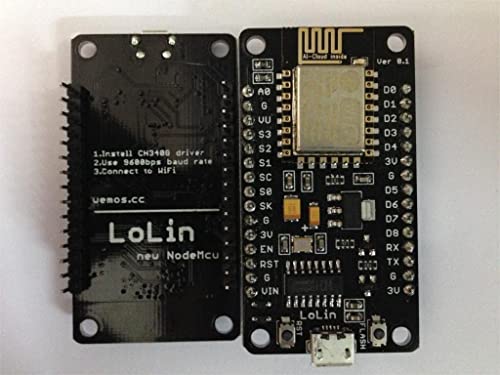
HiLetgo 1PC ESP8266 NodeMCU CP2102 ESP-12E Development Board Open Source Serial Module Works Great for Arduino IDE/Micropython (Small)


Key features
- •ESP8266 CP2102 NodeMCU ESP-12E WIFI Serial Wireless Module
- •Built-in Micro-USB, with flash and reset switches, easy to program
- •Full I/O port and Wireless 802.11 supported, direct download no need to reset
- •Arduino compatible, works great with the latest Arduino IDE/Mongoose IoT/Micropython
- •Data download access to the website: http://www.nodemcu.com
Brandeleduino
CategoryNetwork Transceivers
HiLetgo 1PC ESP8266 NodeMCU CP2102 ESP-12E Development Board Open Source Serial Module Works Great for Arduino IDE/Micropython (Small)
List Price: $15.50$13.95DEALYou Save: $1.55 (10%)
Free shippingFree Returns – 30 daysFree Order CancellationSecure Payment2–3 Days DeliveryGet It October 25, 2026In Stock (1)No marketing spamNo account requiredFulfilment by FedEx / Amazon / UPS / ShipwirePayPal / Card Buyer Protection
Customer Reviews
Reviews sourced from verified Amazon purchasers4.3
out of 5
Based on 10 reviews
5★
40%
4★
50%
3★
0%
2★
0%
1★
10%
Best ESP8266 dev board out there!
Mark Serrano✓ Verified Purchase•June 6, 2017
July 25th Review Update
============
I ordered 6 more pieces last night, and I got all of them following day. I installed Micropython on all of them and activated WebRepl, and I have no issues so far. All of them worked! I'm attaching new screenshots (the one with a fleet of NodeMcu's). Included in this screenshots are some of the projects I have done with this board:
1. Thermal camera sensor
2. Motion detector
3. Robot car
4. Laser tripwire system with RFID-based card access
5. Stepper motor with DRV8825 driver integration
6. Micro servo with OLED screen / Hall Sensor switch
All of these are programmed with Micropython. I have also attached screenshots of my frontend and backend Raspberry-based data collector and analytics program (my own platform). The point of these screenshots is to show what's possible with this board.
So far out of my 19 NodeMcu boards, 17 are perfect. The other two were failure because one of them was never delivered and the other one won't allow any firmware installation. Amazon has refunded those two by the way.
July 10th Review Update
============
So I ordered two more. However one of them was missing. Amazon only delivered one! The other one isn't accepting firmware updates. I wasted a week of waiting for the delivery and talking to support. The good thing is Amazon refunded both, and HiLetGo email tech support is able to provide "moral" support. At least they are responsive. So at the end the delivery part was Amazon's fault because what HiLetGo does is they delivery the items to Amazon and Amazon is the one who fulfills the order. Now the other board that's malfunctioning seems to HiLetGo's fault. I am at odds whether I should reduce my rating from 5 stars to 4 or 3 stars.
I looked for alternatives but I can't find any reliable sellers with reliable reviews. So I still went with HiLetGo. I ordered an extra 5 boards again. And they all worked fine. It took 2 mins to flash the firmware. So 10 good boards versus 1 missing and 1 malfunctioning (which both got refunded) I think should offset the bad experience I had. Comment below if you agree or not.
As part of my research why this other board isn't flashing correctly because of "espcomm_sync failed" errors, it seems it's a hardware misconfiguration. There were suggested workarounds but they didn't work for me. Google "nodemcu espcomm_sync failed" for solutions since I am not allowed to post a URL here. Also Google "Comparison of ESP8266 NodeMCU development boards" to get more information on various NodeMcu boards.
I say get the Amica-based NodeMcu board. It's the easiest and most reliable. The good thing is HiLetGo carries the Amica-based NodeMcu.
So far the projects I have made with this board are:
* Robot car
* Magnetic reed switches for door and mailbox
* Joystick controllers
* Rfid controller
* Weight sensors
* Neopixel controllers
I still prefer this board over the Adafruit Huzzah and Wemos. Recently I've dabbled with Ultrasonic Sensors and Relay. This board also worked flawlessly but the Olimex board seems better but pricier because it has integrated relay. I guess that's not really better because you can buy an extra relay and put it with the NodeMcu.
Jun 29th 2017 Review Update
============
So I ordered two of these again since they are the most reliable ESP8266 dev board out there (for the cheapest price). Oh I've tried them all (Huzzah, Olimex, Wemos etc). If you think I haven't, send me a message and I will order it.
Today I had a hiccup with uploading Micropython. It won't flash. The same commands that worked on my previous two NodeMcus worked flawlessly from these same vendor. But now it won't. I figured I have to use special flash mode when using esptool. Now it's working again.
So for those who are using Micropython and flashing the firmware with esptool, here's the commands that I'd suggest you try
1. Erase first. This assumes you update the PORT accordingly
esptool.py --port /dev/tty.SLAB_USBtoUART erase_flash
2. Upload the firmware. This assumes you went to Micropython and downloaded the firmware! The "-fm dio" is CRITICAL for these latest two dev boards I ordered. Previously I didn't need those. I read from the docs, most NodeMcu boards use this mode. So I guess I got lucky on my first two.
esptool.py --port /dev/tty.SLAB_USBtoUART --baud 115200 write_flash -fm dio 0x00000 esp8266-20170526-v1.9.bin
3. Reset and connect to your terminal to verify.
Bonus content:
Upload a NodeMcu LUA-based firmware:
===============================
esptool.py --port /dev/tty.SLAB_USBtoUART write_flash -fm dio 0x00000 nodemcu-master-21-modules-2017-06-09-04-48-50-float.bin
Note: This assumes you went to NodeMcu and downloaded their firmware. And you browse to the directory where you have this firmware.
Upload a NonOS firmware from Espressif:
===============================
esptool.py --port /dev/tty.SLAB_USBtoUART --baud 115200 write_flash --flash_mode dio --flash_size detect 0x00000 boot_v1.7.bin 0x01000 at/512+512/user1.1024.new.2.bin 0x3fc000 esp_init_data_default.bin 0x7e000 blank.bin 0x3fe000 blank.bin
Note: This assumes you downloaded the ESP8266_NONOS_SDK-2.1.0 sdk from Espressif's website. After downloading browse to ESP8266_NONOS_SDK-2.1.0/bin directory.
Screenshots from my projects
=======================
I've done a couple but I think these two robots I've made are notable and shows you can control these with NodeMcu. The joystick is controlled by a mini NodeMcu (same code I used for the standard NodeMcu). Whoemever is saying this dev board is fake doesn't know a thing.
Original Review
============
I ordered two of this, so I can play around with Micropython firmware (Python-based language) and the Nodemcu firmware (LUA-based language).
Pros:
* Solid build like a rock (compare to other ESP8266 boards)
* It has everything you need. No need for a separate FTDI cable or breakout board
* No need to pull down GPIOs to do a firmware flash update. It's all automatic. Firmware update with Micropython is pure magic.
* No need to solder pins since they are presoldered. Of course you might need to solder the unit itself with your projects but that's a different discussion.
* 4MB memory. That's 32Mbit
* Price is reasonable compare to Ebay
Cons
* None. It just works. That's why I ordered a second one.
Arduino gpio pins
Daniel✓ Verified Purchase•October 7, 2016
I must say this is a great board and runs Arduino well. My only issue at first is that the pin numbers are not correct / using the same format as Arduino. After a little digging, I found this on Github that maps out the difference.
static const uint8_t D0 = 16;
static const uint8_t D1 = 5;
static const uint8_t D2 = 4;
static const uint8_t D3 = 0;
static const uint8_t D4 = 2;
static const uint8_t D5 = 14;
static const uint8_t D6 = 12;
static const uint8_t D7 = 13;
static const uint8_t D8 = 15;
static const uint8_t D9 = 3;
static const uint8_t D10 = 1;
static const uint8_t D0 = 16;
static const uint8_t D1 = 5;
static const uint8_t D2 = 4;
static const uint8_t D3 = 0;
static const uint8_t D4 = 2;
static const uint8_t D5 = 14;
static const uint8_t D6 = 12;
static const uint8_t D7 = 13;
static const uint8_t D8 = 15;
static const uint8_t D9 = 3;
static const uint8_t D10 = 1;
Very Poor construction. Wifi did not work.
tsilver✓ Verified Purchase•August 13, 2016
Update: They said they would refund soon, I'm waiting... NOPE. They wanted me to change my review first. DOUBLE NOPE. Refunded through Amazon's A-to-z guarantee program. I love Amazon.
Wifi did not work. TERRIBLE construction, see attached image.
I was offered a software download instead of refund or replacement.
I purchased this module from another manufacturer and it worked perfectly.
Wifi did not work. TERRIBLE construction, see attached image.
I was offered a software download instead of refund or replacement.
I purchased this module from another manufacturer and it worked perfectly.
Best all around
ran6110✓ Verified Purchase•May 25, 2016
These are my go to ESP-8266 devices, I've used about 20 now and they just work great and none of them have given me the slightest problem.
I'm not sure about the LUA interpreter because the fist thing I do is flash them to the Arduino code.
Here's a handy reference guide for the pinout! Remember, they are 3.3 volt devices
I'm not sure about the LUA interpreter because the fist thing I do is flash them to the Arduino code.
Here's a handy reference guide for the pinout! Remember, they are 3.3 volt devices
My new go-to board instead of Arduino (built-in WiFi, wireless code updates)
horack✓ Verified Purchase•May 10, 2016
These things are awesome. I am currently running 3 of them with a small 64x128 OLED display and a DHT22 sensor in different places in the house. All this built using the Ardunio IDE. I have also added some NTP code I found on the web and now each board syncs up its clock using NTP, so it's almost like having an RTC onboard (as long as you have internet connectivity, at least one time when you power up or reset the device). One of the most awesome features is being able to use the ArduinOTA package so that I can now make code updates wirelessly over wifi after burning the initial code into each board. There are only a few reasons that I would maybe use an Arduino board instead of these: Analog inputs - this has just one built in. Most of my analog input sensors already provide SPI or I2C interfaces, so that's not an issue for me. You may also opt for Arduino if you absolutely need a 5V device (these are 3.3V) or for something battery powered where you'd want the lowest drain. Not sure yet if I can shut off the wifi radio in this guy to achieve similar low-power useability but for 90%+ of my projects, this has just become my go-to board. Note that the one I got from HiLetgo seems to be better than two other ones I got later from another seller. The HiLetgo one can be programmed at a full 921600 baud over USB, where the ones from the other seller can only be programmed reliably at 115200. This could be just luck-of-the-draw and probably they all come from the same factory and it may have just been a batch of less precise processor crystals or who knows what. The difference in programming speed isn't huge, so no big deal. Overall, I am very pleased with these boards. I've attached a pic of my temperature/humidity sensor project. Uses just a NodeMCU, a breadboard, an I2C OLED display, a DHT22 sensor, a 10Kohm resistor and 7 jumper wires. I can access each one of my 3 boards through any browser to get the readings off of it. You could get rid of the OLED and 2 jumper wires, if you just want to be able to read your data through a browser.
- Quick follow up: I just got 3 more from HiLetgo and they all can be programmed at full 921600 baud, so FWIW, the HiLetgo "brand" appears to be better than the batch of 2 I got from a different seller, which could only be programmed reliably at significantly lower speeds though they still appear to run code fine after programming. I still love these NodeMCUs :)
- Another follow up: I have created a githup repo (search github.com for "esp8266_arduino_temperature_nodes") with the source code. It's a bit of a hodge podge since it's just experimental as I play with this board's capabilities. (update: added ILI9341 TFT display, see pic) Hope somebody finds it useful.
- Quick follow up: I just got 3 more from HiLetgo and they all can be programmed at full 921600 baud, so FWIW, the HiLetgo "brand" appears to be better than the batch of 2 I got from a different seller, which could only be programmed reliably at significantly lower speeds though they still appear to run code fine after programming. I still love these NodeMCUs :)
- Another follow up: I have created a githup repo (search github.com for "esp8266_arduino_temperature_nodes") with the source code. It's a bit of a hodge podge since it's just experimental as I play with this board's capabilities. (update: added ILI9341 TFT display, see pic) Hope somebody finds it useful.
Page 1 of 2