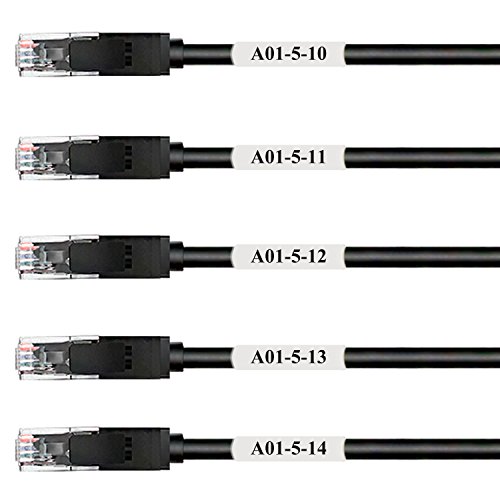
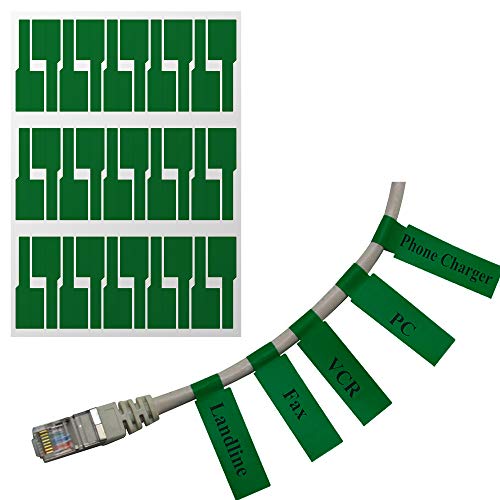
Mr-Label® (20 Sheets, 600 Labels) Green Self-adhesive Cable Label - Waterproof | Tear Resistant | Durable - with Online Print Tool - for Laser Printer



Key features
- •ATTENTION: This label is on A4 sheet and for laser printer only. If you just have inkjet printer, please go to: https://www.amazon.com/dp/B01HB59GQK it is standard letter sheet and works with both inkjet and laser printer. For someone who is not good at A4 sized sheet, please go to: https://www.amazon.com/dp/B01HEB51A6 it is standard letter sheet and works with laser printer only.
- •FREE CONVENIENT PRINT TOOL: For heavy user, it will accelerate your productivity greatly, as you can print a mass of labels with various contents simultaneously. Meanwhile, for your convenience, Mr-Label prepare 30 device icons for most common used electronics and computers, (Laptop, Smartphone, Printer, Smartwatch, iPad, Power Bank, Camera, etc.). You can insert the icon on one side, and leave the other side for device name.
- •ALL WEATHER USE: They are waterproof, tear-resistant, oil-proof, flexible and self-adhesive. Unlike the traditional label which may fade or be damaged easily, they stay in good shape and holding fast in outdoor use.
- •COST EFFICIENT: It is difficult to find a durable and versatile cable marker in attractive price, however, Mr-Label meets the most, they cost efficient and apply easily to attach mass of new labels or replace bunch of old labels.
Mr-Label® (20 Sheets, 600 Labels) Green Self-adhesive Cable Label - Waterproof | Tear Resistant | Durable - with Online Print Tool - for Laser Printer
List Price: $18.02$16.22DEALYou Save: $1.80 (10%)
Free shippingFree Returns – 30 daysFree Order CancellationSecure Payment2–3 Days DeliveryGet It October 25, 2026In Stock (1)No marketing spamNo account requiredFulfilment by FedEx / Amazon / UPS / ShipwirePayPal / Card Buyer Protection
Customer Reviews
Reviews sourced from verified Amazon purchasers3.9
out of 5
Based on 10 reviews
5★
50%
4★
30%
3★
10%
2★
0%
1★
10%
I had previously used envelope labels which are easily torn. Now
Chuck✓ Verified Purchase•March 28, 2017
Fully overhauled my LAN wiring rat's nest. These are what I needed.
I had previously used envelope labels which are easily torn. Now, with the ability to write on AND not tear? Great
Just enough color variation to keep Backbone, Gigabit, Fast Ethernet, and WAN, easily identified.
I had previously used envelope labels which are easily torn. Now, with the ability to write on AND not tear? Great
Just enough color variation to keep Backbone, Gigabit, Fast Ethernet, and WAN, easily identified.
Pain in the ass system. I've used Avery labels ...
Steve✓ Verified Purchase•November 24, 2016
Pain in the ass system. I've used Avery labels over the years and for the life of me I could not get this to print right. Never again.
So glad I tried these
Craig P. Evans✓ Verified Purchase•October 21, 2016
After reading some people's so-so reviews I still chose to give these a shot. Simply put, they are awesome. I have so many areas of my home that are nexuses of incomprehensible tangles of cords and cables. It is only with annoying persistence that I have been able to eventually track each plug back to it's rightful owner. These labels solve that problem completely.
They are perfectly sized. They are incredibly easy to affix to each cord. They attach securely with no fear that they can possibly come loose. They are also tear-resistant. After testing them out a little I know there is no way that they will tear or be damaged through anything resembling normal use and wear-and-tear. If a label does get damaged then I must have done something pretty crazy to cause it to happen. I like the variety of colors as well. It's not necessary, but I find it does make the organization of my cords a little better.
The only real concern that I feel as though should be mentioned is what has already been mentioned by others here. They offer templates in 2 different ways on the website. They offer a MS Word template. I tried this method first. I am very computer-literate, but after a small but significant period of time I could not get this template to work properly, so I moved on to their web input interface on their site. When doing it this way I had no problems whatsoever. It was as simple as could be. I saved the resultant file as a .pdf, opened using Adobe Acrobat, and then changed the paper size to A4 and made sure that no options affecting the output, such as a 'Fit to Page' option were selected. It printed out perfectly aligned and perfectly readable. the double-sided printing for each label is a very nice touch too. One side would be sufficient, but this makes it even better. Others have wondered why these are for A4 paper and not for standard 8 1/2" x 11" like we mostly use here in the states. I admit I wondered that too, but ultimately it doesn't matter. It's A4, so nothing to do but deal with it, and it wasn't difficult to do.
I've also found the label pages can be run through the laser printer multiple times. I did my first batch as soon as I received these, and then a month later I found other items I wanted to label with these and had no problems inputting my text for the next unused labels on the page and printing them.
There are other devices and solutions available for labeling and identifying cords, but after using these labels I would not do anything differently. Five stars for these all the way!
They are perfectly sized. They are incredibly easy to affix to each cord. They attach securely with no fear that they can possibly come loose. They are also tear-resistant. After testing them out a little I know there is no way that they will tear or be damaged through anything resembling normal use and wear-and-tear. If a label does get damaged then I must have done something pretty crazy to cause it to happen. I like the variety of colors as well. It's not necessary, but I find it does make the organization of my cords a little better.
The only real concern that I feel as though should be mentioned is what has already been mentioned by others here. They offer templates in 2 different ways on the website. They offer a MS Word template. I tried this method first. I am very computer-literate, but after a small but significant period of time I could not get this template to work properly, so I moved on to their web input interface on their site. When doing it this way I had no problems whatsoever. It was as simple as could be. I saved the resultant file as a .pdf, opened using Adobe Acrobat, and then changed the paper size to A4 and made sure that no options affecting the output, such as a 'Fit to Page' option were selected. It printed out perfectly aligned and perfectly readable. the double-sided printing for each label is a very nice touch too. One side would be sufficient, but this makes it even better. Others have wondered why these are for A4 paper and not for standard 8 1/2" x 11" like we mostly use here in the states. I admit I wondered that too, but ultimately it doesn't matter. It's A4, so nothing to do but deal with it, and it wasn't difficult to do.
I've also found the label pages can be run through the laser printer multiple times. I did my first batch as soon as I received these, and then a month later I found other items I wanted to label with these and had no problems inputting my text for the next unused labels on the page and printing them.
There are other devices and solutions available for labeling and identifying cords, but after using these labels I would not do anything differently. Five stars for these all the way!
Mr-Label labels work great after using them for about a month
Cliff✓ Verified Purchase•September 11, 2016
Mr-Label labels work great after using them for about a month.
CON
My only suggestion to Mr-Label is to go for a new Zip-Lock type bag that is at least another 1/4" wider. While the bag itself is OK in width, the Zip-Lock area is exactly the size of the sheets and you have to bend the label sheets to get them past the Zip-lock lips. It's not bad if you are printing an entire sheet and have only 10 sheets, but with 200 or more labels on an individual basis, you will be going back and forth a lot trying to take label sheets in and out of that bag, You may want to go and buy a larger bag for your labels.
PRO
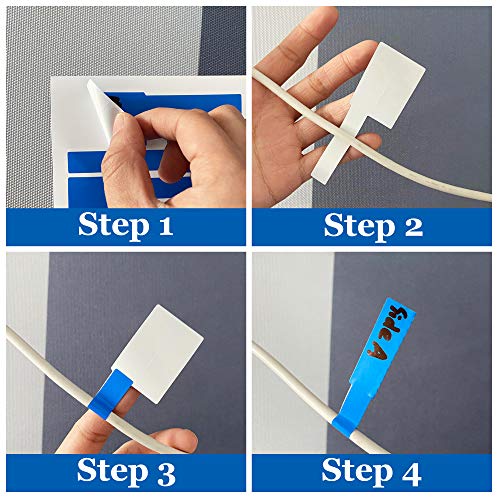
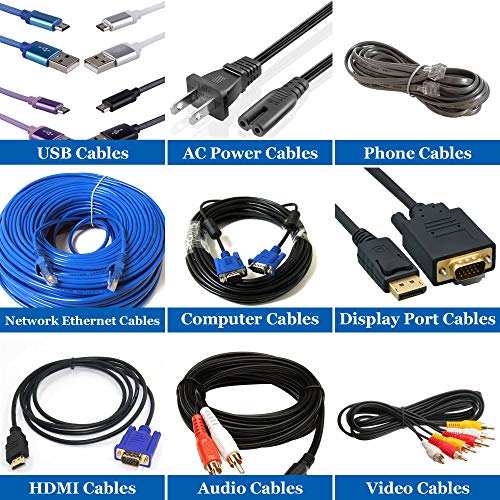
I have almost 20 power cables snaking around my desk not to mention multple USB and other cables. I decided not to try looking too orginized by printing lables in my printer, but they are study enough that shouldn't be any problem. I write with a Sharpie ultra fine point pen which works great. Now when I take a dive under my 8' desk to find a cable, I spend less time trying to figure out which cable is which and I don't unplug something by accident. This product is worth the price. I orderd a multi-color pack to make it easier to identify the power, audio, extension cables, ethernet cables, USB and USB 3.0 cables. These lables are extreamly thin but very durable and they feel like vinyl. No instructions included but after a short time looking at the labels consisting of a "tail" and a flag" I figured out that the skinny tail folds around the cable and is placed on the sticky back side of the label area (the "flag" portion of the label). Then the other flag folds over tip of the tail, encasing it securly. It will not fall off by accident!! If you ever need to remove it you will have to carefully cut it off with scissors or a razor blade. It shouldn't be difficult. Great product and timely shipping.
CON
My only suggestion to Mr-Label is to go for a new Zip-Lock type bag that is at least another 1/4" wider. While the bag itself is OK in width, the Zip-Lock area is exactly the size of the sheets and you have to bend the label sheets to get them past the Zip-lock lips. It's not bad if you are printing an entire sheet and have only 10 sheets, but with 200 or more labels on an individual basis, you will be going back and forth a lot trying to take label sheets in and out of that bag, You may want to go and buy a larger bag for your labels.
PRO
I have almost 20 power cables snaking around my desk not to mention multple USB and other cables. I decided not to try looking too orginized by printing lables in my printer, but they are study enough that shouldn't be any problem. I write with a Sharpie ultra fine point pen which works great. Now when I take a dive under my 8' desk to find a cable, I spend less time trying to figure out which cable is which and I don't unplug something by accident. This product is worth the price. I orderd a multi-color pack to make it easier to identify the power, audio, extension cables, ethernet cables, USB and USB 3.0 cables. These lables are extreamly thin but very durable and they feel like vinyl. No instructions included but after a short time looking at the labels consisting of a "tail" and a flag" I figured out that the skinny tail folds around the cable and is placed on the sticky back side of the label area (the "flag" portion of the label). Then the other flag folds over tip of the tail, encasing it securly. It will not fall off by accident!! If you ever need to remove it you will have to carefully cut it off with scissors or a razor blade. It shouldn't be difficult. Great product and timely shipping.
Labels hard to remove & tricky to apply
R.varad✓ Verified Purchase•July 15, 2016
It works on a basic level.
Cons
"¢ Hard to pull off the labels from their sheet. If it isn't done carefully, they tend to tear.
"¢ If you don't need 600 labels, this is not an economical buy.
"¢ I have not printed on the sheets. I have been writing on them with a thin sharpie. They can smear if you aren't careful
Cons
"¢ Hard to pull off the labels from their sheet. If it isn't done carefully, they tend to tear.
"¢ If you don't need 600 labels, this is not an economical buy.
"¢ I have not printed on the sheets. I have been writing on them with a thin sharpie. They can smear if you aren't careful
Page 1 of 2