Wireless Presenter, Hyperlink Volume Control Presentation Clicker RF 2.4GHz USB PowerPoint Clicker Presentation Remote Control Pointer Slide Advancer (Black)


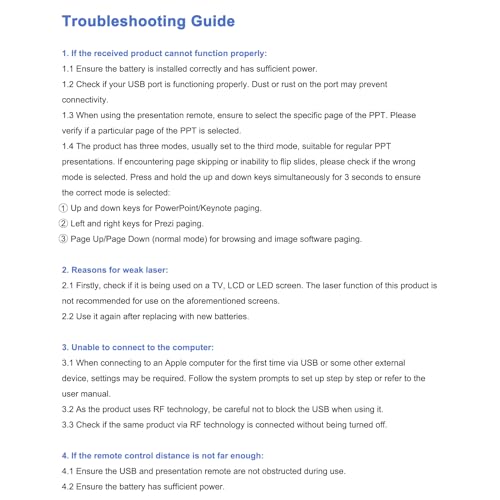
Key features
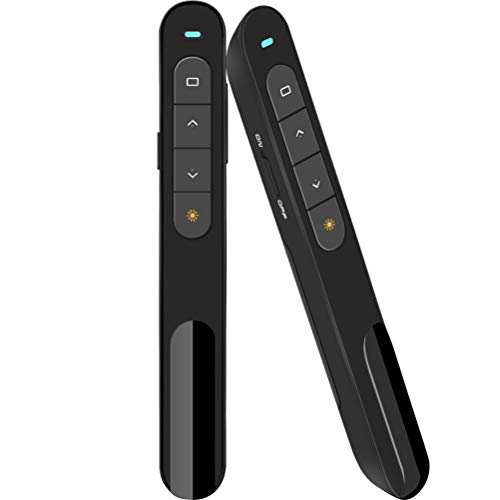
- •Slideshow clicker support hyperlinks, Volume Control; It also combines more functions of page up, page down, play slides, black screen for PowerPoint presentation; Single click the multipurpose button which is labeled with a square to select hyperlink; Double-click the multipurpose button to enter hyperlink; Long press multipurpose button to switch window
- •A bright red light that's easy to see against most backgrounds (not recommended for LED, LCD screens);Wireless range of powerpoint presenter up to 98 foot, free to move around the room; It comes with a clip that allows you to slide it in your pocket securely
- •Wireless presentation pointer supports MS Word, Excel, PowerPoint, ACD See, website, iWork (Keynote & Numbers & Pages) Google Slides
- •Presenter support options: Windows 2003, XP, Windows Vista, Windows7, Windows 8, Windows 10, Mac OS (For MacBook on OS X, plug the usb receiver into laptop, it will come out a box, and then you can select 101or104 option), Linux, Android
- •Slide advancer has low power indicate; One-piece design, built-in docking bay in wireless transmitter tail to store USB receiver for easy pack up and portability, USB stays secured into place with a magnet system
Wireless Presenter, Hyperlink Volume Control Presentation Clicker RF 2.4GHz USB PowerPoint Clicker Presentation Remote Control Pointer Slide Advancer (Black)
List Price: $22.68$20.41DEALYou Save: $2.27 (10%)
Free shippingFree Returns – 30 daysFree Order CancellationSecure Payment2–3 Days DeliveryGet It October 25, 2026In Stock (2)No marketing spamNo account requiredFulfilment by FedEx / Amazon / UPS / ShipwirePayPal / Card Buyer Protection
Customer Reviews
Reviews sourced from verified Amazon purchasers4.5
out of 5
Based on 10 reviews
5★
80%
4★
20%
3★
0%
2★
0%
1★
0%
A very helpful teacher or presenter tool!
M. White✓ Verified Purchase•January 21, 2024
I've used this Clicker/Pointer with an 8-year-old Dell Latitude laptop, a 2 year old Mac mini and a 2 year old iMac to control PowerPoint and KeyNote presentations. Today I was thrilled to realize that I can also control ProPresenter 7 on the iMac. The iMac is in an upper level open sound booth and I'm standing below it about 35 feet away. There is a split second delay, so if you're doing music slides, you would have to practice to get the timing right. If you're just doing a classroom presentation, it works quite well. Highly recommend this remote.
Nice, simple, compact
Ron H✓ Verified Purchase•December 20, 2023
This is a nice compact unit. On my second unit for my computer. Wore the first one out, well three years might do that. Got another one for my laptop. Simple 4 buttons and has directions on how to use it. Plug and use it right away for PowerPoints. If you use the laser pointer a lot then keep a battery handy. As the laser gets dim replace the battery. Great for a guest speaker who may not have one or is used to running their presentation from their laptop where my projector access is in the corner of the room. And not very expensive either.
Bluetooth + works with iPad Pro
MrBaz✓ Verified Purchase•December 11, 2023
I got this because I needed a true Bluetooth presentation clicker for using with my iPad. This paired up with no problem. Forward/back works just as expected. The volume control works as well. The green laser pointer is VERY good. Very focused beam pattern and bright. The special button events do NOT work, but I'm honestly not surprised since that's most likely a compatibility thing with iPadOS.
The only ding I'll give it is the charging port. Micro-USB, really? It's 2024, USB-C has been a standard for YEARS now.
The only ding I'll give it is the charging port. Micro-USB, really? It's 2024, USB-C has been a standard for YEARS now.
I THINK I'MA LIKE IT
CRYSTAL SMITH✓ Verified Purchase•November 29, 2023
The media could not be loaded. I just wish when you open the hyperlink with the laser pointer, that it had a feature on the remote to where you can close up the links from the pointer because you still have to walk back to your PC/laptop to close the videos that's linked inside your presentation....the instructions tell you how to make the hyperlink button function....just FYI....the laser pointer works fine also...I just forgot to show it....but it works....I like the small compact size, I like how u take the small dongle and insert inside the computer port and it works AUTOMATICALLY (I have a Dell laptop with Windows 11...FYI)...I definitely like how the volume buttons even functions my projector's volume....1 AAA battery is needed....I'ma love this thing as long as it's working....it has a small card that had warranty info in it for you to register...I guess thru the email provided on the card.....again...as long as it's working....I'ma fall in Love with this thing!!!!
Works well for my needs
Anna Murphy✓ Verified Purchase•October 9, 2023
The easy plug-n-play is great for quick starting presentations. I also feel the laser pointer is powerful but I have only used it in 3/10 presentations thus far. I saw other reviews where folks were saying the clip quality was poor but given that I held the device in my hand like a pen majority of the time, I didn't encounter the same issue.
Page 1 of 2


![XIMIBI Red Laser Pointer High Power,[2100metres] USB Rechargeable Hunting Outdoor Astronomy Hunting High Power Laser Pointer for Presentations Teaching Outdoor Cat Dog Laser Light Pointer Toy](https://m.media-amazon.com/images/I/5165-gQb7tL._SL500_.jpg)


![Red Laser Pointer High Power, High Power Laser Pointer [Material Upgrade] Laser Pointer Pen,[2000 metres]Red Lazer Pointer USB Rechargeable for Teaching HuntingOutdoor Astronomy Hunting Lazer Pointer](https://m.media-amazon.com/images/I/51JmzcnASvL._SL500_.jpg)