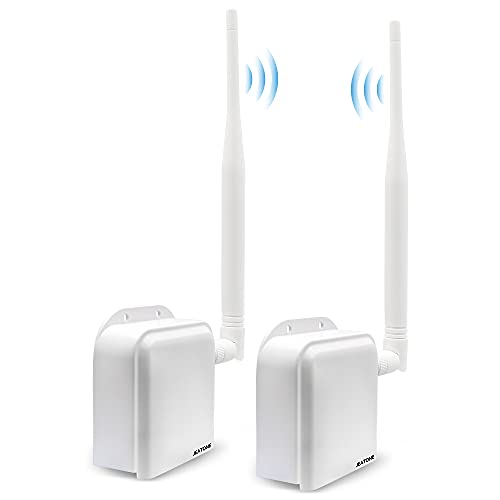
VONETS VAP11G-300 WiFi Bridge 2.4GHz WiFi to Ethernet Convert/WiFi Repeater/Point to Point with RJ45 Male DC/USB Powered for PLC IP Camera Printer Medical Devices Network Devices


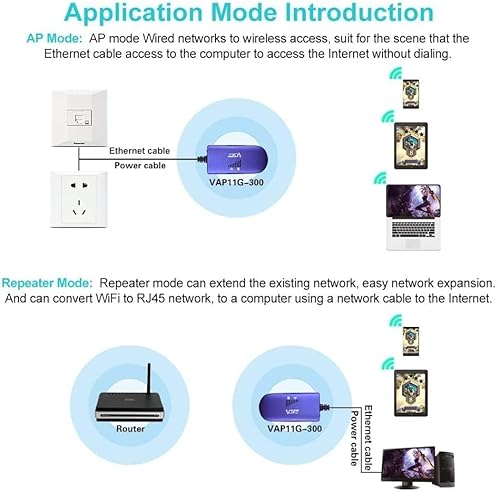


Key features
- •Environmental,needn't extra power supply,reducing e-waste.
- •Portable,small size good for plug and play,no need to reset.
- •Professional intelligent WiFi repeater,support WiFi hot spots scan automatically and WiFi hot spot memory function.
- •Support connecting more than 20 pieces WiFi terminal at the same time.
- •100 meters transmission distance(without obstacle).
VONETS VAP11G-300 WiFi Bridge 2.4GHz WiFi to Ethernet Convert/WiFi Repeater/Point to Point with RJ45 Male DC/USB Powered for PLC IP Camera Printer Medical Devices Network Devices
List Price: $45.36$40.82DEALYou Save: $4.54 (10%)
Free shippingFree Returns – 30 daysFree Order CancellationSecure Payment2–3 Days DeliveryGet It October 24, 2026In Stock (1)No marketing spamNo account requiredFulfilment by FedEx / Amazon / UPS / ShipwirePayPal / Card Buyer Protection
Customer Reviews
Reviews sourced from verified Amazon purchasers3.6
out of 5
Based on 10 reviews
5★
50%
4★
30%
3★
10%
2★
0%
1★
10%
which is likely why you want this- it is easy. Look on the back of the unit and ...
Lincoln J. Thurber•July 10, 2018
Okay, here is the deal...ignore most of the instructions. The thing is simple to setup if you do not get trapped into following teh instructions. If you are trying to add wireless to a device that has no wifi, which is likely why you want this- it is easy.
Look on the back of the unit and follow the four instructions they have on there! Do not insert the SB or Cat6 Male Plug into your computer!!!! Just plug the device into power. Look for the signal the device puts out on your "Wifi Analyzer" called Vonets___. Open a web browser and type in the dotted-decimal address list listed on the back of the unit or in the instructions. The credentials for user and password are teh defaults; AGAIN I MUST STRESS this is all listed on the back of the device. Once you get into the admin setup just choose the wifi signal you want to use and any WAP/WAPII security associated with it. Then let the device "chug" away setting up the connection If the device just seems to spin, but never seems completed, just unplug the the device to use it...it is working 99% of the time
Look on the back of the unit and follow the four instructions they have on there! Do not insert the SB or Cat6 Male Plug into your computer!!!! Just plug the device into power. Look for the signal the device puts out on your "Wifi Analyzer" called Vonets___. Open a web browser and type in the dotted-decimal address list listed on the back of the unit or in the instructions. The credentials for user and password are teh defaults; AGAIN I MUST STRESS this is all listed on the back of the device. Once you get into the admin setup just choose the wifi signal you want to use and any WAP/WAPII security associated with it. Then let the device "chug" away setting up the connection If the device just seems to spin, but never seems completed, just unplug the the device to use it...it is working 99% of the time
Awesome device.
Keltin•July 6, 2018
Awesome device. The little, and I mean it's tiny, manual that comes with it is a bit cryptic in its terminology, but that's mostly because there is very little wordage. Just a few words here and there, and it's easy to get confused as to what they mean. But technologically speaking, this device is awesome.
Outside of the cryptic manual, it's actually easy to setup and use. I just connected it to my PC, browsed to its static IP of 192.168.254.254, and then used the Web GUI to set it up. That consisted of scanning for my WiFi "hotspots" (available SSIDs), selecting the one I wanted it to bridge, then giving it a static IP so I can always find it. Boom! Done! Now just plug it into any RJ45 port, and its on my network. I used this for an outdoor WiFi Security camera that had dropped off the network. WiFi on the camera wasn't working anymore, but once I plugged this into its RJ45 port the camera was back on the network and working flawlessly. And it's actually got better throughput than the camera's original WiFi connection.
It also has the option of becoming a hotspot itself. This can be disabled if you like (which I did as I only needed the bridge for the camera) but it does offer the functionality of extending your WiFi network from the point it is deployed. So it's not only a great bridge for wired devices but also a WiFi extender.
Unbeatable product at this price point! And it saved me from having to replace a WiFi camera that had lost its WiFi capabilities. The cameras I use are awesome in every respect except their WiFi circuitry. Crappy circuit that is prone to low bandwidth and utter shutdown. I've had three of these cameras develop WiFi problems, but this little jewel saves them!
Outside of the cryptic manual, it's actually easy to setup and use. I just connected it to my PC, browsed to its static IP of 192.168.254.254, and then used the Web GUI to set it up. That consisted of scanning for my WiFi "hotspots" (available SSIDs), selecting the one I wanted it to bridge, then giving it a static IP so I can always find it. Boom! Done! Now just plug it into any RJ45 port, and its on my network. I used this for an outdoor WiFi Security camera that had dropped off the network. WiFi on the camera wasn't working anymore, but once I plugged this into its RJ45 port the camera was back on the network and working flawlessly. And it's actually got better throughput than the camera's original WiFi connection.
It also has the option of becoming a hotspot itself. This can be disabled if you like (which I did as I only needed the bridge for the camera) but it does offer the functionality of extending your WiFi network from the point it is deployed. So it's not only a great bridge for wired devices but also a WiFi extender.
Unbeatable product at this price point! And it saved me from having to replace a WiFi camera that had lost its WiFi capabilities. The cameras I use are awesome in every respect except their WiFi circuitry. Crappy circuit that is prone to low bandwidth and utter shutdown. I've had three of these cameras develop WiFi problems, but this little jewel saves them!
Works well, as both a bridge, and a repeater. I needed something to make a WiFi signal into a wired one, which this did.
Kaniki•May 20, 2018
My low review score is not due to it being a bad product, but due to lack of control of its abilities.
What it comes with is, the device.. Pretty much that is about it.. A small useless manual, but if you know what you are doing, then you will never need to look at it. You do need your own power source though. You can power it through the USB port, which I am sure most people have an extra USB power adapter from a cell phone around.. Or, if like me.. I had a router that used one of those round plugs.. It actually was the same exact size, voltage, and at least as many amps as what I needed for this. Since I was not using the router any more, I just used that power cord to plug into the plug that is on the device, right next to where the cords come out. You have your own choice of which one you want to use. You do not need to use both though.
I have a cell wifi adapter. It is a "ZTE Warp Connect" from Sprint. The ZTE Warp does not give you control over what WiFi channels it uses.. By default, it used channel 7 and 11 at first, then 3 and 7 next time I checked. By default, this device uses the exact same 2 channels.. My guess is, this device uses one channel to connect to the source device, the ZTE in this case, and the other to send a signal out to other things for you to connect to it.. That is why I wish I had more control over what channels either one of them uses.
What I do like is the fact that I can take a WiFi connection, and turn it into a wired connection using this device. I had a local cable company for internet service, and they got too expensive after they bought out my old company. After they did, they raised prices.. I found a service that was a fraction of the cost, but lower speeds, and it went through a cell tower instead. But I still needed to connect my wired computers to that service. To that point, this device worked great. Not only that, but since it is a repeater too, it expands the coverage for me so I can use it at the back of the house, with a good connection too. Basically, it fit both of my needs with one inexpensive device.
When I first set this device up, for some reason, it did not connect with my ZTE device very well. I had to reboot them both to get it to connect right. Ironic thing was, I never had any problem with connecting to the ZTE at that time with a laptop or my cell phone. I am not sure if it was this device, or the ZTE that was as fault though. Either way, once I got them working, they stayed working for quite a while. Then after about 3 weeks of use, I started getting glitchy service through it. I just rebooted both devices, and have not had any problem since.. Again, I am not sure if it was this device or the ZTE at fault there either.
Overall, so far, I am happy with it. It has met all my needs, with no problem. and the price is reasonable too. I have only used it for about 2 months so far, but so far, I am happy with it. I gave it 3 stars due to limited control over some parts of its settings, and, because I had a small problem getting it to connect to my WiFi, and I did have to reboot it once.. But, not knowing if it was this device at fault, or the ZTE, I can not say for sure, so take that into account.
What it comes with is, the device.. Pretty much that is about it.. A small useless manual, but if you know what you are doing, then you will never need to look at it. You do need your own power source though. You can power it through the USB port, which I am sure most people have an extra USB power adapter from a cell phone around.. Or, if like me.. I had a router that used one of those round plugs.. It actually was the same exact size, voltage, and at least as many amps as what I needed for this. Since I was not using the router any more, I just used that power cord to plug into the plug that is on the device, right next to where the cords come out. You have your own choice of which one you want to use. You do not need to use both though.
I have a cell wifi adapter. It is a "ZTE Warp Connect" from Sprint. The ZTE Warp does not give you control over what WiFi channels it uses.. By default, it used channel 7 and 11 at first, then 3 and 7 next time I checked. By default, this device uses the exact same 2 channels.. My guess is, this device uses one channel to connect to the source device, the ZTE in this case, and the other to send a signal out to other things for you to connect to it.. That is why I wish I had more control over what channels either one of them uses.
What I do like is the fact that I can take a WiFi connection, and turn it into a wired connection using this device. I had a local cable company for internet service, and they got too expensive after they bought out my old company. After they did, they raised prices.. I found a service that was a fraction of the cost, but lower speeds, and it went through a cell tower instead. But I still needed to connect my wired computers to that service. To that point, this device worked great. Not only that, but since it is a repeater too, it expands the coverage for me so I can use it at the back of the house, with a good connection too. Basically, it fit both of my needs with one inexpensive device.
When I first set this device up, for some reason, it did not connect with my ZTE device very well. I had to reboot them both to get it to connect right. Ironic thing was, I never had any problem with connecting to the ZTE at that time with a laptop or my cell phone. I am not sure if it was this device, or the ZTE that was as fault though. Either way, once I got them working, they stayed working for quite a while. Then after about 3 weeks of use, I started getting glitchy service through it. I just rebooted both devices, and have not had any problem since.. Again, I am not sure if it was this device or the ZTE at fault there either.
Overall, so far, I am happy with it. It has met all my needs, with no problem. and the price is reasonable too. I have only used it for about 2 months so far, but so far, I am happy with it. I gave it 3 stars due to limited control over some parts of its settings, and, because I had a small problem getting it to connect to my WiFi, and I did have to reboot it once.. But, not knowing if it was this device at fault, or the ZTE, I can not say for sure, so take that into account.
Great product to make ethernet devices wireless. Lights are bright and distracting.
S. Puppala•February 18, 2018
Remarkable! This little device allows a PowerBook G4 running Mac OS9 to access the internet wirelessly using the Classilla browser! The device is lightweight and the computer's USB port provides the power, so there is nothing to tether the computer to the desktop. Setup was a bit tough - I could not set it up with the Classilla browser, and had to use a modern computer to do so. The interface is not overly complex, but could be simpler for initial setup. It is, however, set-and-forget; after that initial setup, it has not needed further attention. The one bother is that the lights are overly bright and distracting. Even tucked away behind the computer, in a dimly lit room they are still bothersome. The LED's are behind a ventilation grille which should not be covered up with black tape. Also, there are times you need some indication of whether or not the device is receiving a signal. I took the cover off and drew on the LEDs with a black indelible marker with minimal success. I guess electrical tape directly on the LED's is the next step. Unfortunately, opening the case and making modifications undoubtedly voids the warranty.
Looked promising
KHolden•September 8, 2017
I get my internet in my house through a Hotspot. Currently I tether that hotspot to a laptop and then share the internet connection to a router for everyone else to use. This allows me to bypass the 10 device limit of the hotspot, as well as have a broader signal range. I was hoping this device would replace the laptop in the equation. Not so.
Getting it set up was relatively easy, and the speed worked fine with first test, but after 5 minutes, the internet speed would slow down to a crawl making it unusable. Thinking I just set something up wrong, I tried to get into the settings, but I couldn't get back into the set-up mode. I had to reset the whole device and go through the set-up process all over. In the end, I could not get it to function with a speed faster than dial-up, so I sent it back.
Getting it set up was relatively easy, and the speed worked fine with first test, but after 5 minutes, the internet speed would slow down to a crawl making it unusable. Thinking I just set something up wrong, I tried to get into the settings, but I couldn't get back into the set-up mode. I had to reset the whole device and go through the set-up process all over. In the end, I could not get it to function with a speed faster than dial-up, so I sent it back.
Page 1 of 2