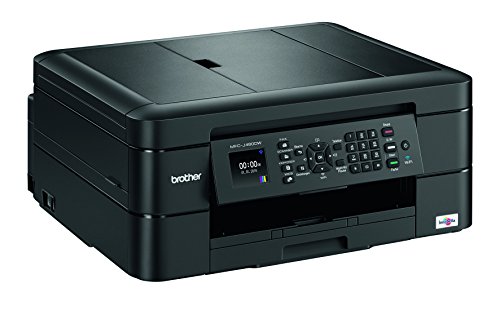
Brother MFC-J480DW - Wireless Inkjet Color All-in-One Printer w Auto Document Feeder, Amazon Dash Replenishment Enabled



Key features
- •MFC-J480DW - 1200 x 6000 dpi, 27/10ppm, USB 2.0, 802.11b/g/n, LCD, 19W, 8.3kg
Brother MFC-J480DW - Wireless Inkjet Color All-in-One Printer w Auto Document Feeder, Amazon Dash Replenishment Enabled
List Price: $410.98$369.88DEALYou Save: $41.10 (10%)
Free shippingFree Returns – 30 daysFree Order CancellationSecure Payment2–3 Days DeliveryGet It October 25, 2026In Stock (11)No marketing spamNo account requiredFulfilment by FedEx / Amazon / UPS / ShipwirePayPal / Card Buyer Protection
Customer Reviews
Reviews sourced from verified Amazon purchasers3.6
out of 5
Based on 10 reviews
5★
40%
4★
0%
3★
20%
2★
10%
1★
30%
Not my MFC-J615w
jabphn•February 13, 2018
I would really like my old brother back! I had that for 8 years. This is definitely slower, it eats ink like there is no tomorrow. I made 60 copies of a 4 page bulletin for our World Day of Prayer Program. Only the cover was in color, the rest was in black. I went thru 2 yellows and 1 magenta, and most of the black. After reading reviews, I understand the starter ink is a very small amount, but I paid 12.49 for a yellow at Walmart and then I had to run back again to get another yellow just to finish the last 2. I am more than upset that I couldn't print in black and white if there was a color that was out. I followed the direction to use gray scale (which I could do successfully with my old printer). This one won't budge. So the individual ink is a bit of a joke.
In the past I have had problem with my wireless, this one did set up like a dream in just a few minutes. The print color is paler than my old one, but nice and clear. Kudos to the support staff, they are wonderful to work with. Unfortunately I am stuck with this one, because I cannot afford another. This one just is not my MFC-J615w.
In the past I have had problem with my wireless, this one did set up like a dream in just a few minutes. The print color is paler than my old one, but nice and clear. Kudos to the support staff, they are wonderful to work with. Unfortunately I am stuck with this one, because I cannot afford another. This one just is not my MFC-J615w.
Wastes ink automatically
James B•April 1, 2017
If you don't print very often, you will still have to keep buying ink cartridges in all colors. Brother pushed out a firmware update directly through WiFi, and since then I've noticed that the printer will bring itself out of sleep mode occasionally to run a "cleaning", which wastes a bunch of ink unnecessarily. Eventually, the ink cartridges go empty, even the ones I almost never used (I usually print with black ink only).
Making matters worse, you can't even use the scanner unless all the ink cartridges have ink. Imagine my surprise when I was completely unable to scan some important docs all day because the local shops were sold out of yellow ink-- but the yellow ink was nearly full when I'd last used it weeks earlier.
This auto-cleaning seems like a dirty trick by Brother to force us to buy ink more often.
Otherwise, the printer works pretty well. Just keep lots of spare ink around.
Making matters worse, you can't even use the scanner unless all the ink cartridges have ink. Imagine my surprise when I was completely unable to scan some important docs all day because the local shops were sold out of yellow ink-- but the yellow ink was nearly full when I'd last used it weeks earlier.
This auto-cleaning seems like a dirty trick by Brother to force us to buy ink more often.
Otherwise, the printer works pretty well. Just keep lots of spare ink around.
Because Hewlett-Packard Sucks
Ken Wells•January 14, 2017
I am trying this product out because I have vowed to NOT buy anymore little HP printers that never seem have enough ink (and refuse to keep running) demand to print an 'alignment' sheet, are constantly cleaning the print heads, griping about the print heads running out, and so on. I figured I would put my toe in the water with this Brother brand to start my journey away from HP.
Update: I have used this printer for about a week and it seems to work great. For roughly 80 dollars plus 30 dollars of 2 sets of extra ink, I feel I have broken the bonds of purchasing HP for a personal printer. Although this printer does feel 'delicate', m confidence it its performance is very high. I expect to push this printer hard. If it still holds up, I will be buying another 'Brother' brand for home use. Good by cruel HP world.
Update: I have used this printer for about a week and it seems to work great. For roughly 80 dollars plus 30 dollars of 2 sets of extra ink, I feel I have broken the bonds of purchasing HP for a personal printer. Although this printer does feel 'delicate', m confidence it its performance is very high. I expect to push this printer hard. If it still holds up, I will be buying another 'Brother' brand for home use. Good by cruel HP world.
Avoid it!!! Also, Brother tech support is useless.
Steve M.•December 27, 2016
1. The printing and/or copying output is too slow. We contacted Brother for support via chat and they told us to do the exact things we had just told them we did before contacting them, so that was pointless. The machine is just slow - apparently no way to change that.
2. Stopped working after 5-6 months. Spent 1-1/2 hours total time in two phone calls to Brother's "Tech Support". Their people were obviously not knowledgeable at all and were no help. Paid a guy to come work on the problem and he got it working but it stopped after one day.
Threw it out and bought an Epson, which we had before and which is:
A. Easier to set up.
B. MUCH faster than the Brother.
C. Much more user-friendly in every way.
D. Still working great after a year.
2. Stopped working after 5-6 months. Spent 1-1/2 hours total time in two phone calls to Brother's "Tech Support". Their people were obviously not knowledgeable at all and were no help. Paid a guy to come work on the problem and he got it working but it stopped after one day.
Threw it out and bought an Epson, which we had before and which is:
A. Easier to set up.
B. MUCH faster than the Brother.
C. Much more user-friendly in every way.
D. Still working great after a year.
but only after a good half hour of messing around
KennyKavanaugh•November 21, 2016
Printers have always provided an inordinate amount of frustration. This one is beyond anything I've ever experienced.
Literally every time we tried to print anything, the printer showed as offline. Numerous times I resolved the issue for my wife (she has a Chromebook, so you have to jump through numerous hoops to use Google's "cloud print"), but only after a good half hour of messing around. And it's not some issue of "oh, it's offline, I'll just press the power button and it'll be fine." NOPE, nothing you do brings it back online...or at least nothing that any reasonable human could do. EVERY TIME it's a mysterious process that nobody should have to go through, and no average user could possibly figure out. I would eventually figure things out, but never quite understand what I did to do so.
Let me be clear: I'd consider myself fairly "nerdy". I do tech. I've built several of my own computers. I was never never able to figure out what the problem was with this awful POS of a printer. It NEVER worked without some level of hassle, to a greater or lessor degree. Usually greater. I'm actually going to go back down to the basement now and continue demolishing this thing with a hammer, because that's how much I hate it.
I just want a printer that prints. I'm going back to the most basic printer I can find, and I don't even care it it prints wirelessly.
Do you know that scene in "Office Space" where the guys destroy the printer, and revel in it? I just did that in my basement. Unfortunately my knuckles are currently bleeding, but it was SO worth it.
Literally every time we tried to print anything, the printer showed as offline. Numerous times I resolved the issue for my wife (she has a Chromebook, so you have to jump through numerous hoops to use Google's "cloud print"), but only after a good half hour of messing around. And it's not some issue of "oh, it's offline, I'll just press the power button and it'll be fine." NOPE, nothing you do brings it back online...or at least nothing that any reasonable human could do. EVERY TIME it's a mysterious process that nobody should have to go through, and no average user could possibly figure out. I would eventually figure things out, but never quite understand what I did to do so.
Let me be clear: I'd consider myself fairly "nerdy". I do tech. I've built several of my own computers. I was never never able to figure out what the problem was with this awful POS of a printer. It NEVER worked without some level of hassle, to a greater or lessor degree. Usually greater. I'm actually going to go back down to the basement now and continue demolishing this thing with a hammer, because that's how much I hate it.
I just want a printer that prints. I'm going back to the most basic printer I can find, and I don't even care it it prints wirelessly.
Do you know that scene in "Office Space" where the guys destroy the printer, and revel in it? I just did that in my basement. Unfortunately my knuckles are currently bleeding, but it was SO worth it.
Page 1 of 2