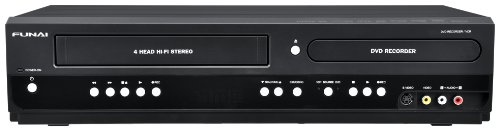
Magnavox MDR867H HD DVR/DVD Recorder with Digital Tuner (Black)


Key features
- •HD Digital Twin Tuner
- •Record HD Broadcasting Program
- •Records up to 1000 hours of HD content onto 1TB HDD
- •Record to HDD, DVD and External HDD
- •Built in Wireless LAN
Magnavox MDR867H HD DVR/DVD Recorder with Digital Tuner (Black)
List Price: $1018.49$916.64DEALYou Save: $101.85 (10%)
Free shippingFree Returns – 30 daysFree Order CancellationSecure Payment2–3 Days DeliveryGet It October 25, 2026In Stock (1)No marketing spamNo account requiredFulfilment by FedEx / Amazon / UPS / ShipwirePayPal / Card Buyer Protection
Customer Reviews
Reviews sourced from verified Amazon purchasers3.4
out of 5
Based on 10 reviews
5★
50%
4★
50%
3★
0%
2★
0%
1★
0%
A Great Device for Recording Broadcast Programs
Fabbian G. Dufoe✓ Verified Purchase•January 13, 2018
I bought this to replace an older Magnavox DVR whose tuner was failing. The old DVR was a standard definition device with a single tuner--it allowed recording a single program, much like an old VCR, although it supported watching a previously recorded program while it was recording a new one. The new DVR has two high definition tuners, allowing you to record two different programs simultaneously while watching a previously recorded program. The programs can be recorded in high definition and played through the TV's HDMI port. I have other devices connected to my HDMI ports so I watch recorded programs via a composite video connection (using the red, white, and yellow RCA connectors). When I get rid of my cable box I'll switch to the HDMI port.
Other reviews have covered most of the features of this DVR but there are a few things I thought deserved special mention. One is the user settable variable skip and variable replay. If you set variable skip for 60 seconds and variable replay for 30 seconds you can skip over commercials a minute at a time, then back up 30 seconds at a time once you're past the commercials. That way you never have to watch more than 30 seconds of commercials. If you fast forward through commercials you have to watch them so you will know when to resume your program although you don't have to listen to them. Variable skip spares you from even looking at them.
There are four fast forward speeds and three rewind speeds available from regular playback. The first fast forward speed plays sound with the speeded up picture. It's great for getting through part of a news broadcast that's going on too long. The fastest forward speed (4) is very fast. It will advance you very quickly to any place in the program.
By default the DVR records chapter marks every ten minutes. You can change that time interval if you wish. You can advance to the next chapter mark at the press of a button. That's even faster than fast forwarding through a program at the highest speed.
You can edit programs to delete commercials. Trimming out commercials doesn't make sense unless you plan to save the video to a DVD or another hard drive. It's tedious work but the finished product is quite satisfactory. Editing capabilities aren't mentioned at all in the terrible user manual but they are quite extensive. Recorded programs are given a title from the guide that accompanies digital broadcast TV. Highlight a title and press the "Menu" button on the remote control. Select "Edit" from the menu that appears on screen. To strip out commercials I choose "Chapter Edit". My first step is "Combine All Chapters". Then I go through the video placing chapter divisions at the beginning and end of each commercial break ("Chapter Dividing"). Finally I step through each of the commercial breaks and delete those chapters ("Chapter Delete"). To eliminate unwanted material at the beginning or end of a video you can insert a chapter mark, position the playback pointer in the unwanted area, and delete that chapter You can also go the the "Title Dividing" menu and break the video into two files.
I haven't used the "Combine Program(s)" menu but I suspect it allows you to rearrange clips from one or more videos. That seems to offer a pretty powerful set of editing tools.
You can copy a file from the internal hard drive to an external hard drive or you can copy to a DVD. Unlike my old DVR, there is no high speed option for making the copy and you can't choose the compression level. The compression level is set automatically and the video is copied in real time. I think that's because the videos on the hard drive are recorded at better resolution than a DVD can record so the files have to be converted to the lower DVD resolution. On my old DVR if I wanted to change the resolution of the file it had to be copied in real time as well.
Unlike the DVR from the cable company, you have to program this one by date and time. The cable company lets you choose a program and it worries about when the program will be shown. With the Magnavox DVR that's your responsibility. If a station deviates from its published schedule that can cause a problem. If you try to record more than two programs at the same time a program in progress may be stopped to start recording the later one.
On the whole I like this DVR much better than the one the cable company provided. It's easier to find channels and the fast forward and rewind controls are much more precise than those with the cable box. I was surprised and pleased to find this DVR when I began looking for a replacement for my old one. So far it has been an improvement in every respect.
Other reviews have covered most of the features of this DVR but there are a few things I thought deserved special mention. One is the user settable variable skip and variable replay. If you set variable skip for 60 seconds and variable replay for 30 seconds you can skip over commercials a minute at a time, then back up 30 seconds at a time once you're past the commercials. That way you never have to watch more than 30 seconds of commercials. If you fast forward through commercials you have to watch them so you will know when to resume your program although you don't have to listen to them. Variable skip spares you from even looking at them.
There are four fast forward speeds and three rewind speeds available from regular playback. The first fast forward speed plays sound with the speeded up picture. It's great for getting through part of a news broadcast that's going on too long. The fastest forward speed (4) is very fast. It will advance you very quickly to any place in the program.
By default the DVR records chapter marks every ten minutes. You can change that time interval if you wish. You can advance to the next chapter mark at the press of a button. That's even faster than fast forwarding through a program at the highest speed.
You can edit programs to delete commercials. Trimming out commercials doesn't make sense unless you plan to save the video to a DVD or another hard drive. It's tedious work but the finished product is quite satisfactory. Editing capabilities aren't mentioned at all in the terrible user manual but they are quite extensive. Recorded programs are given a title from the guide that accompanies digital broadcast TV. Highlight a title and press the "Menu" button on the remote control. Select "Edit" from the menu that appears on screen. To strip out commercials I choose "Chapter Edit". My first step is "Combine All Chapters". Then I go through the video placing chapter divisions at the beginning and end of each commercial break ("Chapter Dividing"). Finally I step through each of the commercial breaks and delete those chapters ("Chapter Delete"). To eliminate unwanted material at the beginning or end of a video you can insert a chapter mark, position the playback pointer in the unwanted area, and delete that chapter You can also go the the "Title Dividing" menu and break the video into two files.
I haven't used the "Combine Program(s)" menu but I suspect it allows you to rearrange clips from one or more videos. That seems to offer a pretty powerful set of editing tools.
You can copy a file from the internal hard drive to an external hard drive or you can copy to a DVD. Unlike my old DVR, there is no high speed option for making the copy and you can't choose the compression level. The compression level is set automatically and the video is copied in real time. I think that's because the videos on the hard drive are recorded at better resolution than a DVD can record so the files have to be converted to the lower DVD resolution. On my old DVR if I wanted to change the resolution of the file it had to be copied in real time as well.
Unlike the DVR from the cable company, you have to program this one by date and time. The cable company lets you choose a program and it worries about when the program will be shown. With the Magnavox DVR that's your responsibility. If a station deviates from its published schedule that can cause a problem. If you try to record more than two programs at the same time a program in progress may be stopped to start recording the later one.
On the whole I like this DVR much better than the one the cable company provided. It's easier to find channels and the fast forward and rewind controls are much more precise than those with the cable box. I was surprised and pleased to find this DVR when I began looking for a replacement for my old one. So far it has been an improvement in every respect.
Hard-Drive Digital Tuner/Recorder
Mister Tomatoe✓ Verified Purchase•December 17, 2017
I love the fact that this device has a digital tuner built in to it, and that you can record programs to an on-board hard drive as opposed to DVD-RW discs. I can also use it to play standard DVD's. Also, the picture resolution is much better than it would be on a DVD-RW. I hope I get many years of service from it. Antenna TV lives!
Works well although remote is too small.
Lilac Lil✓ Verified Purchase•November 21, 2017
Only half of the OTA channels for this area are received by this DVR even though we have great reception for all of the OTA channels on our TVs. Some of the received channels do not record well, giving a very poor picture. When I recorded to a disc then tried to play the disc in another player it would not play. It sounded good, but this DVR does not measure up.
UPDATE: After using a splitter to run a cable from the antennae to the TV and another cable to the DVR rather than running the cable from the antennae to the DVR, then to the TV, both received all of the available channels. So far the channels we have recorded have been excellent, looking exactly like a live show. I have not used a disc to record anything, yet. Also the remote is very small making it difficult to use if you need glasses or have large fingers. I am now giving this DVR four stars.
UPDATE: After using a splitter to run a cable from the antennae to the TV and another cable to the DVR rather than running the cable from the antennae to the DVR, then to the TV, both received all of the available channels. So far the channels we have recorded have been excellent, looking exactly like a live show. I have not used a disc to record anything, yet. Also the remote is very small making it difficult to use if you need glasses or have large fingers. I am now giving this DVR four stars.
Very Good Video Hard Drive and DVD Recorder
DC19✓ Verified Purchase•February 26, 2017
The DVR/DVD works very well with good reproduction of video and sound. It was easy to set up using the HDMI connection and antenna jack. The Title Screen of recorded programs is clear and gives more information than the older models, because it can be connected by wireless means to the internet. The fast forward feature is a bit tricky to use, because there is a delay of about 1 second after the remote button is pressed. This is also true for the channel changer by remote. My older model has no delay, so it will take a little time to get used to it. It seems like a good machine for recording TV shows or movies.
Highly Recommended
David Gillespie✓ Verified Purchase•March 24, 2016
Exceeded my expectations. Works like my old (record off my outside antenna) VCR did except records high quality TV Digital programs on either HDD or DVD. Can transfer (dub) recorded programs from the HDD to the DVD, finalize and play the program on any DVD player. Highly recommended.
Page 1 of 2