Qotom Barebone Mini PC Q190S with Intel Celeron j1900 Processor onboard, Quad core 2.42 GHz, Mini PC Dual NIC


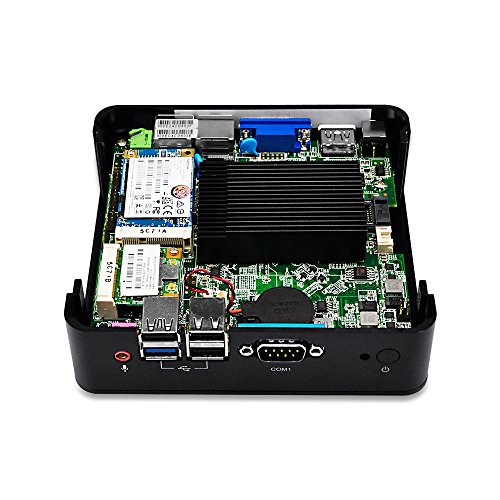
Key features
- •CPU: Intel Celeron Processor J1900 (Quad-Core 2M Cache, 2 GHz, up to 2.42 GHz)
- •Main Port: HD Video Port, VGA, 2 LAN, 3 USB2.0, USB3.0, Serial
- •Palm-sized Mini PC, Fanless no noise. Black aluminum-alloy case
- •Support Windows / Linux / pfSense etc.
- •Designed and produced by QOTOM. One Year Warranty
Qotom Barebone Mini PC Q190S with Intel Celeron j1900 Processor onboard, Quad core 2.42 GHz, Mini PC Dual NIC
List Price: $238.62$214.76DEALYou Save: $23.86 (10%)
Free shippingFree Returns – 30 daysFree Order CancellationSecure Payment2–3 Days DeliveryGet It October 24, 2026In Stock (1)No marketing spamNo account requiredFulfilment by FedEx / Amazon / UPS / ShipwirePayPal / Card Buyer Protection
Customer Reviews
Reviews sourced from verified Amazon purchasers4.1
out of 5
Based on 10 reviews
5★
70%
4★
20%
3★
10%
2★
0%
1★
0%
Runs smoothly and lode dwindows without issues.
Danny H.✓ Verified Purchase•August 24, 2018
Great little PC. Loaded Windows 10 OEM. Works great. All the drivers were automatically detected. This machine is being used as a workstation that only runs one application that is not resource intensive. I would say it runs really smooth for a work environment that will not require it to run to many programs.
Linux Ubuntu 16.04 Server Will Not Stay Up Longer Than a Day.
N. Sturm✓ Verified Purchase•April 13, 2017
I love the concept. I just wish it worked.
I ordered this "Linux" mini in June 2016. It was delivered with an unregistered version of Windows 7. The Mini worked fine out of the box with Win 7. It still works fine as a Win 7 desktop, although it runs a little hot. I have placed a fan nearby blowing on the box to keep it near room temperature. I bought this 10W Linux Min PC to replace my 500W Ubuntu server.
I mounted a 160GB 2.5" hard drive and installed Ubuntu 16.04 in a dual boot configuration (earlier Ubuntu versions would not install - wrong drivers) using a USB DVD. It worked fine under Linux for a few days. Then hung up with a blank screen (crashed). No response to any combination of keystrokes, including Ctl-Alt-Del. It rebooted fine after I cycled power via the power button. However, I cannot depend on Linux Ubuntu 16.04 to live longer than a day or two on this Mini. That is unacceptable. The seller's Customer Service said the chipset "does not work well with Linux". I now must power down & power up the device every other day to reboot it. This is very disappointing since I bought this "Linux Mini PC" to be a Linux Ubuntu Server replacement. I do not have his problem with Win 7.If anyone knows how to fix this Ubuntu problem, please me know.
I bought a second similar device in July 2016 to test the Windows 10 GUI. It worked fine with Win 7 out of the box, same as the first one, above. I mounted a 1TB 2.5" drive in the box, and installed Win 10 from the download option. The computer goes down about once a week, maybe due to heat? That hard drive is hot. But this is much better than Ubuntu, in Qotom Box # 1, which fails almost daily.
However, since the
I ordered this "Linux" mini in June 2016. It was delivered with an unregistered version of Windows 7. The Mini worked fine out of the box with Win 7. It still works fine as a Win 7 desktop, although it runs a little hot. I have placed a fan nearby blowing on the box to keep it near room temperature. I bought this 10W Linux Min PC to replace my 500W Ubuntu server.
I mounted a 160GB 2.5" hard drive and installed Ubuntu 16.04 in a dual boot configuration (earlier Ubuntu versions would not install - wrong drivers) using a USB DVD. It worked fine under Linux for a few days. Then hung up with a blank screen (crashed). No response to any combination of keystrokes, including Ctl-Alt-Del. It rebooted fine after I cycled power via the power button. However, I cannot depend on Linux Ubuntu 16.04 to live longer than a day or two on this Mini. That is unacceptable. The seller's Customer Service said the chipset "does not work well with Linux". I now must power down & power up the device every other day to reboot it. This is very disappointing since I bought this "Linux Mini PC" to be a Linux Ubuntu Server replacement. I do not have his problem with Win 7.If anyone knows how to fix this Ubuntu problem, please me know.
I bought a second similar device in July 2016 to test the Windows 10 GUI. It worked fine with Win 7 out of the box, same as the first one, above. I mounted a 1TB 2.5" drive in the box, and installed Win 10 from the download option. The computer goes down about once a week, maybe due to heat? That hard drive is hot. But this is much better than Ubuntu, in Qotom Box # 1, which fails almost daily.
However, since the
Works with OpenBSD
Ray Lillard✓ Verified Purchase•January 13, 2017
Only had unit for one week. Worked out of the box. Installed OpenBSD 6.0 without any problems -- it just works.
Unfortunately the Wifi device chip is a Broadcom BCM43224 which is not supported by OpenBSD due to licensing issues. Broadcom is hostile to open-source software in general and OpenBSD in particular. I have order an Atheros based Wifi board. Assume that it worked if I don't report a problem in about 1 week from now.
I am currently configuring and testing the network routing. I will be installing this in the family coffee shop to handle POS (credit card processing), security cameras, alarm system and in-house music service. No web server. Again assume all went well if I haven't complained here.
I would prefer 4 LAN ports, even three would be better, but I was unable to find one with Wifi from seller. If one exists, please let me know.
Unfortunately the Wifi device chip is a Broadcom BCM43224 which is not supported by OpenBSD due to licensing issues. Broadcom is hostile to open-source software in general and OpenBSD in particular. I have order an Atheros based Wifi board. Assume that it worked if I don't report a problem in about 1 week from now.
I am currently configuring and testing the network routing. I will be installing this in the family coffee shop to handle POS (credit card processing), security cameras, alarm system and in-house music service. No web server. Again assume all went well if I haven't complained here.
I would prefer 4 LAN ports, even three would be better, but I was unable to find one with Wifi from seller. If one exists, please let me know.
Initially overheated, locks up. Now has been running rock solid for 9 months.
Medic233✓ Verified Purchase•January 10, 2017
Reformatted the unit to run OpnSense, a fork of PFSense. Ran fine for about 48 hours, and then my wife contacted me, and she wasn't able to get online. Come to find out the unit overheated and locked up. Restarted the unit when I came home, ran fine for another 48 hours, and locked up. Okay, I figured I would reformat the unit with PFSense, and it ran for about 36 hours before locking up. I have open space around the unit, it is close to the floor where it is cooler. Again, ran for about 48 hours, and it overheated and locked up. At this point my family became irritated with the unit, and now it is relegated to covering my PC only, and only when I am home to start it up and shut it down.
Anyone else have similar issues, and is there a fix for it?
I'd bump my rating to 5 stars if it didn't lock up consistently and have to be manually shut down and allowed to cool for a period of time.
So, this a further review after running this unit for a few more months. I've run both OPNSense and PFSense on this unit, and am currently running PFSense v2.3.4-RELEASE (amd64) on it with PFBlockerNG, and probably 20 active DHCP leases.
The unit has run consistently, without hiccups since the initial hiccup that would cause it to overheat and lock up. I had an old floor fan that I placed close to the unit, and it serves multiple purposes, cooling everything in node zero. Temps have been consistently 28-38 degrees Celsius.
I ultimately mounted it on the included VESA mount, on the wall in node zero. There is good air movement around and underneath the unit.
Works great, does exactly what I needed, has had no hardware failures, and keeps my internet clean for my family.
9 month followup. Now running PFSense 2.3.5-DEVELOPMENT (amd64) with PFBlocker and TLD enabled. No hiccups, only good for 400k TLD addresses, but has been running rock solid. I did add an AC Infinity Multifan S5 to the system to suck the hot air off of the unit, but it is whisper quiet and we don't hear anything coming from the node zero. Definitely a great buy, and I am already looking at something similar with an I3/I5 for future versions of PFSense.
Anyone else have similar issues, and is there a fix for it?
I'd bump my rating to 5 stars if it didn't lock up consistently and have to be manually shut down and allowed to cool for a period of time.
So, this a further review after running this unit for a few more months. I've run both OPNSense and PFSense on this unit, and am currently running PFSense v2.3.4-RELEASE (amd64) on it with PFBlockerNG, and probably 20 active DHCP leases.
The unit has run consistently, without hiccups since the initial hiccup that would cause it to overheat and lock up. I had an old floor fan that I placed close to the unit, and it serves multiple purposes, cooling everything in node zero. Temps have been consistently 28-38 degrees Celsius.
I ultimately mounted it on the included VESA mount, on the wall in node zero. There is good air movement around and underneath the unit.
Works great, does exactly what I needed, has had no hardware failures, and keeps my internet clean for my family.
9 month followup. Now running PFSense 2.3.5-DEVELOPMENT (amd64) with PFBlocker and TLD enabled. No hiccups, only good for 400k TLD addresses, but has been running rock solid. I did add an AC Infinity Multifan S5 to the system to suck the hot air off of the unit, but it is whisper quiet and we don't hear anything coming from the node zero. Definitely a great buy, and I am already looking at something similar with an I3/I5 for future versions of PFSense.
Good machine for the price. Realize what you are purchasing.
soaknewe (so can you)✓ Verified Purchase•October 16, 2016
Been using this now for several months after installing Windows 10 Pro. Install went flawlessly and updates since have proven solid. Use it mostly for email and surfing but have used it for streaming videos from YouTube. On-board sound is fine and video look good at full screen. As other users have pointed out, this is a Celeron processor and multitasking will place stress on the processor/main board and things might not happen as fast as you wish. But for the price, I think it's a great deal. Again, just realize you are buying a 1964 VW bug and not a Tesla Model S. The Bug will get you down the road, but not nearly as fast as the Tesla.
Edit: July 2017 = As someone else pointed out in their review, the NIC port has no "Lip" to retain the RJ-45 connector for your connection to the Lan/Wan/Internet and sometimes, the cable with move out of the port enough to disconnect you (if you're surfing or doing things on your network). Getting to the point now where I'm dropping a star for the annoyance.
Edit: July 2017 = As someone else pointed out in their review, the NIC port has no "Lip" to retain the RJ-45 connector for your connection to the Lan/Wan/Internet and sometimes, the cable with move out of the port enough to disconnect you (if you're surfing or doing things on your network). Getting to the point now where I'm dropping a star for the annoyance.
Page 1 of 2


