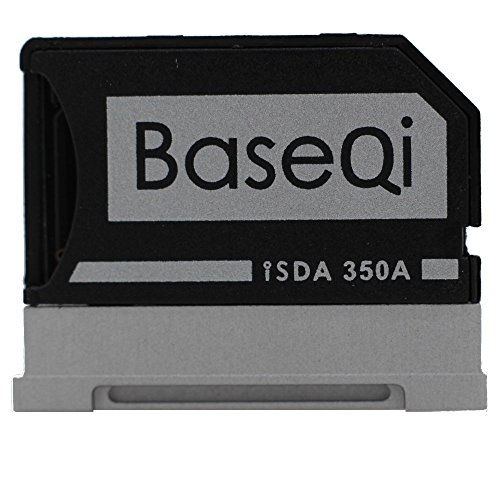
BASEQI Aluminum MicroSD Adapter for Microsoft Surface Book 13.5" (Model-350A) - Add up to 1TB of extra storage space


Key features
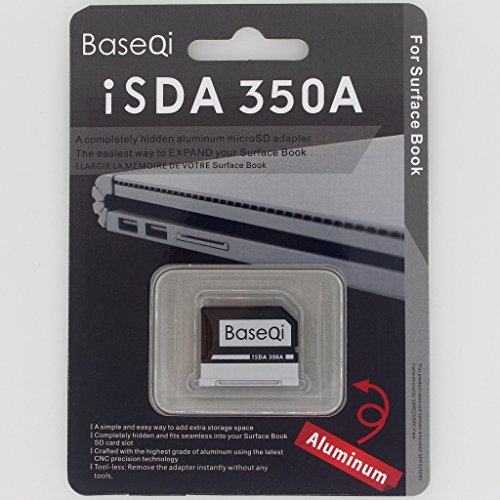
- •Simple & Easy to adding storage space, Add up to 256GB of extra space.
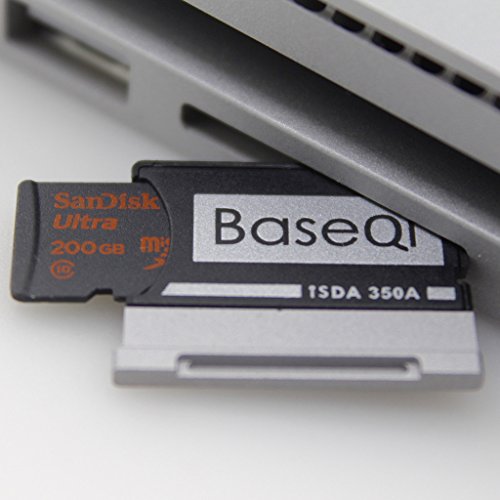
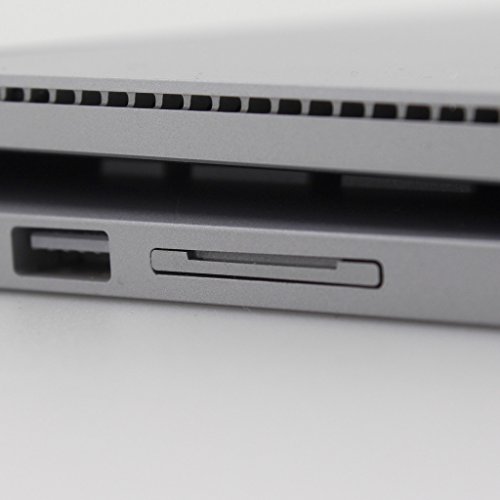
- •Completely hidden and fits snugly into your Surface Book SD card slot.
- •Use aluminum material and each one is CNC precision machining.
- •Toolless : When you remove without any tools
BrandBaseQi
CategoryMemory Card Adapters
SizeSurface Book & Surface Book 2 13.5" (model-350A)
Colorblack
BASEQI Aluminum MicroSD Adapter for Microsoft Surface Book 13.5" (Model-350A) - Add up to 1TB of extra storage space
List Price: $43.63$39.27DEALYou Save: $4.36 (10%)
Free shippingFree Returns – 30 daysFree Order CancellationSecure Payment2–3 Days DeliveryGet It October 24, 2026In Stock (1)No marketing spamNo account requiredFulfilment by FedEx / Amazon / UPS / ShipwirePayPal / Card Buyer Protection
Customer Reviews
Reviews sourced from verified Amazon purchasers4.4
out of 5
Based on 10 reviews
5★
80%
4★
20%
3★
0%
2★
0%
1★
0%
Clever and well made gadget for Surface Book. Might save you money.
R. L. Lewis✓ Verified Purchase•June 22, 2018
This is a well-made and clever device that allows you to save some money on the Surface Book 2. I have the 15 inch model and saved a few hundred dollars by going with the 512GB SSD version over the 1TB. Knowing that flush-fitting SD card adapters were available made this work for me. The Base Qi 351A model is made for the 15 inch Surface Book 2. It fits perfectly. It is completely secure, out of the way, and won't snag on anything, yet leaves access to the fingernail groove from the top for ready removal if necessary. I've attempted to capture just how it fits and the fingernail groove in the picture. After installation, the SB2 immediately saw the card, and has done so after shutdowns and restarts as well. The aluminum edge of the device adds some rigidity to the adapter and compliments the finish of the Surface Book but does not exactly match it. The price seems high for something as simple as an SD card adapter, but this is a high quality device and it can allow you to save many times its cost on a high end computer like the Surface Book 2.
Not deep enough for 15" Surface Book 2
Shaky Dave✓ Verified Purchase•January 17, 2018
This would be an obvious five stars except it does not actually fit the 15" Surface Book 2 well. It sinks in about a fifth of an inch beyond being flush with the notebook, and I knew immediately after putting it in that it would be a huge hassle to get out. Thankfully I haven't needed to yet, but I expect digging for it will be very unpleasant and may scratch the aluminum of the SD adapter. Other than that it read the SD card without problem and does as it claims.
Great way to cheaply expand the storage on your Surface Book or other device with a SD card slot you don't use.
Amazon Customer✓ Verified Purchase•December 11, 2017
I bought a 200GB micro SD card for $50 on black Friday sale. Compared to $200 for an extra 256GB of storage in my Surface Book 2, I will take the pain of having to manually mount the card (one time deal) and ensuring that only content that requires the base will go on it.
That means that Videos, Games and other bulk stuff that I know requires the base goes on the card. Looking up how to mount the card so you can use it like a normally attached drive will show you the true usage of this coupled with a micro SD card.
As for this adapter specifically, I only saw it the 5 minutes I was inserting it into my SB2. It is recessed in, color matched, and does the job perfectly. Couldn't be happier. I bought this $15 adapter instead of spending another $200 for a higher storage SB2.
That means that Videos, Games and other bulk stuff that I know requires the base goes on the card. Looking up how to mount the card so you can use it like a normally attached drive will show you the true usage of this coupled with a micro SD card.
As for this adapter specifically, I only saw it the 5 minutes I was inserting it into my SB2. It is recessed in, color matched, and does the job perfectly. Couldn't be happier. I bought this $15 adapter instead of spending another $200 for a higher storage SB2.
Must Have for a Surface Book.
Bruce Fyfe✓ Verified Purchase•July 11, 2017
This is an "accessory" that Microsoft should have included with the Surface Book. When I upgraded from my Surface Pro 4 to the Surface Book the lack of a proper Micro SD card slot was troubling. On my SP4 the SD card slot was very well integrated and hidden. I liked that since I don't take my DC card in and out a lot, I use it for document storage (OneDrive cache, BitLocker encrypted of course). I don't really think there are a lot of people who use Surface Books that need a full size SD card slot and if they do an adapter seems OK. I don't want an SD card sticking our of my portable device.
This nice little adapter fits perfectly, matched the Surface Book case and fills out my dream device perfectly. I wish that Microsoft had put the SD card slot on the tablet instead of the base but that is another story. If you want to increase your Surface Book storage space this is a must have.
This nice little adapter fits perfectly, matched the Surface Book case and fills out my dream device perfectly. I wish that Microsoft had put the SD card slot on the tablet instead of the base but that is another story. If you want to increase your Surface Book storage space this is a must have.
A "perfect fit" for the Surface Book.
J.A. Simpson✓ Verified Purchase•June 29, 2017
Just what I was looking for. Why Microsoft went with the full size SD card despite not being able to engineer the slot to accept the cards flush is beyond me but this solves the problem.
Insert the MicroSD card into the adapter and insert the adapter into the Surface Book's SD card slot. It fits flush with the rest of the device so I can leave it in, effectively doubling the storage space of my Book. The adapter matches the Book's design perfectly and it stays in securely. No trouble reading/writing from the adapter either.
It was a bit pricey for what is basically an adapter but I guess since it's so "specialized' they can justify charging that much? That's my only gripe, but it's minor.
Insert the MicroSD card into the adapter and insert the adapter into the Surface Book's SD card slot. It fits flush with the rest of the device so I can leave it in, effectively doubling the storage space of my Book. The adapter matches the Book's design perfectly and it stays in securely. No trouble reading/writing from the adapter either.
It was a bit pricey for what is basically an adapter but I guess since it's so "specialized' they can justify charging that much? That's my only gripe, but it's minor.
Page 1 of 2