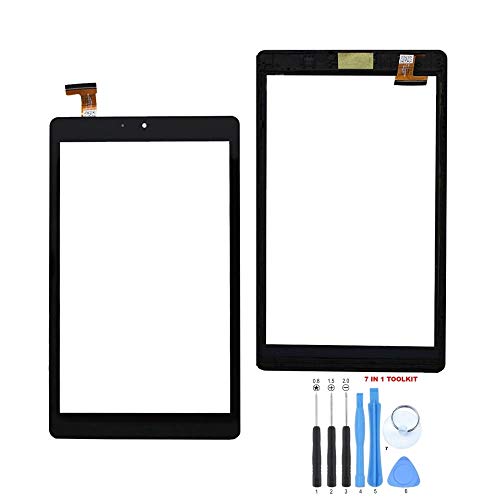
Fixcracked Touch Screen Replacement Parts Digitizer Glass Assembly for Ipad mini 2012 (A1432 A1454 A1455)& mini 2 2013 (A1489 A1490 A1491) 9.7 inch+ Professional Tool Kit (white)


Key features
- •PLEASE NOTE: This repair is very difficult!
- •Glass Screen Digitizer Complete Full Assembly for iPad mini with IC Chip, Home Button, Camera Bracket, and Adhesive PRE-Installed (Black)
- •Assembly for your iPad Mini to replace your cracked screen/glass or non-functioning / unresponsive touch screen
- •FixCracked ipad mini digitizer screen repair kit includes 6 pcs Ipad tool Kit and the FixCrackedTM opening tool will allow you to gently and safely separate the ipad mini digitizer from your LCD without using Picks and Pry tools that can crack your LCD
- •It comes complete with the home button, IC Chip, camera bracket, and the adhesive pre-installed to make everything so much easier to install
BrandFixCracked
CategoryDigitizers
Fixcracked Touch Screen Replacement Parts Digitizer Glass Assembly for Ipad mini 2012 (A1432 A1454 A1455)& mini 2 2013 (A1489 A1490 A1491) 9.7 inch+ Professional Tool Kit (white)
List Price: $38.78$34.90DEALYou Save: $3.88 (10%)
Free shippingFree Returns – 30 daysFree Order CancellationSecure Payment2–3 Days DeliveryGet It October 25, 2026In Stock (1)No marketing spamNo account requiredFulfilment by FedEx / Amazon / UPS / ShipwirePayPal / Card Buyer Protection
Customer Reviews
Reviews sourced from verified Amazon purchasers3.5
out of 5
Based on 10 reviews
5★
50%
4★
20%
3★
20%
2★
10%
1★
0%
Don't try this at home
Sarah T.✓ Verified Purchase•January 27, 2018
OMG, so many steps. TINY photos. Really intense concentration required. There are >FORTY-SIX
My husband is an engineer (like, that's his job!) and still failed. My iPad is dead now. He thinks he knows the problem, but the issue is that once you eviscerate your iPad, there are almost NO instructions on putting the bloody thing back together; he had to GUESS!! Because it's just not in the instructions.
If you are buying this because your techy brother told you a novice can do it, ignore him and take it to a repair place. Then you'll still have your iPad.
Giving two stars because I'm sure (if you know what you're doing), the kit is fine and the instructions are probably just there to serve as a reminder. >.<
My husband is an engineer (like, that's his job!) and still failed. My iPad is dead now. He thinks he knows the problem, but the issue is that once you eviscerate your iPad, there are almost NO instructions on putting the bloody thing back together; he had to GUESS!! Because it's just not in the instructions.
If you are buying this because your techy brother told you a novice can do it, ignore him and take it to a repair place. Then you'll still have your iPad.
Giving two stars because I'm sure (if you know what you're doing), the kit is fine and the instructions are probably just there to serve as a reminder. >.<
It turned on and all but the touch wasn’t working ...
Isaac Cedillos✓ Verified Purchase•January 19, 2018
It turned on and all but the touch wasn't working and I redid everything and it still didn't work. I might have done something wrpmg the first time, so I'll give the product 5 stars.
Great product, works perfectly
Jennifer✓ Verified Purchase•November 24, 2017
Great product, works perfectly. The directions provided are good for taking things apart but there are no directions on putting things back together.
I'm the least mechanically inclined person on Earth. This first run took me about 2 hours. I'm confident I could do it again now in 45 minutes.
I used a space heater instead of a hair dryer. I think that sped things along quite well.
I'm the least mechanically inclined person on Earth. This first run took me about 2 hours. I'm confident I could do it again now in 45 minutes.
I used a space heater instead of a hair dryer. I think that sped things along quite well.
Great seller and excellent customer service
Amazon Prime User✓ Verified Purchase•October 11, 2017
Great seller and excellent customer service. Great product. However, when installing, please look for a video instruction that show a screen replacement. The included directions are very small and hard to follow, so I felt frustrated until I found a video that walked me through the process. Watch the video first and then start the replacement. Just as a side note, leave the front facing camera alone. Some videos will show how to disassemble the front-facing camera, and if you are replacing a cracked screen, you may not need to touch the camera.
Not Quite Aure.
JustSomeGuy✓ Verified Purchase•July 30, 2017
My attempt failed. I don't blame the hardware itself but based on the YouTube guides I watched...it seemed this kit was lacking some gear found in other kits. That said, I was able to get it connected with the gear in the box.
Page 1 of 2