Inateck SSD Mounting Bracket 2.5 to 3.5 with SATA Cable and Power Splitter Cable, ST1002S



Key features
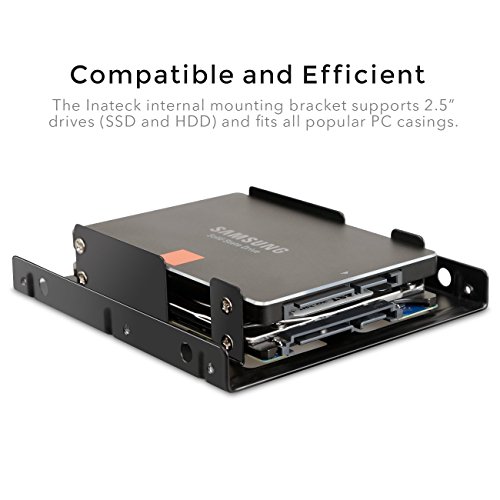
- •【2.5 to 3.5 adapter 】: Support 2. 5" Hard drives (SSD and HDD) and fits all popular PC casings
- •【 fit for 2x2. 5" Drives】: fit for 2x 2. 5" Drives providing valuable space for additional PC components
- •【Sata cables】: realizing Fast and interference-free data and power transmissions
- •【Fast speed】: The top speeds up to 6 Gaps. Downwards compatible with SATA I and SATA II
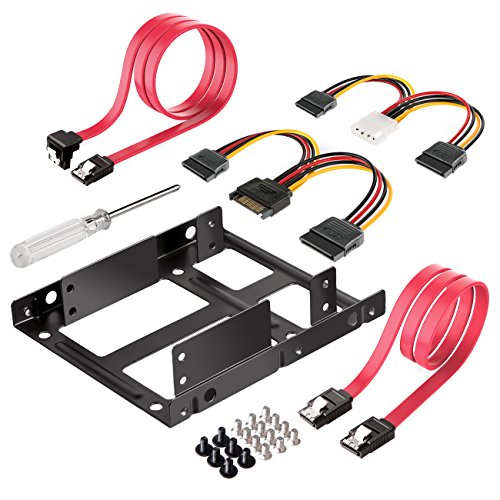
- •【What you get 】: 1 x SSD mounting bracket, 1 x screw driver, all screws needed, 1x 4 pin to Dual 15 pin SATA power cables cm), 1x 15 pin to Dual 15 pin SATA power cables, 2x SATA data cables
Inateck SSD Mounting Bracket 2.5 to 3.5 with SATA Cable and Power Splitter Cable, ST1002S
List Price: $19.38$17.44DEALYou Save: $1.94 (10%)
Free shippingFree Returns – 30 daysFree Order CancellationSecure Payment2–3 Days DeliveryGet It October 24, 2026In Stock (1)No marketing spamNo account requiredFulfilment by FedEx / Amazon / UPS / ShipwirePayPal / Card Buyer Protection
Customer Reviews
Reviews sourced from verified Amazon purchasers4.7
out of 5
Based on 10 reviews
5★
80%
4★
20%
3★
0%
2★
0%
1★
0%
I don't really feel like going through the hassle of getting a replacement
Nicole K✓ Verified Purchase•July 25, 2023
New Review: I had already processed the return by the time I heard from Inateck. They are very persistent people. I was fine with just returning it, but they really REALLY wanted to send me another one. They wore me down with persistent so I finally said yes. This is all to say: if you've got a problem with the product, contact them and see about getting a replacement. They are more than willing to work with you.
The new bracket I received was much easier to work with. Last time I couldn't get the screws that came with the bracket to work with the outer most screw holes, this time they worked. It was still a tight fit though. (The interior holes work just fine, it's strange the outer ones are such a hassle.)
I've attached some photos to this review so you can understand the setup I have... My case has a very nicely designed hard drive enclosure that makes it's super easy to remove drives and then a noise reduction system that requires extra long screws. The extra long screws work perfectly with 3.5 hard drives (I use to have two in there and replaced one with the SSD). However, they are just a tad too big for the bracket. I ended up using the black screws that came with the bracket and they just barely worked with my setup.
While I would have greatly preferred to use extra long screws, the fact that the bracket accepted the screws it came with was a step up. Since I was able to make it work with my case in the end, I'll bump the review up to 4 stars.
Old (3 Star) Review: Unfortunately this did not work for me. The SSD fit perfectly, but the bracket did not fit my case. My case uses extra long specialty screws to attach the hard drives due to a vibration reduction design. This has never been a problem with my regular (3.5) hard drives, but the bracket had holes a tad too small. I tried using the screws that came with the bracket and those were an extremely tight fit as well (I couldn't screw them in all the way). I spent almost 15 minutes trying to get the bracket to fit with my setup before finally giving up. I think I probably got a faulty set, but since I've got no "brand loyalty" to Inateck, I don't really feel like going through the hassle of getting a replacement. I'll just do a straight return and see about trying another kit or just having my SSD left hanging.
The new bracket I received was much easier to work with. Last time I couldn't get the screws that came with the bracket to work with the outer most screw holes, this time they worked. It was still a tight fit though. (The interior holes work just fine, it's strange the outer ones are such a hassle.)
I've attached some photos to this review so you can understand the setup I have... My case has a very nicely designed hard drive enclosure that makes it's super easy to remove drives and then a noise reduction system that requires extra long screws. The extra long screws work perfectly with 3.5 hard drives (I use to have two in there and replaced one with the SSD). However, they are just a tad too big for the bracket. I ended up using the black screws that came with the bracket and they just barely worked with my setup.
While I would have greatly preferred to use extra long screws, the fact that the bracket accepted the screws it came with was a step up. Since I was able to make it work with my case in the end, I'll bump the review up to 4 stars.
Old (3 Star) Review: Unfortunately this did not work for me. The SSD fit perfectly, but the bracket did not fit my case. My case uses extra long specialty screws to attach the hard drives due to a vibration reduction design. This has never been a problem with my regular (3.5) hard drives, but the bracket had holes a tad too small. I tried using the screws that came with the bracket and those were an extremely tight fit as well (I couldn't screw them in all the way). I spent almost 15 minutes trying to get the bracket to fit with my setup before finally giving up. I think I probably got a faulty set, but since I've got no "brand loyalty" to Inateck, I don't really feel like going through the hassle of getting a replacement. I'll just do a straight return and see about trying another kit or just having my SSD left hanging.
I'm happy with it.
Grace Betz✓ Verified Purchase•July 7, 2023
This was a good buy, in my opinion. Good price, and I like the cables it came with. The splitter was a must for me, and the option of a straight or 90 degree cable was nice. Having it come with the screwdriver was a nice touch, but it would have been massively better to have one with a magnetic tip. I could have just searched around the house to see if we had a magnetic tipped screwdriver that was that small, but I didn't think it would take that long. I underestimated the difficulty of getting the aggravatingly tiny screw to stay lined up while you try and get the upper ssd lined up with the stupid hole. But all of the pain of lining up the screws wasn't even as bad as dealing with the sata cable. The cable that came with the bracket was fine (since it came with a straight cable), but the 90 degree just didn't work at all.
The problem was that I had to hook up two SSDs, but only had one straight cable (since the cable my computer was already using was also a 90 degree connector).
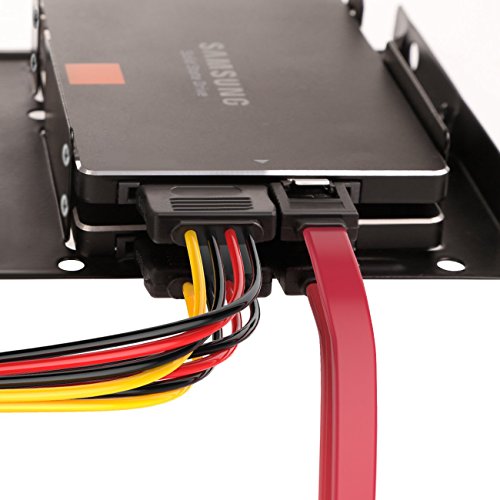
The bracket mounts the SSD too far into the plate to allow the port to hang by the edge, so a 90 turn brings the connector straight into the metal. This forces you to flip the 90 the other direction, which then puts you straight into the other connectors for your second SSD. Thus, you have to put the 90 on the upper SSD instead of the lower one, but then the 90 points directly into the edge of my case/the 3.5 slot. The cable has to do this awkward, immediate 270 degree bend. I couldn't just put the 90 on the motherboard side, because the SATA ports there had the same problem, where a 90 on one would block the other SATA port.
Overall, it fits, it works, I'm happy with it. The quality of the components are fine, and it isn't their fault that I don't have another straight connector lying around, and it isn't their fault that I have big, dumb fingers that hate working with tiny screws. But it would have been a nice touch if they had designed the mounting bracket edge to line up perfectly with the end of the 2.5 drive, allowing a 90 degree SATA connector to actually clear the bracket. But at this price, I probably shouldn't even be complaining.
The problem was that I had to hook up two SSDs, but only had one straight cable (since the cable my computer was already using was also a 90 degree connector).
The bracket mounts the SSD too far into the plate to allow the port to hang by the edge, so a 90 turn brings the connector straight into the metal. This forces you to flip the 90 the other direction, which then puts you straight into the other connectors for your second SSD. Thus, you have to put the 90 on the upper SSD instead of the lower one, but then the 90 points directly into the edge of my case/the 3.5 slot. The cable has to do this awkward, immediate 270 degree bend. I couldn't just put the 90 on the motherboard side, because the SATA ports there had the same problem, where a 90 on one would block the other SATA port.
Overall, it fits, it works, I'm happy with it. The quality of the components are fine, and it isn't their fault that I don't have another straight connector lying around, and it isn't their fault that I have big, dumb fingers that hate working with tiny screws. But it would have been a nice touch if they had designed the mounting bracket edge to line up perfectly with the end of the 2.5 drive, allowing a 90 degree SATA connector to actually clear the bracket. But at this price, I probably shouldn't even be complaining.
Easy install in OptiPlex 7040 SFF
Amazon Customer✓ Verified Purchase•June 20, 2023
Installed in a Dell OptiPlex7040 Small Form Factor. Allows me to run my OS from my M.2 NVMe and place two additional SATA SSD drives where my old 3.5" HDD was. The SATA cables provided were a little too long for my use case but was able to tuck to the side. The power splitter was included and works fine. The fit of the metal adapter in my drive caddy did not require any machine tooling for the connect pins. Worked out of the box and fit was good as seen in the pictures.
All metal installation bracket that you can easily mount a 2.5 inch SSD to
Robert_D✓ Verified Purchase•June 16, 2023
Pretty happy with this purchase. They give you everything you need including 2 sata cables and 2 power splitters. The metal bracket is quite sturdy in securing your SSD or HDD to.
Not sure why one data cable has a right-angle connector but
Chris✓ Verified Purchase•May 15, 2023
Not sure why one of the two data cable has a right-angle connector. No illustration or instructions about this issue in the package but my assumption is it was meant for the bottom drive.
When 2 drives are mounted in the bracket, the right-angle data connector has enough clearance from the bracket frame for the bottom drive, but maybe not when the bracket is installed in the regular sized tray depending on the tray structural configuration. For the top drive, the bottom drive straight in data connector is in the way of the right-angle data connector.
I found in one of my spare drive trays, the plastic of the tray was in the way of the right-angle connector if in the bottom drive in the bracket. But in a different style drive tray there was no issue.
Mounting the top drive upside down so the right-angle data cable extends up away from the other lower drive is an easy solution if the drive tray would be in the way of the right-angle connector in the bottom drive when the bracket is installed in it. Another solution would be to cut a space for the data cable in the plastic of the drive tray using tin snips which I did for my PC because the cables had to both extend downward.
When 2 drives are mounted in the bracket, the right-angle data connector has enough clearance from the bracket frame for the bottom drive, but maybe not when the bracket is installed in the regular sized tray depending on the tray structural configuration. For the top drive, the bottom drive straight in data connector is in the way of the right-angle data connector.
I found in one of my spare drive trays, the plastic of the tray was in the way of the right-angle connector if in the bottom drive in the bracket. But in a different style drive tray there was no issue.
Mounting the top drive upside down so the right-angle data cable extends up away from the other lower drive is an easy solution if the drive tray would be in the way of the right-angle connector in the bottom drive when the bracket is installed in it. Another solution would be to cut a space for the data cable in the plastic of the drive tray using tin snips which I did for my PC because the cables had to both extend downward.
Page 1 of 2


