Thrustmaster T16000M FCS Flight Pack (PC)


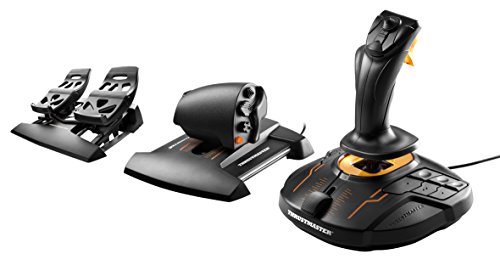
Key features
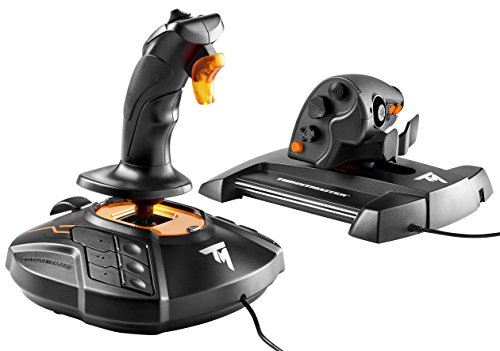
- •The T.16000M FCS is compatible with PC via USB in Windows 10, 8, 7 and Vista (32-bit and 64-bit).
- •The T.16000M FCS offers you a precision level greater than current systems, which will not decrease over time, thanks to the joystick's H.E.A.R.T technology (U.S. patent US08471815).
- •Fully ambidextrous joystick: 3 removable components allow the joystick to be perfectly tailored for left-handed or right-handed use.
- •The joystick includes 16 action buttons with "braille"-style physical button identification + one 8-way Point of View hat switch and 4 independent axes, including twist rudder
- •The T.A.R.G.E.T software allows you to load and create specific mapping profiles for each game.Magnets ensure friction-free action for unlimited precision in time
Thrustmaster T16000M FCS Flight Pack (PC)
List Price: $320.09$288.08DEALYou Save: $32.01 (10%)
Free shippingFree Returns – 30 daysFree Order CancellationSecure Payment2–3 Days DeliveryGet It October 24, 2026In Stock (11)No marketing spamNo account requiredFulfilment by FedEx / Amazon / UPS / ShipwirePayPal / Card Buyer Protection
Customer Reviews
Reviews sourced from verified Amazon purchasers4.4
out of 5
Based on 10 reviews
5★
40%
4★
60%
3★
0%
2★
0%
1★
0%
Excellent Combo for Elite Dangerous - Long wait for joystick to be ship via Warranty Service
CBerg✓ Verified Purchase•October 15, 2023
Update 16 Jan 19: Received replacement joystick on 14 Jan 19. 15 days after Thrustmaster approved my warranty replacement. The item came in a beat up product box but the joystick seem to be in new condition. Doesn't mean it is new just that it looked new. The new joystick has no issues of the jitters. I can leave the calibration setting on auto vice manual. Also, I made a mistake on the warranty period. The warranty is actually 2 years so I still have 1 year left on my replacement so it makes me feel a little better the issue shows up on the new joystick.
Update 12 Jan 19: Just before the 1 year warranty period the joystick started to jitter. Even after calibrating the joystick, there would be a jitter. (Jitter = moving erratically with no user input). Thrustmaster had me take a video of me calibrating and showing that it still had the jitter before they would warranty the joystick. Once they approve the warranty, they ask me to cut the usb cord at the base and take a photo of the cut cord and base. This the bad part. They originally said that the item would ship on 10 January. Now they are saying that it is still being processed for shipping with an unknown date for shipment. This is why I have drop my rating down to 3 star "OK". I have a feeling that I will be waiting a long time for my replacement joystick.
Update 17 Feb 18: So, after Googling, found out that the throttle has an adjustment screw for tension. You need to slide the throttle all the way up and the flip it over so the you can see the bottom. A screw should be showing through the base. Less tension, counter clockwise and more tension clockwise. Also, I took some suggestion from the online community and put some White Lithium Grease on the guide rails inside the throttle. The grease dose a good job keeping the glide up and down smooth with little tension.
I only had the HOTAS for 1 week and I am loving it. I purchased the HOTAS for Elite Dangerous. I didn't really read the manual or online stuff so my first experience was very bad. I tried programming the buttons using the in game binding of keys. Do not do this! The key to using the HOTAS is the TARGET app that you download from Thrustmaster. TARGET is the app that will bind game keys to the HOTAS. Once I figured that out, the HOTAS worked as it was suppose to. The default key binding for Elite was not to my liking so I had to change it. Once again a little reading to understand how to program the binding and it was very easy to make modification. There is a way to do it using scripts but I like the GUI.
Game Play. Although I was doing fine with the mouse and keyboard, there is something more natural using a joystick and a throttle. Landing and fighting became much easier. I think it is because all the key buttons are within a thumb reach away vice pressing the wrong key on the keyboard. BTW mouse and keyboard still works. I use the mouse for the galaxy and system maps. The keyboard for typing in names of systems or stations.
Weight. The joystick and throttle are both weighted down. The bottom feet are pretty sticky, preventing it from moving. Only during very intense fighting dos the throttle, and more likely the joystick move.
Build. Both the joystick and throttle are plastic. However, the plastic feels very sturdy under hand. It does seem like it can take a good beating without breaking.
The joystick is spring loaded meaning that it goes back to center. I don't see a way to adjust the tension but the tension doesn't seem to stiff. The throttle is somewhat smooth. As I move the throttle up and down, you can feel it clicking in small increments. It is not hard to move it up and down but there is a noticeable click.
Update 12 Jan 19: Just before the 1 year warranty period the joystick started to jitter. Even after calibrating the joystick, there would be a jitter. (Jitter = moving erratically with no user input). Thrustmaster had me take a video of me calibrating and showing that it still had the jitter before they would warranty the joystick. Once they approve the warranty, they ask me to cut the usb cord at the base and take a photo of the cut cord and base. This the bad part. They originally said that the item would ship on 10 January. Now they are saying that it is still being processed for shipping with an unknown date for shipment. This is why I have drop my rating down to 3 star "OK". I have a feeling that I will be waiting a long time for my replacement joystick.
Update 17 Feb 18: So, after Googling, found out that the throttle has an adjustment screw for tension. You need to slide the throttle all the way up and the flip it over so the you can see the bottom. A screw should be showing through the base. Less tension, counter clockwise and more tension clockwise. Also, I took some suggestion from the online community and put some White Lithium Grease on the guide rails inside the throttle. The grease dose a good job keeping the glide up and down smooth with little tension.
I only had the HOTAS for 1 week and I am loving it. I purchased the HOTAS for Elite Dangerous. I didn't really read the manual or online stuff so my first experience was very bad. I tried programming the buttons using the in game binding of keys. Do not do this! The key to using the HOTAS is the TARGET app that you download from Thrustmaster. TARGET is the app that will bind game keys to the HOTAS. Once I figured that out, the HOTAS worked as it was suppose to. The default key binding for Elite was not to my liking so I had to change it. Once again a little reading to understand how to program the binding and it was very easy to make modification. There is a way to do it using scripts but I like the GUI.
Game Play. Although I was doing fine with the mouse and keyboard, there is something more natural using a joystick and a throttle. Landing and fighting became much easier. I think it is because all the key buttons are within a thumb reach away vice pressing the wrong key on the keyboard. BTW mouse and keyboard still works. I use the mouse for the galaxy and system maps. The keyboard for typing in names of systems or stations.
Weight. The joystick and throttle are both weighted down. The bottom feet are pretty sticky, preventing it from moving. Only during very intense fighting dos the throttle, and more likely the joystick move.
Build. Both the joystick and throttle are plastic. However, the plastic feels very sturdy under hand. It does seem like it can take a good beating without breaking.
The joystick is spring loaded meaning that it goes back to center. I don't see a way to adjust the tension but the tension doesn't seem to stiff. The throttle is somewhat smooth. As I move the throttle up and down, you can feel it clicking in small increments. It is not hard to move it up and down but there is a noticeable click.
Finally, some precision in a joystick.
L. Lorden✓ Verified Purchase•October 14, 2023
I've tried a few joysticks and everything I tried had a very sloppy center dead zone, making games like MSFS 2020 impossible to play effectively. Precision here is excellent and finally the slop is gone, well worth the extra money.
Only complaint I have are the button numbers, you can't read them and there needs to be more contrast in color on the labels. I may have to buy some stick on numbers or do some painting in order to identify them all.
Only complaint I have are the button numbers, you can't read them and there needs to be more contrast in color on the labels. I may have to buy some stick on numbers or do some painting in order to identify them all.
Best joystick I have ever had.
Ricanther✓ Verified Purchase•October 11, 2023
This joystick is the 2nd T16000 I have ever owned. My first one was over a decade old and I gave it to a friend because he did not have one. The precision is perfect for flying games compared to other brands I have ever tried.
Good throttle, stick needs BIG improvements
R Noel✓ Verified Purchase•October 10, 2023
I will split this into two parts, the throttle, and joystick.
The throttle:
The TWCS throttle is MASSIVE. Friends with smaller hands have some trouble reaching the paddles and lower side button and hat. A sliding throttle with insane accuracy, the TWCS does its job pretty well. If you can reach them, the number of buttons and hats is more than enough for nearly all games. I personally prefer a rotating throttle handle, but if you want a sliding throttle without building your own or forking out $300+ for something like Virpil or VKB, this is a high quality product.
Pros:
Lots of buttons
Very accurate sensor for main throttle axis
Good, nice feeling plastic assembly.
Fairly easy to disassemble and reassemble
Cons:
Large. If you have small hands, this product will be either painful or annoying to use.
Small analog pinky dial is poorly placed and too stiff to use.
I would have preferred the analog stick to be on the side rather than the front, so I could use my thumb for it, not my index finger.
Slide action can have a lot of "sticktion" ie the friction makes it hard to move in small increments, as it will jump when you apply enough force to overcome it. You can grease the rails, or there is a third party on etsy that sells a replacement system for the plastic rider the handle attaches to. However this requires disassembly, which voids the warranty. You shouldn't need it though, as everything inside can be easily fixed.
T.16000M
The stick is somewhat disappointing. At $60-70 normally (not right now unfortunately), the stick essentially takes everything the Logitech 3D Extreme Pro does wrong, and does it right. Conversely, it takes everything that stick does right and does wrong. The grip is comfortable, fairly wide so your hand won't cramp as fast as the 3D Pro, and has a nice, enormous palm rest. The palm rest is so wide, you can almost use the stick without holding it. And the stick is ambidextrous, as you can swap the thumb rest and palm rest direction. The stick claims to have 16 buttons plus a hat, but you can only use 4 buttons plus the 4-way hat without taking your hand off. Compared to the 3D pro, which has 6 buttons plus a hat available while holding the stick, this is a downgrade, and will show when playing something like Elite or Star Citizen.
The stick axes are extremely accurate, and much better than any potentiometer based stick, but still suffers from a couple of issues. If you've ever used any high quality stick, there is the ability to center one axis at a time due to separate centering springs/cams. However, Thrustmaster opted for a simple single spring design which forces both axes to center. Not a big deal, but a slight annoyance. Second, the stick suffers from "sticktion" as well, though not to the degree of the throttle. Finally, the twist axis (which you can't lock) starts to go haywire over time. This can be fixed by taking the stick apart and cleaning the potentiometer with rubbing alcohol, but this a) voids the warranty, and b) is a long and arduous process. Unlike the throttle, the stick assembly is very difficult to reassemble properly (due to buttons not being fixed in place).
Pros:
Very accurate main x/y axes.
Comfortable grip, though sweaty hands may start to cramp from gripping too hard.
Nice, good feeling plastic assembly.
Cons:
Mushy buttons (similar to the rubber-domes of non-mechanical keyboards), and wobbly hat.
Very few buttons on stick itself.
Twist axis gets dirty and must be cleaned
"Sticktion" over time on main stick axes.
The little throttle slide in the center of the base doesn't align with the painted markings for some reason...
While the TWCS is great if you can get one near its MSRP, I recommend a better stick. At current prices, the VKB Gladiator NXT is only moderately more expensive, and is MUCH better. A 3D Extreme Pro would also work, but the main sensors are not nearly as precise.
The throttle:
The TWCS throttle is MASSIVE. Friends with smaller hands have some trouble reaching the paddles and lower side button and hat. A sliding throttle with insane accuracy, the TWCS does its job pretty well. If you can reach them, the number of buttons and hats is more than enough for nearly all games. I personally prefer a rotating throttle handle, but if you want a sliding throttle without building your own or forking out $300+ for something like Virpil or VKB, this is a high quality product.
Pros:
Lots of buttons
Very accurate sensor for main throttle axis
Good, nice feeling plastic assembly.
Fairly easy to disassemble and reassemble
Cons:
Large. If you have small hands, this product will be either painful or annoying to use.
Small analog pinky dial is poorly placed and too stiff to use.
I would have preferred the analog stick to be on the side rather than the front, so I could use my thumb for it, not my index finger.
Slide action can have a lot of "sticktion" ie the friction makes it hard to move in small increments, as it will jump when you apply enough force to overcome it. You can grease the rails, or there is a third party on etsy that sells a replacement system for the plastic rider the handle attaches to. However this requires disassembly, which voids the warranty. You shouldn't need it though, as everything inside can be easily fixed.
T.16000M
The stick is somewhat disappointing. At $60-70 normally (not right now unfortunately), the stick essentially takes everything the Logitech 3D Extreme Pro does wrong, and does it right. Conversely, it takes everything that stick does right and does wrong. The grip is comfortable, fairly wide so your hand won't cramp as fast as the 3D Pro, and has a nice, enormous palm rest. The palm rest is so wide, you can almost use the stick without holding it. And the stick is ambidextrous, as you can swap the thumb rest and palm rest direction. The stick claims to have 16 buttons plus a hat, but you can only use 4 buttons plus the 4-way hat without taking your hand off. Compared to the 3D pro, which has 6 buttons plus a hat available while holding the stick, this is a downgrade, and will show when playing something like Elite or Star Citizen.
The stick axes are extremely accurate, and much better than any potentiometer based stick, but still suffers from a couple of issues. If you've ever used any high quality stick, there is the ability to center one axis at a time due to separate centering springs/cams. However, Thrustmaster opted for a simple single spring design which forces both axes to center. Not a big deal, but a slight annoyance. Second, the stick suffers from "sticktion" as well, though not to the degree of the throttle. Finally, the twist axis (which you can't lock) starts to go haywire over time. This can be fixed by taking the stick apart and cleaning the potentiometer with rubbing alcohol, but this a) voids the warranty, and b) is a long and arduous process. Unlike the throttle, the stick assembly is very difficult to reassemble properly (due to buttons not being fixed in place).
Pros:
Very accurate main x/y axes.
Comfortable grip, though sweaty hands may start to cramp from gripping too hard.
Nice, good feeling plastic assembly.
Cons:
Mushy buttons (similar to the rubber-domes of non-mechanical keyboards), and wobbly hat.
Very few buttons on stick itself.
Twist axis gets dirty and must be cleaned
"Sticktion" over time on main stick axes.
The little throttle slide in the center of the base doesn't align with the painted markings for some reason...
While the TWCS is great if you can get one near its MSRP, I recommend a better stick. At current prices, the VKB Gladiator NXT is only moderately more expensive, and is MUCH better. A 3D Extreme Pro would also work, but the main sensors are not nearly as precise.
The throttle is much smoother and has a nice long range to it so it makes the throttle ...
Rita Fae Walsh✓ Verified Purchase•October 8, 2023
So I finally make it home after 2 weeks in lovely Cheraw, South Carolina and waiting for me was my new toy...A Thrustmaster T1600m FCS Hotas. I spent most of Saturday morning setting up the controls in Elite Dangerous and getting to know them. I was using the T-Flight HOTAS X before and I can tell you that this new joystick and throttle are a major step up.
The throttle is much smoother and has a nice long range to it so it makes the throttle control very precise and I love the throttles linear motion. The extra buttons on the throttle are nice and every one of them is easily reached and I have smallish hands. The only thing I don't like is throttles mini analog joystick. I think it's the way the game uses it (Elite Dangerous) and when you release it the ship seems to continue drift in the direction of the thrust and must be countered with an opposing thrust even though the stick seems to center properly. I tried setting a dead zone but it made no difference. It was particularly bad during landings so I finally gave up on it and assigned the thrusters to the top POV hat on the throttle. The mini joystick has a button when you press in on it and I use this to center my Tobii EyeX when I need to. The only down side to the throttle is that there is no center detent or any other detents on the throttle. This for me is not a big deal as I have been using the throttle in forward thrust mode only and pressing a button to reverse the thrust as the HOTAS X really didn't work well with the forward and reverse thrust mode in the game.
The T1600m stick is night and day better than the HOTAS X. You have much control and it feels more precise. The stick force is not adjustable like the HOTAS X but it feels nice with the right amount of tension and a very positive centering of the stick when you relax pressure. The sticks POV is a little high for me but not really an issue as I can get to it quickly and accurately. The buttons on the base of the joystick hard to tell apart very easily when I need to. Luckily I have voice attack to do those functions and I'm getting use to them after a couple of sessions.
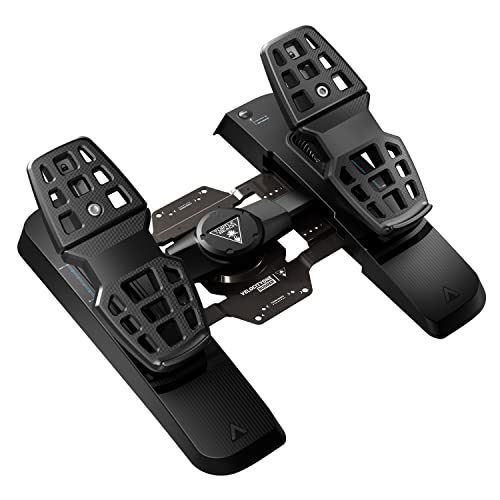
I have the Thrustmaster pedals as well and these can be plugged into the throttle or used as a stand alone. These are the first pedals I've ever used and they feel quite natural to use. They offer much more control than the twist function (I haven't tried the T1600m twist function) and after using them as a stand alone for a couple of months or so plugging them into the throttle seems to make them less twitchy and more precise. I have a bit of carpal tunnel in my hands and the twisting of the stick aggravates this so the pedals are very much welcomed. The only downside to them is they are a bit close together but not too bad. I have seen negative reviews crying about the use of plastic on them but I've had no issues with these pedals at all. They seem to be well made and very smooth. I would personally like the centering of them to be a bit more positive but I don't have any problems with them as they stand
With the new controls setup, joystick, throttle, pedals and Tobii EyeX I feel like I'm more in control the ship and I feel like I'm actually flying a ship and not playing a game. This all has deepened the experience and my enjoyment greatly. I can honestly recommend my Thrustmaster setup to anyone who is considering a new setup.
The throttle is much smoother and has a nice long range to it so it makes the throttle control very precise and I love the throttles linear motion. The extra buttons on the throttle are nice and every one of them is easily reached and I have smallish hands. The only thing I don't like is throttles mini analog joystick. I think it's the way the game uses it (Elite Dangerous) and when you release it the ship seems to continue drift in the direction of the thrust and must be countered with an opposing thrust even though the stick seems to center properly. I tried setting a dead zone but it made no difference. It was particularly bad during landings so I finally gave up on it and assigned the thrusters to the top POV hat on the throttle. The mini joystick has a button when you press in on it and I use this to center my Tobii EyeX when I need to. The only down side to the throttle is that there is no center detent or any other detents on the throttle. This for me is not a big deal as I have been using the throttle in forward thrust mode only and pressing a button to reverse the thrust as the HOTAS X really didn't work well with the forward and reverse thrust mode in the game.
The T1600m stick is night and day better than the HOTAS X. You have much control and it feels more precise. The stick force is not adjustable like the HOTAS X but it feels nice with the right amount of tension and a very positive centering of the stick when you relax pressure. The sticks POV is a little high for me but not really an issue as I can get to it quickly and accurately. The buttons on the base of the joystick hard to tell apart very easily when I need to. Luckily I have voice attack to do those functions and I'm getting use to them after a couple of sessions.
I have the Thrustmaster pedals as well and these can be plugged into the throttle or used as a stand alone. These are the first pedals I've ever used and they feel quite natural to use. They offer much more control than the twist function (I haven't tried the T1600m twist function) and after using them as a stand alone for a couple of months or so plugging them into the throttle seems to make them less twitchy and more precise. I have a bit of carpal tunnel in my hands and the twisting of the stick aggravates this so the pedals are very much welcomed. The only downside to them is they are a bit close together but not too bad. I have seen negative reviews crying about the use of plastic on them but I've had no issues with these pedals at all. They seem to be well made and very smooth. I would personally like the centering of them to be a bit more positive but I don't have any problems with them as they stand
With the new controls setup, joystick, throttle, pedals and Tobii EyeX I feel like I'm more in control the ship and I feel like I'm actually flying a ship and not playing a game. This all has deepened the experience and my enjoyment greatly. I can honestly recommend my Thrustmaster setup to anyone who is considering a new setup.
Page 1 of 2