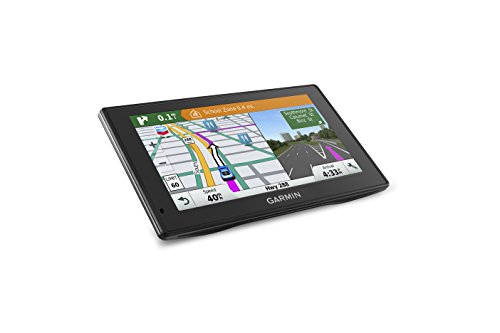
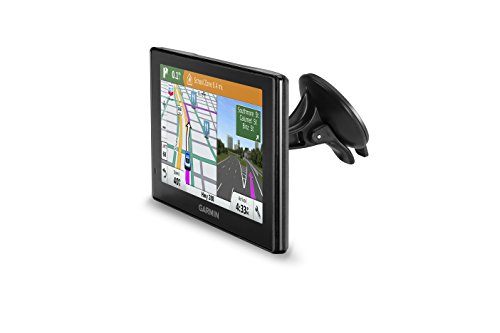
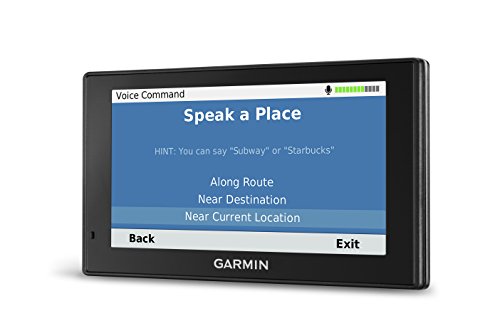
Garmin 010-N1540-01 DriveSmart 60LMT GPS Navigator, 6.1" - (Renewed)

Key features
- •Bright 6.0-Inch GPS navigator with dual-orientation, pinch-to-zoom display
- •Detailed maps of North America with free lifetime map updates and lifetime traffic. Preloaded street maps included.
- •Bluetooth hands-free calling and voice-activated navigation
- •DRIVER alerts for increased Awareness, including upcoming sharp curves, school zones, speed changes and more
- •Customizable smartphone notifications let you display calls, texts and other app alerts on your navigation screen
BrandGarmin
CategoryGPS, Finders & Accessories
Size6.1 inches
ColorBlack
Warranty1 year limited warranty
Garmin 010-N1540-01 DriveSmart 60LMT GPS Navigator, 6.1" - (Renewed)
List Price: $121.04$108.94DEALYou Save: $12.10 (10%)
Free shippingFree Returns – 30 daysFree Order CancellationSecure Payment2–3 Days DeliveryGet It October 26, 2026In Stock (3)No marketing spamNo account requiredFulfilment by FedEx / Amazon / UPS / ShipwirePayPal / Card Buyer Protection
Customer Reviews
Reviews sourced from verified Amazon purchasers4.1
out of 5
Based on 10 reviews
5★
30%
4★
10%
3★
20%
2★
0%
1★
40%
Gave it to my girlfriend for Christmas. Haven't seen ...
Dr. Awesome✓ Verified Purchase•January 26, 2018
Gave it to my girlfriend for Christmas. Haven't seen her since. I think it must have worked well for her. Mine just keeps giving me directions to my job and then back home. I need a different life... I have no direction.
If you get lost with this you shouldn't leave the driveway!
Acerider✓ Verified Purchase•January 25, 2018
Garmin comes through again! Replaced a 10 year old Garmin that still works with this one. It's like replacing a 10 year old cell phone. The features in this are amazing. Other than pressing the power button i don't have to touch it to operate. I can use Voice Command to do everything from entering an address to searching for a particular named restaurant. Want to turn volume up or down, brighten the screen, add a waypoint, find a POI, just speak it. Of course you can also use the touch screen if you want. Works perfectly! Maps that i've used in Tennessee and Arkansas have all been completely up to date.
Some have mentioned glare on the screen. That is the one thing I didn't understand on this model since my 10 year old Garmin and my 3 year old Garmin Marine in my boat are both non-glare screens, this one is not. The only time it has been noticeable to me is driving into the Sun I can see my reflection in the screen. It's a simple work around though! Just turn the unit a little to the side (screen is visible from side angle) and/or brighten the screen (using Voice Command) and it will overcome the glare. I almost let the reviews about glare keep me buying this unit. Am so very happy I decided to try it anyway.
And when you order, go ahead and get the Garmin Portable Auto Friction Mount to set it on your dash, especially if your in a state (California) where you can't use the windshield mount. They are a perfect match for each other and it works great.
Some have mentioned glare on the screen. That is the one thing I didn't understand on this model since my 10 year old Garmin and my 3 year old Garmin Marine in my boat are both non-glare screens, this one is not. The only time it has been noticeable to me is driving into the Sun I can see my reflection in the screen. It's a simple work around though! Just turn the unit a little to the side (screen is visible from side angle) and/or brighten the screen (using Voice Command) and it will overcome the glare. I almost let the reviews about glare keep me buying this unit. Am so very happy I decided to try it anyway.
And when you order, go ahead and get the Garmin Portable Auto Friction Mount to set it on your dash, especially if your in a state (California) where you can't use the windshield mount. They are a perfect match for each other and it works great.
Very poor quality product
Tomas E. Sanchez✓ Verified Purchase•June 10, 2017
This product is a piece of junk, plain and simple. This Garmin DriveSmart 60LMT can not handle the heat. First of all I own a Garmin nuvi 255W, and a 1490T. These units when not in use reside in the center console of our vehicles. I have never had any problems with these units what so ever. As for this new unit I bought, it sat in my center console over night and the pictures will explain the issue. The ambient temperature was 86°, Humidity was 52%, no this is not a selfie picture where everything is backwards. When the unit finally cools down either bringing it in the house or putting it in front of the AC, it works like a charm. I just bought this unit in the past week so there should be no excuse for this to happen unless Garmin is getting sloppy. As I mentioned before this unit can not take the heat, which makes it worthless to own. People keep there GPS units in their vehicles and I it doesn't matter where you live, you vehicle is going to get hot when locked up. I am going to return this unit, but I am not sure if I want to purchase another Garmin product. So in review, this unit fails to operate correctly when left in a vehicle, which means you have to carry this unit on your person just to keep it cool.
Very limited storgage space and broken software
Amazon Customer✓ Verified Purchase•December 16, 2016
I purchased the DriveSmart 60 NA LMT GPS Navigator. As a GPS device, it works fairly well. The problem is with the software and very limited internal storage space on the device. The Garmin Express software detected the device fine and it has not had any problems updating the device with the latest software for the internal device and also with map updates. However, after loading the map, the device storage is 92% full! The internal storage capacity of this device is simply ridiculously inadequate. The Garmin Express software tells you your device is almost full and to consider installing a SD card for additional storage. Problem is, I have! (And I'm only 1 of MANY people having this problem.) To make a long story short, you need to format your SD Card as FAT or FAT 32. (Been there done that 50 times already.) Then the info says to try a different SD card. (Been there done that.) Then the info says to try a different size card. (Been there done that with small and larger cards 8GB to 32GB.) Then the info says to check their compatibility list of cards. (Been there done that. No problems indicated by using SanDisk cards I have.) Then the info says to make sure you inserted the card all the way. (Umm, really Garmin? If I pushed it in any farther, it would fall out the other side.) Then the info says to try a different USB port on your computer, and if that doesn't work, to try a completely different computer. (Umm, how many computers do you think I own Garmin? Regardless, I HAVE tried multiple USB ports on MULTIPLE computers and it does not work.)
The funny thing is that Windows has no problem detecting and seeing the "DriveSmart 60" device AND it also sees the SD card as a separate drive under the DriveSmart device. (Yeah, pretty sure the problem isn't with Windows and there is something more than a little flaky with the design of the DriveSmart SD adapter/circuitry and/or with the Garmin Express software!)
Essentially NOTHING you try will get the Garmin Express software to see you have a SD card inserted in the slot. ALSO, the software inside the device itself is clueless to how much storage you have. You pull up the device information screen and it shows things like software version, Bluetooth version, firmware version, etc. but it does NOT tell you how much storage you have or how much is available. How many devices do any of you own that contains storage that doesn't have the basic ability to show you the storage spaced used and available? (Hint - NONE.)
I have tried the Garmin Express 4.2.x, 4.3.x, 4.4.x, skipped v4.5, and now also tried the very latest v5.0 version. NONE of them work and all fail to see that a SD card is inserted into the Garmin DriveSmart.
So basically you load the map and the device is out of storage space. Gee, I can't wait for the day when Garmin releases a map update that can't fit on the limited internal storage space. I guess Garmin's intention is that you throw the device away and buy a product from someone else when that happens.
The funny thing is that Windows has no problem detecting and seeing the "DriveSmart 60" device AND it also sees the SD card as a separate drive under the DriveSmart device. (Yeah, pretty sure the problem isn't with Windows and there is something more than a little flaky with the design of the DriveSmart SD adapter/circuitry and/or with the Garmin Express software!)
Essentially NOTHING you try will get the Garmin Express software to see you have a SD card inserted in the slot. ALSO, the software inside the device itself is clueless to how much storage you have. You pull up the device information screen and it shows things like software version, Bluetooth version, firmware version, etc. but it does NOT tell you how much storage you have or how much is available. How many devices do any of you own that contains storage that doesn't have the basic ability to show you the storage spaced used and available? (Hint - NONE.)
I have tried the Garmin Express 4.2.x, 4.3.x, 4.4.x, skipped v4.5, and now also tried the very latest v5.0 version. NONE of them work and all fail to see that a SD card is inserted into the Garmin DriveSmart.
So basically you load the map and the device is out of storage space. Gee, I can't wait for the day when Garmin releases a map update that can't fit on the limited internal storage space. I guess Garmin's intention is that you throw the device away and buy a product from someone else when that happens.
Does not come with a digital traffic cable - must buy as an extra. THEN it's great.
Pharma Doc✓ Verified Purchase•December 6, 2016
Bought this as an upgrade for my 5 year old Nuvi after using one in an Avis rental car in California - absolutely fell in love with the SmartDrive instructions ("in 1/4 mile get in the outside left lane, make a left turn at the light and then an immediate right turn onto State Street.") The display is huge, and very intuitive as all Garmins are. There is a great voice-command menu activated by stating "Voice Command" and then you can call out a command (my main one is "Detour.")
The biggest negative is that this unit is Live-traffic enabled, yet you don't get a compatible traffic cable - a $58.00 extra. I tried to use my older traffic cable but it was "not compatible." The digital one arrived and works fine but come on, Garmin! A traffic-enabled GPS without a traffic cable?!!!
The second negative, common to all Garmins STILL is that you can't get a dual display that shows you upcoming turns and their distances. I guess the designers think it's really cool to show the generic picture of the highway exit when you are coming up to it, but it would be nice to know that my next exit is 7 miles ahead and not when I'm almost on top of it. I mean, if my 10 year old Honda can do it, why can it not be an option in a new portable unit??
Recommended, with the caveats as above.
The biggest negative is that this unit is Live-traffic enabled, yet you don't get a compatible traffic cable - a $58.00 extra. I tried to use my older traffic cable but it was "not compatible." The digital one arrived and works fine but come on, Garmin! A traffic-enabled GPS without a traffic cable?!!!
The second negative, common to all Garmins STILL is that you can't get a dual display that shows you upcoming turns and their distances. I guess the designers think it's really cool to show the generic picture of the highway exit when you are coming up to it, but it would be nice to know that my next exit is 7 miles ahead and not when I'm almost on top of it. I mean, if my 10 year old Honda can do it, why can it not be an option in a new portable unit??
Recommended, with the caveats as above.
Page 1 of 2