AnyTone AT-778UV Dual Band Transceiver Mobile Radio VHF/UHF Ham Radio for Vehicle Car Radio
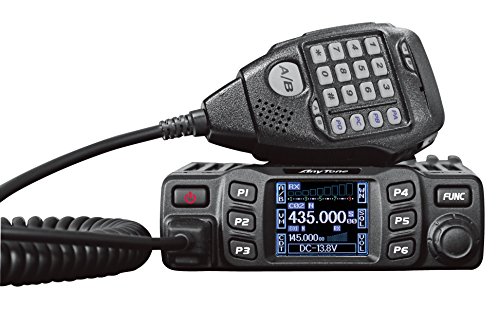
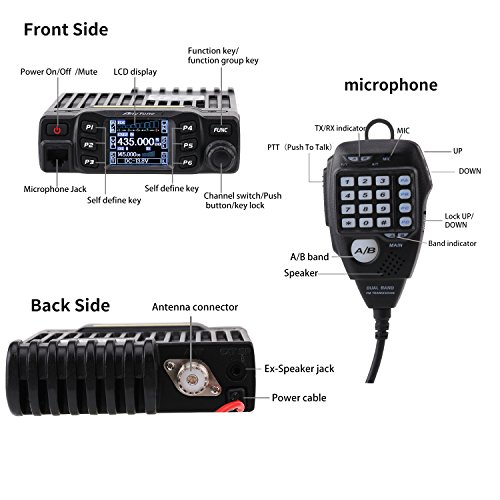


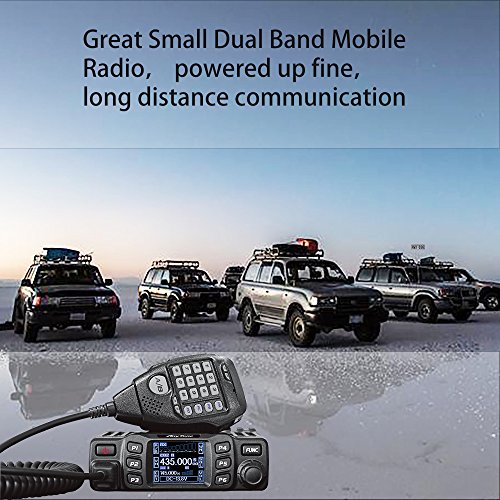

Key features
- •25W/15W/5W dual band VHF/UHF mobile radio transceiver with DTMF and 5Tone function! Color LCD. 180 degree rotatable TFT LCD display.
- •Frequency range: VHF: 136-174mhz UHF: 400-480mhz. Please download the programming software from support in AnyTone website.You can find the AnyTone website address in the user's manual.
- •Features ctcss, DCS, 200channels & more! Narrow band Compliant, lighted keypad mic, built-in speakers in both radio & mic, built-in cooling fan, DC power cable with fuse holder & more!
- •Single call, group call, selective call and emergency call are all available.
- •☛Warranty 1 year warranty. Money back if you are not satisfied with it in 1 month. Please feel free to Contact with us if you have any query. We will give you prompt reply and good after service
AnyTone AT-778UV Dual Band Transceiver Mobile Radio VHF/UHF Ham Radio for Vehicle Car Radio
List Price: $180.42$162.38DEALYou Save: $18.04 (10%)
Free shippingFree Returns – 30 daysFree Order CancellationSecure Payment2–3 Days DeliveryGet It June 25, 2026In Stock (1)No marketing spamNo account requiredFulfilment by FedEx / Amazon / UPS / ShipwirePayPal / Card Buyer Protection
Customer Reviews
Reviews sourced from verified Amazon purchasers4.6
out of 5
Based on 10 reviews
5★
60%
4★
40%
3★
0%
2★
0%
1★
0%
Great radio with a great price.
Gary Buie✓ Verified Purchase•August 19, 2023
This radio works great on both UHF and VHF frequencies and when using CHIRP or RT Systems software the programming is a breeze. (Use the CHIRP as it is free.)
When paired with an antenna and a battery go box you have a super emergency transceiver for the home for when the lights go out.
73
Gary KO4WAJ
When paired with an antenna and a battery go box you have a super emergency transceiver for the home for when the lights go out.
73
Gary KO4WAJ
Problem with DTCS programming using CHIRP
Lisa Janice Cohen✓ Verified Purchase•August 13, 2023
The radio is compact and seems well made. I am unable to set DTCS tones other than 023 using the current CHIRP. This is a bug. You can not select any tone other than 023.
Fantastic little Radio!
KB2SEO✓ Verified Purchase•August 1, 2023
This little unit replaced the Final Eating B-Tech. Great heat dissipation, The Amateurs I have spoken to all comment how nice the transmit signal sounds both Simplex and repeater. A decent antenna with GAIN will give you enough distance for either mode. The handmike is comfortable and ergonomic fitting. Programming is better than the HTX 212,242 from Radio Shack and tons better the btech and baofengs . Great features ,small size, wont melt through your dashboard if you get a case of alligator operation ( all mouth, no ears,hihi) I literally stuff mine between the Passenger seat and center console of my 2017 Renegade Trail Hawk.
For the price? Its a fantastic find for the brand new Amateur looking for a basic FM rig to a Packet rig, to the well seasoned Extra. It gets the KB2SEO stamp of approval. Will be buying one for the Shack and house soon!
For the price? Its a fantastic find for the brand new Amateur looking for a basic FM rig to a Packet rig, to the well seasoned Extra. It gets the KB2SEO stamp of approval. Will be buying one for the Shack and house soon!
Not difficult to program.
Michael H✓ Verified Purchase•July 29, 2023
Received my radio fast! Thank you. I found this radio pretty simple to program manually. it is small but compact & easy display to read. I did get to talk on a repeater & received a very good audio report, radio does get warm to hot on high power operations so i set all my local freq on med power. Manual is okay for instruction & it came with a cd rom disc & usb cord for programming on pc , which you really don't need in my opinion. Menus are 2 button for volume & squelch controls but no big deal. Receive quality sounds good as well as the speaker but for mobile use i will use an ext speaker to help with road noise in the mobile. Would i recommend this to anybody? Yes but I need to test longevity to be sure. Pretty pleased right now.
Update. I have had this radio since February and the only issue is sometimes when i power it up the screen is blank, but i hear tones when pushing buttons. I am thinking its the cold weather because i haven't had a issue once since temps above freezing. Solution was to disconnect power to the unit & plug it back in then it works again. Other than that no issues i hit repeaters no problem with clear audio & the receive is good, but i would recommend an ext speaker it just gives a crisper professional sound. Radio works well, if you need help with manual programming youtube has how to videos.
Update. I have had this radio since February and the only issue is sometimes when i power it up the screen is blank, but i hear tones when pushing buttons. I am thinking its the cold weather because i haven't had a issue once since temps above freezing. Solution was to disconnect power to the unit & plug it back in then it works again. Other than that no issues i hit repeaters no problem with clear audio & the receive is good, but i would recommend an ext speaker it just gives a crisper professional sound. Radio works well, if you need help with manual programming youtube has how to videos.
How to Program
David✓ Verified Purchase•July 15, 2023
My unit came with a flash drive containing the software. Here is a summary of how to program the radio.
1. Install the software as you would with any software.
2. Click on the newly installed icon and you will see an option to install "USBToComPort_Win8." You must install this driver.
3. Open the software and turn on the radio.
4. In the software, click on "SET," and then, "Set Com." The Com port window will open. Click on the pull down for the available Com ports and leave it open. Plug the programming cable into the radio. Now plug the other end of the cable into a USB port on your computer and watch for a new Com port to pop up in the pull down menu. Select that Com port.
5. Click on "Program," and then click on "Read from Radio." You have to do this step first to save an image (configuration) of your radio. Once this is done, you now have a usable file in which you can begin entering your frequencies. Click on "File" and "Save As" and give your new file a filename.
6. Enter your frequencies, CTCSS etc. and any configuration settings you want, like AOP (automatic power on), DTMF, scan type, default volume, etc (see screenshots below).
7. Click the file save icon.
8. Click "Program," and then click "Write to Radio."
9. Done.
I really like this little radio. It's built solid, and the greater portion of the case is aluminum heatsink. The receive sound quality is very good, and reports on the transmit sound quality are also very good. And I found it quite easy to learn and use. I am using an old ATX computer power supply, so my input voltage is only 12.4V, but I get full quieting on every repeater within about 25 miles. I don't have a reliable power meter to measure the actual output. This little radio does everything I need, and it does it well. If I buy a radio for the car, I'll buy another one of these. At this price point, it's a no-brainer.
1. Install the software as you would with any software.
2. Click on the newly installed icon and you will see an option to install "USBToComPort_Win8." You must install this driver.
3. Open the software and turn on the radio.
4. In the software, click on "SET," and then, "Set Com." The Com port window will open. Click on the pull down for the available Com ports and leave it open. Plug the programming cable into the radio. Now plug the other end of the cable into a USB port on your computer and watch for a new Com port to pop up in the pull down menu. Select that Com port.
5. Click on "Program," and then click on "Read from Radio." You have to do this step first to save an image (configuration) of your radio. Once this is done, you now have a usable file in which you can begin entering your frequencies. Click on "File" and "Save As" and give your new file a filename.
6. Enter your frequencies, CTCSS etc. and any configuration settings you want, like AOP (automatic power on), DTMF, scan type, default volume, etc (see screenshots below).
7. Click the file save icon.
8. Click "Program," and then click "Write to Radio."
9. Done.
I really like this little radio. It's built solid, and the greater portion of the case is aluminum heatsink. The receive sound quality is very good, and reports on the transmit sound quality are also very good. And I found it quite easy to learn and use. I am using an old ATX computer power supply, so my input voltage is only 12.4V, but I get full quieting on every repeater within about 25 miles. I don't have a reliable power meter to measure the actual output. This little radio does everything I need, and it does it well. If I buy a radio for the car, I'll buy another one of these. At this price point, it's a no-brainer.
Page 1 of 2
Related products

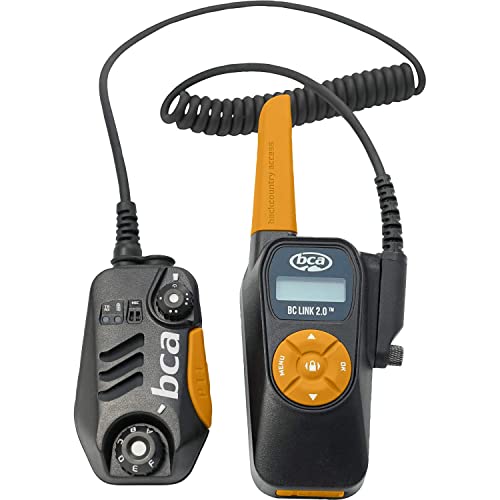
Backcountry Access BCA BC Link Group Communication Radio (Black 2.0, 2 Pack)
List: $463.13$416.82DEAL


