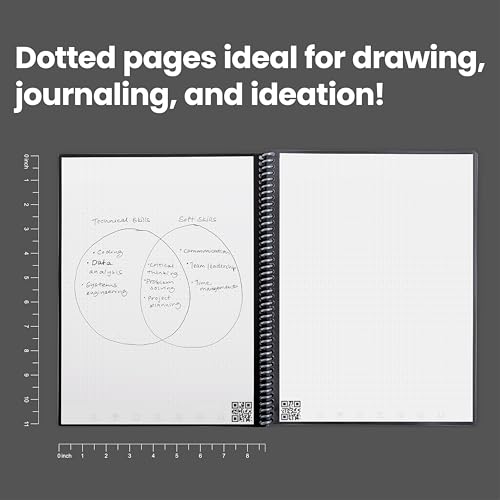
Rocketbook Core Reusable Spiral Notebook, Letter Size 8.5x11, Black - Dotted Pages, App-Connected, Erasable, Durable Cover, Ideal for School, Work, and Creative Projects




Key features
- •No more wasting paper - this environmentally-friendly 32 page dotted grid notebook can be used endlessly by wiping clean with a damp cloth
- •Blast your handwritten notes to popular cloud services like Google drive, Dropbox, Evernote, box, OneNote, Slack, iCloud, email and more using the free Rocketbook application for iOS and Android
- •Allow 15 seconds for ink from any Pilot Frixion pen, marker, or highlighter to dry in order for it to bond to our specialized pages
- •Sophisticated AI technology allows you to use Rocketbook's smart titles, smart search, and email transcription for easier naming and searching of your notes
- •Includes 1 Rocketbook Core (formerly known as Everlast) Letter Size (8.5" x 11") Notebook, 1 Pilot Frixion Pen, and 1 Microfiber Cloth. Note package may reflect "Everlast"
Rocketbook Core Reusable Spiral Notebook, Letter Size 8.5x11, Black - Dotted Pages, App-Connected, Erasable, Durable Cover, Ideal for School, Work, and Creative Projects
List Price: $49.94$44.95DEALYou Save: $4.99 (10%)
Free shippingFree Returns – 30 daysFree Order CancellationSecure Payment2–3 Days DeliveryGet It October 25, 2026In Stock (10)No marketing spamNo account requiredFulfilment by FedEx / Amazon / UPS / ShipwirePayPal / Card Buyer Protection
Customer Reviews
Reviews sourced from verified Amazon purchasers4.2
out of 5
Based on 10 reviews
5★
50%
4★
20%
3★
30%
2★
0%
1★
0%
This is a really nice notebook. I wish I knew about these several ...
Alex✓ Verified Purchase•January 27, 2018
This is a really nice notebook. I wish I knew about these several years ago, since I am mostly done with any classes I may take for the near future. I love how it scans and uploads your notes directly into your storage of choice (google docs for me). It also does a fabulous job only capturing the page and your notes so you don't have all the other background/spiral pieces that a scanner bed would capture. Really easy to set up and use and a damp cloth wiped all the notes away. Considering the price, I am worried about potentially damaging the notebook if placed in a large backpack etc. so I may need to think of ways to protect it from bending during transit.
Gotta press pretty hard to make it work
Andrea Polk✓ Verified Purchase•January 7, 2018
Purchased for my college-age daughter to take to class, the Rocketbook is a wonderful innovation, however, it takes a lot of pressure from the Frixion pens to use it - which is concerning to the user. I purchased Pilot Frixion Colors (Eraseable Markers) to use with the Rocketbook and they worked fine. But the Pilot Frixion Clicker Retractable Gel pens were tougher to use, and unfortunately more practical for notetaking.
Maybe it's just the way my daughter writes? Maybe we got a harder than average Rocketbook? Hard to know how the need for 'more' pressure than usual will affect the durability and usefulness of the product.
Maybe it's just the way my daughter writes? Maybe we got a harder than average Rocketbook? Hard to know how the need for 'more' pressure than usual will affect the durability and usefulness of the product.
Please use caution!
Broodmother of the Lesbian Swarm✓ Verified Purchase•December 23, 2017
Before I go any further, please let me advise you all to ignore some advice included in one of the other reviews for this notebook. It is not recommended to use clear tape over the Table of Contents on the inside of the front cover. This damages the paint on the inside cover and renders the Table of Contents completely unusable. Please see the attached pic to see what sort of damage this can cause. Don't make the same mistake I did.
My intentions for this journal was to provide me a more private way to journal while also not wasting paper. It was meant to replace a diary, planner, and a school notebook. In most respects, it has achieved that.
[Pros]
- Method of erasing pages is efficient
- Scanning papers into the app is easy
- Scans are clean and easy to read
[Cons]
- Odd sizing for the smaller version of this notebook makes it difficult to find a cover for it, and the cover it ships with is of very poor quality.
- Paint on the cover is very easily removed
- The cover is warping out of shape, and I have only had this book for a month.
- You're limited in pen size and pen color.
For day to day use, this reusable notebook is a head above the competition, and I'm completely pleased with both the quality of the scans and the ease with which the scans are completed. I believe that with a better cover, this notebook would easily become a 5/5 product. I'm considering rebinding it, and will update this review if I do choose to do so.
My intentions for this journal was to provide me a more private way to journal while also not wasting paper. It was meant to replace a diary, planner, and a school notebook. In most respects, it has achieved that.
[Pros]
- Method of erasing pages is efficient
- Scanning papers into the app is easy
- Scans are clean and easy to read
[Cons]
- Odd sizing for the smaller version of this notebook makes it difficult to find a cover for it, and the cover it ships with is of very poor quality.
- Paint on the cover is very easily removed
- The cover is warping out of shape, and I have only had this book for a month.
- You're limited in pen size and pen color.
For day to day use, this reusable notebook is a head above the competition, and I'm completely pleased with both the quality of the scans and the ease with which the scans are completed. I believe that with a better cover, this notebook would easily become a 5/5 product. I'm considering rebinding it, and will update this review if I do choose to do so.
This product is literal magic.
Leah✓ Verified Purchase•October 10, 2017
If I could give it 4.5 stars I would be happy. Love the idea and the actual functioning of it. It'll be easier to just have my things on my phone, tablet, and computer. I send them to my Google Drive and it works like a charm. This book is literal magic. It's easy to write on: doesn't necessarily FEEL like paper (but then again it isn't, so why feel that way?) but the Frixion pens write really well on it regardless. Be careful and allow a few extra seconds for the ink to dry so that it won't smudge. I set it up so that immediately after I scan it, it will show up into my drive.
The reason for 4/4.5 stars instead of 5 is that many colors of Frixion brand pens do not show up well or at all. If you typically write your notes in black, blue, or red ink this is not a problem. I fell in love with the Frixion pens a few years ago and since then have exclusively bought Frixion brand. They are trusty; they write smoothly and erase well every time as long as the eraser is clean. I have the gel pens, the click pens, the markers, the pastel highlighters, and one regular yellow highlighter in this brand (i have a problem lmao) but I am a student and I use my pens all day long. They don't bleed through regular paper or anything. When a friend showed me this book I had to have it (what can I say, I am an office supply slut) and bought it immediately.
I'm going to attach my test pictures so that you can know which things work best with the Everlast Rocketbook.
I've included a color key at the bottom and highlighted which colors show up mostly true to color so that you can buy ones that are more likely to look nice once scanned. The pens stay put really well, the black marker fades easily, but overall the colors will show up.
Pens: All of the pens showed up once scanned. Some looked more like black than their actual color (1, 16, 17, 18, 23, 24, 25)
Markers: All of the markers showed up once scanned. Some looked discolored (35, 36, 37)
Pastel Highlighters: So disappointed! They are beautiful colors but the only one that showed up was the yellow (41).
I uploaded the scan and also took a picture of the page itself to show the difference in colors. Hope this was helpful!!
Overall, I love love love this product and will keep using it and recommending it to others (along with the Frixion pens!!)
The reason for 4/4.5 stars instead of 5 is that many colors of Frixion brand pens do not show up well or at all. If you typically write your notes in black, blue, or red ink this is not a problem. I fell in love with the Frixion pens a few years ago and since then have exclusively bought Frixion brand. They are trusty; they write smoothly and erase well every time as long as the eraser is clean. I have the gel pens, the click pens, the markers, the pastel highlighters, and one regular yellow highlighter in this brand (i have a problem lmao) but I am a student and I use my pens all day long. They don't bleed through regular paper or anything. When a friend showed me this book I had to have it (what can I say, I am an office supply slut) and bought it immediately.
I'm going to attach my test pictures so that you can know which things work best with the Everlast Rocketbook.
I've included a color key at the bottom and highlighted which colors show up mostly true to color so that you can buy ones that are more likely to look nice once scanned. The pens stay put really well, the black marker fades easily, but overall the colors will show up.
Pens: All of the pens showed up once scanned. Some looked more like black than their actual color (1, 16, 17, 18, 23, 24, 25)
Markers: All of the markers showed up once scanned. Some looked discolored (35, 36, 37)
Pastel Highlighters: So disappointed! They are beautiful colors but the only one that showed up was the yellow (41).
I uploaded the scan and also took a picture of the page itself to show the difference in colors. Hope this was helpful!!
Overall, I love love love this product and will keep using it and recommending it to others (along with the Frixion pens!!)
EXCEPTIONAL! This will change your life!
Amazon Customer✓ Verified Purchase•August 18, 2017
This product amazed me and exceeded my expectations. It works exceptionally and as described. The Rocketbook app is so simple and easy to use. The scanning is perfect, it captures the colors, exposes the page with the right lighting, and crops and adjusts the page properly. Each scan takes less than a second, and you can combine multiple pages into one scan and upload them as one document.
This is brilliant and I am so glad I purchased this product because it is perfect for school. I have seven classes and so I assigned each symbol in the notebook to my respective Google Drive folders. Some people say that the symbols aren't relatable and its difficult to relate the symbols in the notebook to a class or something. What i did is just assigned my first period class with the first symbol, second period with the second symbol, and so on. The Frixion highlighters and pens erase easily with the included erasers on the pens and effortlessly with a damp microfiber cloth (I provided the link to a very compact microfiber cloth that I use, I'd highly recommend it). Anyways, the product is great, and definitely worth the $35.
Pro tip: use clear tape on the inside cover page where the symbols are. This way if you change a class or something you can just remove the tape, put new tape on and write a new label for the symbol
I recommend several other products to use with this notebook. These are the best deals I could find. I have purchased these and have tried them with the Rocketbook Everlast.
Frixion highlighters : https://www.amazon.com/gp/product/B00J50MSTM/ref=oh_aui_detailpage_o00_s01?ie=UTF8&psc=1
Frixion clicker pens 0.7 mm : https://www.amazon.com/gp/product/B00J50MSTM/ref=oh_aui_detailpage_o00_s01?ie=UTF8&psc=1
Frixion four color pen 0.5 mm (great for taking notes) : https://www.amazon.com/gp/product/B00OPODGHQ/ref=oh_aui_detailpage_o00_s02?ie=UTF8&psc=1
Frixion eraser : https://www.amazon.com/gp/product/B00IPP9FW6/ref=oh_aui_detailpage_o01_s00?ie=UTF8&p
Compact microfiber cloth: https://www.amazon.com/gp/product/B001A0C7E6/ref=oh_aui_detailpage_o00_s01?ie=UTF8&psc=1
This is brilliant and I am so glad I purchased this product because it is perfect for school. I have seven classes and so I assigned each symbol in the notebook to my respective Google Drive folders. Some people say that the symbols aren't relatable and its difficult to relate the symbols in the notebook to a class or something. What i did is just assigned my first period class with the first symbol, second period with the second symbol, and so on. The Frixion highlighters and pens erase easily with the included erasers on the pens and effortlessly with a damp microfiber cloth (I provided the link to a very compact microfiber cloth that I use, I'd highly recommend it). Anyways, the product is great, and definitely worth the $35.
Pro tip: use clear tape on the inside cover page where the symbols are. This way if you change a class or something you can just remove the tape, put new tape on and write a new label for the symbol
I recommend several other products to use with this notebook. These are the best deals I could find. I have purchased these and have tried them with the Rocketbook Everlast.
Frixion highlighters : https://www.amazon.com/gp/product/B00J50MSTM/ref=oh_aui_detailpage_o00_s01?ie=UTF8&psc=1
Frixion clicker pens 0.7 mm : https://www.amazon.com/gp/product/B00J50MSTM/ref=oh_aui_detailpage_o00_s01?ie=UTF8&psc=1
Frixion four color pen 0.5 mm (great for taking notes) : https://www.amazon.com/gp/product/B00OPODGHQ/ref=oh_aui_detailpage_o00_s02?ie=UTF8&psc=1
Frixion eraser : https://www.amazon.com/gp/product/B00IPP9FW6/ref=oh_aui_detailpage_o01_s00?ie=UTF8&p
Compact microfiber cloth: https://www.amazon.com/gp/product/B001A0C7E6/ref=oh_aui_detailpage_o00_s01?ie=UTF8&psc=1
Page 1 of 2


