Wacom Bamboo Ink Smart Stylus Black Active Touch Pen Stylus for Windows 10 Touchscreen Input Devices Surface Pro - CS321AK
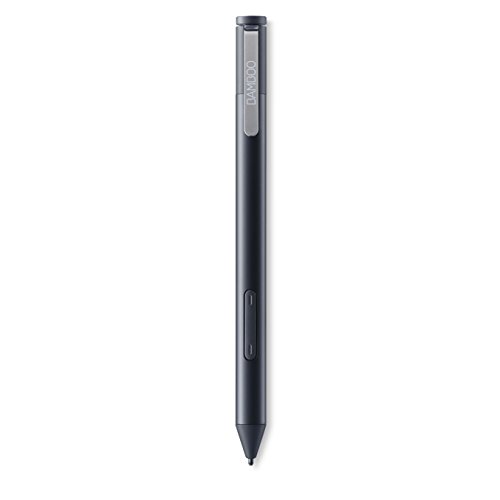


Key features
- •Compatible with Windows 10 pen-enabled devices (MPP/AES)
- •Built for Windows ink
- •Ergonomic triangular design and soft-touch surface
- •Bamboo Note app
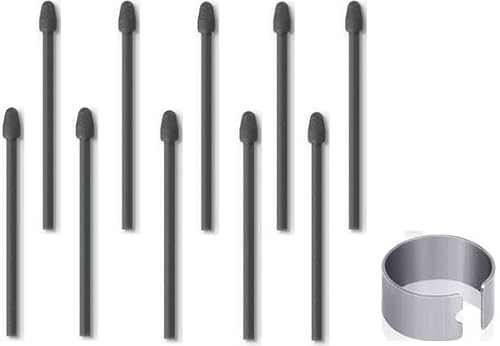
- •Three different nib types - soft, medium and firm
Wacom Bamboo Ink Smart Stylus Black Active Touch Pen Stylus for Windows 10 Touchscreen Input Devices Surface Pro - CS321AK
List Price: $121.04$108.94DEALYou Save: $12.10 (10%)
Free shippingFree Returns – 30 daysFree Order CancellationSecure Payment2–3 Days DeliveryGet It October 25, 2026In Stock (1)No marketing spamNo account requiredFulfilment by FedEx / Amazon / UPS / ShipwirePayPal / Card Buyer Protection
Customer Reviews
Reviews sourced from verified Amazon purchasers4.1
out of 5
Based on 10 reviews
5★
30%
4★
70%
3★
0%
2★
0%
1★
0%
Good Option for Dell XPS 13
Wilmetter✓ Verified Purchase•August 6, 2023
I am using this with a Dell XPS 13 2-in-1 computer. I also regularly use a Surface Pro 4, so I am basically comparing my experience with the Bamboo Ink to the Surface Pen.
I had some issues getting the pen to initially connect via Bluetooth with the computer. The pen did not show up as a visible device in the Windows 10 Settings for Bluetooth devices. I tried repeatedly to get it to work and failed. Eventually, I visited the Wacom website and downloaded updated drivers. This drive package added a Wacom Pen app to my computer. Using that, I was able to connect without any trouble.
Once connected, the pen works beautifully for my needs. I am using it primarily to mark up PDF documents. I can do that both in Adobe Acrobat DC and using Microsoft Inking in Edge, with Edge set to open the PDF. Both work very well. There is no noticeable lag between drawing and ink appearing. I have played around a little bit with the drawing application in Windows Ink Workspace, and the Bamboo Ink seems very similar in capabilties to the Surface pen.
The Bamboo Ink feels good enough in the hand but it lacks the comfortable heft of the Surface pen. Also, the top button seems a little bit more flimsy than on the Surface pen, but I have had no issues with it. It can be programmed to launch various applications including Ink Workspace and One Note. It comes with a variety of tips and a battery. So far, I am happy with its performance.
I had some issues getting the pen to initially connect via Bluetooth with the computer. The pen did not show up as a visible device in the Windows 10 Settings for Bluetooth devices. I tried repeatedly to get it to work and failed. Eventually, I visited the Wacom website and downloaded updated drivers. This drive package added a Wacom Pen app to my computer. Using that, I was able to connect without any trouble.
Once connected, the pen works beautifully for my needs. I am using it primarily to mark up PDF documents. I can do that both in Adobe Acrobat DC and using Microsoft Inking in Edge, with Edge set to open the PDF. Both work very well. There is no noticeable lag between drawing and ink appearing. I have played around a little bit with the drawing application in Windows Ink Workspace, and the Bamboo Ink seems very similar in capabilties to the Surface pen.
The Bamboo Ink feels good enough in the hand but it lacks the comfortable heft of the Surface pen. Also, the top button seems a little bit more flimsy than on the Surface pen, but I have had no issues with it. It can be programmed to launch various applications including Ink Workspace and One Note. It comes with a variety of tips and a battery. So far, I am happy with its performance.
Everything is very good except for the connection with my Lenovo Yoga 720 15.6" 2-in-1
Sviatlana✓ Verified Purchase•July 7, 2023
I Purchased this pen for Lenovo Yoga 720 15,6". The stylus has a nice weight, soft touch coating and very comfortable in my hand.
But there is a small problem.
My Bamboo Ink stylus sometimes loses connection with my Lenovo Yoga even with Wacom drivers. The bluetooth pen is connected, but the tip is not detected. On forums I found out that this problem is solved by press two side buttons on the stylus. But for me it works only with in combination a reboot my laptop. I noticed that this happens every time after I connect to my Lenovo laptop a graphic tablet Wacom intuos CTL-4100WL. Maybe it's a problem with the Wacom drivers but maybe a problem with my Lenovo Yoga. Maybe with the original Lenovo stylus I wouldn't have to mess around with the setting of the side buttons and reboot my device. But overall I'm happy with this pen.
But there is a small problem.
My Bamboo Ink stylus sometimes loses connection with my Lenovo Yoga even with Wacom drivers. The bluetooth pen is connected, but the tip is not detected. On forums I found out that this problem is solved by press two side buttons on the stylus. But for me it works only with in combination a reboot my laptop. I noticed that this happens every time after I connect to my Lenovo laptop a graphic tablet Wacom intuos CTL-4100WL. Maybe it's a problem with the Wacom drivers but maybe a problem with my Lenovo Yoga. Maybe with the original Lenovo stylus I wouldn't have to mess around with the setting of the side buttons and reboot my device. But overall I'm happy with this pen.
Used to color book cover
Kevin Tracy✓ Verified Purchase•July 5, 2023
I recently finished work on a coloring/comic book and wanted a way to color the cover in a realistic but high quality way. Instead of relying on the scanner we have on our printer, I decided to get this pen for my Dell XPS 13 2-in-1 laptop.
While the pen recognizes light pressure well, the threshold for maximum pressure is very low. Still, the book came out looking really sharp and I got a lot of compliments.
I used Autodesk Sketchbook to do the coloring and superimposed the linework over the finished colored version in GIMP to make it look more like a coloring book page. This was exactly the look I wanted.
I haven't figured out how to change the nibs yet. The instructions aren't clear, but I assume there are plenty of tutorials on YouTube.
While the pen recognizes light pressure well, the threshold for maximum pressure is very low. Still, the book came out looking really sharp and I got a lot of compliments.
I used Autodesk Sketchbook to do the coloring and superimposed the linework over the finished colored version in GIMP to make it look more like a coloring book page. This was exactly the look I wanted.
I haven't figured out how to change the nibs yet. The instructions aren't clear, but I assume there are plenty of tutorials on YouTube.
Huge upgrade over Lenovo stylus
Occasional Reviewer✓ Verified Purchase•June 23, 2023
When the tip fell out of my Lenovo 4X80H34887 ThinkPad Active Capacitive Pen, I discovered that it was impossible to find any replacement nibs. Very frustrating, and Lenovo provides no direction of any kind on what tech is used in my Yoga 11e 3rd generation model 20GA000KUS (I discovered that the Yoga 11e 3rd gen uses Wacom AES); nor do they provide a clear recommendation on what product replaces it.
So, I decided to take a chance and instead purchased a Wacom Bamboo Ink Smart Stylus. I purchased mine "Like New" from FPP Computers for only $22. I will say that I *much* prefer the Bamboo to the Lenovo stylus I was using before. After installing the updated Wacom drivers, I was able to customizable Bluetooth-linked top button (very nice) and have found it very comfortable to hold, with an ever-so-slightly grippy surface. The nib depth is set to provide clear visibility of the tip touching the surface of the screen, and the experience is much, much better. Maybe it's faster than the Lenovo pen, which I believe was also produced by Wacom--I can't tell. But I do know that my on-screen handwriting is clearer, and it just seems to be a more natural writing experience. I stopped by the store yesterday and tried inking in OneNote on a Microsoft Surface Pro with the Surface Pen, and, honestly, this $22 pen on a cheap Lenovo Yoga 11e seemed to track much better: it doesn't track as fast as the Surface does, but it's absolutely more accurate and registers clearer writing. Speaking of which, the pen switches between the Wacom AES technology found in my Yoga 11e and the Surface's N-Trig technology (which was rebranded "Microsoft Pen Protocol" after Microsoft's acquisition of the Israeli-based N-Trig), so I plan on testing the pen out on a Surface. Unlike the Lenovo 4X80H34887, it did not come with a nifty USB clip, so there's no way to attach it to the device. But that's fine. It did come with a Duracell battery.
If you're looking for a stylus for the Yoga 11e (or for any device that uses Wacom AES technology), I would strongly recommend the Wacom Bamboo Ink Smart Stylus.
So, I decided to take a chance and instead purchased a Wacom Bamboo Ink Smart Stylus. I purchased mine "Like New" from FPP Computers for only $22. I will say that I *much* prefer the Bamboo to the Lenovo stylus I was using before. After installing the updated Wacom drivers, I was able to customizable Bluetooth-linked top button (very nice) and have found it very comfortable to hold, with an ever-so-slightly grippy surface. The nib depth is set to provide clear visibility of the tip touching the surface of the screen, and the experience is much, much better. Maybe it's faster than the Lenovo pen, which I believe was also produced by Wacom--I can't tell. But I do know that my on-screen handwriting is clearer, and it just seems to be a more natural writing experience. I stopped by the store yesterday and tried inking in OneNote on a Microsoft Surface Pro with the Surface Pen, and, honestly, this $22 pen on a cheap Lenovo Yoga 11e seemed to track much better: it doesn't track as fast as the Surface does, but it's absolutely more accurate and registers clearer writing. Speaking of which, the pen switches between the Wacom AES technology found in my Yoga 11e and the Surface's N-Trig technology (which was rebranded "Microsoft Pen Protocol" after Microsoft's acquisition of the Israeli-based N-Trig), so I plan on testing the pen out on a Surface. Unlike the Lenovo 4X80H34887, it did not come with a nifty USB clip, so there's no way to attach it to the device. But that's fine. It did come with a Duracell battery.
If you're looking for a stylus for the Yoga 11e (or for any device that uses Wacom AES technology), I would strongly recommend the Wacom Bamboo Ink Smart Stylus.
Good pen; don’t pay full price
Bree Morley✓ Verified Purchase•June 15, 2023
For context, I am a digital artist who primarily uses this for illustration on Photoshop. I've been using this pen for a few weeks now, and although I'm not noticing any difference in control or quality in the pen strokes between this one and the one that came standard with my laptop, it does feel a lot better to hold. The buttons are in good places, my hand is way more comfortable using it, and it feels sturdy and long lasting.
HOWEVER, I bought this on sale for $25. It is worth $25. Don't pay the full price, your art or your work will not be smoother or easier with a new upgraded pen. It will not make your laptop/tablet on the level of say a Cintiq. It just feels better and more weighted than the standard, which I believe is worth the discounted price.
HOWEVER, I bought this on sale for $25. It is worth $25. Don't pay the full price, your art or your work will not be smoother or easier with a new upgraded pen. It will not make your laptop/tablet on the level of say a Cintiq. It just feels better and more weighted than the standard, which I believe is worth the discounted price.
Page 1 of 2




![HXHN Soft Pen Tips/Nibs [Pen Tip 0.7mm] for Samsung Galaxy Note 10/20 /S21/S22 Ultra/ S23 Ultra/Tab S6/ S6 Lite /S7/S7 FE/S7 Plus/ S8/ S8 Plus/ S8 Ultra/Book Pro 360 (2 PCS)](https://m.media-amazon.com/images/I/31st0AmRj7L._SL500_.jpg)