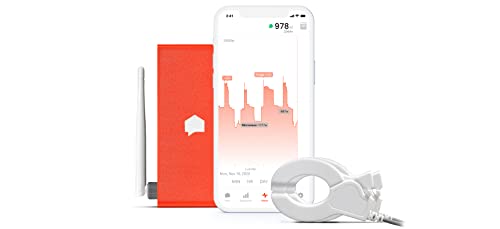
Sense Energy Monitor - Track Electricity Usage in Real Time and Save Money - Meets Rigorous ETL/Intertek Safety Standards



Key features
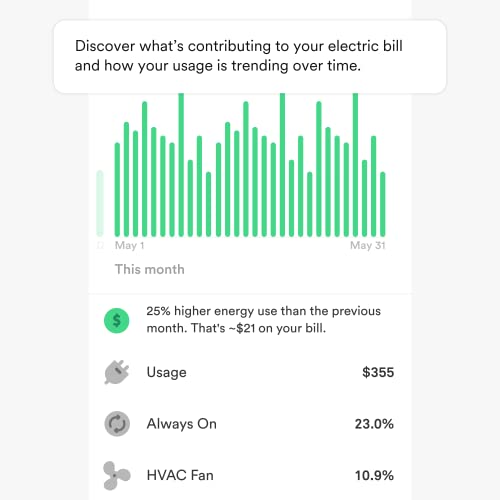
- •SENSE SAVES: Sense saves you energy and money by providing insight into your home's energy use and activity.
- •SEE WHAT'S UP. KNOW WHAT'S ON: Track how much electricity you're using, what time your kids got home, or when someone leaves the basement light on. Sense identifies patterns in your energy use to help your family be more efficient, informed, and secure.
- •MONITOR YOUR HOME'S ENERGY USE FROM ANYWHERE: Real-time data through our iOS, Android, and web apps.
- •AVOID DISASTER: Set custom notifications for critical devices, like your sump pump, well pump, or flat iron.
- •MEETS RIGOROUS SAFETY STANDARDS: Sense's components and system have been designed and ETL/Intertek certified for installation and operation inside the electrical panel.
Sense Energy Monitor - Track Electricity Usage in Real Time and Save Money - Meets Rigorous ETL/Intertek Safety Standards
List Price: $435.05$391.55DEALYou Save: $43.50 (10%)
Free shippingFree Returns – 30 daysFree Order CancellationSecure Payment2–3 Days DeliveryGet It October 26, 2026In Stock (2)No marketing spamNo account requiredFulfilment by FedEx / Amazon / UPS / ShipwirePayPal / Card Buyer Protection
Customer Reviews
Reviews sourced from verified Amazon purchasers4.1
out of 5
Based on 10 reviews
5★
60%
4★
40%
3★
0%
2★
0%
1★
0%
Fantastic tool that just requires patience
Doug in California✓ Verified Purchase•January 23, 2024
We have a vacation home that seemed to have unexplained super high electricity bills. I purchased the Sense Monitor to try to understand it.
I'm not super handy dandy and a little terrified working around electricity, but I was able to install it. The directions and videos they have are excellent. You want to make sure you have an electrical outlet nearby to power it. I didn't have any open breakers for the probe power to hang off, so I had to pick up a $15 one at the hardware store. Easier than I thought to do.
It's in a fringe wifi area of the house but must have a strong radio on 2.4ghz because it's always has a solid connection.
The hardest thing once it's installed is being patient for it to discover devices. You can see the overall consumption right away, which is fascinating as you see it going up and down during the day.
After a day or two, a device was discovered, and as time went on, more and more appeared. It keeps learning. Even over a year later, it will occasionally pop up something newly discovered. Ours has found all the big players like the hot tub and refrigerator and lots of random things like the garage door opener, the OLED television, instant-hot faucet, etc.
Not sure about some of the negative reviews in here. The thing is doing something pretty amazing with AI. It's like someone complaining that their dog can only beat them 2 out of 5 times in chess.
It's a fantastic application of artificial intelligence that uses big data and crowdsourcing to identify very subtle patterns in your electrical system and identify them with surprising accuracy.
The app on the iPhone is well done and fun to scroll through. You forget about it for weeks at a time, but it's continuously learning and occasionally finding new things.
It is very cool, and there isn't anything like it that is as well polished. If you are looking for instant gratification, maybe this isn't the product for you. Nothing will be. But if you are playing the long game and want to understand your home electrical needs intimately, this thing is fantastic.
I'm not super handy dandy and a little terrified working around electricity, but I was able to install it. The directions and videos they have are excellent. You want to make sure you have an electrical outlet nearby to power it. I didn't have any open breakers for the probe power to hang off, so I had to pick up a $15 one at the hardware store. Easier than I thought to do.
It's in a fringe wifi area of the house but must have a strong radio on 2.4ghz because it's always has a solid connection.
The hardest thing once it's installed is being patient for it to discover devices. You can see the overall consumption right away, which is fascinating as you see it going up and down during the day.
After a day or two, a device was discovered, and as time went on, more and more appeared. It keeps learning. Even over a year later, it will occasionally pop up something newly discovered. Ours has found all the big players like the hot tub and refrigerator and lots of random things like the garage door opener, the OLED television, instant-hot faucet, etc.
Not sure about some of the negative reviews in here. The thing is doing something pretty amazing with AI. It's like someone complaining that their dog can only beat them 2 out of 5 times in chess.
It's a fantastic application of artificial intelligence that uses big data and crowdsourcing to identify very subtle patterns in your electrical system and identify them with surprising accuracy.
The app on the iPhone is well done and fun to scroll through. You forget about it for weeks at a time, but it's continuously learning and occasionally finding new things.
It is very cool, and there isn't anything like it that is as well polished. If you are looking for instant gratification, maybe this isn't the product for you. Nothing will be. But if you are playing the long game and want to understand your home electrical needs intimately, this thing is fantastic.
Good for Rentals
Paison✓ Verified Purchase•December 20, 2023
Application - Rent an attached apartment in my home that has its own panel box and need to bill tenant for monthly electric expense. Works well for my application.
Installation: Installed two 15 amp breakers, 1 on phase A and 1 on phase B and according to tech support, they don't have to be bridged. If you don't have any free spaces for new breakers, you can piggyback on two existing breakers as long as one is on phase A and the other on phase B. Setup can only be completed with phone app and must have Bluetooth AND Location turned on. You can turn location off after Sense is detected and setup.
Web App - You can only export your data with the web app and it has day, week, month and year exports. This is the most important feature if you are running a business. In these modern times of slick and smooth apps, this is not one of them and will probably go through many updates as time goes on to bring it into modern times. All the other fluff about monitoring other appliances is useless to me. I already know that when an appliance is turned on I will use more electricity.
Antenna - Have a flush mounted panel box and installed antenna into a punch-out hole in the panel box as per instructions and works fine.
Phone App - Fair at best. Can't export data with phone app. If you're away you need to get to a computer to log into the web app to export data.
Advantages - System runs off WiFi and data is sent to cloud where you can log on with a computer to access your data. Would be nice if you have a strong WiFi signal near the Sense. My router is over 100' from the panel box being monitored so I installed an Asus RP-AC51 WiFi repeater. Now Sense has access for full 2.4G (5G not recommended) WiFi signal strength and have not experienced any drops.
Warranty: A very substandard 60 day warranty. Which means they don't want to backup or have confidence in their products. Tech support responded to my questions within a reasonable time.
Where made: "We manufacture our Sense monitors in North America and abroad." Poor excuse for an answer and sounds like they are trying to hide the words, "Made in Communist China."
Update 02/10/2021 - System has been rock solid, probably due to strong & stable 2.4G WiFi. Tech support has replied back to several emails very quickly and am very satisfied with the timing of their response. In the past I've used TED Pro Home (The Energy Detective) and Efergy Energy monitor and both are substandard when compared to Sense. TED uses home power lines and has way too many interruptions. Efergy requires the sending unit in the panel box and receiving unit at the router to be in direct line of sight, which is very difficult to accomplish and way too many drops. In a business environment where you are billing a tenant for accurate electric expense, then the Sense Energy Monitor is your only reliable choice.
Installation: Installed two 15 amp breakers, 1 on phase A and 1 on phase B and according to tech support, they don't have to be bridged. If you don't have any free spaces for new breakers, you can piggyback on two existing breakers as long as one is on phase A and the other on phase B. Setup can only be completed with phone app and must have Bluetooth AND Location turned on. You can turn location off after Sense is detected and setup.
Web App - You can only export your data with the web app and it has day, week, month and year exports. This is the most important feature if you are running a business. In these modern times of slick and smooth apps, this is not one of them and will probably go through many updates as time goes on to bring it into modern times. All the other fluff about monitoring other appliances is useless to me. I already know that when an appliance is turned on I will use more electricity.
Antenna - Have a flush mounted panel box and installed antenna into a punch-out hole in the panel box as per instructions and works fine.
Phone App - Fair at best. Can't export data with phone app. If you're away you need to get to a computer to log into the web app to export data.
Advantages - System runs off WiFi and data is sent to cloud where you can log on with a computer to access your data. Would be nice if you have a strong WiFi signal near the Sense. My router is over 100' from the panel box being monitored so I installed an Asus RP-AC51 WiFi repeater. Now Sense has access for full 2.4G (5G not recommended) WiFi signal strength and have not experienced any drops.
Warranty: A very substandard 60 day warranty. Which means they don't want to backup or have confidence in their products. Tech support responded to my questions within a reasonable time.
Where made: "We manufacture our Sense monitors in North America and abroad." Poor excuse for an answer and sounds like they are trying to hide the words, "Made in Communist China."
Update 02/10/2021 - System has been rock solid, probably due to strong & stable 2.4G WiFi. Tech support has replied back to several emails very quickly and am very satisfied with the timing of their response. In the past I've used TED Pro Home (The Energy Detective) and Efergy Energy monitor and both are substandard when compared to Sense. TED uses home power lines and has way too many interruptions. Efergy requires the sending unit in the panel box and receiving unit at the router to be in direct line of sight, which is very difficult to accomplish and way too many drops. In a business environment where you are billing a tenant for accurate electric expense, then the Sense Energy Monitor is your only reliable choice.
Great energy tracking plus added benefits
Scott Dixon✓ Verified Purchase•December 17, 2023
Sense monthly e-mails let me see what appliances are consuming the most energy and point out constant on items that need attention. I love that you can set up the device to send notifications to your phone when certain appliances turn on a set number of times during a certain time period. For instance, Sense tells me if my garage furnace turns on more than 3 times in an hour. Great when I forget to turn down the thermostat when I'm done working out there or leave the door open. Same deal with the well pump. It's like having home security notifications based off the activity of your appliances. It also sends me an alert every time the device goes offline which tells me my power went out. I'd say the app detects and guesses the type of appliance 70% of the time. It can be a little frustrating sometimes turning things off and on to pin point the correct device to re-name but once it's set up and established, you are golden. I am an electrician's apprentice so I was able to install the unit myself with no issue. Just make sure you have the breaker space before you buy. I now recommend this device to all clients we do work for. If you are getting something like a hot tub or another high consumption appliance, this would be a must have to know exactly how much it is costing you on your bill.
Review from an engineer
Max✓ Verified Purchase•December 12, 2023
I'm not an electrician but I am an engineer and wanted to give an honest review on how someone who is comfortable with technology will experience the installation and operation of the device.
INSTALLATION
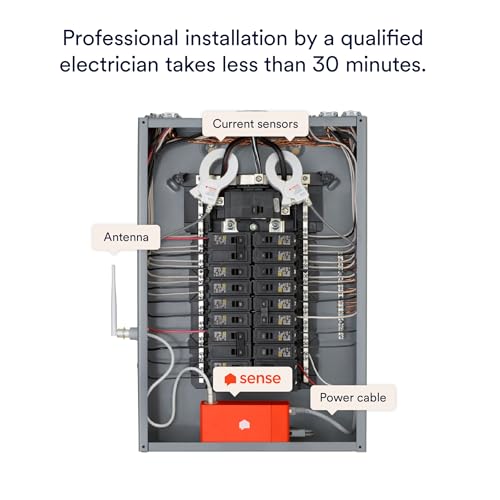
The installation is very straightforward and should take 30 minutes, including prep and cleanup. Here are some things that are not immediately obvious from the simple installation guide.
* They mentioned that this device should be installed by an electrician. This is likely because you'll be playing in your panel, which cannot be fully turned off. The installation is dead simple.
* Your electric panel, if fed by the street, will ALWAYS have live, exposed and energized terminals. The energized and deadly parts are whatever come BEFORE your service disconnect. You will need to put two clamps around insulated ENERGIZED wires. That's the reason the instruction manual asks to get an electrician to install the Sense. You do not want to touch the live terminals ever.
* Buy a touchless live voltage detector. Test it on a live circuit, then test it when the circuit is off. Use that to help you confirm that what is off is really off.
* The manual mentions it but it's really important. Make sure the clamps are put around the live wires AFTER the clamps are plugged in the sense. You can receive a deadly shock otherwise.
* When you are putting clamps around the live wire or your hands are anywhere near the energized terminals, DO IT WITH ONLY ONE HAND. Your other hand will be in your back pocket.
* Wear rubber shoes/boots and use common sense.
WIFI
* Do make sure that the antenna is screwed in all the way and that it is OUTSIDE the panel. Doesn't matter if it's visible to you or stuck inside a wall, it must be outside that metal box
* The device only supports 2.4Ghz. While it's touted as a longer range than 5Ghz, the spectrum is usually crowded.
* Setup was easy and worked the first time. It doesn't try to provide a seamless experience by capturing the config from your phone, which is a good thing. Devices that try to be too smart and only support 2.4Ghz often fail when the wireless network name (SSID) is the same for both 2.4Ghz and 5Ghz.
* The sense connects over bluetooth for the initial discover and WiFi configuration. It costs more but provides a solid experience that doesn't involve changing the WiFi on your phone (Like an Amazon Alexa for example).
Accuracy
* I found the sense to be 5-10% off in a consistent fashion when compared to the meter. This will likely not affect device detection since turning a 100W light bulb on and off produced consistent results on the dashboard.
* I wish they'd provide a way to calibrate the sensor for advanced users. For example, turning off all the circuits in the panel except for a circuit that only has a 100W light bulb (Or something equivalent...). Then calibration mode would listen for 1 minute while the user turns the light bulb on and off a few time. Repeat for the different live wire and both clamps would be calibrated
Device detection
* You can turn on network device detection in the settings. It will see when network devices turn on and off and try to match their MAC address to an energy pattern
* "My Home". You can help the detection algorithm by listing the devices you have in your home. You can simply say you have "1 over" or be more specific with the make and model.
* There is integration with other IoT devices. For example, it can connect to a smart thermostat and learn when it turns on the heat/ac/fan and improve the detection of your HVAC system.
* It takes a few weeks to see devices appear.
* I'll need to come back and edit my review when it finds devices.
App and data
* The app works well and is easy to use
* Electricity cost is fixed with no support for more complex billing schemes. For example, in California, we have a 3-tier system where the more electricity you use, the more expensive it gets.
* There's integration with different assistants if that's your thing (Alexa, Google)
* Integration with IFTTT is pretty cool and lets you do things like send you an email if you leave the garage door open or if the bathroom light stays on for more than 1 hour.
* There is no local interface not support for it. Publishing data to a local MQTT gateway would make this ideal for power users
* Data export in CSV is available but needs to be done manually via the web interface.
* There is no public API of any kind. You'll find reverse engineered clients on Github but nothing supported by Sense.
DETECTION LOG (To be updated regularly
08/03 Sense installed. No devices found
08/05 No devices
Review update log (Excludes detection updates)
08/05 Initial review. 4 stars
INSTALLATION
The installation is very straightforward and should take 30 minutes, including prep and cleanup. Here are some things that are not immediately obvious from the simple installation guide.
* They mentioned that this device should be installed by an electrician. This is likely because you'll be playing in your panel, which cannot be fully turned off. The installation is dead simple.
* Your electric panel, if fed by the street, will ALWAYS have live, exposed and energized terminals. The energized and deadly parts are whatever come BEFORE your service disconnect. You will need to put two clamps around insulated ENERGIZED wires. That's the reason the instruction manual asks to get an electrician to install the Sense. You do not want to touch the live terminals ever.
* Buy a touchless live voltage detector. Test it on a live circuit, then test it when the circuit is off. Use that to help you confirm that what is off is really off.
* The manual mentions it but it's really important. Make sure the clamps are put around the live wires AFTER the clamps are plugged in the sense. You can receive a deadly shock otherwise.
* When you are putting clamps around the live wire or your hands are anywhere near the energized terminals, DO IT WITH ONLY ONE HAND. Your other hand will be in your back pocket.
* Wear rubber shoes/boots and use common sense.
WIFI
* Do make sure that the antenna is screwed in all the way and that it is OUTSIDE the panel. Doesn't matter if it's visible to you or stuck inside a wall, it must be outside that metal box
* The device only supports 2.4Ghz. While it's touted as a longer range than 5Ghz, the spectrum is usually crowded.
* Setup was easy and worked the first time. It doesn't try to provide a seamless experience by capturing the config from your phone, which is a good thing. Devices that try to be too smart and only support 2.4Ghz often fail when the wireless network name (SSID) is the same for both 2.4Ghz and 5Ghz.
* The sense connects over bluetooth for the initial discover and WiFi configuration. It costs more but provides a solid experience that doesn't involve changing the WiFi on your phone (Like an Amazon Alexa for example).
Accuracy
* I found the sense to be 5-10% off in a consistent fashion when compared to the meter. This will likely not affect device detection since turning a 100W light bulb on and off produced consistent results on the dashboard.
* I wish they'd provide a way to calibrate the sensor for advanced users. For example, turning off all the circuits in the panel except for a circuit that only has a 100W light bulb (Or something equivalent...). Then calibration mode would listen for 1 minute while the user turns the light bulb on and off a few time. Repeat for the different live wire and both clamps would be calibrated
Device detection
* You can turn on network device detection in the settings. It will see when network devices turn on and off and try to match their MAC address to an energy pattern
* "My Home". You can help the detection algorithm by listing the devices you have in your home. You can simply say you have "1 over" or be more specific with the make and model.
* There is integration with other IoT devices. For example, it can connect to a smart thermostat and learn when it turns on the heat/ac/fan and improve the detection of your HVAC system.
* It takes a few weeks to see devices appear.
* I'll need to come back and edit my review when it finds devices.
App and data
* The app works well and is easy to use
* Electricity cost is fixed with no support for more complex billing schemes. For example, in California, we have a 3-tier system where the more electricity you use, the more expensive it gets.
* There's integration with different assistants if that's your thing (Alexa, Google)
* Integration with IFTTT is pretty cool and lets you do things like send you an email if you leave the garage door open or if the bathroom light stays on for more than 1 hour.
* There is no local interface not support for it. Publishing data to a local MQTT gateway would make this ideal for power users
* Data export in CSV is available but needs to be done manually via the web interface.
* There is no public API of any kind. You'll find reverse engineered clients on Github but nothing supported by Sense.
DETECTION LOG (To be updated regularly
08/03 Sense installed. No devices found
08/05 No devices
Review update log (Excludes detection updates)
08/05 Initial review. 4 stars
Updated March 2021 - Cool Device with improved features
Chris Wilson✓ Verified Purchase•December 7, 2023
Original Review 4-4-2018 ( Several Updates below original review):
Cool device and very accurate at detecting overall energy usage but individual device detection is hit & miss at best. I have had it for 3 months and it helps me monitor my overall home electricity usage in real time. It does an ok job detecting some appliances but a poor job detecting others (more on that below).
The Good:
-It is 99.5% accurate for what my utility company is measuring and billing me for, so it is very accurate
-Detects amperage and voltage on each 120V leg (hidden in the app menu; go to: Settings->My Home -> Sense Monitor), which is great when you need to see if one leg of your panel has more usage or voltage issues.
-Does data collection about once a second
- Can quickly identify resistance loads (space heater, toaster, etc) and induction motors (older furnaces, older pool pumps, exhaust fans) within a week or so if used regularly. Most of these items were identified correctly but dont always get detected between cycles
-Devices with single speed compressors take a little longer to identify but eventually get identified correctly (fridges, traditional AC unit, dehumidifier)
The Bad:
-Install is not for the average homeowner (but not much can be done about that from the Manufacturer's prospective). Having a pro install the component will be around $100 but there is not very good documentation to give a pro for install. The manufacturer has no real documentation meant for professional electricians (no electrical diagrams or requirements), so a pro who is not familiar with the product may struggle to get it wired into the panel quickly without going to the support website or calling technical support.
-For those with a panel with no room to add a new 2 pole breaker, your electrician will have to make room by adding at least 2 tandem breakers (at an additional cost)
-Wifi antenna extension cable needs to be longer. Installing the sense inside a metal electrical panel is dooming the device to have a poor wifi signal and the short extension cable for the wifi antenna is not very long, which made it a challenge to find a way to get the antenna mounted outside my flush mounted panel
- Device discoveries are usually "guesses" that require the user to verify it but many of the guesses were not accurate for me. The guesses have become more wild over time (ex. a 10 watt load had a 88% chance of being a clothes dryer even though my clothes dryer wasnt on at all).
-Device will use a decent amount of network bandwidth, especially when it is first started because it is "phoning home" to help identify usage patterns. (for those who have metered internet, especially Satellite Internet or those who use cellular data as the only means for internet).
-Will not detect variable speed motors (new pool pumps, modern HVAC equipment, HE washing machines)
- Will not detect lights on dimmers
-Struggles to find computers (I have a high performance desktop PC that stays on 24/7 and it has not been found in 3 months despite using the same amount of energy. My home office equipment in particular uses about 160KWH/month (but I know that thanks to the Kill-A-Watt, not the Sense monitor).
Suggestions for the Manufacturer:
-Create a device similar to the Kill-A-Watt that pairs with the Sense monitor to quickly "train" sense on some of the most common appliances like computers, toasters, etc. This would greatly speed up the device discovery process and eliminate the guesswork for the user. I would love to walk around the house in a matter of hours and train the Sense monitor to detect most of my most commonly used objects. This would eliminate the months long process of guesswork involved.
- Create a "training mode" that essentially lets a homeowner turn things on one at a time to help quickly (and more accurately) identify the most commonly used appliances and lights. Information provided to the homeowner will be much more accurate after the device is trained.
- Partner with a wifi extender company or offer one that easily extend a home's wifi to the sense device. Most electrical panels are located outside of the living space of the home (building exterior, garages, or basements). Most wifi equipment is not going to be close to these locations and I would imagine that it would be needed often. My device in the garage is on the fringe of my wifi (50% signal strength) but my house is only 2000sqft with the wifi centrally located in the house. If my house was any bigger, I doubt the sense device would be able to stay connected to my wifi reliably.
- Technical documentation in PDF format for electricians. The website is great but an electrician needs a set of technical instructions that can be printed out by the homeowner. Also define whether it is ok to connect to a breaker that is designed to accept 2 conductors per circuit (like the Square D breakers).
-Web interface from a computer is incomplete. The web interface for Sense does not have the power meter function available, forcing the user to use the phone app.
This is a great meter but I would not install it in a customer's home to help break down their usage by category. It is very cool to see usage realtime and what it does when you turn things on and off. I also think this device would be fantastic for someone wanting to get an idea of their home's peak load so a backup generator could be properly sized for a home. I do not think the appliance identification is ready for prime time because most of the "suggestions" were wrong. My house is fairly high tech with modern appliances (variable speed pool pump & Mitsubishi variable speed HVAC system) and the Sense device has not been able to identify any of them because their power usage constantly varies.
I expected more accuracy of detected devices for a $300 product plus the $200 I had to pay an electrician to put this in. I have a very expensive device that tells me how much total electricity my house uses each day (my power company lets me see the same reports on their website).
Update: 12-10-2018:
So my original review still stands (read that first) but here is an addendum.
More good:
-Web interface now has live power usage, which is great to view in a web interface.
- They now let you setup your billing cycle so you can view your billing cycle usage each month (as of this review, this could only be viewed from the phone/tablet app).
- Usage alerts - I can setup alerts to inform me if monthly usage is trending above a certain threshold. Ex. my first 1000KWH is dirt cheap but everything after that is more expensive. I usually use less than 1000KWH except in the Summer. Sense will alert me if things are trending towards going over my 1000KWH limit that I setup. I usually will get alerts fairly early in the billing cycle to help make sure I try to reduce my usage. This has allowed me to reduce my electricity bill by staying under 1000KWH for 7 months of the year so far (a 1000KWH usage bill is only $65 total)
The Bad -
-Things have not gotten any more accurate. In fact, the only accurate appliances that get identified on their own are: AC condenser (16 year old single speed outdoor unit), refrigerator, portable dehumidifier & mini fridge. I do have a generic 500 watt resistance (heat) load that I eventually created because the app sees it whenever I run one of the two small burners on my stove or my radiator space heater in my master bedroom (on low).
-My pool pump runs daily from 8am-5pm but is variable speed (Pentair Intelliflo -consuming 200-250 watts per hour usually). In the 10 months I have owned the Sense unit, it has never identified the pool pump as anything (not even a guess).
-The same goes for my computer. I have tried to turn the computer off at night but the Sense unit hasnt even attempted to guess what this daily ~225watt load is.
-One other appliance that I was surprised that the Sense unit could not identify is our dishwasher. We run it about 3x a week on the same setting every time. It is an older dishwasher from 2007, so it would be nice to see how much energy each cycle uses.
-From time to time, I log into the app and see that it thinks that appliances are running when they arent. I "report" the errors and the app just says "we will use the info to make things more accurate".
The problem with group machine learning is that the data has to be accurate (to become useful information). I dont feel there are many homeowners out there that are willing or able to accurately confirm all their appliances as running (they are more apt to just confirm the app's suggestion that an appliance is what it really is). Garbage data input equals garbage data output. For example: a group of non-observant homeowners using this device could confirm the Sense guess that an appliance is their clothes dryer when it really is their oven (because they both have similar electric resistance loads). The machine learning becomes flawed and could start to predict other homes the same way.
Again, this device is very accurate at detecting overall energy usage and does a great job keeping track of overall energy usage BUT do not expect it to accurately figure out everything in your home on a granular level (ex. Dishwasher, Clothes Dryer, Iron, Clothes washer, living room lights, Coffee Maker, Toaster, Oven, TV, Cable Box, Cable Modem, Computer, Garage Lights, Vacuum Cleaner, Air Purifier, Pool Pump, etc). If those are your expectations, then you will be pretty pleased with the product. It still has great features but know it's limitations based on on my (and other's) real-world experiences and I think you will be happy.
Update Sept. 22, 2019
Device is still unable to detect anything accurately in my home except the garage lights, garage door opener, and a 500 watt heating element load. It occasionally gets my pool cleaner pump (not my main pool pump) but it also says its on during the day when it is clearly not, so the usage statistics are not accurate (such as percentage of daily usage). No matter how many times I report the device as not on, it eventually gets detected as falsely on after a few days. It does see my mini fridge and regular fridge but confuses the two back and forth on a regular basis, so again usage statistics for each device is wrong. It sometimes is able to nail my AC condenser but not always, so again, usage statistics are inaccurate.
This is a very good overall usage meter as it is accurate within a half a percent of what my utility company says I use and when I use electricity, but I stand by my statement that the appliance learning is a crapshoot at best. I have had the device for 18 months and it is unable to "learn" my home appliances, so i have a glorified live energy monitor, which is useful, however I would never trust the appliance usage statistics.
Update: March 5, 2021
Upgraded to a solid 4.25 stars!
I installed a 6 panel solar array (enphase system) in Spring 2020 and this Sense monitor is my go-to for live production statistics. Rarely a day goes by that I dont check my solar statistics using this app. The enphase enlighten portal is great but it only reports individual panel production and house power consumption in 15 minute increments. The sense monitor can tell me second by second my solar production vs. grid usage. Since I have a small array, I dont export much to the grid but I plan to install additional panels when I can afford it (the majority of the costs of phase 1 was the design with expansion in mind, equipment install, the electrical wiring and conduit that had to be installed in a tight attic; luckily phase 2 will not require any house wiring changes this time).
The Great new features I am using:
- Solar section of the app is great (it is my go-to page)
- I am also very happy with the Sense Labs portion of the app. The best part of sense labs is the electrical fault detection. It is constantly monitoring the power quality and lets you download a 30 day history of any voltage dips and spikes into a csv spreadsheet format. Why is that important? If you have a electrical feeder or floating neutral with an intermittent connection problem like I did (ours was a bad connection on one of the two 125v power feeders at the transformer). Having this information can help you provide information to your power company or electrician when they are trying to troubleshoot an intermittent problem like flickering lights. Labs also looks at motor stalls, which is great, especially for AC units. It may alert you to the fact that a capacitor on an induction compressor or blower motor is failing or has failed (this will cause winding damage and eventual failure if left untreated).
- Integration with thermostats and smart wifi plugs & switches. Now the devices it can identify are more accurate and you can see usage stats on the individual TP-Link wifi switches.
- Expansion port is not just for solar anymore. It can now be configured a few different ways, which is helpful for those with 400 amp service panels (two 200 amp panels in the home). I still wish there was a way to do 400 amp service and still monitor solar (this is not a problem for me, but some larger houses with solar may not be able to take full advantage of a sense monitor unless they roll out a version with multiple sensor ports or they find a way to parallel two monitors on the same account).
The rest - Most of what I said in my past reviews still stand but accuracy is decently better. I do think it is worth it now for most homeowners to get one. It helps shed light on our usage and it provides some monitoring and alerts for things like power quality and motor stalls that a homeowner may not be aware of until it gets a lot worse. It is also very obvious that they are constantly improving features and accuracy. They have a great forum that their staff looks at (including asking for feature improvements).
Even though this product is not perfect, you can tell that they are continuing to innovate and add new useful features (and so far the price point has not changed since I purchased it).
Cool device and very accurate at detecting overall energy usage but individual device detection is hit & miss at best. I have had it for 3 months and it helps me monitor my overall home electricity usage in real time. It does an ok job detecting some appliances but a poor job detecting others (more on that below).
The Good:
-It is 99.5% accurate for what my utility company is measuring and billing me for, so it is very accurate
-Detects amperage and voltage on each 120V leg (hidden in the app menu; go to: Settings->My Home -> Sense Monitor), which is great when you need to see if one leg of your panel has more usage or voltage issues.
-Does data collection about once a second
- Can quickly identify resistance loads (space heater, toaster, etc) and induction motors (older furnaces, older pool pumps, exhaust fans) within a week or so if used regularly. Most of these items were identified correctly but dont always get detected between cycles
-Devices with single speed compressors take a little longer to identify but eventually get identified correctly (fridges, traditional AC unit, dehumidifier)
The Bad:
-Install is not for the average homeowner (but not much can be done about that from the Manufacturer's prospective). Having a pro install the component will be around $100 but there is not very good documentation to give a pro for install. The manufacturer has no real documentation meant for professional electricians (no electrical diagrams or requirements), so a pro who is not familiar with the product may struggle to get it wired into the panel quickly without going to the support website or calling technical support.
-For those with a panel with no room to add a new 2 pole breaker, your electrician will have to make room by adding at least 2 tandem breakers (at an additional cost)
-Wifi antenna extension cable needs to be longer. Installing the sense inside a metal electrical panel is dooming the device to have a poor wifi signal and the short extension cable for the wifi antenna is not very long, which made it a challenge to find a way to get the antenna mounted outside my flush mounted panel
- Device discoveries are usually "guesses" that require the user to verify it but many of the guesses were not accurate for me. The guesses have become more wild over time (ex. a 10 watt load had a 88% chance of being a clothes dryer even though my clothes dryer wasnt on at all).
-Device will use a decent amount of network bandwidth, especially when it is first started because it is "phoning home" to help identify usage patterns. (for those who have metered internet, especially Satellite Internet or those who use cellular data as the only means for internet).
-Will not detect variable speed motors (new pool pumps, modern HVAC equipment, HE washing machines)
- Will not detect lights on dimmers
-Struggles to find computers (I have a high performance desktop PC that stays on 24/7 and it has not been found in 3 months despite using the same amount of energy. My home office equipment in particular uses about 160KWH/month (but I know that thanks to the Kill-A-Watt, not the Sense monitor).
Suggestions for the Manufacturer:
-Create a device similar to the Kill-A-Watt that pairs with the Sense monitor to quickly "train" sense on some of the most common appliances like computers, toasters, etc. This would greatly speed up the device discovery process and eliminate the guesswork for the user. I would love to walk around the house in a matter of hours and train the Sense monitor to detect most of my most commonly used objects. This would eliminate the months long process of guesswork involved.
- Create a "training mode" that essentially lets a homeowner turn things on one at a time to help quickly (and more accurately) identify the most commonly used appliances and lights. Information provided to the homeowner will be much more accurate after the device is trained.
- Partner with a wifi extender company or offer one that easily extend a home's wifi to the sense device. Most electrical panels are located outside of the living space of the home (building exterior, garages, or basements). Most wifi equipment is not going to be close to these locations and I would imagine that it would be needed often. My device in the garage is on the fringe of my wifi (50% signal strength) but my house is only 2000sqft with the wifi centrally located in the house. If my house was any bigger, I doubt the sense device would be able to stay connected to my wifi reliably.
- Technical documentation in PDF format for electricians. The website is great but an electrician needs a set of technical instructions that can be printed out by the homeowner. Also define whether it is ok to connect to a breaker that is designed to accept 2 conductors per circuit (like the Square D breakers).
-Web interface from a computer is incomplete. The web interface for Sense does not have the power meter function available, forcing the user to use the phone app.
This is a great meter but I would not install it in a customer's home to help break down their usage by category. It is very cool to see usage realtime and what it does when you turn things on and off. I also think this device would be fantastic for someone wanting to get an idea of their home's peak load so a backup generator could be properly sized for a home. I do not think the appliance identification is ready for prime time because most of the "suggestions" were wrong. My house is fairly high tech with modern appliances (variable speed pool pump & Mitsubishi variable speed HVAC system) and the Sense device has not been able to identify any of them because their power usage constantly varies.
I expected more accuracy of detected devices for a $300 product plus the $200 I had to pay an electrician to put this in. I have a very expensive device that tells me how much total electricity my house uses each day (my power company lets me see the same reports on their website).
Update: 12-10-2018:
So my original review still stands (read that first) but here is an addendum.
More good:
-Web interface now has live power usage, which is great to view in a web interface.
- They now let you setup your billing cycle so you can view your billing cycle usage each month (as of this review, this could only be viewed from the phone/tablet app).
- Usage alerts - I can setup alerts to inform me if monthly usage is trending above a certain threshold. Ex. my first 1000KWH is dirt cheap but everything after that is more expensive. I usually use less than 1000KWH except in the Summer. Sense will alert me if things are trending towards going over my 1000KWH limit that I setup. I usually will get alerts fairly early in the billing cycle to help make sure I try to reduce my usage. This has allowed me to reduce my electricity bill by staying under 1000KWH for 7 months of the year so far (a 1000KWH usage bill is only $65 total)
The Bad -
-Things have not gotten any more accurate. In fact, the only accurate appliances that get identified on their own are: AC condenser (16 year old single speed outdoor unit), refrigerator, portable dehumidifier & mini fridge. I do have a generic 500 watt resistance (heat) load that I eventually created because the app sees it whenever I run one of the two small burners on my stove or my radiator space heater in my master bedroom (on low).
-My pool pump runs daily from 8am-5pm but is variable speed (Pentair Intelliflo -consuming 200-250 watts per hour usually). In the 10 months I have owned the Sense unit, it has never identified the pool pump as anything (not even a guess).
-The same goes for my computer. I have tried to turn the computer off at night but the Sense unit hasnt even attempted to guess what this daily ~225watt load is.
-One other appliance that I was surprised that the Sense unit could not identify is our dishwasher. We run it about 3x a week on the same setting every time. It is an older dishwasher from 2007, so it would be nice to see how much energy each cycle uses.
-From time to time, I log into the app and see that it thinks that appliances are running when they arent. I "report" the errors and the app just says "we will use the info to make things more accurate".
The problem with group machine learning is that the data has to be accurate (to become useful information). I dont feel there are many homeowners out there that are willing or able to accurately confirm all their appliances as running (they are more apt to just confirm the app's suggestion that an appliance is what it really is). Garbage data input equals garbage data output. For example: a group of non-observant homeowners using this device could confirm the Sense guess that an appliance is their clothes dryer when it really is their oven (because they both have similar electric resistance loads). The machine learning becomes flawed and could start to predict other homes the same way.
Again, this device is very accurate at detecting overall energy usage and does a great job keeping track of overall energy usage BUT do not expect it to accurately figure out everything in your home on a granular level (ex. Dishwasher, Clothes Dryer, Iron, Clothes washer, living room lights, Coffee Maker, Toaster, Oven, TV, Cable Box, Cable Modem, Computer, Garage Lights, Vacuum Cleaner, Air Purifier, Pool Pump, etc). If those are your expectations, then you will be pretty pleased with the product. It still has great features but know it's limitations based on on my (and other's) real-world experiences and I think you will be happy.
Update Sept. 22, 2019
Device is still unable to detect anything accurately in my home except the garage lights, garage door opener, and a 500 watt heating element load. It occasionally gets my pool cleaner pump (not my main pool pump) but it also says its on during the day when it is clearly not, so the usage statistics are not accurate (such as percentage of daily usage). No matter how many times I report the device as not on, it eventually gets detected as falsely on after a few days. It does see my mini fridge and regular fridge but confuses the two back and forth on a regular basis, so again usage statistics for each device is wrong. It sometimes is able to nail my AC condenser but not always, so again, usage statistics are inaccurate.
This is a very good overall usage meter as it is accurate within a half a percent of what my utility company says I use and when I use electricity, but I stand by my statement that the appliance learning is a crapshoot at best. I have had the device for 18 months and it is unable to "learn" my home appliances, so i have a glorified live energy monitor, which is useful, however I would never trust the appliance usage statistics.
Update: March 5, 2021
Upgraded to a solid 4.25 stars!
I installed a 6 panel solar array (enphase system) in Spring 2020 and this Sense monitor is my go-to for live production statistics. Rarely a day goes by that I dont check my solar statistics using this app. The enphase enlighten portal is great but it only reports individual panel production and house power consumption in 15 minute increments. The sense monitor can tell me second by second my solar production vs. grid usage. Since I have a small array, I dont export much to the grid but I plan to install additional panels when I can afford it (the majority of the costs of phase 1 was the design with expansion in mind, equipment install, the electrical wiring and conduit that had to be installed in a tight attic; luckily phase 2 will not require any house wiring changes this time).
The Great new features I am using:
- Solar section of the app is great (it is my go-to page)
- I am also very happy with the Sense Labs portion of the app. The best part of sense labs is the electrical fault detection. It is constantly monitoring the power quality and lets you download a 30 day history of any voltage dips and spikes into a csv spreadsheet format. Why is that important? If you have a electrical feeder or floating neutral with an intermittent connection problem like I did (ours was a bad connection on one of the two 125v power feeders at the transformer). Having this information can help you provide information to your power company or electrician when they are trying to troubleshoot an intermittent problem like flickering lights. Labs also looks at motor stalls, which is great, especially for AC units. It may alert you to the fact that a capacitor on an induction compressor or blower motor is failing or has failed (this will cause winding damage and eventual failure if left untreated).
- Integration with thermostats and smart wifi plugs & switches. Now the devices it can identify are more accurate and you can see usage stats on the individual TP-Link wifi switches.
- Expansion port is not just for solar anymore. It can now be configured a few different ways, which is helpful for those with 400 amp service panels (two 200 amp panels in the home). I still wish there was a way to do 400 amp service and still monitor solar (this is not a problem for me, but some larger houses with solar may not be able to take full advantage of a sense monitor unless they roll out a version with multiple sensor ports or they find a way to parallel two monitors on the same account).
The rest - Most of what I said in my past reviews still stand but accuracy is decently better. I do think it is worth it now for most homeowners to get one. It helps shed light on our usage and it provides some monitoring and alerts for things like power quality and motor stalls that a homeowner may not be aware of until it gets a lot worse. It is also very obvious that they are constantly improving features and accuracy. They have a great forum that their staff looks at (including asking for feature improvements).
Even though this product is not perfect, you can tell that they are continuing to innovate and add new useful features (and so far the price point has not changed since I purchased it).
Page 1 of 2